
Rossmax Z1-BP
Rossmax Z1 Automatic Upper-Arm Blood Pressure Monitor User Manual
Model: Z1-BP
1. Introduction
This user manual provides essential information for the safe and effective operation of your Rossmax Z1 Automatic Upper-Arm Blood Pressure Monitor. Please read this manual thoroughly before first use and keep it for future reference.
The Rossmax Z1 Automatic Blood Pressure Monitor utilizes Real Fuzzy Technology to determine the optimal cuff pressure based on your systolic blood pressure and arm size. This technology eliminates discomfort from excessive inflation and prevents inaccurate readings due to incorrect cuff inflation levels.
2. Product Overview
2.1 Key Features
- Automatic one-touch operation for ease of use.
- Large LCD display (69 x 64.4 mm) for clear readings.
- Real Fuzzy Technology for accurate and comfortable measurement.
- Cuff detection to ensure proper cuff placement.
- Movement detection to alert users of body movement during measurement.
- Hypertension Risk Indication for easy interpretation of results.
- Irregular Heartbeat Detection (IHB).
- Latex-Free Patented Universal Cone Cuff.
- USB Type C port for power connection.
- Lifetime Calibration.
2.2 Components
The Rossmax Z1 Blood Pressure Monitor package typically includes:
- Rossmax Z1 Main Unit
- Universal Cone Cuff (24-40cm)
- User Manual (this document)
- Storage Pouch
- AAA Batteries (4 required, not included)

Image: Contents of the Rossmax Z1 Blood Pressure Monitor package, showing the main unit, cuff, and user manual.
3. Setup
3.1 Battery Installation
The device requires 4 AAA batteries. Locate the battery compartment on the back or bottom of the main unit. Open the cover and insert the batteries, ensuring correct polarity (+/-). Close the battery compartment cover securely.
3.2 Powering the Device
The Rossmax Z1 can be powered by batteries or via the USB Type C port. To use USB power, connect a compatible USB Type C cable to the device and a power source (e.g., USB wall adapter, computer USB port). Ensure the power source provides stable voltage.
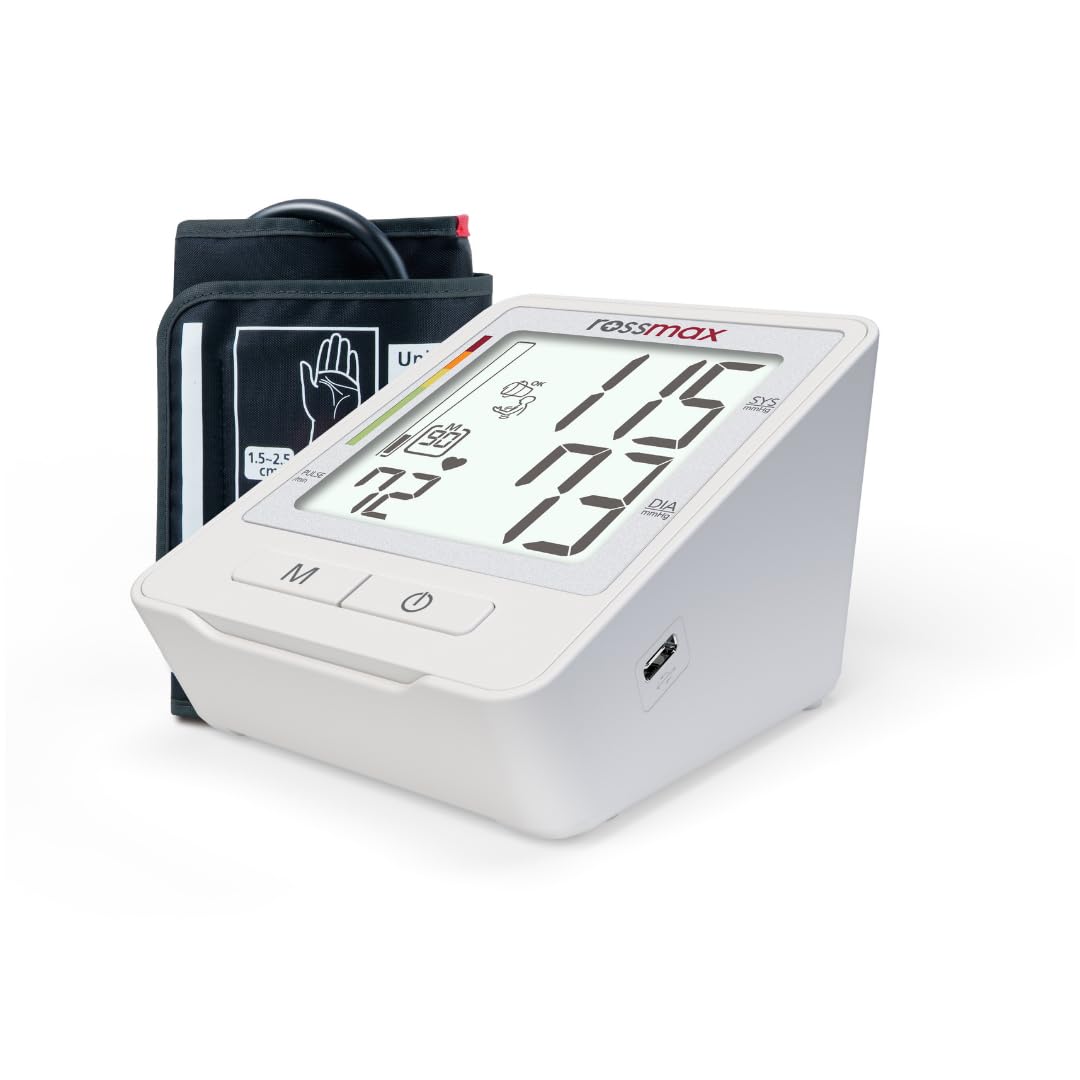
Image: Side view of the Rossmax Z1 Blood Pressure Monitor, highlighting the USB Type C port for power connection.
3.3 Cuff Attachment
Connect the air tube from the cuff securely into the air jack on the side of the main unit. Ensure the connection is firm to prevent air leakage during measurement.

Image: The Rossmax Z1 Blood Pressure Monitor with its universal cone cuff connected, ready for use.
4. Operating Instructions
4.1 Before Measurement
- Avoid eating, drinking alcohol, smoking, exercising, and bathing for 30 minutes before measurement.
- Rest for at least 15 minutes before taking a measurement.
- Sit in a comfortable position with your back supported and feet flat on the floor.
- Place your arm on a flat surface so the cuff is at heart level.
- Do not talk or move during the measurement.
4.2 Applying the Cuff
Wrap the cuff firmly around your bare upper arm, approximately 1-2 cm above the elbow joint. Ensure the air tube runs down the center of your arm in line with your middle finger. The cuff should be snug but not too tight. The cuff detection feature will help confirm correct placement.

Image: A person's arm with the Rossmax Z1 cuff properly applied, positioned for a blood pressure measurement.
4.3 Taking a Measurement
- Press the START/STOP button (usually marked with a power symbol) to turn on the device.
- The cuff will automatically inflate using Real Fuzzy Technology to the appropriate pressure.
- Remain still and silent during the measurement. The device will detect any movement and display a warning if detected.
- Once the measurement is complete, the systolic pressure, diastolic pressure, and pulse rate will be displayed on the large LCD.
- The device will automatically power off after a period of inactivity, or you can press the START/STOP button again to turn it off.

Image: The Rossmax Z1 Blood Pressure Monitor's large LCD display showing typical blood pressure readings (systolic, diastolic) and pulse rate.
4.4 Memory Function
The Rossmax Z1 stores previous measurements. To recall past readings, press the M (Memory) button. Repeated presses will cycle through stored measurements.
5. Maintenance
5.1 Cleaning
Wipe the main unit and cuff with a soft, dry cloth. If necessary, use a cloth lightly dampened with water or a mild detergent. Do not use abrasive cleaners or immerse the device in water.
5.2 Storage
Store the device and cuff in a clean, dry place, away from direct sunlight, extreme temperatures, and humidity. If not in use for an extended period, remove the batteries to prevent leakage.
5.3 Calibration
The Rossmax Z1 features Lifetime Calibration, ensuring long-term accuracy. Regular professional calibration is generally not required under normal use conditions.
6. Troubleshooting
| Problem | Possible Cause | Solution |
|---|---|---|
| Device does not turn on. | Batteries are dead or incorrectly inserted. / USB power not connected or faulty. | Replace batteries, ensuring correct polarity. / Check USB cable and power source. |
| Cuff does not inflate or inflates too little. | Cuff not properly connected to the unit. / Air leakage from cuff or tube. | Ensure cuff tube is securely plugged in. Check cuff and tube for damage. |
| Inaccurate or inconsistent readings. | Incorrect cuff placement. / Movement or talking during measurement. / Not resting before measurement. | Re-apply cuff as per instructions. Remain still and silent. Rest for 15 minutes prior. |
| "Movement Detected" warning. | User moved during measurement. | Repeat measurement, ensuring no movement or talking. |
| Irregular Heartbeat (IHB) symbol displayed. | Detection of an irregular heartbeat during measurement. | This indicates an irregular heartbeat. Consult a healthcare professional if this symbol appears frequently. |
7. Specifications
| Feature | Detail |
|---|---|
| Model | Z1-BP |
| Measurement Method | Oscillometric |
| Display Type | LCD (69 x 64.4 mm) |
| Cuff Type | Universal Cone Cuff (24-40 cm), Latex-Free |
| Power Source | 4 x AAA Batteries or USB Type C (DC) |
| Item Weight | 560 g |
| Package Dimensions | 18.5 x 15 x 14 cm |
| Country of Origin | Taiwan |
| Special Features | Real Fuzzy Technology, Cuff Detection, Movement Detection, Hypertension Risk Indication, Irregular Heartbeat Detection (IHB), Lifetime Calibration |
8. Warranty and Support
The Rossmax Z1 Blood Pressure Monitor comes with a Lifetime Calibration feature, ensuring the accuracy of your device over its lifespan. For specific warranty terms and conditions, please refer to the warranty card included with your product or contact Rossmax customer support.
For technical support, service, or inquiries, please contact your local Rossmax distributor or visit the official Rossmax website. Contact information for the manufacturer is provided in the product specifications:
- Manufacturer: Rossmax International Ltd., 12F - 189 Kang Chien Road, Taipei 114, TAIWAN ROC.
- Email: info@rossmax.com
- Importer (India): Healthshine India Pvt Ltd Magadi Taluka Ramnagara Dist Karnataka
9. Important Safety Information
- This device is intended for adult use only.
- Do not use this device on infants, young children, or individuals who cannot express consent.
- Consult your physician before using this device if you have any medical conditions, especially if you have a pacemaker, are pregnant, or suffer from arrhythmias.
- Self-diagnosis and treatment based on measurement results are dangerous. Always consult a healthcare professional for interpretation of readings and medical advice.
- Do not attempt to repair or modify the device yourself. Refer all servicing to authorized personnel.
- Keep the device and its components out of reach of children and pets.
- Use only the specified cuff provided with the device.
- Avoid strong electromagnetic fields (e.g., mobile phones, microwave ovens) near the device during measurement.
Related documentsZ1-BP


Ask a question about this manual
Ask about setup, troubleshooting, compatibility, parts, safety, or missing instructions. Manuals+ will review the question and use this page’s manual context to help answer it.