Introduction
This manual provides essential information for the proper use and maintenance of your DUDAO X3C Type-C Wired Earphones. Please read it carefully before using the product to ensure optimal performance and longevity.

Image: DUDAO X3C Type-C Wired Earphones, black color.
What's in the Box
Your DUDAO X3C Type-C Wired Earphones package includes the following item:
- Type-C Earphone

Image: Packaging for DUDAO X3C Type-C Wired Earphones.
Key Features
- Hi-Fi Stereo Sound: Experience clear and powerful audio with 15mm composite material drivers.
- Noise Reduction: Designed to minimize external distractions for an immersive listening experience.
- In-Line Microphone & Volume Controller: Easily manage calls and audio playback without accessing your device.
- Ergonomic In-Ear Design: Maximizes comfort for extended wear and ensures a secure fit.
- Tangle-Free Cable: The 1.2-meter TPE cable is designed to resist tangling.
- Lightweight and Portable: Easy to carry and use anywhere.
- USB Type-C Connectivity: Compatible with a wide range of modern Type-C devices.

Image: Exploded view illustrating the 15mm composite material vibration film driver for enhanced audio quality.

Image: Earphone shown in an ear model, highlighting the ultra-light half-in-ear design for comfort and sound insulation.
Video: An overview of the DUDAO Type-C Wired Earphones, showcasing key features like noise reduction, Hi-Fi audio, in-line volume control, and high sensitivity microphone.
Setup
To set up your DUDAO X3C Type-C Wired Earphones:
- Locate the Type-C port on your compatible device (e.g., smartphone, tablet, laptop).
- Insert the Type-C connector of the earphones firmly into the device's Type-C port.
- Ensure the connection is secure. Your device should automatically recognize the earphones.
- If your device does not immediately recognize the headset, enable the OTG (On-The-Go) connection feature in your device's settings. Refer to your device's manual for specific instructions on enabling OTG.

Image: DUDAO X3C Type-C Earphones with a Type-C interface, shown connected to an iPhone 15.
Operating Instructions
The DUDAO X3C earphones feature an in-line remote control for convenient operation:
- Volume Up: Press the 'Volume plus' button to increase audio volume.
- Volume Down: Press the 'Volume reduction' button to decrease audio volume.
- Function Key (Middle Button):
- Press once to Play/Pause music.
- Press once to Answer/End a call.
- Press twice to skip to the next track.
- Press three times to go to the previous track.

Image: Close-up of the in-line remote control, indicating the volume up, volume down, and function keys.
Device Compatibility
These earphones are designed for wide compatibility with devices featuring a USB Type-C audio port. Compatible devices include, but are not limited to:
- iPhone 15 series
- iPad Pro
- MacBook Pro
- Samsung Galaxy S24/S23/S22/S21/S20/Note 20/Note 10 series
- Google Pixel 6/6 Pro/5/4a/3a XL/4 XL/3/2 XL series
- OnePlus 10 Pro/9 Pro/9/8Pro/Nord 8T/8 series
- Other devices with USB Type-C audio port.
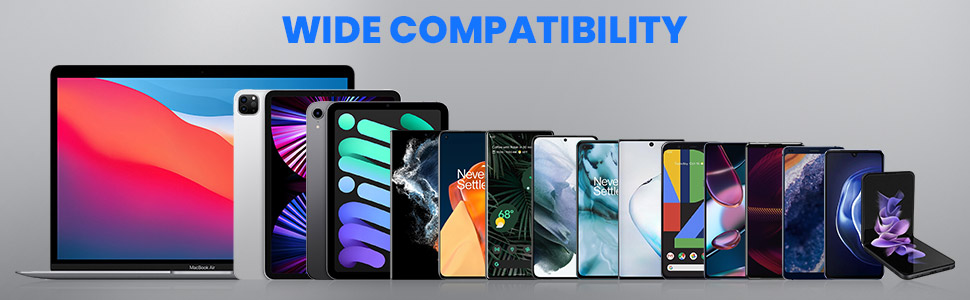
Image: A range of devices including laptops, tablets, and smartphones, illustrating the wide compatibility of the Type-C earphones.
Maintenance
To ensure the longevity and optimal performance of your earphones:
- Keep the earphones clean and dry. Avoid exposure to excessive moisture or liquids.
- Store them in a clean, dry place when not in use.
- Avoid pulling the cable forcefully to prevent damage to the wiring or connectors.
- Clean the ear tips regularly with a soft, dry cloth to remove earwax or debris.
- Do not attempt to disassemble or modify the earphones, as this will void the warranty.
Troubleshooting
- No Sound:
- Ensure the Type-C connector is fully inserted into your device.
- Check your device's volume settings.
- If using an Android device, verify that OTG (On-The-Go) connection is enabled in your device settings if the earphones are not recognized automatically.
- Test the earphones with another compatible device to rule out a device-specific issue.
- Microphone Not Working:
- Ensure the microphone is not obstructed.
- Check your device's privacy settings to ensure microphone access is granted to the relevant applications.
- Test the microphone with another application or device.
- Volume Control Not Responding:
- Ensure the earphones are securely connected.
- Some applications may override the in-line volume control; try adjusting volume directly on your device.
Specifications
| Feature | Detail |
|---|---|
| Model Name | X3C |
| Connectivity Technology | Wired |
| Headphones Jack | Type-C Port |
| Noise Control | Sound Isolation |
| Audio Driver Type | Dynamic Driver |
| Driver Size | 15mm |
| Cable Feature | Tangle Free |
| Cable Length | 1.2 Meters |
| Control Type | Volume Control, In-line Remote |
| Microphone Format | Built-In |
| Item Weight | 12 Grams |
| Material | Plastic |
| Water Resistance Level | Water Resistant |
| Compatible Devices | iPhone, iPad, MacBook Pro, Galaxy, Google Pixel, Oneplus |
| Country of Origin | China |
Warranty and Support
For any compatibility issues, product inquiries, or support, please contact DUDAO India Customer Care:
- Customer Care Number: +91-9310681651
- Manufacturer: HongKong Company, Guangdong Huitou Industrial Co.,Ltd.
Please retain your purchase receipt for warranty claims.


