1. Product Overview
The Belkin BoostCharge Portable Charger 20000 mAh is designed to provide reliable power for your mobile devices on the go. Featuring one USB-C port and two USB-A ports, it allows for simultaneous charging of up to three devices. This power bank is pre-charged and ready for immediate use, adhering to TSA airline safety standards for carry-on luggage.

Figure 1: Belkin BoostCharge Portable Charger 20000 mAh with included cable.
The power bank is equipped with an internal 20,000 mAh battery, offering extended battery life for various devices. Its robust design incorporates safety features such as overcharge protection to ensure secure and efficient charging.
Video 1: An overview of Belkin products and their commitment to connectivity and innovation.
2. Package Contents
- 1 x Belkin BoostCharge Portable Charger 20000 mAh
- 1 x 6-inch USB-A to USB-C cable

Figure 2: The power bank and its accompanying USB-A to USB-C charging cable.
3. Setup and Initial Use
3.1 Initial Charging of the Power Bank
Your Belkin BoostCharge Portable Charger comes pre-charged and ready for use. For optimal performance and to ensure a full charge, it is recommended to fully charge the power bank before its first extensive use. Connect the included USB-A to USB-C cable to the power bank's USB-C port and plug the USB-A end into a compatible USB wall charger (not included).
3.2 Connecting Devices for Charging
The power bank features one USB-C port and two USB-A ports. Use the appropriate cable for your device. The included USB-A to USB-C cable can be used to charge USB-C compatible devices.

Figure 3: Charging multiple devices using the power bank's USB-C and USB-A ports.
4. Operating Instructions
4.1 Charging Your Devices
To charge a device, connect it to one of the power bank's output ports (USB-C or USB-A) using a compatible charging cable. The power bank will automatically begin charging your device. The USB-C port provides up to 15W of power, while each USB-A port provides up to 12W. Total shared output for USB-C is 15W max.

Figure 4: A smartphone being charged by the Belkin power bank.
4.2 Checking Battery Status
The power bank features an LED indicator light system to display its remaining charge. Press the power button once to activate the lights. Each illuminated LED typically represents a portion of the total battery capacity. Refer to the table below for a general guide:
| LED Indicators | Approximate Charge Level |
|---|---|
| 4 LEDs | 75% - 100% |
| 3 LEDs | 50% - 75% |
| 2 LEDs | 25% - 50% |
| 1 LED | 0% - 25% (Recharge Recommended) |

Figure 5: LED indicator lights on the power bank.
5. Maintenance and Safety
5.1 General Care
- Keep the power bank dry and away from moisture.
- Avoid extreme temperatures.
- Clean with a soft, dry cloth. Do not use harsh chemicals or abrasive materials.
- Store in a cool, dry place when not in use.
5.2 Safety Features
The Belkin BoostCharge Portable Charger is designed with multiple safety features to protect both the power bank and your connected devices:
- Overcharge Protection: Prevents damage from overcharging.
- Temperature Protection: Monitors and regulates internal temperature.
- Dual-Chip Protection: Intelligent safety chips prevent damage from overvoltage, overcurrent, and other faults.
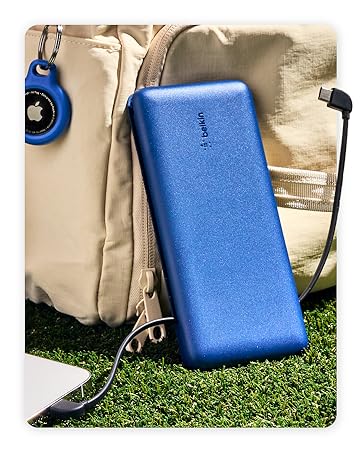
Figure 6: Advanced safety testing and protection features.
5.3 Air Travel Compliance
This power bank is compliant with TSA airline safety standards, making it suitable for carry-on luggage during air travel. Its 74 Wh (watt-hour) rating is within the 100 Wh-limit for carry-on devices.
6. Troubleshooting
6.1 Device Not Charging
- Ensure the power bank is sufficiently charged (check LED indicators).
- Verify that the charging cable is securely connected to both the power bank and your device.
- Try using a different charging cable to rule out cable malfunction.
- Confirm your device is compatible with the power bank's output ports (USB-A or USB-C).
6.2 Slow Charging
- Ensure your device supports fast charging and that you are using a compatible cable.
- Charging multiple devices simultaneously may reduce the charging speed for individual devices.
- Environmental factors can affect charging speed.
6.3 Power Bank Not Recharging
- Ensure the charging cable is properly connected to the power bank's input port and a functional wall charger.
- Try a different wall charger and cable.
- Allow sufficient time for recharging, especially for a 20,000 mAh capacity battery.
7. Specifications
| Feature | Detail |
|---|---|
| Model Number | BPB012 |
| Battery Capacity | 20000 mAh |
| Ports | 1x USB-C, 2x USB-A |
| USB-C Output | 15W Max |
| USB-A Output | 12W Max (per port) |
| Product Dimensions | 6.24 x 3.12 x 0.86 inches |
| Item Weight | 15 ounces |
| Batteries | 1 Lithium Polymer battery (included) |
| Special Features | Cable Included, Fast Charging, High Capacity, LED Indicator Lights |
8. Warranty and Support
Belkin provides a 2-year warranty for this product. Additionally, it includes a $2,500 Connected Equipment Warranty (CEW), offering peace of mind for connected devices.

Figure 7: Belkin's warranty and connected equipment coverage.
For detailed terms and conditions, or for further support, please visit the official Belkin website: www.belkin.com.


