
Introduction
This manual provides comprehensive instructions for the safe and efficient operation, setup, maintenance, and troubleshooting of your Scheppach Robocut XXL900 Robotic Lawnmower. Please read this manual thoroughly before operating the device to ensure proper use and longevity.

Figure 1: Scheppach Robocut XXL900 Robotic Lawnmower with included boundary wire, pegs, and spare blade.
Safety Information
Always adhere to the following safety guidelines to prevent injury and damage to the product:
- Read all instructions carefully before use.
- Keep hands and feet away from the cutting blades.
- Do not operate the mower in wet conditions or during rain. The mower is equipped with a rain sensor, but manual intervention may be required.
- Ensure the boundary wire is correctly installed to prevent the mower from leaving the designated area.
- Keep children and pets away from the operating area.
- Turn off the mower and remove the safety key before performing any maintenance or cleaning.
- Use only original replacement parts and accessories.
- Do not attempt to modify the mower.
Package Contents
Verify that all items are present in the package:
- Scheppach Robocut XXL900 Robotic Lawnmower
- Charging Station
- Power Adapter
- Boundary Wire (approx. 170 meters)
- Fixing Pegs (approx. 230 pieces)
- Replacement Blades (9 pieces)
- User Manual

Figure 2: Illustration of included components and their quantities.
Setup
1. Charging Station Placement
Place the charging station on a flat, level surface in an area with access to a power outlet. Ensure there is sufficient clear space around the station for the mower to dock easily.
2. Boundary Wire Installation
The boundary wire defines the mowing area. Lay the wire around the perimeter of your lawn, securing it with the provided pegs. Ensure the wire is taut and buried or securely pegged to prevent tripping hazards and damage. Maintain recommended distances from obstacles and edges as per the full manual.
3. Initial Charging
Connect the charging station to power. Place the robotic lawnmower onto the charging station. The mower will begin charging automatically. Allow approximately 110 minutes for a full charge before first use.
4. App Pairing and PIN Code Setup
Download the official Scheppach app to your smartphone. Use the app to pair your mower via Wi-Fi or Bluetooth. During the initial setup, you will be prompted to set a personal PIN code for anti-theft protection. This PIN is required to operate the mower and change settings.

Figure 3: Connectivity features including Wi-Fi, Bluetooth, App control, and anti-theft PIN security.

Figure 4: Key features controllable via the smart app.
Operating
1. Starting and Stopping
To start the mower, ensure it is within the boundary wire and press the 'Start' button on the control panel or via the app. To stop, press the 'Stop' button on the mower or in the app. The mower will automatically return to its charging station when the battery is low or its schedule is complete.
2. Mowing Schedule and Zones
Utilize the mobile app to set up a customized mowing schedule. You can define specific mowing times and days. For complex lawns, the app allows you to set up multiple mowing zones, ensuring complete coverage.
3. Cutting Height Adjustment
The cutting height can be adjusted steplessly from 20 mm to 60 mm using the dial located on top of the mower. Rotate the dial to your desired cutting height setting.
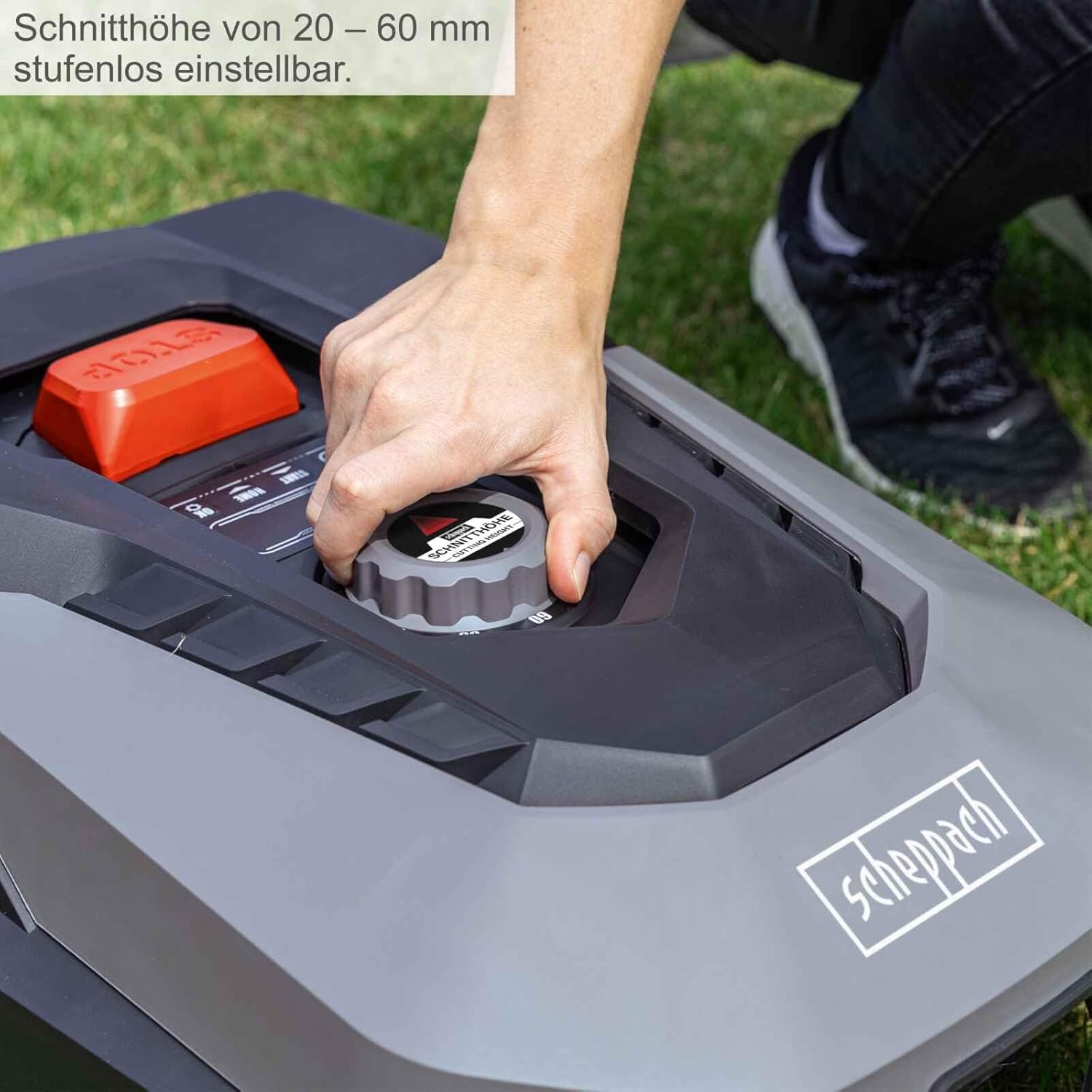
Figure 5: Adjusting the cutting height from 20-60 mm using the integrated dial.
4. Edge Cutting Function
The Robocut XXL900 features an edge cutting function to ensure a neat finish along the perimeter of your lawn. This function can be activated via the app.
5. Rain Sensor
The integrated rain sensor detects precipitation and automatically pauses mowing operations, returning the mower to its charging station. Mowing will resume once the rain stops and the lawn is dry.

Figure 6: Operational capabilities including maximum area, incline, cutting dimensions, and rain sensing.

Figure 7: The robotic lawnmower actively mowing a lawn.
Maintenance
1. Blade Replacement
For optimal cutting performance, inspect the blades regularly and replace them when they show signs of wear or damage. Always turn off the mower and remove the safety key before handling the blades. Use only genuine Scheppach replacement blades.
2. Cleaning the Mower
Regularly clean the underside of the mower, especially the cutting deck, to remove grass clippings and debris. A floating cutting head design assists in maintaining consistent contact with uneven terrain and simplifies cleaning. Use a brush or damp cloth; avoid using high-pressure water jets directly on electrical components.

Figure 8: Maintenance aspects including cleaning the cutting mechanism.

Figure 9: The floating cutting head adapts to uneven ground for consistent cutting.
3. Battery Care
To prolong battery life, store the mower in a dry, frost-free environment during winter months. Ensure the battery is fully charged before long-term storage. The mower uses a 20V / 4Ah battery.
Troubleshooting
This section addresses common issues you might encounter. For more detailed troubleshooting, refer to the complete manual or contact customer support.
| Problem | Possible Cause | Solution |
|---|---|---|
| Mower not starting | Low battery; Safety key not inserted; PIN not entered. | Charge battery; Insert safety key; Enter correct PIN. |
| Mower not charging | Not properly docked; Power supply issue. | Ensure proper contact with charging pins; Check power connection. |
| Mower stuck or erratic movement | Obstacle detected; Boundary wire issue; Uneven terrain. | Clear obstacles; Check boundary wire for breaks; Mower handles up to 35% incline, but extreme unevenness may cause issues. |
| Poor cutting performance | Dull or damaged blades; Grass clippings clogging cutting deck. | Replace blades; Clean cutting deck. |
Specifications
| Feature | Specification |
|---|---|
| Model | Robocut XXL900 |
| Brand | Scheppach |
| Item Weight | 16.28 kg (35.8 lbs) |
| Cutting Width | 18 cm |
| Cutting Height | 20 - 60 mm (steplessly adjustable) |
| Max. Lawn Surface | 900 m² |
| Max. Incline | 35% |
| Battery | 20V / 4Ah |
| Operating Time | Approx. 120 minutes |
| Charging Time | Approx. 110 minutes |
| Connectivity | Wi-Fi, Bluetooth, App Control |
| Features | Rain Sensor, Anti-theft PIN, Floating Cutting Head |
Warranty and Support
Scheppach provides a manufacturer's warranty for this product. Please refer to the warranty card included in your package for specific terms and conditions. For technical support, spare parts, or warranty claims, please contact Scheppach customer service.
Manufacturer: SCHEPPACH
Email: service@scheppach.com

Figure 10: Manufacturer contact details for support.
