1. Introduction
Thank you for choosing the Cecotec ForceClima 7550 Style Connected Portable Air Conditioner. This manual provides essential information for the safe and efficient operation, maintenance, and troubleshooting of your new appliance. Please read this manual thoroughly before use and retain it for future reference.
This portable air conditioner is designed to provide cooling, fan, dehumidification, and night mode functions for rooms up to 14 m².
2. Safety Instructions
Please observe the following safety precautions to prevent injury or damage to the appliance:
- Ensure the power supply matches the voltage specified on the rating label.
- Do not operate the unit with a damaged power cord or plug.
- Keep the appliance away from heat sources, direct sunlight, and flammable materials.
- Do not block the air inlets or outlets. Maintain adequate clearance around the unit for proper airflow.
- This appliance uses R-290 refrigerant, which is flammable. Handle with care and ensure proper ventilation during installation and maintenance.
- Do not insert objects into the air outlets.
- Unplug the unit before cleaning or performing any maintenance.
- This appliance is not intended for use by persons (including children) with reduced physical, sensory, or mental capabilities, or lack of experience and knowledge, unless they have been given supervision or instruction concerning use of the appliance by a person responsible for their safety.
- Children should be supervised to ensure that they do not play with the appliance.
3. Product Overview
The Cecotec ForceClima 7550 Style Connected is a versatile portable air conditioner offering multiple functions for your comfort.
3.1 Components
- Main Unit
- Exhaust Hose
- Window Kit
- Remote Control
- User Manual

Image 3.1: Overview of the Cecotec ForceClima 7550 Style Connected Portable Air Conditioner, showing the unit, remote control, and smartphone app interface.

Image 3.2: Front view of the portable air conditioner, highlighting its compact design.
3.2 Control Panel and Remote Control
The unit features a touch control panel with an LED display for quick adjustments and status viewing. A remote control is also included for convenient operation from a distance.

Image 3.3: Detailed view of the touch control panel on the unit and the included remote control.
3.3 Key Features
- High Cooling Capacity: 7000 BTU (1750 frigories) for rapid and effective cooling.
- Wide Coverage Area: Suitable for rooms up to 14 m².
- 4 Operating Modes: Cooling, Fan, Dehumidifier, and Night mode.
- 2 Fan Speeds: Low and High settings for customized airflow.
- Dehumidifier Function: Capable of extracting up to 20 liters of moisture per day.
- 24-Hour Timer: Program the unit to turn on or off automatically.
- Wi-Fi Connectivity: Control the unit remotely via a smartphone app.
- Eco-friendly Refrigerant: Uses R-290 gas.
- Portability: Equipped with 360° multi-directional wheels for easy movement.
4. Setup
4.1 Unpacking
Carefully remove the air conditioner and all accessories from the packaging. Check for any damage during transit. Retain the packaging for future storage or transport.
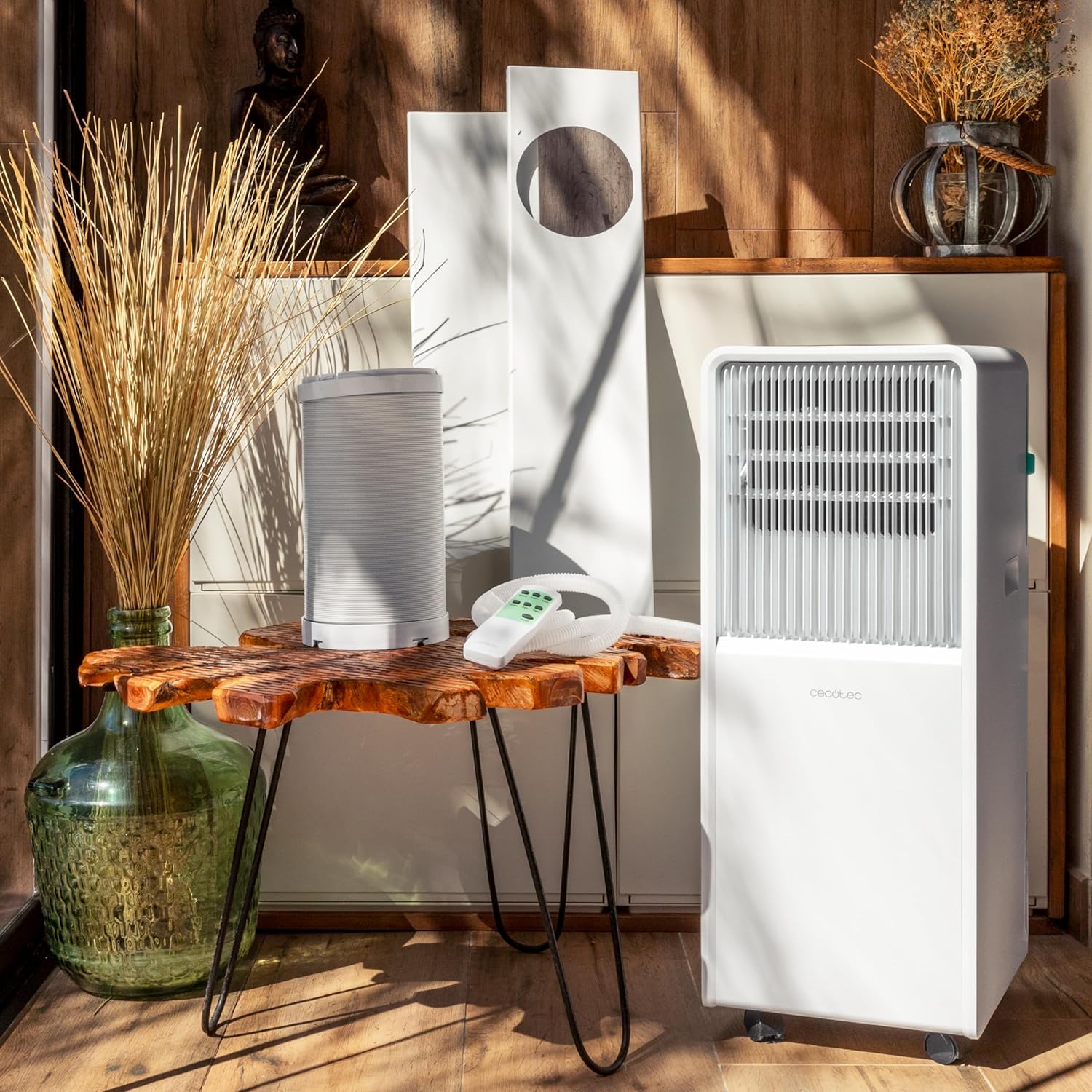
Image 4.1: The portable air conditioner unit displayed with its accessories, including the exhaust hose, window kit, and remote control.
4.2 Placement
Place the air conditioner on a stable, level surface. Ensure there is at least 30 cm (12 inches) of clearance around the unit for proper air circulation. The 360° multi-directional wheels allow for easy repositioning.

Image 4.2: A user demonstrating the ease of moving the portable air conditioner with its integrated wheels.
4.3 Exhaust Hose and Window Kit Installation
- Attach one end of the exhaust hose to the air outlet on the back of the unit.
- Assemble the window kit according to the instructions provided with the kit.
- Secure the other end of the exhaust hose to the window kit.
- Install the window kit in a suitable window opening, ensuring a tight seal to prevent outside air from entering.

Image 4.3: The portable air conditioner in use, with its exhaust hose properly installed in a window.
4.4 Power Connection
Plug the power cord into a grounded electrical outlet. Ensure the outlet meets the electrical requirements of the unit.
5. Operating Instructions
Operate your air conditioner using either the touch control panel on the unit or the remote control.
5.1 Power On/Off
Press the Power button (U) on the control panel or remote control to turn the unit on or off.
5.2 Mode Selection
Press the Mode button to cycle through the available operating modes:
- Cooling Mode: Provides powerful cooling. Adjust temperature using Temp +/- buttons.
- Fan Mode: Circulates air without cooling.
- Dehumidifier Mode: Removes excess moisture from the air.
- Night Mode (Sleep Mode): Operates quietly for comfortable sleep, gradually increasing temperature in cooling mode.

Image 5.1: Visual representation of the four distinct operating modes of the air conditioner.
5.3 Temperature Adjustment
In Cooling mode, use the Temperature Up (TEMP+) and Temperature Down (TEMP-) buttons on the control panel or remote to set your desired room temperature.
5.4 Fan Speed Selection
Press the Speed button to choose between Low and High fan speeds, adjusting the intensity of airflow.

Image 5.2: Comparison of the two available fan speeds: Low for gentle circulation and High for stronger airflow.
5.5 Timer Function
Use the Timer button to program the unit to automatically turn on or off after a set period, up to 24 hours. Press the Timer button, then use the Temp +/- buttons to set the desired duration.

Image 5.3: A hand interacting with the timer function on the control panel.
5.6 Wi-Fi Connectivity (Connected Feature)
The 'Style Connected' feature allows you to control your air conditioner via a smartphone application. Download the official Cecotec app, follow the in-app instructions to pair your device, and enjoy remote control functionality.

Image 5.4: A user operating the air conditioner remotely through the dedicated smartphone application.
6. Maintenance
Regular maintenance ensures optimal performance and extends the lifespan of your air conditioner.
6.1 Draining Water
In Dehumidifier mode, or when the internal water tank is full, the unit will collect water. The unit may stop operating when the tank is full. Refer to the specific instructions in the full manual for draining the collected water. The unit can extract up to 20 liters per day.

Image 6.1: Visual representation of the air conditioner's dehumidification capability, indicating 20 liters per day.
6.2 Cleaning Air Filters
The air filters should be cleaned regularly (e.g., every two weeks) to maintain efficiency. Turn off and unplug the unit before cleaning. Remove the filters, wash them with lukewarm water and mild detergent, rinse thoroughly, and allow them to air dry completely before reinserting.
6.3 Exterior Cleaning
Wipe the exterior of the unit with a soft, damp cloth. Do not use harsh chemicals, abrasives, or solvents, as these can damage the surface.
6.4 Storage
If storing the unit for an extended period, ensure it is clean and dry. Drain any remaining water, clean the filters, and store the unit in a cool, dry place, preferably in its original packaging.
7. Troubleshooting
Before contacting customer support, please refer to the following common issues and solutions:
| Problem | Possible Cause | Solution |
|---|---|---|
| Unit does not turn on | No power supply; Power cord not plugged in; Fuse blown. | Check power connection; Check circuit breaker/fuse. |
| Unit not cooling effectively | Window kit not properly sealed; Room too large; Air filters dirty; Exhaust hose blocked or bent. | Ensure window kit is sealed; Clean air filters; Check exhaust hose for obstructions. |
| Water leakage | Water tank full; Drain plug not properly sealed. | Drain water tank; Ensure drain plug is securely closed. |
| Unusual noise | Unit not on a level surface; Internal components loose. | Place on a level surface; If noise persists, contact support. |
8. Specifications
| Feature | Specification |
|---|---|
| Brand | Cecotec |
| Model Number | 08163 |
| Cooling Capacity | 7000 BTU (1750 frigories) |
| Coverage Area | Up to 14 m² |
| Dehumidification Capacity | 20 Liters/day |
| Energy Efficiency Class | A |
| Noise Level | 50.5 Decibels |
| Refrigerant | R-290 |
| Power (Watts) | 785 W |
| Voltage | 2 Kilovolts (Note: This value seems unusually high and might be a data entry error. Please refer to the product label for actual operating voltage.) |
| Product Dimensions (L x W x H) | 27.5 x 68.5 x 33 cm |
| Weight | 1.95 kg (Note: This value seems unusually low for an air conditioner. Please refer to the product label for actual weight.) |
| Special Features | Dehumidifier, Remote Controlled |
9. Warranty and Support
Your Cecotec ForceClima 7550 Style Connected Portable Air Conditioner comes with a standard manufacturer's warranty. For specific warranty terms and conditions, please refer to the warranty card included with your product or visit the official Cecotec website.
For technical assistance, troubleshooting beyond this manual, or to inquire about spare parts, please contact Cecotec customer support. Contact information can typically be found on the manufacturer's website or in the product packaging.


