
1. Introduction
Thank you for choosing the Dpofirs Hands-Free Binocular Glasses. This manual provides essential information for the proper setup, operation, and maintenance of your device. Please read it thoroughly before use to ensure optimal performance and longevity.

Figure 1: Dpofirs Hands-Free Binocular Glasses, front-angled view.
Key Features:
- Hands-Free Operation: Designed for activities like float fishing, these binocular glasses allow clear observation of distant objects, such as fishing floats, without needing to hold traditional binoculars. This frees your hands for other tasks.
- Durable Construction: The lenses feature a premium coating for bright, clear images and long-lasting wear resistance. The frame is constructed from robust yet lightweight ABS material.
- HD Lenses: Equipped with multiple customized optical lenses, these glasses provide sharp, clear images free from glare and scattered light, enhancing visual clarity for various activities.
- Three Color Filters: Includes red, yellow, and gray filters. These can be interchanged to optimize viewing under different lighting conditions, effectively reducing glare from water surfaces and bright sunlight.
- Adjustable Focus: Manual focus adjustment allows for clear vision for users with diopter variations up to ±7, ensuring a sharp image tailored to individual eyesight.
2. Package Contents
Please verify that all items listed below are included in your package:
- Binocular Glasses x 1
- Eyepieces x 2
- Cleaning Cloth x 1
- Glasses Frame x 1
- Rubber Nose Pads x 2
- Storage Case x 1
- Neck Strap x 1
- Filters x 6 (Filter covers are pre-attached to the filters)

Figure 2: Binocular glasses and included accessories.
3. Specifications
| Item Type | Binocular Glasses |
| Brand | Dpofirs |
| Model Number | Dpofirsqsbr5yhg2x |
| Material | ABS, Optical Glass |
| Weight | Approximately 292g / 10.3 ounces |
| Maximum Magnification | 6X |
| Filter Colors | Gray, Yellow, Red |
| Focusing Method | Individual binocular focusing |
| Wearing Style | Glasses-style |
| Target Audience | Adults |
| Intended Use | Fishing, Bird Watching, Sports, Concerts |
4. Setup
4.1 Initial Inspection
Before first use, carefully inspect the binocular glasses and all accessories for any signs of damage. If any components are missing or damaged, please contact customer support.
4.2 Attaching the Neck Strap
Attach the provided neck strap to the designated loops on the binocular glasses frame. Ensure it is securely fastened to prevent accidental drops.
4.3 Adjusting Nose Pads (if applicable)
The binocular glasses come with rubber nose pads for comfort. Adjust their position to ensure a comfortable and stable fit on your nose.

Figure 3: Front view of the binocular glasses, showing nose pads and lenses.
5. Operating Instructions
5.1 Wearing the Binocular Glasses
Place the binocular glasses on your face like regular eyeglasses, ensuring the lenses are positioned correctly in front of your eyes. The earpieces should rest comfortably over your ears.
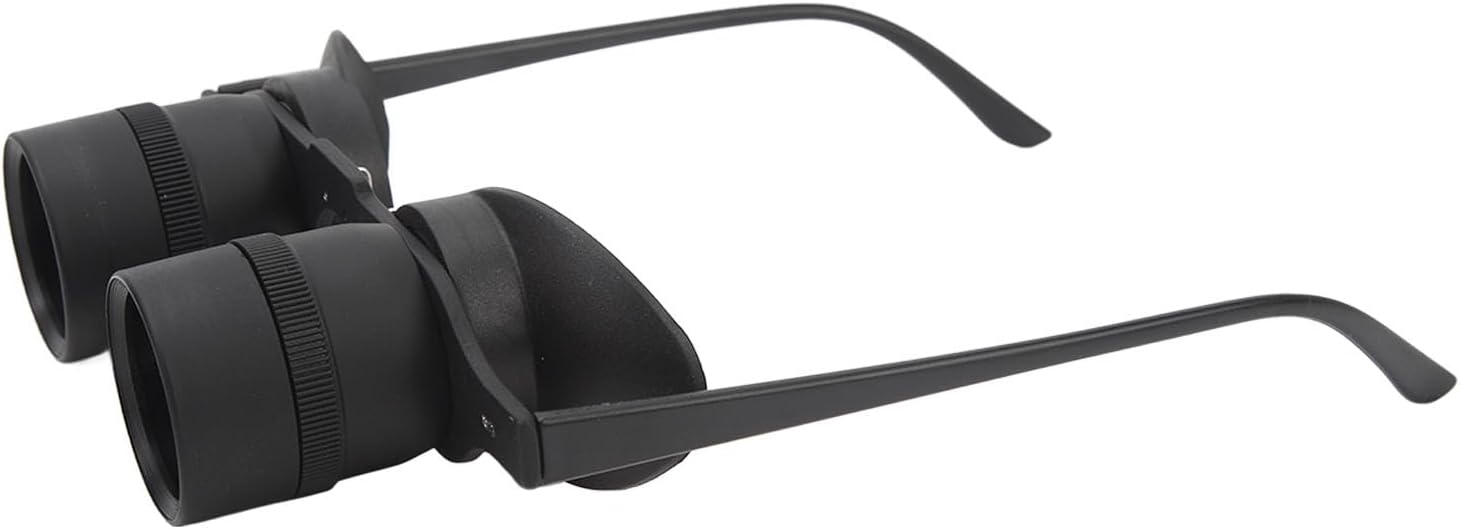
Figure 4: Side view of the binocular glasses, demonstrating how they are worn.
5.2 Focusing Method
The binocular glasses feature individual focusing for each eye:
- Left Eye Focus: Begin by observing a distant target with your left eye. Adjust the left diopter adjustment ring (located around the left lens) until the target appears clear and sharp.
- Right Eye Focus: Next, observe the same target with your right eye. Adjust the right diopter adjustment ring (located around the right lens) until the target appears clear and sharp for your right eye.
Once both eyes are focused, the image should be clear and comfortable to view.

Figure 5: Angled view highlighting the adjustable focus rings on each lens.
5.3 Lens Replacement (Using Color Filters)
The binocular glasses come with three pairs of color filters (red, yellow, gray) to enhance viewing in different conditions. To replace the lenses:
- Gently rotate the lens module (the part containing the lens) above the focus ring counter-clockwise. This will loosen and allow you to remove the existing round lens.
- Select the desired color filter.
- Align the chosen filter with the lens opening and rotate it clockwise until it is securely fastened.
Caution: Do not apply excessive force when rotating the lens modules, as they are secured by screws. Gentle rotation is sufficient for removal and attachment.

Figure 6: Close-up view of a lens module, indicating the area for rotation during lens replacement.
6. Maintenance
6.1 Cleaning the Lenses
Use the provided cleaning cloth to gently wipe the lenses. For stubborn smudges, breathe lightly on the lens surface before wiping. Avoid using abrasive materials or harsh chemicals, as these can damage the lens coating.
6.2 Cleaning the Frame
Wipe the ABS frame with a soft, damp cloth. Do not immerse the binocular glasses in water.
6.3 Storage
When not in use, store the binocular glasses in the provided storage case to protect them from dust, scratches, and impacts. Keep them in a cool, dry place away from direct sunlight and extreme temperatures.
7. Troubleshooting
| Problem | Possible Cause | Solution |
|---|---|---|
| Image is blurry or out of focus. | Incorrect focus adjustment. | Adjust the individual focus rings for each eye until the image is clear (refer to Section 5.2). |
| Glare or reflections are visible. | Bright lighting conditions or water surface reflection. | Try using one of the colored filters (red, yellow, or gray) to reduce glare (refer to Section 5.3). |
| Lenses are dirty. | Dust or smudges on the lens surface. | Clean the lenses gently with the provided cleaning cloth (refer to Section 6.1). |
| Binocular glasses feel uncomfortable. | Nose pads or earpieces are not properly adjusted. | Adjust the rubber nose pads and ensure the earpieces sit comfortably (refer to Section 4.3). |
8. Warranty and Support
For warranty information or technical support, please refer to the product packaging or contact the retailer from whom you purchased the Dpofirs Hands-Free Binocular Glasses. Keep your proof of purchase for any warranty claims.