
Introduction
Thank you for choosing the Milex Wet & Dry Vacuum MHV001. This compact and versatile handheld vacuum cleaner is designed for efficient cleaning of both dry debris and liquid spills. Please read this manual thoroughly before operating the device to ensure safe and optimal performance. Keep this manual for future reference.

Figure 1: The Milex Wet & Dry Vacuum MHV001, a compact handheld vacuum cleaner.
Important Safety Instructions
When using electrical appliances, basic precautions should always be followed, including the following:
- Read all instructions before using this appliance.
- Do not use outdoors or on wet surfaces.
- Do not allow to be used as a toy. Close attention is necessary when used by or near children.
- Use only as described in this manual. Use only manufacturer's recommended attachments.
- Do not use with damaged cord or plug. If appliance is not working as it should, has been dropped, damaged, left outdoors, or dropped into water, return it to a service center.
- Do not pull or carry by cord, use cord as a handle, close a door on cord, or pull cord around sharp edges or corners. Do not run appliance over cord. Keep cord away from heated surfaces.
- Do not unplug by pulling on cord. To unplug, grasp the plug, not the cord.
- Do not handle plug or appliance with wet hands.
- Do not put any object into openings. Do not use with any opening blocked; keep free of dust, lint, hair, and anything that may reduce air flow.
- Keep hair, loose clothing, fingers, and all parts of body away from openings and moving parts.
- Do not pick up anything that is burning or smoking, such as cigarettes, matches, or hot ashes.
- Do not use to pick up flammable or combustible liquids, such as gasoline, or use in areas where they may be present.
- Do not pick up toxic material, such as chlorine bleach, ammonia, or drain cleaner.
- Do not use without dust cup and filter in place.
- Turn off all controls before unplugging.
- Use extra care when cleaning on stairs.
- Do not charge the unit outdoors.
- Use only the charger supplied by the manufacturer to recharge.
- Store the appliance indoors.
Package Contents
Carefully unpack your Milex Wet & Dry Vacuum and check that all items are present and in good condition. If any items are missing or damaged, please contact customer support.
- 1 x Milex Wet & Dry Handheld Vacuum Cleaner (MHV001)
- 1 x Washable Filter (pre-installed)
- 1 x Dust Cup
- 1 x 2-in-1 Nozzle (Crevice tool and brush attachment)
- 1 x Plastic Hose Connector / Extension Hose
- 1 x USB Charging Cable
- 1 x Small Cleaning Brush (for filter)
- 1 x User Manual (this document)
Product Overview
Familiarize yourself with the components of your Milex Wet & Dry Vacuum.
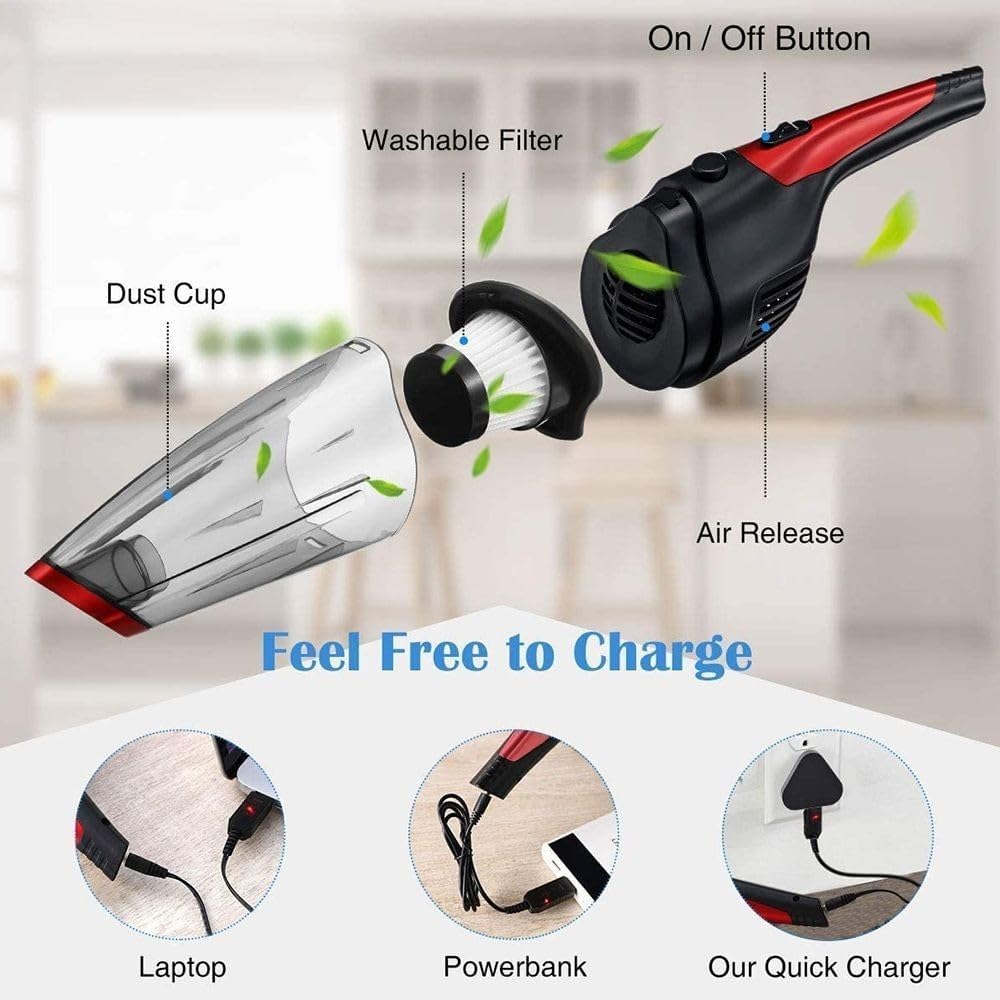
Figure 2: Exploded view showing the main components of the vacuum cleaner. This includes the dust cup, the washable filter, the on/off button, and the air release vent. The image also illustrates various charging methods like laptop, power bank, and a quick charger.
- On/Off Button: Powers the vacuum on and off.
- Air Release: Exhaust vent for air during operation.
- Dust Cup: Transparent container for collecting debris and liquids.
- Washable Filter: HEPA-type filter located inside the dust cup, designed to trap fine particles.
- Charging Port: Located on the handle for connecting the USB charging cable.
- Dust Cup Release Button: Button to detach the dust cup for emptying and cleaning.
Setup
1. Charging the Vacuum
Before first use, fully charge the vacuum cleaner. The device operates wirelessly once charged.
- Connect the provided USB charging cable to the charging port on the vacuum's handle.
- Connect the other end of the USB cable to a suitable power source, such as a laptop, power bank, or a USB wall adapter (not included).
- The charging indicator light will illuminate during charging and typically change color or turn off when fully charged. Refer to the indicator light behavior for your specific unit.
- A full charge typically takes approximately 3-4 hours.
2. Attaching Accessories
The Milex Wet & Dry Vacuum comes with a 2-in-1 nozzle and a plastic hose connector for enhanced versatility.
- To attach the 2-in-1 nozzle, simply push it firmly onto the vacuum's suction inlet. The brush attachment can be slid up or down as needed.
- For extended reach or cleaning in tight spaces, attach the plastic hose connector to the suction inlet, then attach the 2-in-1 nozzle to the other end of the hose.

Figure 3: The Milex Wet & Dry Vacuum being used with an extension hose and nozzle to clean between sofa cushions, demonstrating enhanced reach.
Operating Instructions
1. Powering On/Off
- To turn on the vacuum, press the On/Off button located on the handle.
- To turn off the vacuum, press the On/Off button again.
2. Dry Vacuuming
- Ensure the dust cup and filter are clean and properly installed.
- Select the appropriate nozzle for the surface you are cleaning. Use the brush for upholstery and the crevice tool for tight corners.
- Turn on the vacuum and move the nozzle over the area to be cleaned.
3. Wet Vacuuming (Liquid Spills)
The Milex Wet & Dry Vacuum is suitable for picking up small liquid spills.
- For liquid spills, ensure the filter is clean. While the filter is designed for wet use, excessive saturation can reduce suction.
- Do not exceed the MAX fill line indicated on the dust cup for liquids.
- After picking up liquids, immediately empty and clean the dust cup and filter to prevent odors and mold growth.
- Important: Do not use to pick up flammable, corrosive, or hot liquids.
4. Battery Life
The vacuum provides cordless operation. When the battery is low, the suction power may decrease, or the indicator light may signal a low battery. Recharge the unit as described in the Setup section.
Maintenance
Regular cleaning and maintenance will ensure optimal performance and extend the lifespan of your vacuum cleaner.
1. Emptying and Cleaning the Dust Cup
Empty the dust cup after each use, especially after wet vacuuming.
- Press the button to unlock the dust cup: Locate the dust cup release button, usually near the handle, and press it to detach the dust cup from the main unit.
- Pull out the filter with a slight force: Gently twist and pull the washable filter assembly out of the dust cup.
- A small brush cleans the filter of dust: Use the provided small cleaning brush to remove any accumulated dust or debris from the filter pleats.
- Rinse filter and dust cup repeatedly with clean water: Rinse both the dust cup and the filter under running water until clean. For stubborn dirt, use mild soap.
- Air-dry the filter and dust cup completely: It is crucial that both the filter and dust cup are completely dry before reassembly to prevent mold and maintain suction power. Allow them to air dry for at least 24 hours.
- Reinstall (filter must be completely dry before reuse): Once completely dry, reinsert the filter into the dust cup, ensuring it is seated correctly. Then, attach the dust cup back onto the main vacuum unit until it clicks securely into place.

Figure 4: Step-by-step guide illustrating the process of detaching the dust cup, removing and cleaning the washable filter with a brush, rinsing both components with water, air-drying them, and finally reinstalling them.
2. Filter Replacement
The washable filter has a limited lifespan. If you notice a significant decrease in suction power even after cleaning, or if the filter appears damaged, it may need to be replaced. Contact Milex customer support for replacement filters.
3. Storage
Store the vacuum cleaner in a cool, dry place, away from direct sunlight and extreme temperatures. Ensure the battery is partially charged before long-term storage to maintain battery health.
Troubleshooting
| Problem | Possible Cause | Solution |
|---|---|---|
| Vacuum does not turn on. | Battery is depleted. | Charge the vacuum fully. |
| Charging cable or adapter is faulty. | Try a different USB cable or power adapter. | |
| Low suction power. | Dust cup is full. | Empty the dust cup. |
| Filter is clogged or dirty. | Clean or replace the filter. Ensure it is completely dry before reinstallation. | |
| Nozzle or hose is blocked. | Check for and remove any obstructions in the nozzle or hose. | |
| Water leaks from vacuum during wet use. | Dust cup is overfilled. | Do not exceed the MAX fill line for liquids. Empty the dust cup. |
| Dust cup or filter not properly installed. | Ensure the dust cup and filter are securely attached and sealed. |
Specifications
| Brand | Milex |
| Model Number | MHV001 |
| Type | Wet & Dry Handheld Vacuum Cleaner |
| Power / Wattage | 60 watts |
| Power Source | Rechargeable Battery (Cordless Operation) |
| Filter Type | Washable HEPA Filter |
| Item Weight | 0.85 kg (850 g) |
| Color | Black |
| Special Features | Cordless, Wet & Dry Function, Portable, 2-in-1 Nozzle |
Warranty and Support
Milex products are designed for quality and reliability. For information regarding warranty coverage, technical support, or to purchase replacement parts, please visit the official Milex website or contact their customer service department.
You can often find support information on the brand's Amazon store page: Milex Amazon Store