
1. Introduction
The DIGITUS DS-55324 Wireless Video Extender Kit provides a solution for wirelessly transmitting Ultra-HD 4K/30Hz audio and video signals. This kit operates on a point-to-point connection, featuring a USB-C transmitter and an HDMI receiver, allowing for easy plug-and-play setup without the need for drivers or software. It supports a transmission range of up to 30 meters with a clear line of sight and ensures secure data transmission through 128-bit AES encoding and WPA2 protocol. This device is compatible with HDMI 2.0, DP 1.2, and HDCP 2.2/1.4 standards.

Figure 1: DIGITUS DS-55324 Wireless Video Extender Kit components.
2. Package Contents
Please verify that all items are present and in good condition upon opening the package:
- 1 x Sender Unit (Transmitter with USB-C connector)
- 1 x Receiver Unit (Receiver with HDMI connector)
- 2 x USB-A to USB-C Cable (100cm)
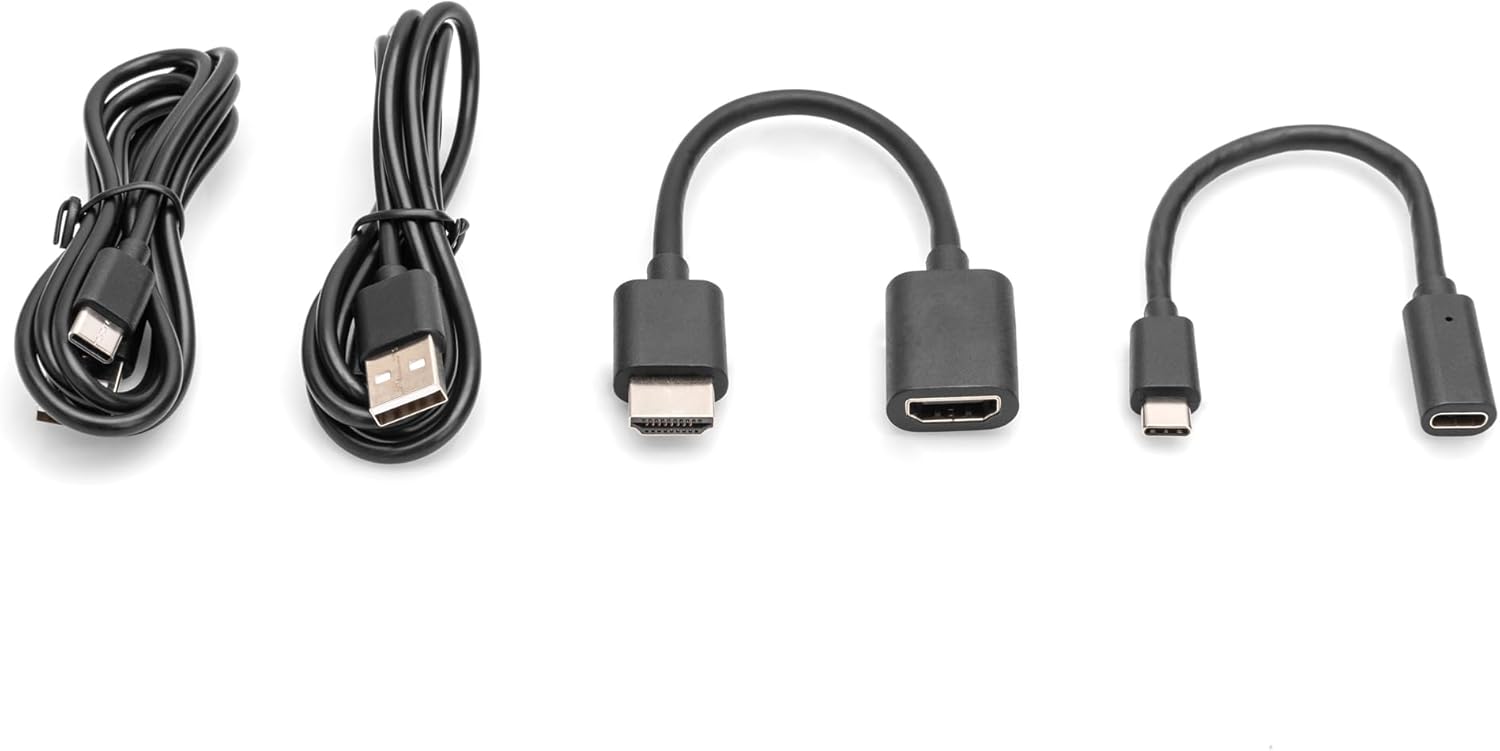
Figure 2: Included cables for power and connection.
3. Product Features and Overview
The DS-55324 kit offers the following key features:
- Wireless transmission of HDMI signals up to 30 meters (with free view).
- Point-to-point connection: 1 sender (source) to 1 receiver (output device).
- Supports resolutions up to 4K UHD (2160p/30Hz).
- HDMI 2.0, DP 1.2, and HDCP 2.2/1.3 compatibility.
- Power supplied via USB-C connection.
- Enhanced security with 128-bit AES Encoding and WPA2 Protocol.

Figure 3: Key features and button location on the extender units.
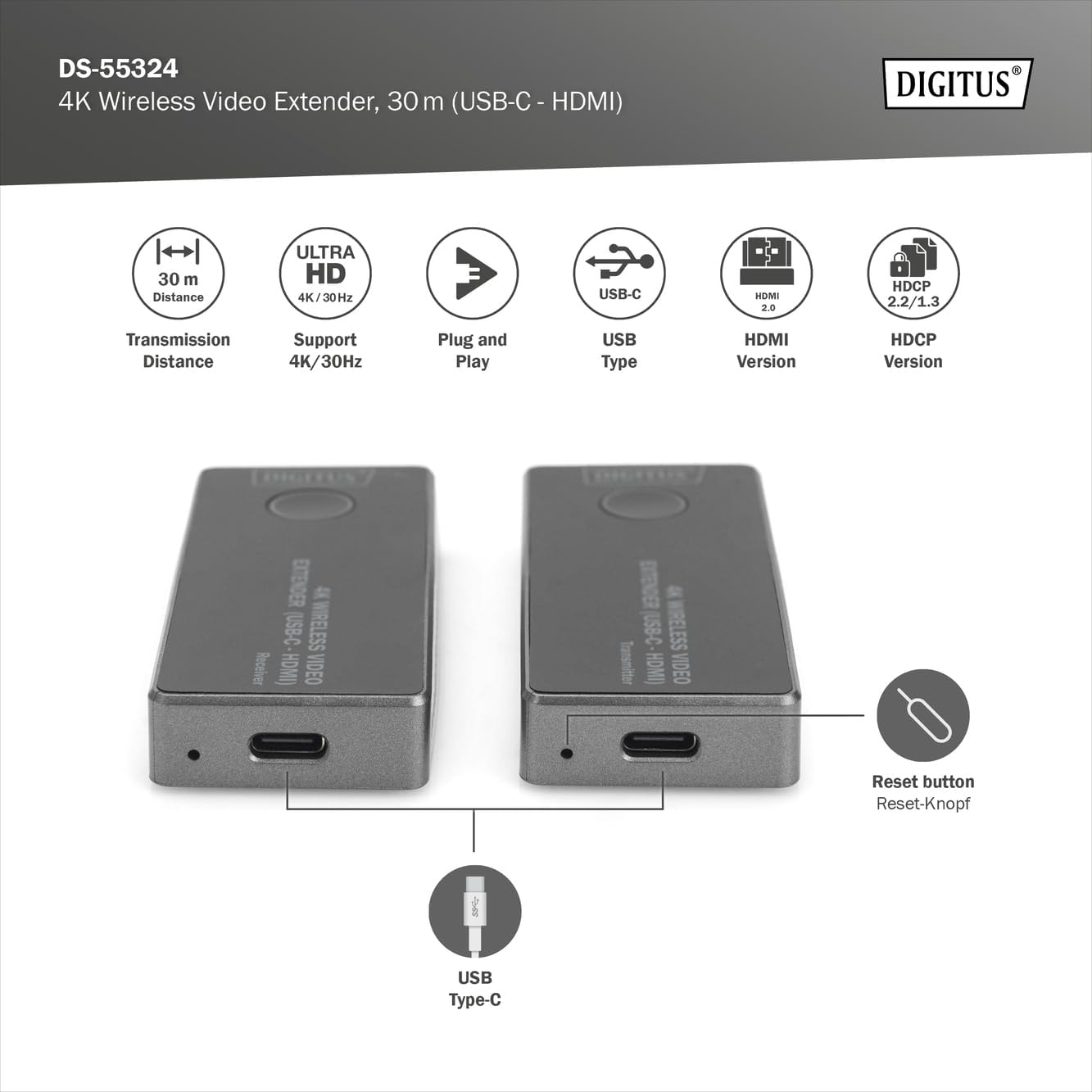
Figure 4: Location of the reset button and USB Type-C power input.
4. Setup Instructions
Follow these steps to set up your DIGITUS Wireless Video Extender Kit:
- Connect the Transmitter: Plug the USB-C connector of the Sender Unit (Transmitter) into the USB-C port of your source device (e.g., laptop, PC, smartphone with USB-C video output).
- Connect the Receiver: Plug the HDMI connector of the Receiver Unit into an available HDMI input port on your display device (e.g., monitor, projector, TV).
- Power the Units: Use the provided USB-A to USB-C cables to connect both the Sender Unit and Receiver Unit to a power source. This can be a USB port on your source/display device or a separate USB power adapter (5V/1A minimum, not included). Ensure both units receive stable power.
- Establish Connection: Once both units are powered and connected, they will automatically attempt to pair. The LED indicators on the units will show their status. A stable connection is indicated when the video signal appears on your display.
- Troubleshooting (if no signal): If no signal is displayed, ensure both units are powered, correctly connected, and within the 30-meter range with minimal obstructions. You may also press the button on each unit to initiate pairing manually if needed.

Figure 5: Connection diagram for the wireless video extender.

Figure 6: Wireless signal transmission from source to display.

Figure 7: Detailed view of the USB-C (transmitter) and HDMI (receiver) ports.
5. Operating Instructions
Once the setup is complete and the units are paired, the extender operates automatically:
- Automatic Signal Transmission: The video and audio signal from your source device will be wirelessly transmitted to your display.
- Resolution: The system will automatically negotiate the best possible resolution up to 4K/30Hz, depending on the capabilities of your source and display devices.
- Button Function: The button on each unit can be used to initiate or re-establish pairing if the connection is lost or not automatically established. A short press typically triggers a re-scan for the partner unit.
6. Maintenance
To ensure the longevity and optimal performance of your DIGITUS Wireless Video Extender Kit, follow these maintenance guidelines:
- Cleaning: Use a soft, dry cloth to clean the units. Do not use liquid cleaners or aerosols, as they may damage the components.
- Storage: Store the units in a cool, dry place away from direct sunlight and extreme temperatures when not in use.
- Handling: Avoid dropping the units or subjecting them to strong impacts. Do not attempt to disassemble the units, as this will void any warranty and may cause damage.
- Ventilation: Ensure the ventilation slots on the units are not blocked to prevent overheating.
7. Troubleshooting
If you encounter issues with your wireless video extender, refer to the following common problems and solutions:
| Problem | Possible Cause | Solution |
|---|---|---|
| No video signal on display | Units not powered Incorrect connections Out of range or obstructions Pairing issue | Ensure both units are powered via USB-C. Verify USB-C transmitter is in source, HDMI receiver in display. Reduce distance between units, remove obstructions. Press the button on both units to re-initiate pairing. |
| Poor video quality or flickering | Interference Weak signal Source/display incompatibility | Move units away from other wireless devices. Ensure clear line of sight and reduce distance. Check if source/display supports 4K/30Hz. Try a lower resolution if possible. |
| No audio | Audio settings on source/display HDMI cable issue (if applicable) | Check audio output settings on your source device and input settings on your display. Ensure the HDMI connection to the receiver is secure. |
| Units feel warm | Normal operation Poor ventilation | Some warmth is normal during operation. Ensure ventilation slots are not blocked. If excessively hot, disconnect and contact support. |
8. Specifications
| Feature | Specification |
|---|---|
| Model Number | DS-55324 |
| Manufacturer | DIGITUS |
| Transmission Distance | Up to 30 meters (line of sight) |
| Supported Resolution | Up to 4K UHD (2160p/30Hz) |
| HDMI Version | HDMI 2.0 |
| DisplayPort Version | DP 1.2 |
| HDCP Support | HDCP 2.2/1.3 |
| Transmitter Connector | USB-C |
| Receiver Connector | HDMI |
| Power Supply | Via USB-C (5V/1A recommended) |
| Security Protocols | 128-bit AES Encoding, WPA2 Protocol |
| Product Dimensions | 3.19 x 1.34 x 0.51 inches (each unit) |
| Item Weight | 1.13 ounces (each unit) |
9. Warranty and Support
For warranty information and technical support, please refer to the documentation provided with your purchase or visit the official DIGITUS website. Keep your proof of purchase for warranty claims.


