
1. Introduction
This manual provides essential instructions for the safe and efficient operation, setup, maintenance, and troubleshooting of your TECHTONGDA Pneumatic Sliding Dual Platen Heat Press Machine. Please read this manual thoroughly before operating the machine to ensure proper usage and to prevent damage or injury.
The TECHTONGDA Pneumatic Sliding Dual Platen Heat Press Machine is designed for commercial sublimation and heat transfer printing on various flat surfaces, including textiles, mouse pads, puzzles, and ceramic tiles. Its pneumatic system ensures consistent pressure, while the dual platen design enhances efficiency.
2. Safety Instructions
Always adhere to the following safety guidelines to prevent accidents and ensure safe operation:
- Electrical Safety: Ensure the machine is connected to a grounded 110V power outlet. Do not operate with wet hands or in damp conditions. Disconnect power before performing any maintenance or cleaning.
- Heat Hazard: The heating platen reaches high temperatures. Avoid direct contact with the platen during operation and cool-down. Use heat-resistant gloves if necessary.
- Pneumatic System: Ensure all air connections are secure and free from leaks. Do not tamper with the pressure regulator settings beyond recommended operational limits.
- Moving Parts: Keep hands and clothing clear of moving parts, especially the sliding platens and the pressing mechanism.
- Emergency Stop: Familiarize yourself with the location and function of the emergency stop button. Press it immediately in case of any malfunction or unsafe condition.
- Ventilation: Operate the machine in a well-ventilated area to dissipate any fumes from heat transfer materials.
- Children and Pets: Keep children and pets away from the machine during operation and when it is cooling down.
3. Product Features
The TECHTONGDA Pneumatic Sliding Dual Platen Heat Press Machine incorporates several features designed for efficiency and quality:
- Pneumatic Design: Utilizes automatic pneumatic pressure for consistent and high-pressure transfers, up to 8kg/cm². Features an industrial armored pressure regulator to prevent air leakage.
- Dual Platen System: Two working tables allow for parallel movement of the heating head, enabling continuous operation and increased productivity.
- Thickened Heating Plate: Ensures uniform and stable temperature distribution across the entire platen surface for high-quality transfers.
- Adjustable Pressure: Pressure can be precisely adjusted to accommodate various material thicknesses.
- Automatic/Semi-automatic Modes: Offers flexible operation with both fully automatic and semi-automatic pressing modes.
- Emergency Stop Button: Provides immediate shutdown of the heating plate's pressing action for safety.

Figure 3.1: Dual-station design for efficient operation. The two platens allow for continuous workflow.
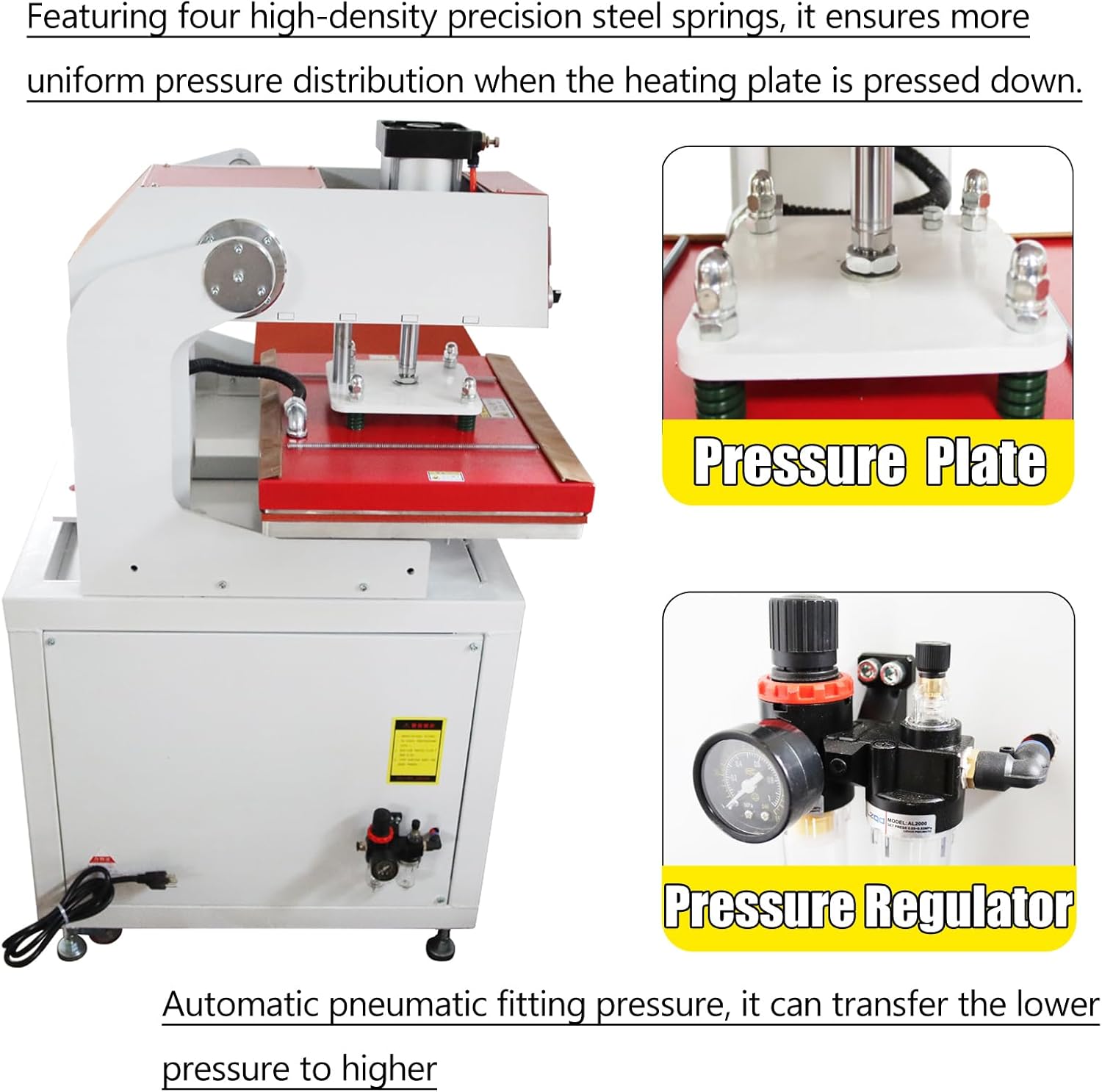
Figure 3.2: Close-up of the pressure plate with four high-density steel springs for uniform pressure distribution, and the pneumatic pressure regulator for precise air pressure control.
4. Setup
Follow these steps to set up your heat press machine:
- Unpacking: Carefully remove the machine from its packaging. Inspect for any shipping damage.
- Placement: Place the machine on a stable, level, and heat-resistant surface capable of supporting its weight (approximately 228 kg / 502 lbs). Ensure adequate clearance around the machine for ventilation and operation.
- Power Connection: Connect the power cord to a grounded 110V AC power outlet.
- Pneumatic Connection: Connect an air compressor (not included) to the machine's pneumatic inlet. Ensure the air pressure supply is stable and within the recommended operating range.
- Initial Inspection: Before first use, check all connections, switches, and moving parts to ensure they are secure and functioning correctly.

Figure 4.1: Machine dimensions and specifications overview. Printing Area: 15.7x19.7 inches (40x50cm). Voltage/Power: 110V/2.5KW.
5. Operating Instructions
Operating the heat press involves setting temperature, time, and pressure, then initiating the transfer process.
5.1 Control Panel Overview

Figure 5.1: Control panel diagram showing the temperature control meter, function buttons, and power/start/scram switches.
- (1) Power Switch: Turns the machine on/off.
- (2) Scram Switch (Emergency Stop): Immediately halts all machine operations.
- (3) Start Switch: Initiates the pressing cycle.
- (4) Temperature Control Meter: Displays and allows adjustment of current (PV) and set (SV) temperatures.
- (5) Fully Automatic/Semi-automatic Switching: Toggles between operation modes.
- (6) Parameter Button: Accesses settings for pressing time, pause time, etc.
- (7) Zero Clearing: Resets production quantity.
- (8) Manual Button: For manual control of certain functions.
5.2 Basic Operation Steps
- Power On: Turn on the main power switch (1).
- Set Temperature: Use the temperature control meter (4) to set the desired temperature. Allow the machine to preheat until the actual temperature (PV) reaches the set temperature (SV).
- Set Time: Use the parameter button (6) to set the desired pressing time.
- Adjust Pressure: Adjust the pneumatic pressure regulator to achieve the required pressure for your material. The lower platen has an adjustable range of 3.94 inches (10cm) to accommodate various product thicknesses.
- Load Material: Place your garment or item on one of the lower platens. Position the transfer material (e.g., sublimation paper, vinyl) on top of the item.
- Select Mode: Choose between fully automatic or semi-automatic mode using button (5).
- Automatic Mode: Press the start key once. The heating plate will automatically move between platens, press down, and release according to set times.
- Semi-automatic Mode: Press the start key once. The heating plate will press down once for the set time. You will need to manually initiate the next press.
- Start Pressing: Press the start switch (3) to begin the heat transfer cycle.
- Unload: Once the cycle is complete, carefully remove the transferred item.
6. Maintenance
Regular maintenance ensures the longevity and optimal performance of your heat press machine:
- Cleaning: Regularly wipe down the exterior of the machine with a damp cloth. For the heating platen, use a non-abrasive cleaner specifically designed for heat press platens when the machine is cool.
- Pneumatic System Check: Periodically inspect air hoses and connections for wear, leaks, or damage. Ensure the air filter in the pressure regulator is clean.
- Lubrication: Apply a small amount of high-temperature grease to moving parts, such as the sliding mechanism and pressure plate springs, as needed.
- Electrical Connections: Routinely check all electrical connections for tightness and signs of wear.
- Storage: When not in use for extended periods, store the machine in a dry, dust-free environment.
7. Troubleshooting
Refer to the following table for common issues and their solutions:
| Problem | Possible Cause | Solution |
|---|---|---|
| Uneven heat transfer | Uneven pressure; damaged heating element; worn platen pad. | Adjust pressure regulator; inspect heating element; replace platen pad. |
| Machine not heating | Power supply issue; faulty heating element; control panel malfunction. | Check power connection; consult technician for element/control panel. |
| Insufficient pressure | Low air pressure from compressor; air leak in pneumatic system; pressure regulator malfunction. | Check air compressor; inspect hoses for leaks; adjust or replace regulator. |
| Platen not sliding smoothly | Debris in sliding mechanism; lack of lubrication. | Clean sliding tracks; apply lubricant. |
| Emergency stop engaged | Emergency button pressed; safety sensor triggered. | Release emergency button; check for obstructions or faults. |
If you encounter issues not listed here or if solutions do not resolve the problem, please contact customer support.
8. Specifications
| Specification | Value |
|---|---|
| Brand | TECHTONGDA |
| Model | B0CV54BGGJ |
| Printing Area | 15.7 x 19.7 inches (40 x 50 cm) |
| Voltage | 110 Volts |
| Wattage | 2500 Watts |
| Temperature Range | 0-260 Degrees Celsius |
| Time Range | 0-999 seconds |
| Pressure (Max) | 8 kg/cm² |
| Adjustable Lower Platen Range | 3.94 inches (10 cm) |
| Gross Weight (G.W.) | 228 KG (502 lbs) |
| Machine Dimensions (L*W*H) | 1100*700*550 mm (43.3*27.5*21.6 inches) |
| Material | Ceramic (heating element) |
| UPC | 840403724246 |
9. Warranty and Support
This product does not include a manufacturer's warranty as per the provided specifications. For any operational questions, technical assistance, or parts inquiries, please contact your retailer or the TECHTONGDA customer support channel where you purchased the product.
Please retain your purchase receipt for any support inquiries.