
Introduction
This manual provides comprehensive instructions for the Hello Kitty Smart Watch (Model: HK4208). Please read this manual carefully before using your device to ensure proper operation and to maximize its features. This smartwatch is designed for interactive use, offering various functions including timekeeping, fitness tracking, entertainment, and communication features.
What's in the Box
- Hello Kitty Smart Watch (Model: HK4208)
- USB Charging Cable
- User Manual (this document)
Setup
1. Charging the Smart Watch
Before first use, fully charge the smartwatch. Connect the provided USB charging cable to the charging port on the back of the watch and to a standard USB power adapter (not included) or a computer's USB port.

Image: Rear view of the Hello Kitty Smart Watch, highlighting the charging contacts and sensor area. The watch features a pink and white strap with Hello Kitty patterns.
- A battery icon will appear on the screen indicating charging status.
- Charging typically takes 1-2 hours for a full charge.
- Ensure the charging contacts are clean and dry before connecting.
2. Powering On/Off
- To Power On: Press and hold the side button until the Hello Kitty logo appears on the screen.
- To Power Off: Press and hold the side button until a power-off option appears, then confirm on the touchscreen.
Operating the Smart Watch
Touchscreen Navigation
The Hello Kitty Smart Watch features an interactive touchscreen display. Swipe left, right, up, or down to navigate through different menus and functions. Tap an icon to select an application or option.
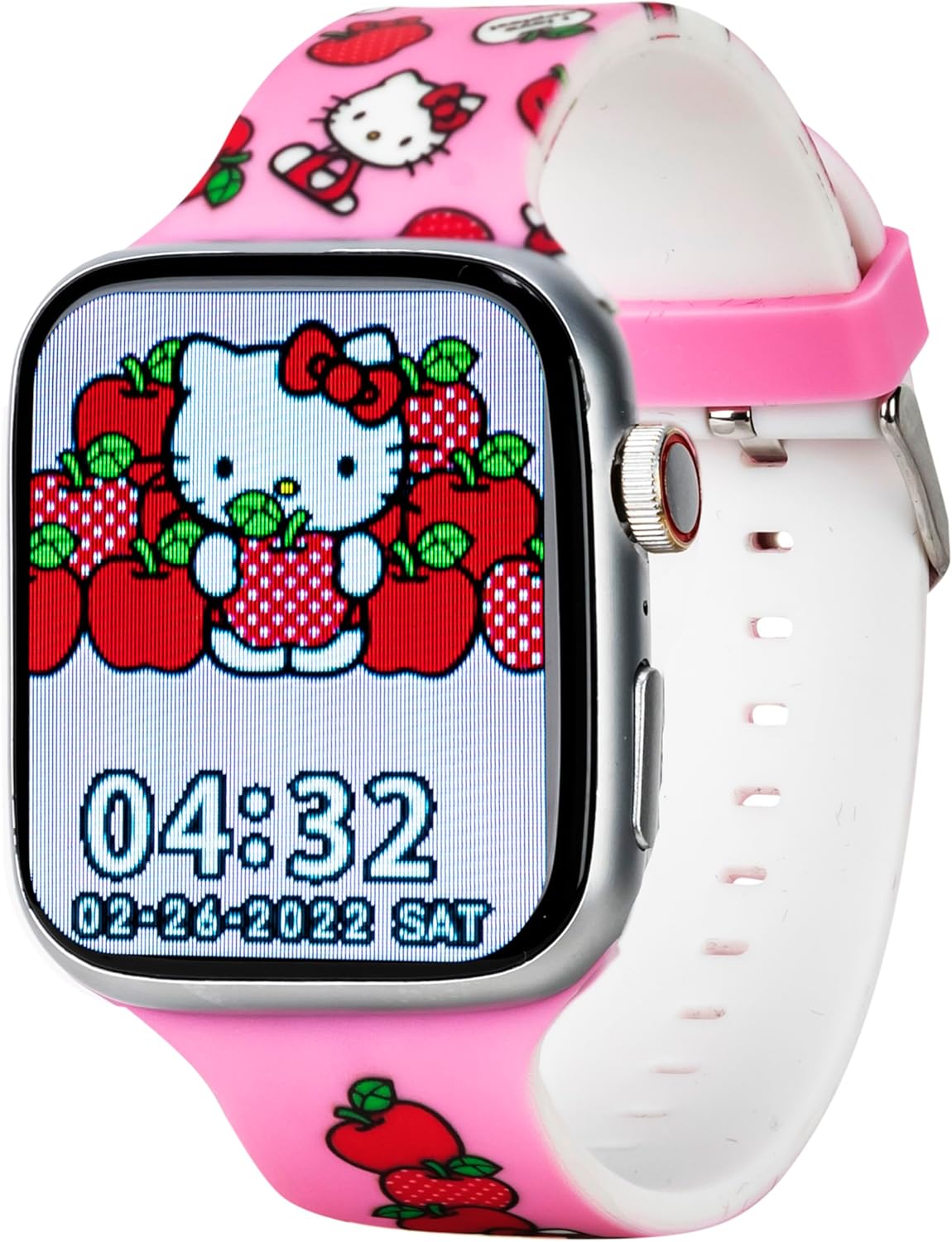
Image: Front view of the Hello Kitty Smart Watch, showcasing a vibrant watch face featuring Hello Kitty surrounded by apples. The time 04:32 and date 02-28-2022 SAT are visible.
Key Features and Functions
- Watch Faces: The watch offers six unique Hello Kitty-themed watch faces. To change, tap and hold the current watch face, then swipe to select your preferred design.

Image: Close-up of the Hello Kitty Smart Watch screen, showing an alternative watch face with Hello Kitty and strawberries. The time 04:31 and date 02-28-2022 SAT are displayed.
- Camera: Access the built-in camera to capture photos. Tap the camera icon, then tap the screen to take a picture. Photos are stored on the watch.
- Music Player: Play pre-loaded music or transfer compatible audio files to the watch. Use the touchscreen controls to play, pause, skip tracks, and adjust volume.
- Fitness & Activity Tracking:
- Pedometer: Tracks your steps throughout the day.
- Sports Modes: Select specific modes for various activities to track duration and estimated calories burned.
- Sedentary Reminder: Alerts you when you've been inactive for too long, encouraging movement.
- Flashlight: Activate the flashlight function for illumination in dark environments.
- Sleep Tracker: Monitors sleep patterns to help understand rest quality.
- Call and Message Notifications: While the watch does not have internet access, it can receive notifications for calls and messages from a paired device (e.g., a smartphone via Bluetooth). Ensure Bluetooth is enabled on both devices and they are within range.
- Weather App: Provides current weather information. (Note: This feature may require a Bluetooth connection to a device with internet access to update weather data).
- Alarm & Stopwatch: Set alarms for reminders or use the stopwatch for timing activities.
- Educational Games: Engage with pre-installed educational games for fun and learning.
- QR Reader: Scan QR codes for interactive content or information.
- Language Options: Select your preferred language from the watch settings.
Maintenance
- Cleaning: Wipe the watch screen and strap with a soft, dry, lint-free cloth. For stubborn marks, slightly dampen the cloth with water. Avoid harsh chemicals or abrasive materials.
- Water Resistance: The watch is designed to be splash-proof. Avoid submerging it in water, showering, or swimming with the watch on.
- Battery Care: To prolong battery life, avoid extreme temperatures. Charge the watch regularly and do not let the battery completely drain for extended periods.
- Storage: When not in use for a long time, store the watch in a cool, dry place.
Troubleshooting
| Problem | Possible Solution |
|---|---|
| Watch does not power on. | Ensure the watch is fully charged. Connect to the charger for at least 30 minutes. If still unresponsive, try a soft reset by holding the side button for 10-15 seconds. |
| Screen is unresponsive. | Restart the watch. If the issue persists, ensure the screen is clean and dry. |
| Battery drains quickly. | Reduce screen brightness. Close unused applications. Limit continuous use of power-intensive features like the camera or music player. |
| Cannot receive notifications. | Ensure Bluetooth is enabled on both the watch and the paired device. Make sure the devices are within Bluetooth range. Check notification settings on the paired device. |
Specifications
| Feature | Detail |
|---|---|
| Model Number | HK4208AZ |
| Display | Interactive Touchscreen |
| Connectivity | Bluetooth (for notifications) |
| Battery | 1 Lithium Ion battery (included) |
| Dimensions | 6.46 x 4.25 x 2.52 inches (Package) |
| Weight | 0.1 ounces (Item) |
| Manufacturer | Accutime Watch Corp. |
| Water Resistance | Splash-proof (not for submersion) |
Warranty and Support
The Hello Kitty Smart Watch (Model: HK4208) comes with a 5-year warranty from Accutime. This warranty covers manufacturing defects under normal use. Please retain your proof of purchase for warranty claims.
For technical support, troubleshooting assistance beyond this manual, or warranty inquiries, please contact Accutime customer service. Refer to the packaging or Accutime's official website for the most current contact information.
Note: Unauthorized repairs or modifications may void your warranty.


