
LEHMANN LHODF-1880C
LEHMANN 8L Hot Air Fryer User Manual
Model: LHODF-1880C
Important Safety Instructions
Please read all instructions carefully before using the appliance. Keep this manual for future reference.
- Do not immerse the appliance, cord, or plug in water or other liquid.
- Ensure the voltage indicated on the appliance corresponds to your local mains voltage before connecting.
- Close supervision is necessary when any appliance is used by or near children.
- Do not operate any appliance with a damaged cord or plug, or after the appliance malfunctions or has been damaged in any manner.
- Unplug from outlet when not in use and before cleaning. Allow to cool before putting on or taking off parts.
- Do not place the appliance against a wall or against other appliances. Leave at least 10 cm free space on the back and sides and 10 cm free space above the appliance.
- Do not place anything on top of the appliance.
- During hot air frying, hot steam is released through the air outlet openings. Keep your hands and face at a safe distance from the steam and from the air outlet openings.
- Also be careful of hot steam and air when you remove the pan from the appliance.
- Immediately unplug the appliance if you see dark smoke coming out of the appliance. Wait for the smoke emission to stop before you remove the pan from the appliance.
Product Overview
Familiarize yourself with the components of your LEHMANN Hot Air Fryer.

Figure 1: Front view of the LEHMANN 8L Hot Air Fryer, showcasing the digital display and the transparent window of the cooking basket filled with vegetables.

Figure 2: The LEHMANN 8L Hot Air Fryer with its removable non-stick cooking basket pulled out, showing the interior cavity.

Figure 3: Diagram illustrating the dimensions of the LEHMANN 8L Hot Air Fryer: 35.5 cm height, 38 cm depth, and 29.5 cm width.
Components:
- Main Unit: Houses the heating element and fan.
- Digital LED Touch Screen: For setting time, temperature, and selecting programs.
- Cooking Basket (8L capacity): Removable, non-stick, with transparent viewing window.
- Handle: For safe removal and insertion of the cooking basket.
- Air Inlet/Outlet: For proper air circulation during operation.
Setup and First Use
- Unpacking: Carefully remove all packaging materials and stickers.
- Cleaning: Clean the cooking basket and any removable parts with hot water, dish soap, and a non-abrasive sponge. Wipe the main unit with a damp cloth. Ensure all parts are completely dry before use.
- Placement: Place the appliance on a stable, horizontal, and level surface. Do not place the appliance on non-heat-resistant surfaces. Ensure adequate ventilation around the appliance.
- Power Connection: Plug the power cord into a grounded wall outlet.
- Initial Run (Optional but Recommended): For the first use, it is recommended to run the air fryer empty for about 10-15 minutes at 180°C to burn off any manufacturing residues. A slight odor may be present, which is normal.
Operating Instructions
Digital Touch Screen Control:

Figure 4: The intuitive digital LED touch screen, showing temperature and time settings, along with various cooking program icons.

Figure 5: A hand interacting with the touch screen, demonstrating the ease of setting functions.
The LEHMANN Hot Air Fryer features a digital LED touch screen for easy operation. You can manually adjust temperature and time or select from 12 pre-set cooking programs.
Cooking Programs:
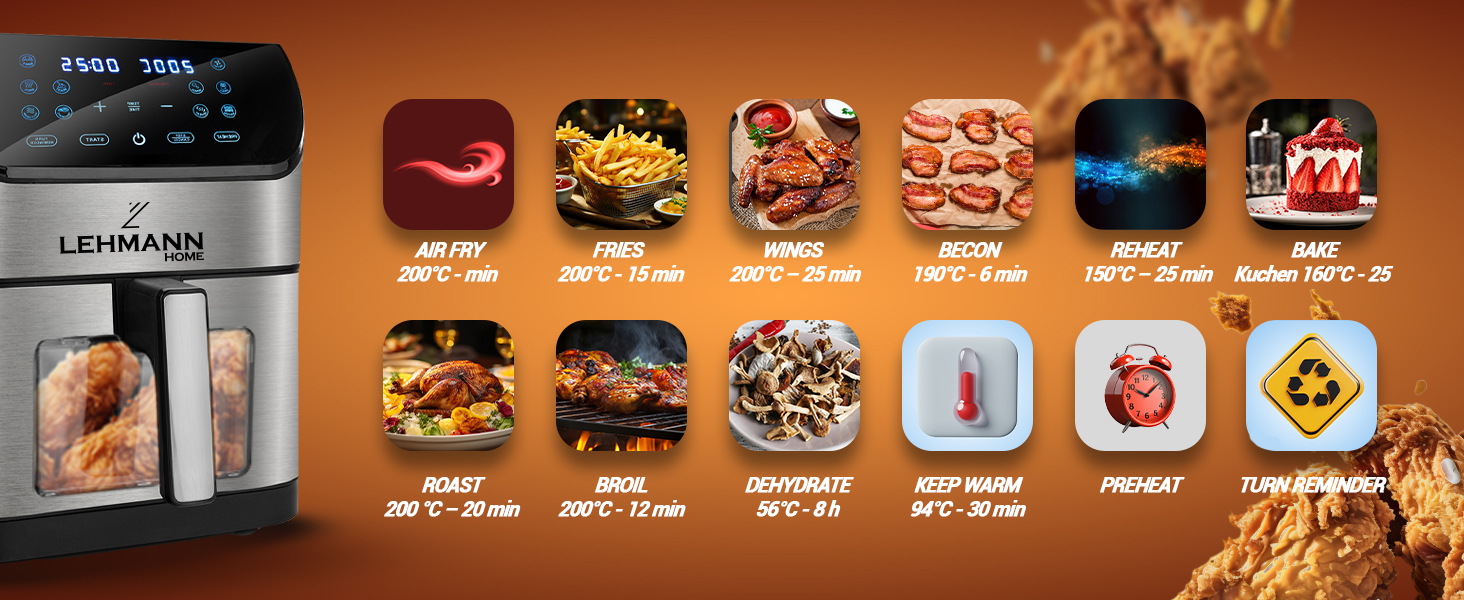
Figure 6: Visual representation of the 12 pre-set cooking functions, including Air Fry, Fries, Wings, Bacon, Reheat, Bake, Roast, Broil, Dehydrate, Keep Warm, Preheat, and Turn Reminder.
The appliance offers 12 versatile functions for various cooking needs:
- Air Fry: General air frying.
- Fries: Optimized for crispy French fries.
- Wings: Ideal for chicken wings.
- Bacon: For perfectly cooked bacon.
- Reheat: To warm up previously cooked food.
- Bake: For baking cakes, pastries, etc.
- Roast: For roasting meats and vegetables.
- Broil: For browning or crisping food.
- Dehydrate: For drying fruits, vegetables, or jerky.
- Keep Warm: Maintains food temperature after cooking.
- Preheat: Heats the air fryer to the desired temperature before adding food.
- Turn Reminder: Prompts you to shake or turn food during cooking for even results.
General Cooking Steps:
- Prepare Food: Place your ingredients in the cooking basket. Do not overfill the basket to ensure proper air circulation.
- Insert Basket: Slide the cooking basket back into the main unit until it clicks into place.
- Power On: Press the power button on the touch screen.
- Select Program or Set Manually:
- Pre-set Program: Tap the icon for your desired cooking program. The appliance will automatically set the recommended temperature and time.
- Manual Setting: Use the temperature and time adjustment buttons (+/-) to set your desired cooking temperature (up to 200°C) and time.
- Start Cooking: Press the "Start" button. The appliance will begin the cooking process.
- Monitor Progress: Use the transparent viewing window and internal light to monitor cooking progress without opening the basket.
- Shake/Turn (if prompted): If the "Turn Reminder" function is active or recommended for your food, the appliance will beep. Carefully remove the basket, shake or turn the food, and reinsert the basket to resume cooking.
- Completion: The appliance will beep when cooking is complete. Carefully pull out the basket using the handle.
- Serve: Transfer the cooked food to a plate. Be cautious of hot oil or food.
- Power Off: Press the power button to turn off the appliance and unplug it from the wall outlet.
Maintenance and Cleaning
Regular cleaning ensures optimal performance and extends the lifespan of your air fryer.
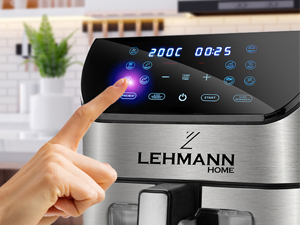
Figure 7: The non-stick cooking basket is dishwasher safe for convenient cleaning.
- Unplug and Cool Down: Always unplug the air fryer and allow it to cool completely before cleaning.
- Clean the Basket: The non-stick cooking basket is removable and dishwasher safe. For manual cleaning, wash with hot water, dish soap, and a non-abrasive sponge. For stubborn residue, soak the basket in hot water with dish soap for about 10 minutes.
- Clean the Interior: Wipe the interior of the appliance with a damp cloth. Do not use abrasive cleaners or scouring pads.
- Clean the Exterior: Wipe the exterior of the air fryer with a damp cloth.
- Heating Element: Use a cleaning brush to remove any food residue from the heating element.
- Storage: Ensure all parts are dry before storing the appliance in a cool, dry place.
Troubleshooting
| Problem | Possible Cause | Solution |
|---|---|---|
| Air fryer does not turn on. | Appliance is not plugged in. Power outlet is not working. Basket is not inserted correctly. | Plug the power cord into a grounded wall outlet. Check the power outlet by plugging in another appliance. Ensure the basket is fully pushed into the main unit until it clicks. |
| Food is not cooked evenly. | Basket is overloaded. Food was not shaken/turned. | Cook food in smaller batches. Shake or turn food halfway through cooking time. |
| White smoke coming from the appliance. | Greasy ingredients are being cooked. Oil residue from previous use. | This is normal for greasy foods. Ensure proper ventilation. Clean the basket and interior thoroughly after each use. |
| Dark smoke coming from the appliance. | Food is burning. Heating element malfunction. | Immediately unplug the appliance. Remove the basket and discard burnt food. If smoke persists after cleaning and with no food, contact customer support. |
| Food is not crispy. | Not enough oil used (for some foods). Temperature too low or cooking time too short. | Lightly brush or spray food with oil for crispier results. Increase temperature or cooking time slightly. |
Specifications
- Brand: LEHMANN
- Model Number: LHODF-1880C
- Color: Black
- Dimensions (L x W x H): 35.5 x 37.6 x 40.2 cm (approx. 13.98 x 14.80 x 15.83 inches)
- Capacity: 8 Liters
- Power: 1800 Watts
- Voltage: 230 Volts
- Material: Plastic, Metal
- Special Features: Automatic shut-off, Temperature control, Timer, Programmable, Digital LED Touch Screen, Viewing Window, Internal Light, Non-stick coating, Dishwasher safe basket.
- Item Weight: 6.1 Kilograms (approx. 13.45 lbs)
Warranty and Support
For warranty information and customer support, please refer to the warranty card included with your product or visit the official LEHMANN website. Please have your model number (LHODF-1880C) and purchase details ready when contacting support.
While specific warranty details are not provided here, LEHMANN is committed to providing high-quality home appliances and customer satisfaction.
Ask a question about this manual
Ask about setup, troubleshooting, compatibility, parts, safety, or missing instructions. Manuals+ will review the question and use this page’s manual context to help answer it.