
Lamshaw Magnetic USB Charging Cable for IOWODO Smart Watch
User Manual: Magnetic USB Charging Cable for IOWODO Smart Watches
Brand: Lamshaw | Model: Magnetic USB Charging Cable
Introduction
Thank you for choosing the Lamshaw Magnetic USB Charging Cable. This product is specifically designed to provide a reliable and convenient charging solution for your IOWODO R30 Pro and R50 1.85'' HD Smart Watches. This manual will guide you through the proper use and care of your new charging cable.

Image: Two Lamshaw Magnetic USB Charging Cables, black color.
Product Overview
Package Contents
- Magnetic USB Charging Cable (2 units, Black)
- Note: Smartwatch not included.
Key Features
- Compatibility: Specifically designed for IOWODO R30 Pro 1.85'' HD Smart Watch and R50 models.
- Magnetic Connection: Ensures a secure and stable connection for efficient charging.
- Portability: Easy to carry and store, ideal for home, office, car, or travel use.
- Durable Construction: Features ABS+PC materials, pure copper probes for rapid and stable conduction, and a flexible PVC cable.
- Safety Protections: Built-in over-current, over-voltage, over-charging, and high-temperature protection.

Image: Detailed view of the charging cable's construction, highlighting the pure copper probe, ABS+PC housing, and flexible PVC cable, with a length of 1 meter (3.3 feet).

Image: Close-up of the USB connector and magnetic pogo pins, illustrating the durable and flexible cable design and the gold-plated pogo pins for reliable connection.
Setup
Connecting the Charger
- Insert the USB-A end of the charging cable into a compatible USB power source (e.g., computer USB port, laptop, wall charger, or power bank).
- Align the magnetic charging pins of the cable with the charging contacts on the back of your IOWODO Smart Watch. The magnets will automatically attract the cable to the correct position.
- Ensure the connection is secure and the smartwatch charging indicator appears on the screen.

Image: A smartwatch connected to the magnetic charging cable, illustrating the secure magnetic attachment and the charging process.
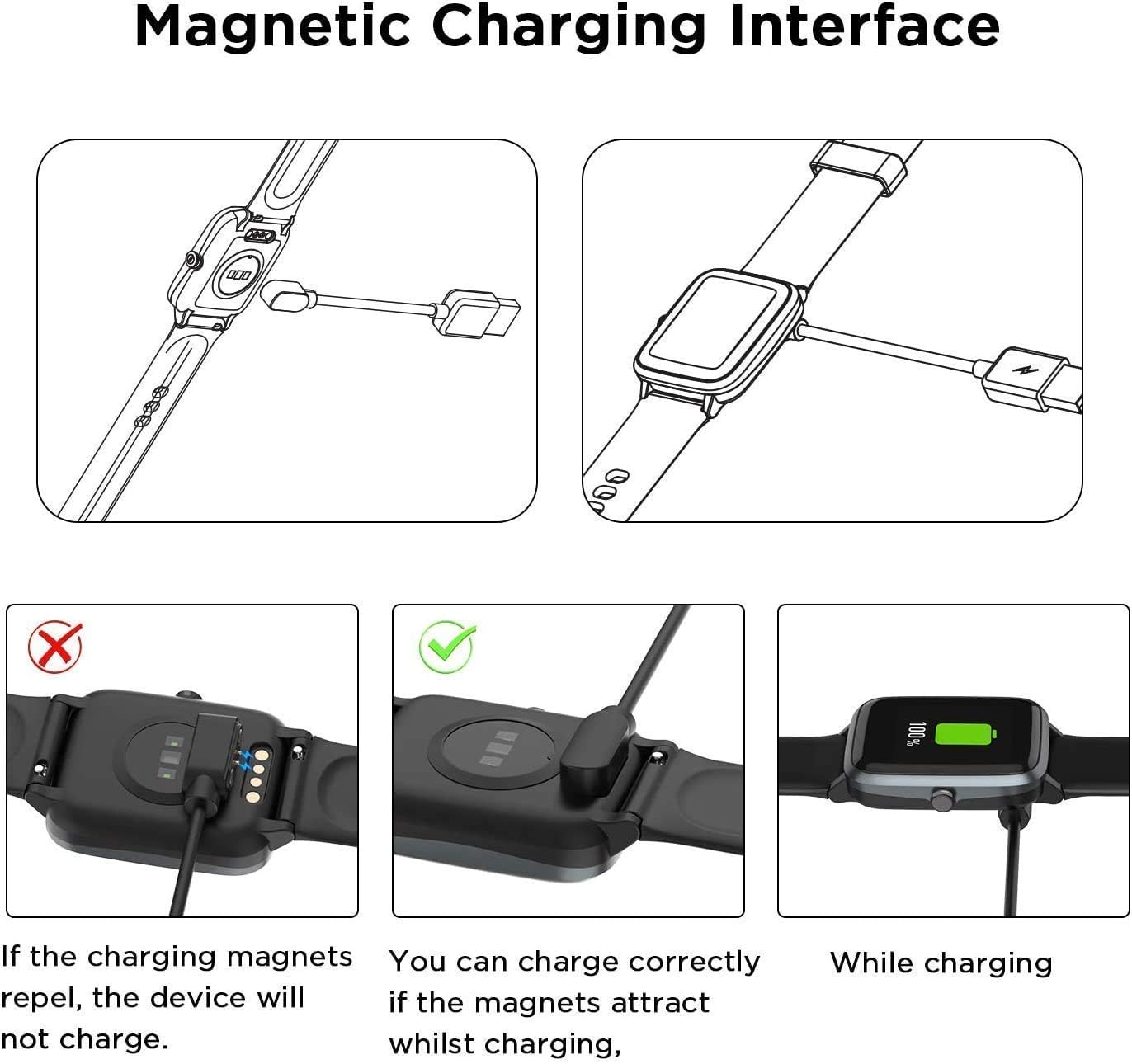
Image: Visual guide demonstrating the correct way to connect the magnetic charger to the smartwatch, emphasizing that the magnets should attract for proper charging.
Operating Instructions
Charging Your Smartwatch
Once connected, your smartwatch will begin charging. The charging status is typically displayed on the smartwatch screen. Ensure the cable is not bent or strained during charging.
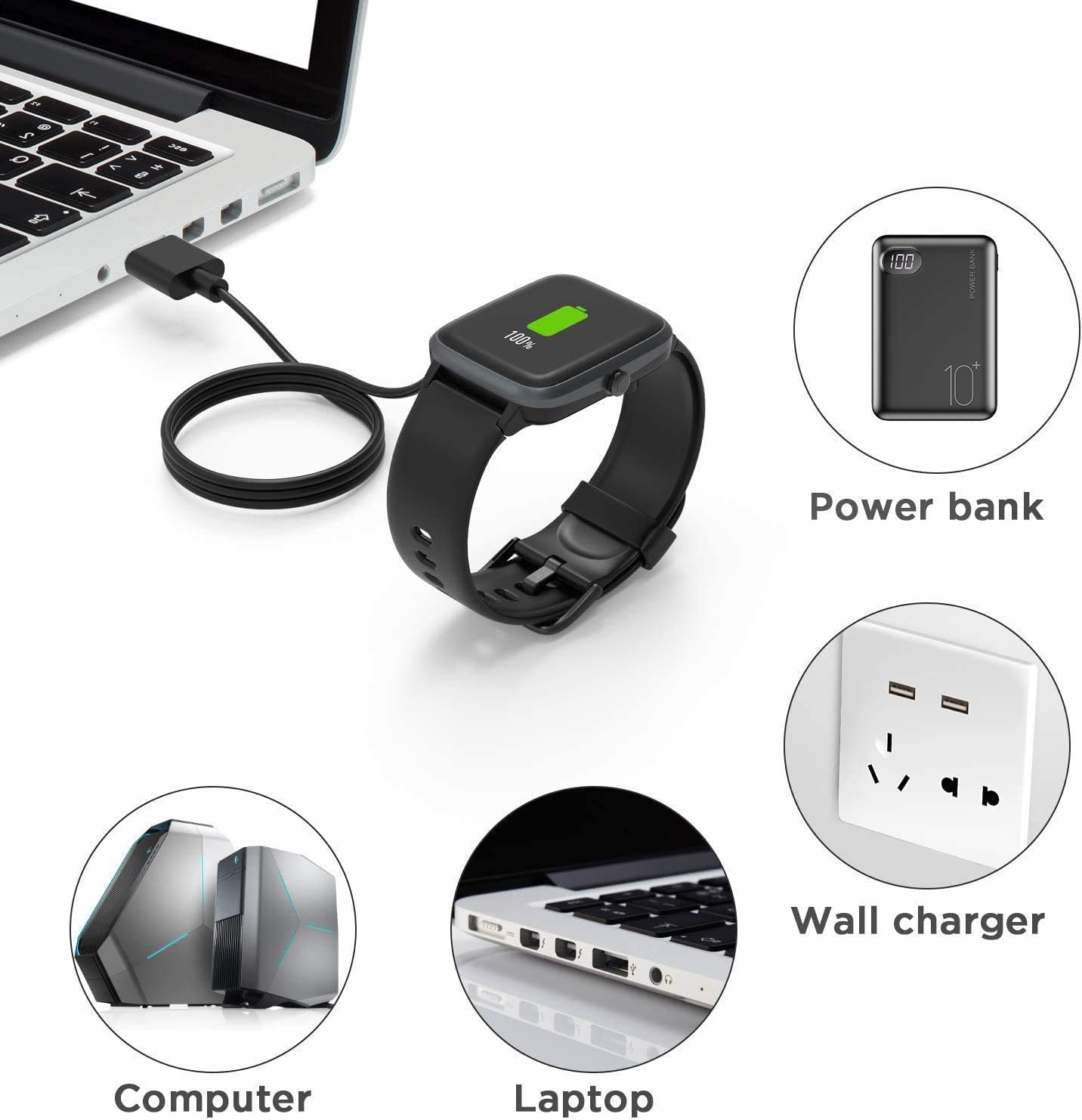
Image: Various compatible charging methods for the smartwatch, including power bank, wall charger, computer, and laptop.
Charging Time
For optimal charging speed, use a 1A output current power source. A full charge typically takes approximately 2.5 hours.

Image: Illustration of the charging process, indicating that a full charge takes approximately 2.5 hours with a 1A output current.
Maintenance and Care
Cleaning
To clean the charging cable, gently wipe it with a soft, dry cloth. Avoid using harsh chemicals or abrasive materials that could damage the cable or its connectors. Ensure the magnetic contacts are free of dust and debris for optimal connection.
Storage
Store the cable in a cool, dry place away from direct sunlight and extreme temperatures. The flexible PVC cable is designed for easy rolling and convenient storage, helping to prevent tangles and damage.

Image: The charging cable's durability is demonstrated by its ability to withstand over 20,000 bending tests, ensuring long-term reliability.
Troubleshooting
Common Issues and Solutions
- Smartwatch not charging:
- Ensure the magnetic contacts on both the cable and the smartwatch are clean and free of debris.
- Verify that the magnetic connection is secure and the magnets are attracting, not repelling. Refer to the 'Magnetic Charging Interface' image in the Setup section.
- Try connecting the USB end to a different power source (e.g., another USB port, a different wall adapter).
- Slow charging:
- Ensure your power source provides at least 1A output current. Lower current sources may result in slower charging.
- Avoid charging through unpowered USB hubs.
- Cable or smartwatch overheating during charging:
- The cable has built-in high-temperature protection. If overheating occurs, disconnect the charger immediately.
- Ensure the smartwatch is placed in a well-ventilated area during charging.
- If the issue persists, discontinue use and contact customer support.

Image: Overview of the integrated safety features, including protection against over-current, over-voltage, over-charging, and high temperatures.
Specifications
| Brand | Lamshaw |
| Compatible Devices | IOWODO R30 Pro, R50 1.85'' HD Smart Watch |
| Connector Type | Magnetic (4-pin), USB-A |
| Cable Type | USB |
| Cable Length | 3.3 feet / 1 meter |
| Color | Black |
| Product Dimensions | 0.5 x 0.5 x 0.5 inches (approximate) |
| Item Weight | 1.6 ounces |
| Manufacturer | LAMSHAW |
| Date First Available | January 26, 2024 |
Warranty and Support
Lamshaw is committed to providing high-quality products. While specific warranty details are not provided in this manual, please refer to your purchase documentation or the seller's policy for information regarding warranty coverage and return options.
For any product inquiries, technical assistance, or support, please contact the seller directly through the platform where you made your purchase. They will be able to provide the most accurate and timely assistance.
Ask a question about this manual
Ask about setup, troubleshooting, compatibility, parts, safety, or missing instructions. Manuals+ will review the question and use this page’s manual context to help answer it.