
TAIYO d1121329857
TAIYO JET RACER 4WD RC Car User Manual
Model: d1121329857
Introduction
This manual provides essential information for the safe and effective operation, maintenance, and troubleshooting of your TAIYO JET RACER 4WD RC Car. Please read this manual thoroughly before using the product.
Safety Precautions
- Always operate the RC car in open, clear areas away from people, pets, and obstacles.
- Do not operate near water or in wet conditions.
- Ensure batteries are correctly inserted with proper polarity.
- Remove batteries when the car is not in use for extended periods.
- Adult supervision is recommended for younger users.
- Do not attempt to modify the product, as this may void the warranty and cause damage.
Product Components
The TAIYO JET RACER 4WD RC Car package typically includes the following components:
- TAIYO JET RACER 4WD RC Car unit
- Remote Controller
- Instruction Manual (this document)
- (Batteries are typically sold separately)


Setup
1. Battery Installation
For the RC Car:
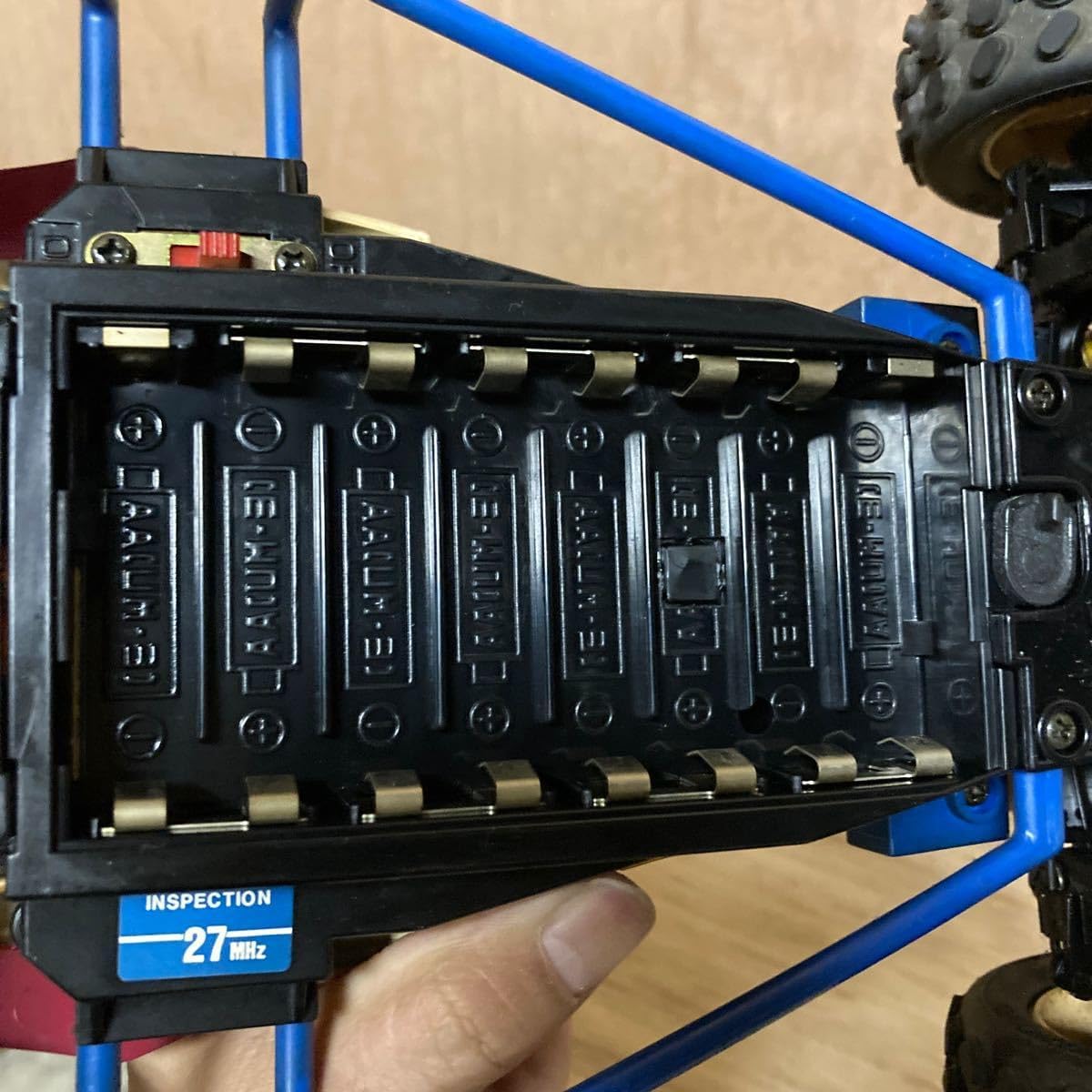
- Locate the battery compartment on the underside of the RC car (refer to Figure 6).
- Open the battery compartment cover.
- Insert the required number of AA-size batteries (UM-3) according to the polarity markings (+/-) inside the compartment (refer to Figure 9).
- Close the battery compartment cover securely.
For the Remote Controller:
- Locate the battery compartment on the underside of the remote controller (refer to Figure 8).
- Open the battery compartment cover.
- Insert one 9V (006P) battery, ensuring correct polarity.
- Close the battery compartment cover securely.
2. Antenna Setup
Extend the antenna on both the RC car and the remote controller fully for optimal signal reception and control range.
Operating Instructions
1. Power On
- Turn on the power switch on the RC car (located on the chassis, refer to Figure 6).
- Turn on the power switch on the remote controller (refer to Figure 7).
2. Basic Controls
The remote controller features two main control sticks:
- Left Stick: Controls forward and backward movement. Push forward to move the car forward, pull back to move backward.
- Right Stick: Controls left and right steering. Push left to turn the car left, push right to turn right.
- Turbo Button: Press the "TURBO" button (refer to Figure 7) for a temporary speed boost.
3. Driving Tips
- Start in an open area to familiarize yourself with the controls.
- Avoid driving on wet surfaces, sand, or excessively dusty environments to prevent damage to internal components.
- If the car loses connection or behaves erratically, turn off both the car and controller, then turn them back on.
Maintenance
- Cleaning: Use a soft, dry cloth to wipe down the car and controller after each use. Do not use water or chemical cleaners.
- Battery Storage: Always remove batteries from both the car and controller when not in use for extended periods to prevent leakage and corrosion.
- Storage: Store the RC car and controller in a cool, dry place away from direct sunlight and extreme temperatures.
- Inspection: Periodically check for loose screws, damaged wires, or worn tires. Replace damaged parts as necessary.
Troubleshooting
| Problem | Possible Cause | Solution |
|---|---|---|
| Car does not move or respond. |
|
|
| Car moves slowly or erratically. |
|
|
| Car does not steer properly. |
|
|
Specifications
| Feature | Detail |
|---|---|
| Model Name | JET RACER 4WD |
| Model Number | d1121329857 |
| Brand | TAIYO |
| Control Frequency | 27 MHz (as indicated on product) |
| Car Battery Type | AA-size (UM-3) batteries (quantity not specified, typically 6-8) |
| Controller Battery Type | 9V (006P) battery |
| Drive System | 4WD (Four-Wheel Drive) |
| Estimated Speed | Up to 25 km/h (as indicated on product) |
Warranty and Support
Specific warranty information for this vintage product is not available. For general inquiries or support, please refer to the original retailer or manufacturer if contact information is provided with your purchase.
Ask a question about this manual
Ask about setup, troubleshooting, compatibility, parts, safety, or missing instructions. Manuals+ will review the question and use this page’s manual context to help answer it.