
1. Introduction
This document provides comprehensive instructions for the safe and effective use of your GuliTech Sanwa PM7A Pocket Mini Digital Multimeter. The PM7A is a portable digital multimeter designed for low-voltage circuit measurement, suitable for various applications including small communications equipment, home electric appliances, and battery voltage checks.
Key features of the PM7A include:
- 4000 count display for precise readings.
- Best accuracy of 0.7%.
- Automatic power-off after approximately 15 minutes of inactivity to conserve battery life.
- Low power ohm function (input voltage 0.4V) for continuity testing.
- Power-saving design for extended battery life.

Image 1.1: Overview of the Sanwa PM7A Digital Multimeter highlighting its features.
2. Safety Information
Always observe the following safety precautions when using the multimeter to prevent electric shock or personal injury, and to avoid damage to the meter or the equipment under test.
- Do Not Exceed Maximum Input Ratings: Never apply voltage or current that exceeds the specified maximum limits for each range.
- Inspect Test Leads: Before each use, check the test leads for any damage to the insulation or exposed metal. Replace damaged leads immediately.
- Ensure Proper Function Selection: Always select the correct function (e.g., DCV, ACV, Ohms) before connecting the test leads to the circuit.
- Avoid Live Circuits: Do not attempt to measure resistance or continuity on live circuits. Disconnect power to the circuit before making these measurements.
- Use Caution with High Voltages: Exercise extreme caution when working with voltages above 30V AC RMS, 42V peak, or 60V DC. These voltages pose a shock hazard.
- Battery Replacement: Replace the battery immediately when the low battery indicator appears to ensure accurate readings.
- Operating Environment: Use the meter only in the specified operating temperature and humidity conditions.
3. Package Contents
Verify that all items are present and in good condition upon unpacking:
- Sanwa PM7A Digital Multimeter with integrated protective case and test leads
- 1 Lithium Metal battery (pre-installed)
- Instruction Manual
4. Product Overview
Familiarize yourself with the components of your PM7A Digital Multimeter:
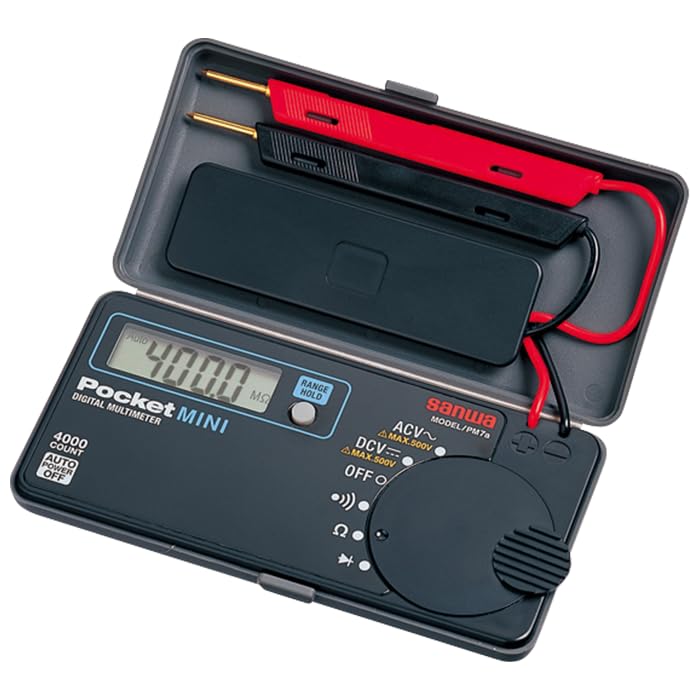
Image 4.1: The Sanwa PM7A Digital Multimeter in its open protective case, revealing the display, function dial, and integrated test leads.
- LCD Display: Shows measurement readings, units, and indicators (e.g., low battery).
- Function Selector Dial: Used to select the desired measurement function (OFF, DCV, ACV, Resistance, Continuity).
- Integrated Test Leads: Red and black test leads are built into the protective case for convenience.
- RANGE Button: Allows manual selection of measurement ranges (if applicable for the selected function).
- HOLD Button: Freezes the current reading on the display. Press again to release.
- Protective Case: Doubles as a stand and storage for the meter and leads.

Image 4.2: The Sanwa PM7A Digital Multimeter with its integrated test leads ready for use.
5. Setup
5.1 Battery Installation
The GuliTech Sanwa PM7A comes with a lithium metal battery pre-installed. The meter is ready for immediate use upon receipt. If battery replacement becomes necessary, refer to the 'Maintenance' section of this manual.
5.2 Connecting Test Leads
The PM7A features integrated test leads. To prepare for measurement:
- Open the protective case of the multimeter.
- Carefully unfold the red and black test leads from their storage compartments.
- Ensure the tips of the test leads are clean and free from damage.
6. Operating Instructions
Before taking any measurement, ensure the meter is set to the correct function and range, and that the test leads are properly connected to the circuit.
6.1 DC Voltage Measurement (DCV)
Use this function to measure direct current voltage up to 500V.
- Turn the function selector dial to the 'DCV' position.
- Connect the red test lead to the positive (+) side of the circuit and the black test lead to the negative (-) side.
- Read the voltage value displayed on the LCD.
6.2 AC Voltage Measurement (ACV)
Use this function to measure alternating current voltage up to 500V.
- Turn the function selector dial to the 'ACV' position.
- Connect the test leads across the points where you want to measure AC voltage.
- Read the voltage value displayed on the LCD.
6.3 Resistance Measurement (Ω)
Use this function to measure the resistance of a component. Ensure the circuit is de-energized before measuring resistance.
- Turn the function selector dial to the 'Ω' position.
- Connect the test leads across the component whose resistance you wish to measure.
- Read the resistance value displayed on the LCD.
6.4 Continuity Test
Use this function to check for an open or closed circuit. The PM7A features a low power ohm (0.4V input) for this test.
- Turn the function selector dial to the 'Continuity' position (often indicated by a buzzer symbol).
- Connect the test leads across the circuit or component.
- If the circuit is continuous (closed), the meter will emit an audible buzzer sound. The display will show a low resistance value. If the circuit is open, no buzzer will sound, and the display will indicate an open circuit (e.g., 'OL').
6.5 RANGE and HOLD Functions
- RANGE: In some measurement functions, pressing the 'RANGE' button allows you to manually cycle through available measurement ranges instead of using auto-ranging.
- HOLD: Press the 'HOLD' button to freeze the current reading on the display. This is useful for taking measurements in hard-to-see areas. Press 'HOLD' again to release the reading and resume live measurements.
6.6 Auto Power Off
The PM7A is designed with a power-saving feature that automatically turns off the meter after approximately 15 minutes of inactivity. To reactivate the meter, simply turn the function selector dial to 'OFF' and then back to the desired measurement function.

Image 6.1: The Sanwa PM7A Digital Multimeter being used in a typical workshop environment.
7. Maintenance
7.1 Cleaning
To maintain the accuracy and longevity of your multimeter:
- Wipe the case with a dry, soft cloth.
- Do not use abrasive cleaners, solvents, or harsh chemicals, as these may damage the plastic components or the display.
- Keep the test lead tips clean and free from debris.
7.2 Battery Replacement
When the low battery indicator appears on the display, it is time to replace the lithium metal battery to ensure continued accurate operation.
- Ensure the multimeter is turned 'OFF' and disconnect the test leads from any circuit.
- Locate the battery compartment (typically on the back of the unit).
- Use a suitable screwdriver to open the battery compartment cover.
- Remove the old battery and insert a new lithium metal battery, observing the correct polarity (+ and -).
- Securely replace the battery compartment cover.
8. Troubleshooting
If you encounter issues with your PM7A multimeter, refer to the following common problems and solutions:
| Problem | Possible Cause | Solution |
|---|---|---|
| No display or faint display | Low or dead battery | Replace the battery (refer to Section 7.2). |
| Incorrect readings | Incorrect function selected Poor test lead connection Measuring a live circuit in resistance/continuity mode | Verify the function dial setting. Ensure test leads are firmly connected. De-energize the circuit before measuring resistance/continuity. |
| No continuity buzzer | Open circuit Low battery | Ensure the circuit is closed. Replace the battery. |
| Meter does not turn on | Battery issue Auto power off engaged | Check/replace battery. Turn dial to OFF then back to desired function. |
9. Specifications
Technical specifications for the GuliTech Sanwa PM7A Digital Multimeter:
| Feature | Specification |
|---|---|
| Display | 4000 counts |
| Best Accuracy | 0.7% |
| DC Voltage (DCV) Max | 500V |
| AC Voltage (ACV) Max | 500V |
| Continuity Range | Low power ohm (input voltage 0.4V) |
| Auto Power Off | Approx. 15 minutes |
| Power Source | 1 Lithium Metal battery (included) |
| Product Dimensions | 9.84 x 7.87 x 5.91 inches |
| Item Weight | 4.16 ounces |
| Model Number | GL-Sanwa-PM7a |
| Manufacturer | Sanwa Electric Instrument Co., Ltd (Japan) |
| Certifications | CE |
10. Warranty and Support
For warranty information, technical assistance, or customer support regarding your GuliTech Sanwa PM7A Digital Multimeter, please refer to the official GuliTech website or contact your authorized distributor. You may also visit the GuliTech Store on Amazon for additional product information.