
Leapiture Leapitured53061u9pw
Leapiture Manual Coffee Beans Roaster Instruction Manual
Model: Leapitured53061u9pw
Introduction
This manual provides instructions for the safe and effective use of your Leapiture Manual Coffee Beans Roaster. This device is designed for home coffee roasting, allowing you to achieve your preferred roast level for a mellow and enhanced coffee flavor.

Image: The Leapiture Manual Coffee Beans Roaster, ready for use, alongside a cup of freshly brewed coffee and roasted beans.
Safety Instructions
- Always operate the roaster on a stable, heat-resistant surface to prevent tipping and heat damage.
- Keep the roaster and heat source away from flammable materials.
- Ensure adequate ventilation during operation to disperse smoke and odors.
- Handle hot components with extreme care. Use heat-resistant gloves when touching the drum or bracket during and immediately after roasting.
- Keep children and pets away from the roasting area.
- Do not leave the roaster unattended while in use.
- Some chaff may catch fire if it comes into contact with the flame. Monitor carefully and have a fire extinguisher or damp cloth nearby.
Product Components
The Leapiture Manual Coffee Beans Roaster consists of the following main parts:
- Roasting Drum: A mesh cylinder where coffee beans are placed for roasting.
- Stirrer Handle: Used to manually rotate the roasting drum for even heating.
- Rectangular Support Bracket: Provides a stable frame for the roasting drum and heat source.
- Heat Source Base: Designed to hold an alcohol burner or similar small heat source.
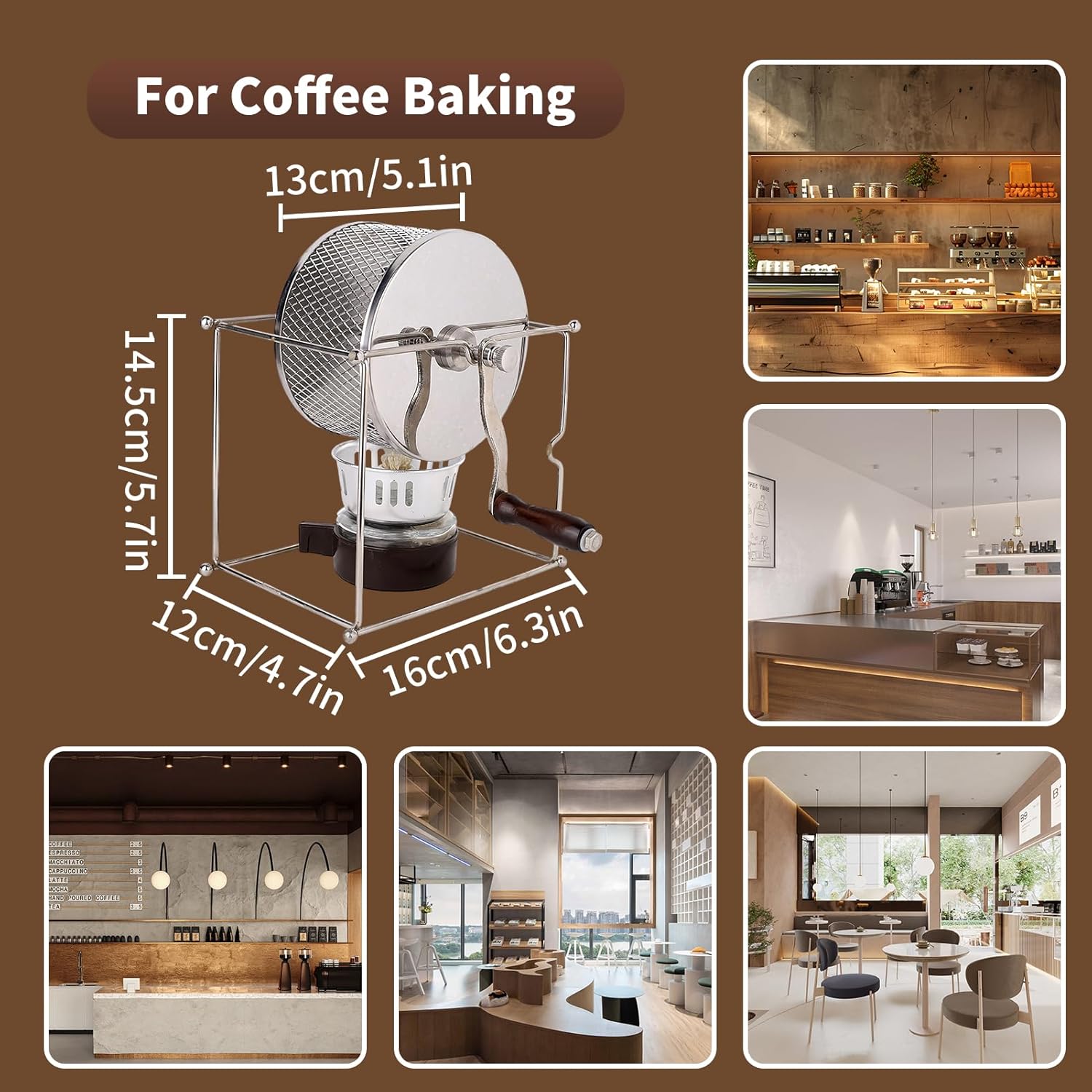
Image: The coffee roaster with its key dimensions (13cm/5.1in width, 14.5cm/5.7in height, 12cm/4.7in depth, 16cm/6.3in length) highlighted.

Image: A detailed view of the heat source base, showing the burner holder and ventilation slots.
Setup
- Place the rectangular support bracket on a stable, level, and heat-resistant surface.
- Position the heat source base securely within the designated area of the bracket.
- Insert the roasting drum into the bracket's rotating mechanism, ensuring it spins freely.
- Attach the stirrer handle firmly to the roasting drum.
- Verify that all components are stable and properly assembled before proceeding to operation.
Operating Instructions
1. Preparation Stage
Pour approximately 100 grams of green coffee beans into the mesh roasting drum. Securely tighten the lid to prevent beans or chaff from escaping during roasting.
Ensure the equipment is stable and prepare a reliable heat source, such as an alcohol burner, gas stove, or portable propane burner. A small burner with adjustable heat is recommended for consistent control. Use medium heat.

Image: The coffee roaster with a flame from a burner heating the drum, illustrating the preparation stage.
2. Even Heating
Place the loaded roasting drum over the heat source. Continuously rotate the handle at a steady pace, approximately one rotation per second. This ensures even roasting and prevents scorching, promoting uniform moisture evaporation within the beans.
This initial stage focuses on dehydration and preheating, typically lasting 3-5 minutes.

Image: Green coffee beans visible inside the mesh roasting drum, undergoing the even heating process.
3. First Crack Observation
Approximately 7-10 minutes into roasting, you will hear a popping sound, similar to popcorn. This is known as the "first crack." During this phase, the beans expand rapidly, changing from pale green to light brown, and begin shedding their silverskin (chaff).
Note: Some chaff may catch fire if it contacts the flame. Monitor carefully, ensure good ventilation, and take precautions to avoid flare-ups.

Image: Coffee beans inside the mesh roasting drum, appearing lighter brown and expanded, indicating the first crack stage.
4. Roast Level Control
The timing for stopping roasting depends on your desired flavor preference:
- Light Roast: Stop roasting immediately after the first crack ends (around 12-15 minutes total). Beans will appear dry with a pronounced acidity, ideal for pour-over or cold brew.
- Medium Roast: Continue roasting until just before or at the early stage of the second crack, typically around 20-25 minutes. The flavor becomes more balanced, with a harmony of sweetness and acidity, great for drip coffee or siphon brewing.
- Dark Roast: Proceed into the second crack phase (around 225°C or 437°F) and continue for about 5 more minutes. Beans will darken significantly, often becoming slightly shiny with oil. Expect rich, smoky flavors with reduced acidity and increased bitterness, best suited for espresso or moka pot brewing.

Image: Dark brown, glossy coffee beans inside the mesh roasting drum, representing a dark roast level.
5. Cooling & Storage
Once roasting is complete, immediately transfer the beans to a metal strainer or use a cooling fan to halt the roasting process and prevent overdevelopment.
Allow the beans to cool completely (about 20 minutes), then store them in an airtight container.
Allow them to rest for 24-72 hours for degassing and flavor stabilization before grinding or brewing. Avoid brewing immediately after roasting.

Image: An icon depicting the cooling and storage process for roasted coffee beans.
Maintenance and Care
- After each use, allow the roaster to cool completely before cleaning.
- Use a soft brush or cloth to remove any residual chaff or coffee oils from the roasting drum and support bracket.
- Wash the drum and bracket with mild soap and warm water, then rinse thoroughly.
- Ensure all components are completely dry before storing to prevent rust or corrosion.
- Store the roaster in a clean, dry place away from direct sunlight.
Troubleshooting
Uneven Roast
If beans are roasting unevenly, ensure consistent rotation of the drum throughout the process. Verify that the heat source is evenly distributed beneath the drum.
Beans Not Roasting
If beans are not roasting or roasting too slowly, check if the heat source is adequate and positioned correctly. Increase the heat slightly if necessary, but monitor closely to avoid scorching.
Excessive Smoke
While some smoke is normal during roasting, excessive smoke may indicate too high a temperature or insufficient ventilation. Ensure good ventilation in your roasting area. Reduce heat if smoke is excessive and not related to the natural roasting process.
Specifications
| Feature | Detail |
|---|---|
| Product Dimensions | 6.3 x 4.72 x 8.27 inches |
| Item Weight | 1.96 pounds |
| Manufacturer | Leapiture |
| Model Number | Leapitured53061u9pw |
| Material | Food-grade Stainless Steel |
Warranty and Support
For warranty information or product support, please refer to the retailer's return policy or contact Leapiture customer service directly. Specific warranty details are not provided in this manual.
Ask a question about this manual
Ask about setup, troubleshooting, compatibility, parts, safety, or missing instructions. Manuals+ will review the question and use this page’s manual context to help answer it.