
1. Introduction
This manual provides detailed instructions for the setup, operation, and maintenance of your LiveFine WiFi Automatic Pill Dispenser. Please read this manual thoroughly before using the device to ensure proper function and safety. This device is designed to assist with medication management by dispensing pills at programmed times and offering remote monitoring capabilities.
2. Safety Information
Important Safety Precautions:
- Keep this personal pill dispenser out of reach of children to prevent accidental ingestion or misuse.
- Follow proper instructions for pill retrieval to avoid spills or incorrect dosage.
- Exercise caution around electricity when connecting the power adapter.
- Do not immerse the device in water or other liquids.
- Use only the specified power adapter and batteries.
3. Product Overview
The LiveFine WiFi Automatic Pill Dispenser is an advanced medication management system featuring remote monitoring and customizable dosage settings. It includes a secure, lockable design and integrates with a mobile application for enhanced control.
Key Features:
- Remote Medication Monitoring: Track medication schedules globally via a phone app.
- Smart App Control: Adjust settings, reminders, and monitor schedules through the LiveFine Mobile App.
- Customizable Dosage Management: Utilizes 9 interchangeable dosage rings for varied reminder frequencies, supporting up to 9 doses per day.
- High Capacity: 28 large compartments accommodate multiple pills, reducing refill frequency.
- Secure Locking Mechanism: A lockable cover with a manual key prevents unauthorized access and accidental spills.
- Visual and Audible Alarms: Adjustable light and sound alarms (3 beep patterns, 3 volume settings) ensure timely medication reminders.
- Battery Backup: Features a 4-hour battery backup for travel and power outages.
- Enhanced Design: Includes a quick-press latch lid, LED flashing reminders, and silicone rings for moisture protection.
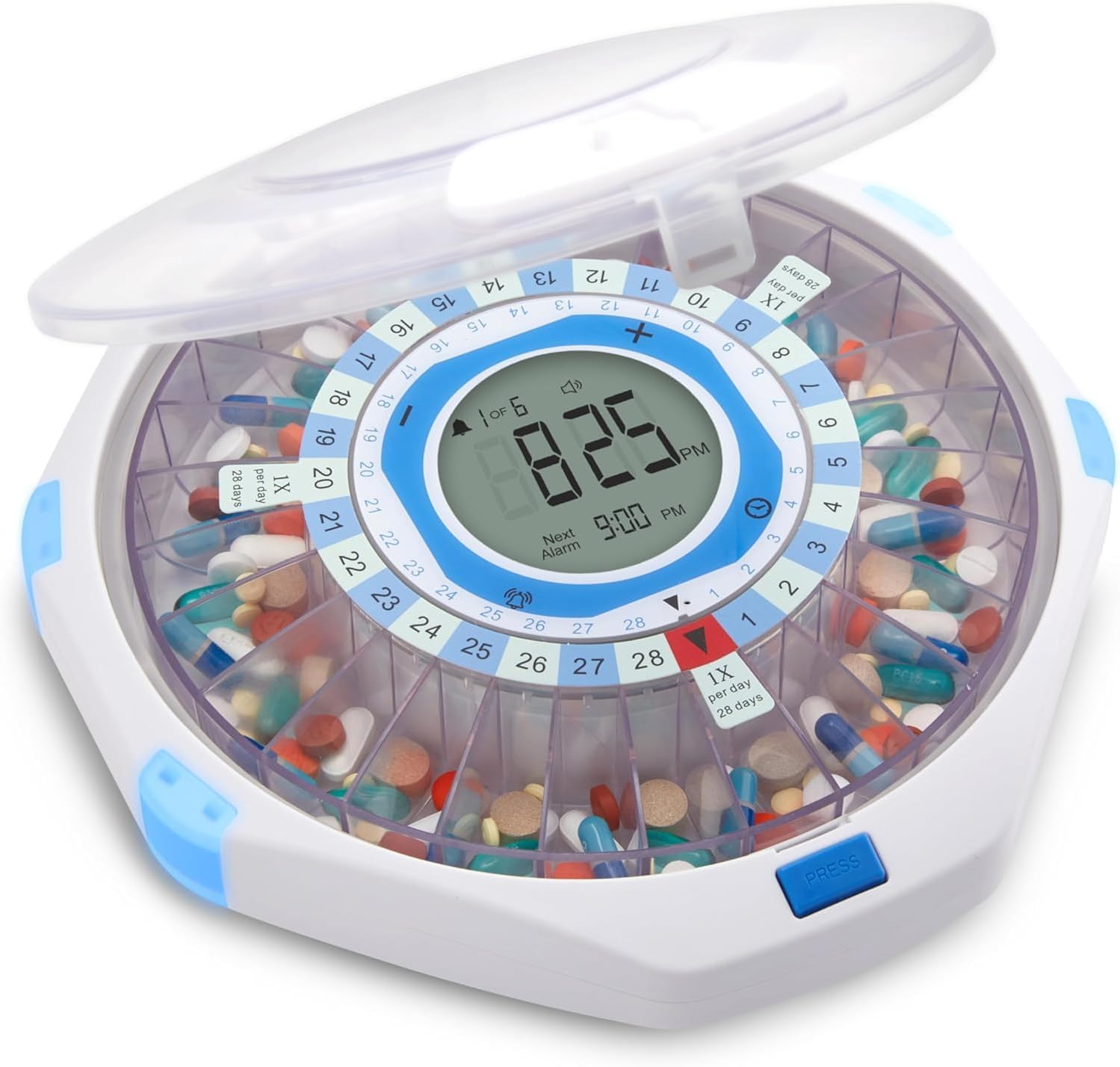
Image: The LiveFine WiFi Automatic Pill Dispenser, showcasing its circular design, 28 compartments filled with various pills, and a central digital display indicating the current time and next alarm.

Image: A detailed diagram highlighting the enhanced features of the dispenser, such as the quick-press latch for easy lid opening, flashing LED lights for improved visibility of reminders, a textured base for stability, and internal silicone rings designed to protect medications from moisture.
4. Setup Guide
4.1. Unboxing and Contents
Carefully unpack the contents of the box. Verify that all items are present:
- LiveFine Automatic Pill Dispenser (Frosted Lid or Clear Lid)
- Dosage Rings (9 different templates)
- Locking Key
- AA Batteries (4)
- User Guide (this document)
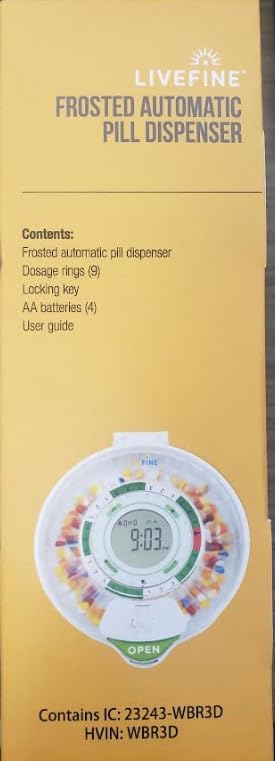
Image: The side panel of the product packaging, clearly listing the included components: the frosted automatic pill dispenser, nine dosage rings, a locking key, four AA batteries, and the user guide.
4.2. Battery Installation
The dispenser requires 4 AA alkaline batteries for operation and backup power. Locate the battery compartment on the underside of the device. Insert the batteries, ensuring correct polarity (+/-). The device also operates with a plug-in power adapter.
4.3. WiFi Connection and App Setup
- Download the LiveFine Mobile App from your device's app store.
- Follow the in-app instructions to create an account and pair your dispenser with the app. This typically involves connecting the dispenser to your home WiFi network.
- Ensure your mobile device and the dispenser are on the same WiFi network during the initial setup for a smooth connection.

Image: A smartphone displaying the LiveFine mobile application. The screen shows the next scheduled dose at 7:00 PM EDT, indicating it is 'Dose 3 of 3', and provides options for monitoring medication cycles and remaining doses.
4.4. Loading Medication
- Unlock and open the dispenser lid using the provided key.
- Select one of the 9 interchangeable dosage rings that matches your prescribed medication schedule (e.g., 1x per day, 2x per day).
- Place the chosen dosage ring onto the central mechanism.
- Fill the 28 compartments with your medication according to the selected dosage ring and your schedule. Ensure pills are placed flat and do not overfill.
- Close the lid and lock it with the key to secure the medication.

Image: A collection of interchangeable dosage rings, each designed with different patterns to facilitate various medication schedules, such as once, twice, or multiple times per day.
4.5. Setting Alarms
Alarms can be set via the LiveFine Mobile App or directly on the device's LCD display.
- Using the App: Open the LiveFine app, navigate to the 'Alarms' section, and set up to 9 daily alarms. You can customize the time, tone, and volume.
- Using the Device: Refer to the 'Operating Instructions' section for details on setting alarms directly on the dispenser's LCD display.

Image: A smartphone displaying the alarm settings within the LiveFine app, showing three programmed alarm times: 9:13 AM, 5:00 PM, and 10:00 PM, with an option to add more doses per day.
5. Operating Instructions
5.1. Understanding the LCD Display
The central LCD display provides essential information and allows for direct control of certain settings.

Image: A detailed view of the dispenser's LCD display, with annotations pointing to key indicators such as alarm volume, battery level, power cable connection status, current alarm number, WiFi connection status, current time (12HR or 24HR), next scheduled alarm time, and selected alarm tone.
- Current Time: Displays the current time in 12-hour or 24-hour format.
- Next Alarm: Shows the time of the upcoming programmed alarm.
- Alarm Volume: Indicates the selected volume level (3 options).
- Alarm Tone: Shows the chosen alarm tone (3 options).
- Battery Level: An icon indicates the current battery status.
- WiFi Connection: An icon indicates the status of the WiFi connection.
- Current/Total Alarm: Displays which alarm number is currently active out of the total programmed alarms (e.g., '1 of 6').
5.2. Retrieving Medication
When an alarm sounds and flashes, it indicates that it is time to take your medication.
- The dispenser will rotate, aligning the correct compartment with the sliding retrieval window.
- Open the sliding retrieval window.
- Carefully pour the pills from the exposed compartment into your hand or a suitable container.
- Close the retrieval window after taking your medication. The alarm will cease once the pills are retrieved.

Image: A hand demonstrating the retrieval of pills from the dispenser's sliding window, illustrating the ease of access for users.
5.3. Adjusting Alarms (Tone and Volume)
You can adjust the alarm tone and volume directly on the device or through the LiveFine Mobile App.
- On Device: Use the control buttons near the LCD display to cycle through the 3 available beep patterns and 3 volume settings.
- Via App: Access the alarm settings in the LiveFine app to select your preferred tone and volume remotely.

Image: The LiveFine pill dispenser with graphical representations of its alarm customization features: setting timed reminders, selecting from various alarm tones, and controlling the volume level.
6. Maintenance
6.1. Cleaning
To maintain hygiene and proper function, clean the dispenser regularly:
- Ensure the device is powered off and unplugged before cleaning.
- Wipe the exterior surfaces with a soft, damp cloth. Avoid abrasive cleaners.
- For the pill compartments, remove the dosage ring and wipe each compartment with a dry or slightly damp cloth. Ensure all compartments are completely dry before refilling with medication.
- Do not submerge the device in water.
6.2. Battery Replacement
When the battery indicator on the LCD display shows low power, replace the 4 AA alkaline batteries. This ensures continuous operation during power outages and maintains device settings.
6.3. Silicone Seal Care
The internal silicone rings help prevent moisture and safeguard medication integrity. Periodically inspect these seals for any signs of wear or damage. Ensure they are clean and properly seated to maintain their protective function.
7. Troubleshooting
- Device Not Turning On: Check if the power adapter is securely plugged in. If using batteries, ensure they are correctly installed and not depleted. Replace batteries if necessary.
- Pills Sticking in Compartment: Ensure pills are dry when loaded. Avoid overfilling compartments. If a pill sticks, gently dislodge it with a non-sharp object.
- App Shows "Offline": Verify that the dispenser is powered on and connected to your WiFi network. Ensure your mobile device is also connected to the internet. If the issue persists, try restarting both the dispenser and your router.
- Incorrect Dispensing Time: Check the time settings on the device and within the LiveFine app. Ensure the correct dosage ring is installed for your schedule.
- Alarm Not Sounding/Flashing: Verify that alarms are enabled in the app and on the device. Check volume settings. Ensure the device is not in a muted state.
8. Specifications
| Feature | Detail |
|---|---|
| Product Dimensions | 8.6 x 9.2 x 2.5 inches |
| Weight | 2.77 Pounds |
| Model Number | LVFPDWIFF |
| Batteries | 4x AA alkaline batteries (included) |
| Power Source | Plug-in adapter, Battery backup |
| Compartments | 28 high-capacity slots |
| Max Doses Per Day | 9 |
| Connectivity | WiFi |
| Special Features | Automatic dispensing, Remote monitoring, Locking key, Adjustable alarms, LED flashing reminders, Silicone seal |
9. Legal Disclaimer
Statements regarding dietary supplements have not been evaluated by the FDA and are not intended to diagnose, treat, cure, or prevent any disease or health condition. This device is intended as an aid for medication management and should not replace professional medical advice.
