
Nexus 87909
Nexus Bendz Prostate Edition User Manual
Model: 87909
Introduction
Thank you for choosing the Nexus Bendz Prostate Edition Bendable Vibrating Prostate Massager. This manual provides essential information for the safe and effective use, maintenance, and troubleshooting of your device. Please read it thoroughly before first use and retain it for future reference.
The Nexus Bendz Prostate Edition is designed for customized pleasure, featuring a bendable, rippled design with dual-density silicone. It offers 6 vibrating functions for the shaft and 6 for the base, providing 48 combinations of pleasure. The device includes a slimline remote control for convenient operation, and both the massager and remote are rechargeable and fully waterproof/submersible.
Safety Information
- Always clean the device thoroughly before and after each use.
- Use only water-based lubricants with this product. Oil-based lubricants can damage silicone.
- Do not use if the device appears damaged or if the silicone is torn.
- Discontinue use immediately if you experience any discomfort or pain.
- Keep out of reach of children.
- Consult a healthcare professional if you have any pre-existing medical conditions or concerns.
Package Contents
- 1 x Nexus Bendz Prostate Edition Massager
- 1 x Slimline Remote Control
- 1 x USB Charging Cable
- 1 x User Manual (this document)
Setup
Charging the Device and Remote
Before first use, fully charge both the Nexus Bendz Prostate Edition massager and its remote control.
- Locate the charging ports on both the massager and the remote. These are typically small, recessed magnetic contact points.
- Connect the provided USB charging cable to the charging points on the device and remote.
- Plug the other end of the USB cable into a standard USB power adapter (not included) or a computer USB port.
- The indicator light on the device and remote will illuminate during charging and turn off or change color when fully charged. Charging typically takes 2-3 hours.
- Disconnect the charging cable once fully charged.
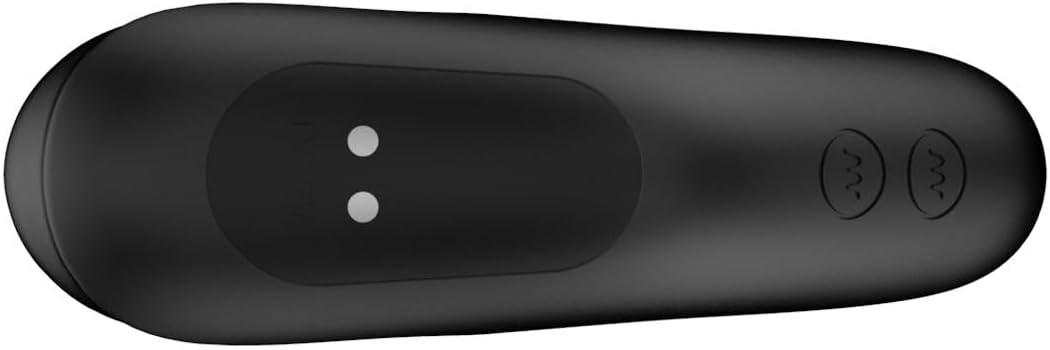
Figure 1: Bottom view of the massager, highlighting the magnetic charging points. Ensure these points are clean and dry before charging.

Figure 2: The slimline remote control, showing the power button and vibration control buttons. The charging port is typically on the underside or end.
Operating Instructions
Powering On/Off
- To power on the massager: Press and hold the power button on the massager for 2-3 seconds until it vibrates briefly.
- To power on the remote: Press and hold the power button on the remote for 2-3 seconds.
- To power off both: Press and hold the power button on either the massager or the remote for 2-3 seconds until the vibrations stop.
Using the Remote Control
The remote control allows for convenient operation of the massager from up to 8 meters away.
- Ensure both the massager and remote are powered on.
- The remote has separate buttons for controlling the shaft vibrations and the base vibrations.
- Press the respective vibration buttons to cycle through the 6 shaft vibration modes and 6 base vibration modes.
- Experiment with different combinations to find your preferred setting from the 48 available pleasure combinations.
Application
Apply a generous amount of water-based lubricant to the massager before insertion. The bendable design allows the device to conform to your body for optimal comfort and targeted stimulation of the prostate and perineum.

Figure 3: The Nexus Bendz Prostate Edition massager. Note the bendable shaft and the rippled texture on the base designed for perineum stimulation.

Figure 4: Side view demonstrating the ergonomic shape and bendable nature of the massager, designed for comfortable use.
Maintenance and Care
Cleaning
Proper cleaning is essential for hygiene and to prolong the life of your device.
- Always clean the massager immediately after each use.
- Wash the device thoroughly with warm water and a mild, toy-safe soap.
- Rinse thoroughly to remove all soap residue.
- Pat dry with a lint-free cloth or allow to air dry completely before storing.
- The device is waterproof/submersible, allowing for easy cleaning under running water.
Storage
Store the massager and remote in a clean, dry, and cool place, away from direct sunlight and extreme temperatures. Keep them separate from other toys made of different materials to prevent material degradation.
Troubleshooting
| Problem | Possible Cause | Solution |
|---|---|---|
| Device not turning on. | Battery is depleted. | Charge the device fully using the provided USB cable. |
| Remote not controlling device. | Remote battery is depleted; Device is off; Out of range. | Charge the remote; Ensure device is powered on; Move remote closer to the device (within 8 meters). |
| Vibrations are weak or inconsistent. | Low battery; Device malfunction. | Recharge the device. If problem persists after charging, contact customer support. |
| Device not charging. | Charging cable not properly connected; Faulty cable/adapter; Dirty charging points. | Ensure cable is securely connected; Try a different USB port or adapter; Clean charging points with a dry cloth. |
Specifications
- Model Number: 87909
- Brand: Nexus
- Color: Black
- Material: Luxury Silicone
- Dimensions (L x W x H): 7.09 x 7.09 x 1.97 inches
- Weight: 10.16 ounces
- Vibration Functions: 6 shaft modes, 6 base modes (48 combinations)
- Control: Device button and Slimline Remote Control
- Remote Range: Up to 8 meters
- Power Source: Rechargeable (USB cable included)
- Waterproof: Yes, submersible
Warranty and Support
For warranty information or technical support, please refer to the official Nexus website or contact your retailer. Keep your proof of purchase for any warranty claims.
Manufacturer: Nexus
Date First Available: February 8, 2024
Ask a question about this manual
Ask about setup, troubleshooting, compatibility, parts, safety, or missing instructions. Manuals+ will review the question and use this page’s manual context to help answer it.