
Introduction
This manual provides essential instructions for the proper use, maintenance, and troubleshooting of your Bose Ultra Open Earbuds Charging Case. This case is designed to provide a convenient and reliable charging solution for your Bose Ultra Open Earbuds, ensuring they are always ready for use. Please read this manual thoroughly before using the product.
Setup
1. Initial Charging of the Case
Before first use, it is recommended to fully charge the Bose Ultra Open Earbuds Charging Case. The case charges via a USB-C connection.
- Locate the USB-C port on the charging case.
- Connect the provided USB-C cable to the port on the case.
- Connect the other end of the USB-C cable to a compatible USB power source (e.g., wall adapter, computer USB port).
- The LED indicator inside the case will illuminate to show charging status. A solid light indicates a full charge.

Image: The Bose Ultra Open Earbuds Charging Case in black, shown closed. The Bose logo is visible on the top surface.
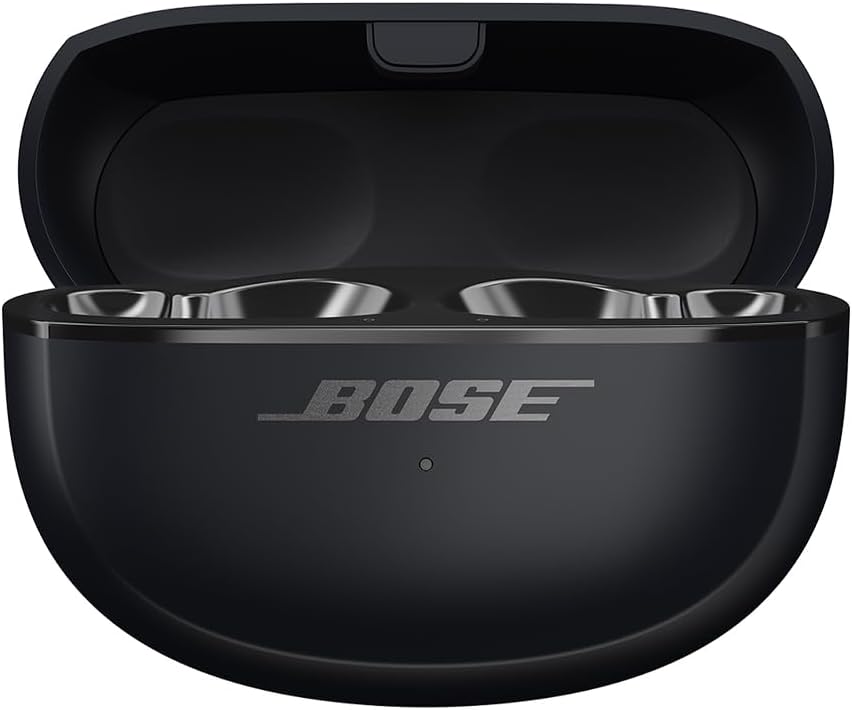
Image: The Bose Ultra Open Earbuds Charging Case in black, shown open with two earbuds placed inside their charging cradles. The internal LED indicator is visible.
Product Overview Video
Video: A brief overview demonstrating the features and charging process of the Bose Ultra Open Earbuds Charging Case, including its sleek design, metal hinges, magnets, charging pins, LED indicator, and USB-C charging port.
Operating the Charging Case
1. Charging Your Earbuds
The charging case is designed to recharge your Bose Ultra Open Earbuds on the go.
- Open the charging case lid.
- Carefully place each earbud into its corresponding charging cradle within the case. Ensure the earbuds are correctly seated; magnets will help guide them into place.
- Close the case lid. The earbuds will begin charging automatically.
- The LED indicator on the case will show the charging status of the earbuds. Refer to the earbud's user manual for specific LED behaviors related to earbud charging.
2. Checking Case Battery Level
To check the battery level of the charging case, open the lid. The LED indicator inside the case will show the current battery status. Consult the full product manual for detailed LED indicator meanings.
Maintenance and Care
Proper care ensures the longevity and optimal performance of your charging case.
- Cleaning: Use a soft, dry, lint-free cloth to clean the exterior of the charging case. Do not use abrasive cleaners, solvents, or sprays.
- Charging Contacts: If necessary, gently clean the charging contacts inside the case with a dry cotton swab. Avoid using metal objects.
- Storage: When not in use for extended periods, store the charging case in a cool, dry place away from direct sunlight and extreme temperatures.
- Water Exposure: The charging case is not waterproof. Avoid exposing it to water or excessive moisture.
Troubleshooting
If you encounter issues with your Bose Ultra Open Earbuds Charging Case, try the following solutions:
| Problem | Possible Solution |
|---|---|
| Case not charging |
|
| Earbuds not charging in case |
|
| LED indicator not working |
|
Specifications
| Feature | Detail |
|---|---|
| Product Dimensions | 1.04 x 2.56 x 1.65 inches |
| Item Weight | 1.55 ounces |
| Item Model Number | 882556-0010 |
| Batteries | 1 Lithium Ion battery required (included) |
| Compatible Devices | Bose Ultra Open Earbuds |
| Charging Interface | USB-C |
| Color | Black |
| Shell Type | Hard |
Warranty and Support
For detailed warranty information and customer support, please refer to the official Bose website or contact their customer service directly. Keep your proof of purchase for warranty claims.
You can visit the official Bose store for more information: Bose Official Store


