
voominhtec PSL-400W4P
Voominhtec 400W Portable Solar Panel User Manual
Model: PSL-400W4P
1. Introduction
Thank you for choosing the Voominhtec 400W Portable Solar Panel. This high-efficiency, foldable solar charger is designed to provide reliable power for your off-grid adventures, power stations, and various outdoor applications. Featuring monocrystalline ETFE technology, it offers excellent conversion rates and durability. Please read this manual thoroughly before use to ensure proper operation and maximize the lifespan of your solar panel.

Image 1.1: The Voominhtec 400W Portable Solar Panel in its unfolded, ready-to-use configuration, showcasing its four panels and integrated kickstand.
2. Safety Information
- Do not attempt to disassemble or modify the solar panel.
- Avoid dropping or subjecting the panel to severe impacts.
- Keep the panel away from open flames, heat sources, and corrosive materials.
- Ensure all connections are secure and correct before operation.
- Do not immerse the panel in water, despite its IP65 rating, to prevent damage to connectors.
- Handle with care, especially when folding or unfolding, to avoid pinching fingers.
3. Product Components
The Voominhtec 400W Portable Solar Panel package includes the following items:
- 1 x Voominhtec 400W Portable Solar Panel
- 1 x Multi-connector cable (MC4 to various DC adapters)
- 8 x Carabiners (for securing the panel)
Image 3.1: The complete package contents, including the folded solar panel, the multi-connector cable with various adapters, and eight carabiners for versatile mounting.

Image 3.2: Detailed view of the folded solar panel, highlighting the integrated handle, accessory pocket, and the robust kickstand mechanism.
4. Specifications
| Parameter | Value |
|---|---|
| Peak Power (Pmax) | 400W |
| Maximum Power Voltage (Vmp) | 40V |
| Maximum Power Current (Imp) | 10A |
| Open Circuit Voltage (Voc) | 48V |
| Short Circuit Current (Isc) | 11A |
| Material | ETFE, Monocrystalline Silicon, Aluminum |
| Efficiency | Up to 24% |
| Waterproof Rating | IP65 |
| Folded Dimensions (L x W) | 27.3 x 30.7 inches |
| Unfolded Dimensions (L x W) | 111 x 30.7 inches |
| Item Weight | 27.7 pounds (approx. 12.5 kg) |
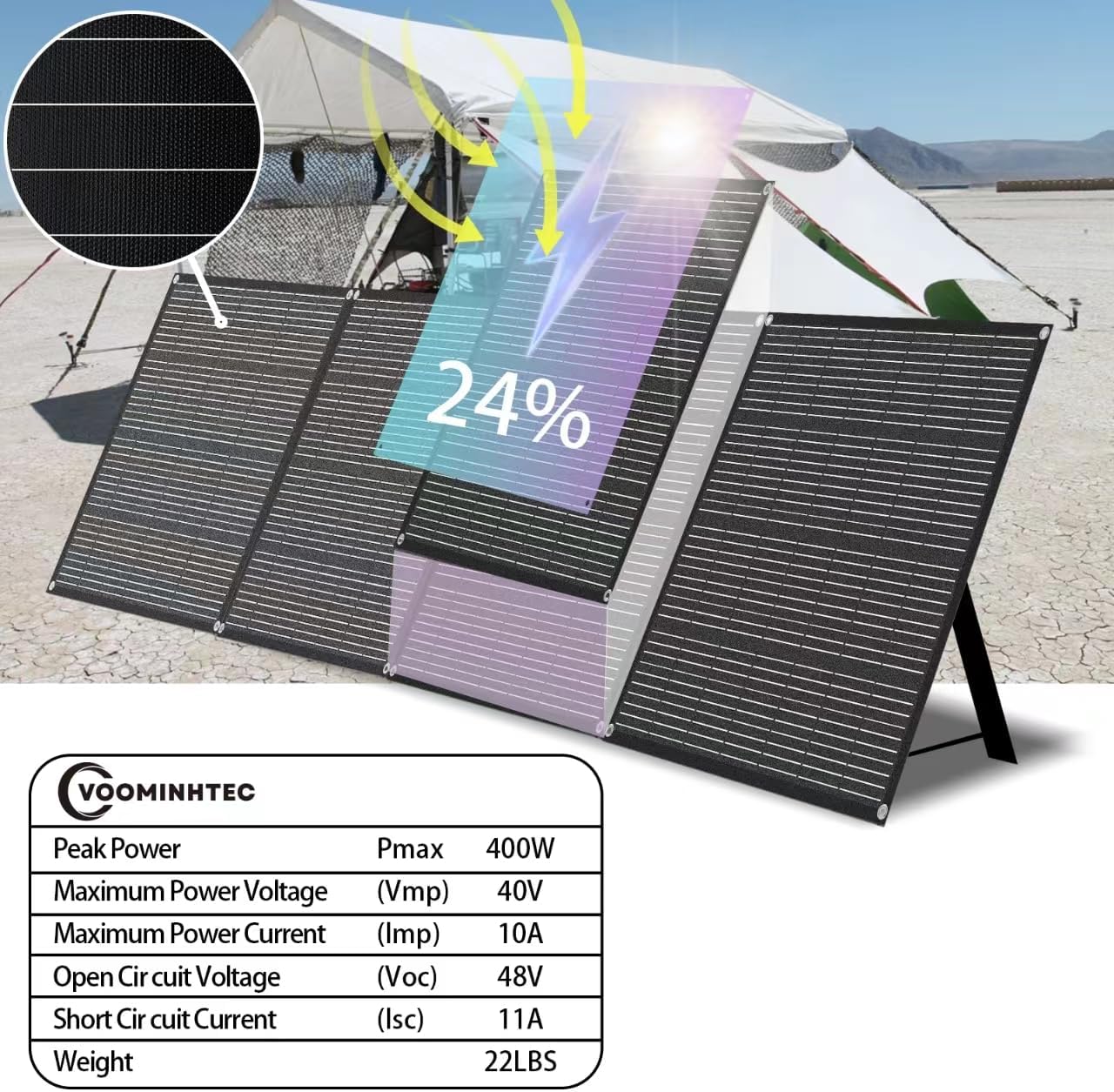
Image 4.1: A visual representation of the solar panel with key electrical specifications overlaid, including Peak Power, Voltage, and Current ratings.

Image 4.2: Diagram illustrating the precise dimensions of the solar panel when folded and fully unfolded, including the optimal kickstand angle of 70 degrees.
5. Setup
- Unfold the Panel: Carefully unfold the solar panel completely on a flat, stable surface.
- Position the Kickstand: Extend the integrated kickstand at the back of the panel. Adjust it to achieve an optimal angle (approximately 70 degrees from the ground) to face the sun directly. This angle maximizes solar energy absorption.
- Secure the Panel (Optional): For windy conditions or uneven terrain, use the provided carabiners to secure the panel through its grommets to stakes, ropes, or other stable anchors.
- Connect to Device: Locate the MC4 connectors on the solar panel. Use the included multi-connector cable to connect the solar panel to your portable power station, solar generator, or 12V/24V battery system. Ensure the correct adapter is used for your device.

Image 5.1: The solar panel set up next to an RV, demonstrating the use of the kickstand to achieve the recommended 70-degree angle for optimal sun exposure.
6. Operating Instructions
Once set up, the solar panel will begin converting sunlight into electrical energy. The charging process will vary depending on the connected device (power station, battery, etc.) and its specific charging requirements.
- Sunlight Exposure: Ensure the solar panel is positioned in direct sunlight with no shadows obstructing the panels. Even partial shading can significantly reduce efficiency.
- Monitoring Charge: Monitor the charging status on your connected power station or solar charge controller.
- Compatibility: The panel is designed for wide compatibility, including various portable power stations and 12V/24V battery systems. It includes a 4-in-1 universal connector (MC4, DC5525, DC7909/8mm, Anderson, TX60) to support most devices.

Image 6.1: An illustration showing the solar panel connected via MC4 connectors and various adapters to a portable power station, demonstrating its broad compatibility.

Image 6.2: A detailed diagram illustrating the various output connectors (DC5525, DC7909/8mm, Anderson, TX60) that allow the solar panel to connect to a wide range of portable power stations.
7. Maintenance
- Cleaning: Regularly wipe the surface of the solar panels with a soft, damp cloth to remove dust, dirt, or debris. A clean surface ensures maximum light absorption and efficiency. Do not use harsh chemicals or abrasive materials.
- Inspection: Periodically inspect the panel for any physical damage, such as cracks, dents, or frayed cables. Ensure all connectors are clean and free of corrosion.
- Storage: When not in use, fold the solar panel and store it in a dry, cool place away from direct sunlight and extreme temperatures. Use the integrated handle for easy transport.

Image 7.1: The solar panel shown in a rainy environment, highlighting its IP65 waterproof rating, which indicates protection against dust and low-pressure water jets.
8. Troubleshooting
| Problem | Possible Cause | Solution |
|---|---|---|
| No power output / Low charging speed | Insufficient sunlight Panel partially shaded Incorrect angle Dirty panel surface Loose or incorrect connection Overcast weather | Move panel to direct sunlight Remove any obstructions Adjust panel angle towards the sun Clean the panel surface Check all cable connections Charging efficiency will be reduced in cloudy conditions |
| Panel not recognized by device | Incompatible adapter Faulty cable Device input limit exceeded | Ensure correct adapter is used Try a different cable if available Verify your device's input specifications |
| Physical damage to panel | Impact or improper handling | Contact customer support for assistance. Do not attempt to repair. |
9. Warranty and Support
The Voominhtec 400W Portable Solar Panel is covered by a standard manufacturer's warranty. Please refer to the warranty card included with your purchase or visit the official Voominhtec website for detailed warranty terms and conditions.
For technical support, troubleshooting assistance, or warranty claims, please contact Voominhtec customer service through the contact information provided on the official brand website or your purchase platform.
Voominhtec Official Store: Visit the Voominhtec Store on Amazon
Ask a question about this manual
Ask about setup, troubleshooting, compatibility, parts, safety, or missing instructions. Manuals+ will review the question and use this page’s manual context to help answer it.