
Introduction
This manual provides essential information for the safe operation, assembly, and maintenance of your ANCHEER 20-inch Folding Electric Fat Tire Bike, Model AMA005688. Please read this manual thoroughly before your first ride to ensure proper usage and to maximize your riding experience.

Image: The ANCHEER 20-inch Folding Electric Fat Tire Bike in its full form, showcasing its robust design and fat tires.
Safety Information
Always prioritize safety. Wear a helmet and appropriate safety gear. Ensure all components are securely fastened before each ride. Adhere to local traffic laws and regulations. Avoid riding in adverse weather conditions or under the influence of substances. Regular maintenance is crucial for safe operation.
Setup
Your ANCHEER electric bike is 85% pre-assembled. The following steps detail the final assembly process.
Assembly Video Guide
Video: This video demonstrates the assembly process for the ANCHEER 20-inch Folding Electric Fat Tire Bike, covering unpacking, handlebar, fender, wheel, pedal, and saddle installation.
Step-by-Step Assembly
- Unpacking: Carefully remove the bike and all components from the box. Inspect for any damage.
- Handlebar and Stem Installation: Insert the handlebar stem into the fork tube. Adjust the height to a comfortable position, ensuring the minimum insertion line is not visible. Secure the quick-release lever.
- Front Fender and Light Installation: Attach the front fender to the fork using the provided screws. Mount the front light to the designated bracket on the fork and connect its wiring.
- Front Wheel Installation: Align the front wheel with the fork dropouts, ensuring the brake rotor slides correctly into the caliper. Secure the wheel using the axle nuts.
- Pedal Installation: Identify the left (L) and right (R) pedals. The left pedal threads counter-clockwise, and the right pedal threads clockwise. Tighten them securely with a wrench.
- Saddle Tube Installation: Insert the saddle tube into the seat post. Adjust the saddle height for comfortable pedaling, ensuring the minimum insertion line is not visible. Secure the quick-release lever.
- Rear Reflector Installation: Attach the rear reflector to the designated mounting point on the rear rack.
- Battery Activation: Insert the key into the battery lock and turn it to the 'ON' position to activate the battery.
- Display Activation: Long press the middle button on the LCD display to turn it On/Off.
- Light Activation: Long press the '+' button on the display to turn the headlight On/Off.
Operating Your Ebike
Working Modes
- PAS (Pedal Assist) Mode: The motor provides assistance as you pedal. Choose from 5 levels of pedal assist to match your desired effort.
- Throttle Mode: Set the LCD display to level 0, then twist the throttle to engage motor power without pedaling, reaching speeds up to 20 MPH.
- Cruise Mode: While in throttle mode, twist and hold the throttle for 8 seconds until the gear signal flashes to activate auto-cruise.
- Pure Pedal Mode: Ride the bike like a traditional bicycle without any motor assistance.
Gear Shifting
The bike features a 7-speed transmission system. Use the twist grip shifter on the handlebar to change gears, allowing for efficient pedaling across various terrains and speeds.
Braking System
The ANCHEER Ebike is equipped with reliable mechanical front and rear disc brakes for effective stopping power. Always apply brakes smoothly and evenly.
LCD Display Functions
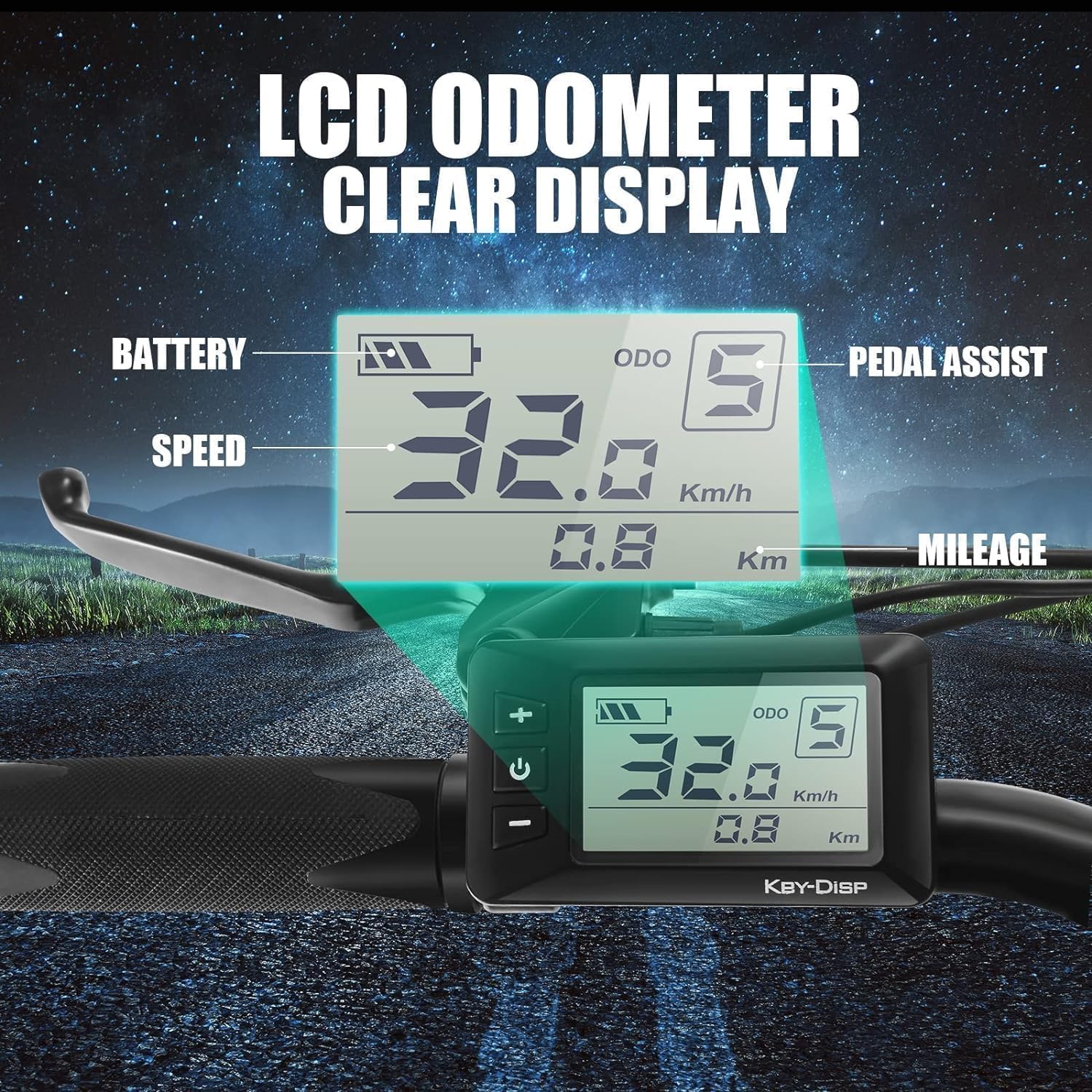
Image: The LCD display showing battery level, speed, pedal assist level, and mileage.
The Smart HD-LCD Meter provides real-time information including battery level, gear, mileage, and current speed. It also displays error codes for troubleshooting.
Maintenance
Regular maintenance ensures the longevity and optimal performance of your electric bike.
- Battery Care: Charge the 48V 10.4Ah hidden Li-ion battery regularly. Avoid fully discharging the battery. Store the battery in a cool, dry place when not in use.
- Tire Pressure: Regularly check and maintain the recommended tire pressure for the 20"x4.0 fat tires. Proper inflation improves ride quality and prevents punctures.
- Brake Inspection: Periodically inspect brake pads and rotors for wear. Ensure brake levers are responsive and cables are free from fraying.
- General Cleaning: Clean your bike with a damp cloth. Avoid using high-pressure water jets directly on electrical components. Lubricate the chain regularly.
Troubleshooting
This section addresses common issues you might encounter.
- No Power: Check if the battery is charged and properly seated. Ensure the key is in the 'ON' position and the display is activated.
- Motor Not Assisting: Verify that the pedal assist level is set above 0. Check for any error codes on the LCD display.
- Brake Issues: If brakes feel spongy or ineffective, inspect brake pads and cables. Adjust cable tension if necessary.
- Unusual Noises: Investigate the source of any new noises. This could indicate loose components, chain issues, or brake rubbing.
For persistent issues or complex repairs, contact ANCHEER customer support.
Specifications
| Feature | Detail |
|---|---|
| Bike Type | Electric Bike |
| Model Name | AMA005688 |
| Motor | 500W Brushless Motor (Peak 750W) |
| Battery | 48V/10.4Ah (499Wh) Hidden Li-ion Battery |
| Max Speed | Up to 22 MPH (Throttle mode up to 20 MPH) |
| Range | Up to 40-55 Miles per charge |
| Wheel Size | 20 Inches (20"x4.0 Fat Tires) |
| Frame Material | Aluminum |
| Number of Speeds | 7 |
| Brake Style | Disc |
| Suspension Type | Front |
| Item Weight | 82.9 Pounds |
| Maximum Weight Recommendation | 265 Pounds |
| Electric Assist Type | Pedal Assist, Throttle |
| Professional Certification | SGS certified to UL2849 standard |
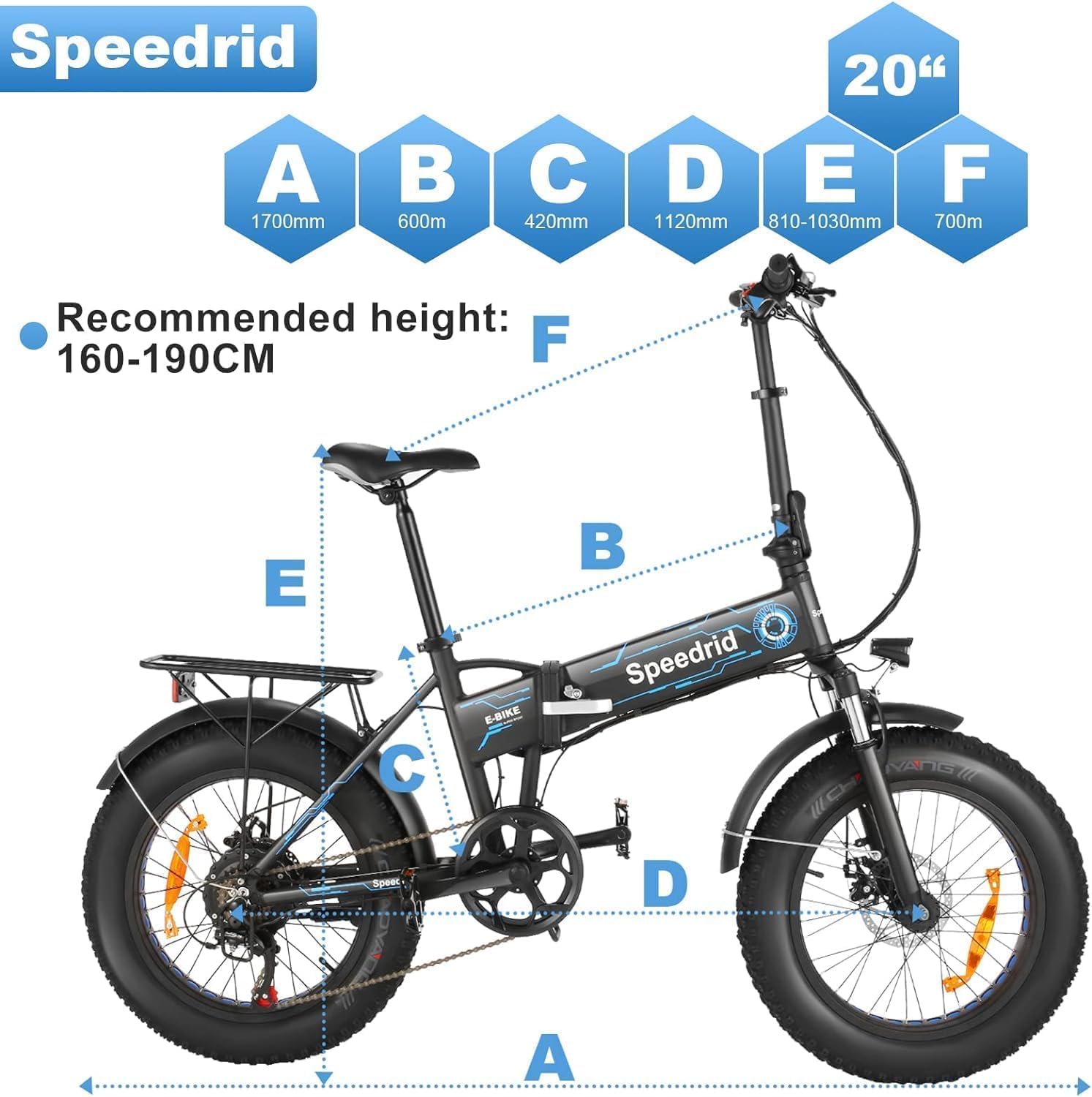
Image: Diagram illustrating the key dimensions of the ANCHEER 20-inch Folding Electric Fat Tire Bike.
Warranty and Support
Your ANCHEER 20-inch Folding Electric Fat Tire Bike comes with a 1-year guarantee on the electric motor, battery, and charger. ANCHEER provides lifelong technical support and update services. For any questions or assistance, please feel free to contact ANCHEER customer support.