
Introduction
Thank you for choosing the OUTON Dimmable 3-Light Floor Lamp. This manual provides detailed instructions for the safe assembly, operation, and maintenance of your new floor lamp. Please read this manual thoroughly before use and retain it for future reference.
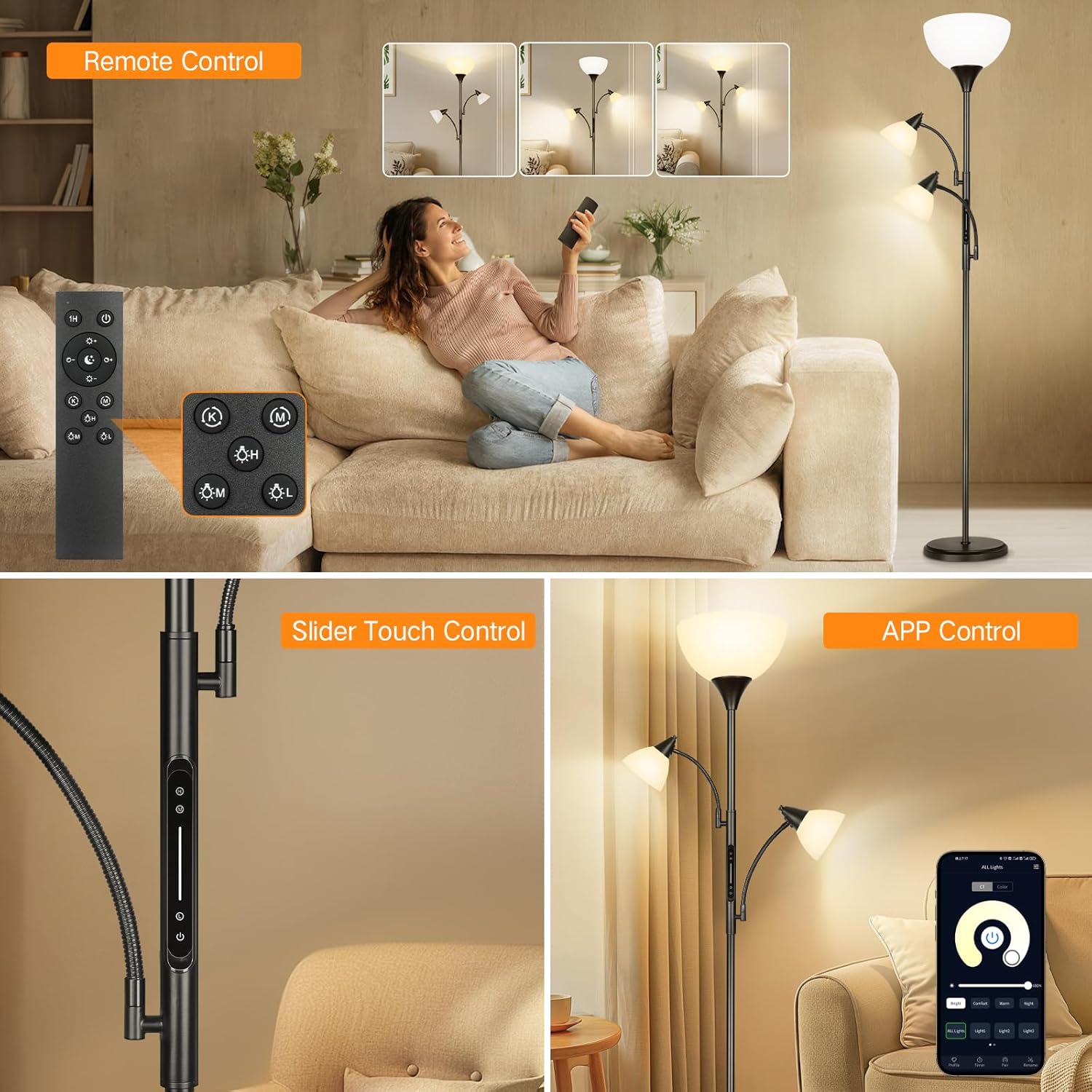
Image: The OUTON Dimmable 3-Light Floor Lamp featuring a main torchiere light and two adjustable reading lights, shown in a modern living room.
Safety Instructions
- Ensure the lamp is unplugged before assembly, cleaning, or bulb replacement.
- Do not operate the lamp with a damaged cord or plug.
- This lamp is designed for indoor use only. Do not expose to water or high humidity.
- Place the lamp on a stable, level surface to prevent tipping. The heavy base is designed for stability.
- Use only the specified bulb type (E26 LED, 9W max per bulb).
- Keep away from flammable materials.

Image: A mother and child with a dog near the lamp, highlighting the heavy-weighted base for stability, ensuring safety around children and pets.
Package Contents
Verify that all components are present before beginning assembly:
- Floor Lamp Base
- Lamp Poles (multiple sections)
- Main Torchiere Light Head with Lampshade
- Two Adjustable Reading Lights
- 3 x 9W E26 LED Bulbs
- Remote Control
- User Manual (this document)
Setup and Assembly
The OUTON Dimmable 3-Light Floor Lamp is designed for quick and easy assembly without the need for additional tools. Follow these steps:
- Step 1: Carefully screw all pole sections together from top to bottom, ensuring they are securely tightened.
- Step 2: Screw the assembled lamp pole into the heavy base, turning clockwise until firm.
- Step 3: Place the top torchiere lampshade onto the lamp holder.
- Step 4: Screw the fixing ring onto the holder to secure the lampshade. Install the provided LED bulbs into all three light sockets (E26 standard).

Image: Visual guide for lamp assembly, illustrating screwing poles, attaching to base, placing the top shade, and installing bulbs.
Operating Instructions
Your OUTON floor lamp offers multiple control options for convenience and versatility.
Control Methods: Remote, Touch, and App
- Remote Control: The magnetic remote allows full control over brightness, color temperature, and individual lights from a distance. It also includes preset scene modes and a 1-hour timer.
- Touch Control: A touch-sensitive panel is integrated into the lamp pole, providing direct control for power, brightness, and individual light activation.
- App Control: Download the compatible app to control your lamp via your smartphone, offering advanced customization and scheduling features.
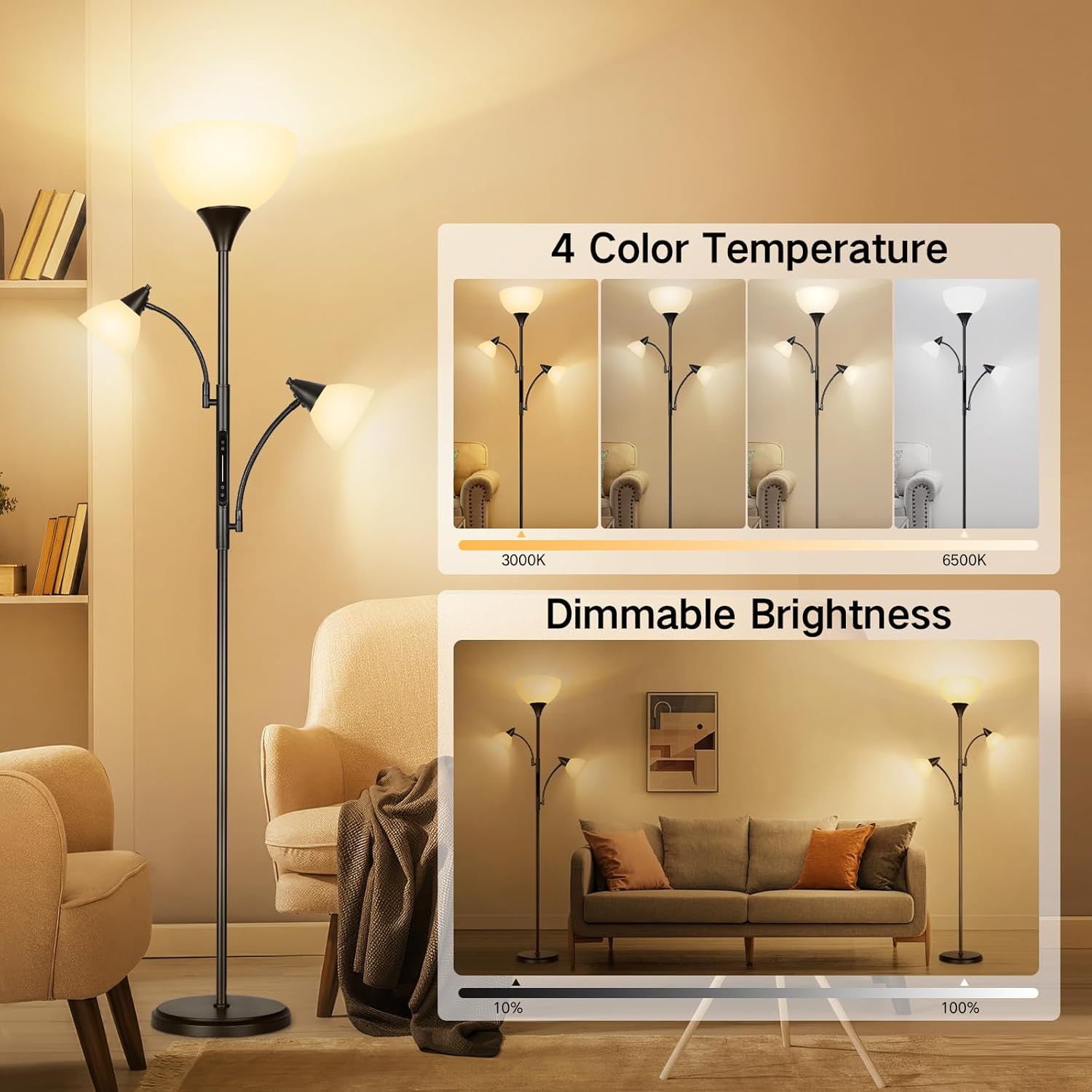
Image: Demonstrates the three control methods: a remote control, a slider touch control on the lamp pole, and a smartphone app interface.
Brightness and Color Temperature Adjustment
Adjust the lighting to suit your needs:
- Dimmable Brightness: The lamp supports brightness adjustment from 10% to 100%. Use the '+' and '-' buttons on the remote or slide your finger on the touch panel to change intensity.
- 4 Color Temperatures: Choose from 3000K (Warm White), 4500K (Natural White), 5000K (Daylight), and 6500K (Cool White). Cycle through these settings using the 'K' button on the remote or the color temperature control on the app.
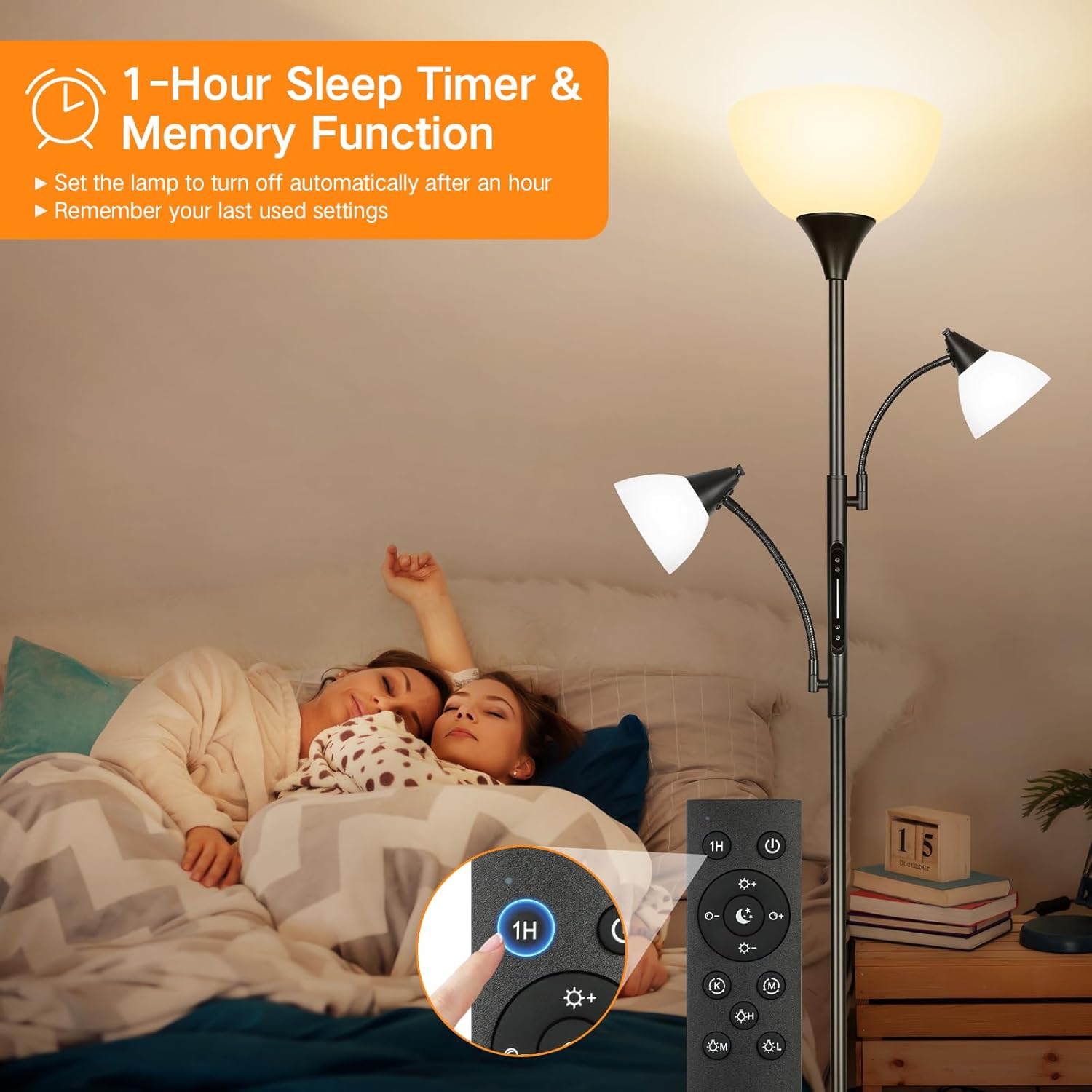
Image: Illustrates the four available color temperatures and the dimmable brightness range of the lamp.
1-Hour Timer and Memory Function
- 1-Hour Timer: Activate the 1-hour timer via the remote control to automatically turn off the lamp after one hour. This is useful for bedtime or when leaving a room.
- Memory Function: The lamp remembers your last used brightness and color temperature settings. When you turn the lamp back on, it will resume these settings.

Image: Shows the 1-hour sleep timer and memory function, with a close-up of the remote control's timer button.
Individual Light Control
The OUTON floor lamp features three individually controlled lights:
- Top Torchiere Lamp: Provides general ambient illumination for the room.
- Two Adjustable Reading Lamps: These lights have flexible goosenecks, allowing you to direct light precisely where needed for tasks like reading or crafting. Each reading light can be turned on/off and dimmed independently.

Image: Illustrates the torchiere floor lamp with two adjustable reading lights, showing their flexibility and independent control.
Video Demonstration: Touch and Remote Control
Video: This video demonstrates the functionality of the touch control panel on the lamp pole and the remote control, showing how to adjust brightness and color temperature for the individual lights and the main torchiere.
Maintenance
- Cleaning: Ensure the lamp is unplugged. Wipe the lamp and shades with a soft, dry cloth. Do not use abrasive cleaners or solvents.
- Bulb Replacement: Always unplug the lamp before replacing bulbs. Allow old bulbs to cool before handling. Replace with E26 standard LED bulbs, 9W maximum.
Troubleshooting
| Problem | Possible Cause | Solution |
|---|---|---|
| Lamp does not turn on. | Power cord not plugged in; outlet not active; bulb loose or faulty. | Check power connection; test outlet with another device; tighten or replace bulb. |
| Remote control not working. | Batteries dead; remote out of range; obstruction. | Replace remote batteries; move closer to the lamp; remove obstructions. |
| Lights flicker or dim unexpectedly. | Loose bulb; unstable power supply. | Tighten bulbs; try a different power outlet. |
| App control not connecting. | Wi-Fi issue; incorrect app settings; lamp not in pairing mode. | Check Wi-Fi connection; ensure correct app setup; refer to app instructions for pairing. |
Specifications
| Feature | Detail |
|---|---|
| Brand | OUTON |
| Model | B0CTKJN2XM |
| Lamp Type | Floor Lamp |
| Number of Light Sources | 3 |
| Light Source Type | LED |
| Bulb Base | E26 Standard |
| Wattage (per bulb) | 9 watts |
| Lumen Output (per bulb) | 810 lumens |
| Color Temperatures | 3000K-6500K (4 settings) |
| Dimmable | Yes (10%-100%) |
| Control Methods | Remote, Touch, App |
| Additional Features | 1-Hour Timer, Memory Function, Adjustable Reading Lights |
| Material Type | Metal, Plastic, Resin |
| Finish Type | Matte |
| Item Weight | 10 Pounds |
| Power Source | Corded Electric |
| Indoor/Outdoor Usage | Indoor |
Warranty and Support
This OUTON Dimmable 3-Light Floor Lamp comes with a 1-year manufacturer's warranty from the date of purchase. This warranty covers defects in materials and workmanship under normal use. It does not cover damage caused by misuse, accidents, unauthorized modifications, or improper installation.
For warranty claims, technical support, or any questions regarding your product, please contact OUTON customer service through the retailer where the product was purchased or visit the official OUTON website for contact information.
