
Mibro AC1
Mibro AC1 Wireless Bluetooth Earphones User Manual
Model: AC1
Introduction
This user manual provides detailed instructions for the operation, maintenance, and troubleshooting of your Mibro AC1 Wireless Bluetooth Earphones. Please read this manual thoroughly before using the product to ensure proper function and longevity.
Safety Information
- Do not expose the earphones or charging case to extreme temperatures, humidity, or corrosive substances.
- Avoid dropping or subjecting the device to strong impacts.
- Do not attempt to disassemble or modify the earphones or charging case. This may void the warranty and cause damage.
- Keep out of reach of children and pets.
- Use only the provided charging cable or a certified equivalent.
- Prolonged exposure to loud sounds may cause hearing damage. Adjust volume to a safe level.
Package Contents
Please check the package for the following items:
- Mibro AC1 Wireless Bluetooth Earphones (Left and Right)
- Charging Case
- Ear Tips (various sizes)
- USB Charging Cable
- User Manual
Product Overview
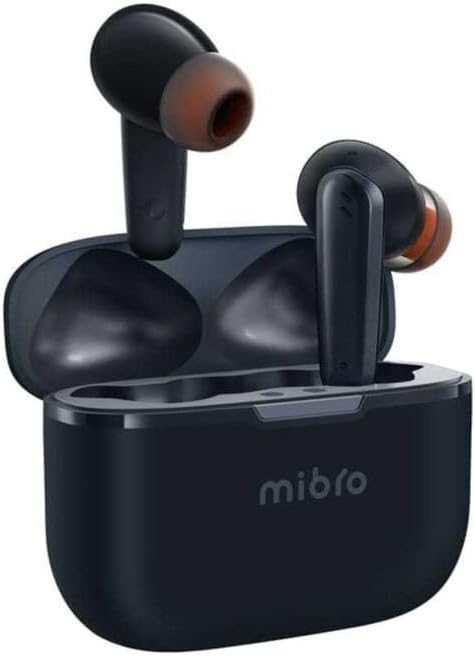
Figure 1: Mibro AC1 Wireless Bluetooth Earphones in their charging case. The image shows the compact design of the earbuds and the portable charging case, highlighting their readiness for use.

Figure 2: Mibro AC1 Earphones demonstrating IPX4 water resistance. The image depicts the earbuds being splashed with water, illustrating their ability to resist sweat and light rain during daily use. Note: The charging case is not waterproof.
Earphone Components:
- Touch Control Area: For managing playback, calls, and voice assistant.
- Microphone: For calls and voice commands.
- Charging Contacts: For charging inside the case.
- Ear Tip: Provides comfort and sound isolation.
Charging Case Components:
- Charging Port: USB-C port for charging the case.
- LED Indicator: Shows charging status and battery level.
- Earbud Slots: Securely holds and charges the earphones.
Setup
1. Charging the Earphones and Case:
- Place the earphones into the charging case. Ensure the charging contacts align.
- Connect the USB charging cable to the charging port on the case and a power source (e.g., computer USB port, wall adapter).
- The LED indicator on the case will show the charging status. A full charge is indicated when the LED turns solid or off, depending on the model's specific behavior.
- Allow approximately 1.5 hours for a full charge of the earphones and 2 hours for the charging case.
2. Pairing with a Device:
- Open the charging case. The earphones will automatically enter pairing mode, and their indicators will flash.
- On your device (smartphone, tablet, computer), enable Bluetooth.
- Search for available Bluetooth devices. Select "Mibro AC1" from the list.
- Once connected, the earphone indicators will stop flashing, and you will hear a confirmation tone.
- The earphones will automatically reconnect to the last paired device when taken out of the case, if Bluetooth is enabled on the device.
Operating Instructions
Touch Controls:
| Action | Function |
|---|---|
| Single Tap (Left/Right Earbud) | Play/Pause music, Answer/End call |
| Double Tap (Right Earbud) | Next Track |
| Double Tap (Left Earbud) | Previous Track |
| Triple Tap (Left/Right Earbud) | Activate Voice Assistant |
| Long Press (2 seconds) | Reject Call |
| Long Press (Left/Right Earbud, 3 seconds) | Toggle Noise Cancellation / Transparency Mode (if applicable) |
Noise Cancellation:
The Mibro AC1 earphones feature advanced noise reduction technology, capable of blocking ambient sounds up to 42dB. This provides a clear and immersive listening experience. Refer to the touch controls table for how to activate or deactivate this feature.
Maintenance
Cleaning:
- Regularly clean the earphones and charging case with a soft, dry, lint-free cloth.
- For ear tips, remove them from the earphones and clean with a damp cloth and mild soap if necessary. Ensure they are completely dry before reattaching.
- Clean the charging contacts on both the earphones and the case using a dry cotton swab to ensure proper charging.
- Do not use abrasive cleaners, alcohol, or chemical solvents.
Storage:
- When not in use, store the earphones in their charging case to protect them and keep them charged.
- Store the device in a cool, dry place, away from direct sunlight and extreme temperatures.
Troubleshooting
| Problem | Possible Solution |
|---|---|
| Earphones not charging |
|
| Cannot pair with device |
|
| No sound or low volume |
|
| Intermittent connection |
|
Specifications
| Feature | Detail |
|---|---|
| Product Dimensions | 5 x 4 x 6 cm; 100 grams |
| Brand | Mibro |
| Model Name | AC1 Earphones |
| Model Number | sol-meac1 |
| Connectivity Technology | Wireless (Bluetooth) |
| Wireless Communication Technology | Bluetooth 5.2 |
| Ear Placement | In-Ear |
| Form Factor | In-Ear |
| Noise Control | Active Noise Cancellation (up to 42dB) |
| Color | Blue |
| Included Components | Ear pads (ear tips) |
| Manufacturer | ZhenShi information technology (Shanghai) Co., Ltd. |
| First Available Date | January 29, 2024 |
Related documentsAC1


Ask a question about this manual
Ask about setup, troubleshooting, compatibility, parts, safety, or missing instructions. Manuals+ will review the question and use this page’s manual context to help answer it.