
1. Introduction
This manual provides detailed instructions for the installation, operation, and maintenance of your Fockety 4-inch LCD Screen Peephole Camera. Please read this manual thoroughly before using the product to ensure proper function and safety. Keep this manual for future reference.
2. Product Features
- 3.97-inch High Definition LCD Display: Provides a clear view of visitors.
- 1080P Camera Resolution: Features a 2MP camera with a 135° wide viewing angle for detailed images.
- Infrared Night Vision: Equipped with high-power infrared fill light for effective night vision.
- Motion Detection: Automatically records visitor portraits and supports video messages.
- Loop Recording: Ensures continuous recording by overwriting the oldest files when the memory card is full.
- Adjustable Focal Length: Allows for clear image capture.
- Multi-language Support: Includes English, Chinese, Russian, French, Italian, German, Japanese, Korean, Czech, Turkish, Arabic.
3. Package Contents
Verify that all items are present in the package:
- 1 x Indoor Display Unit
- 1 x Outdoor Peephole Camera
- 1 x USB Cable
- 1 x Mounting Plate
- 6 x Screws (various lengths)
- 1 x English User Manual
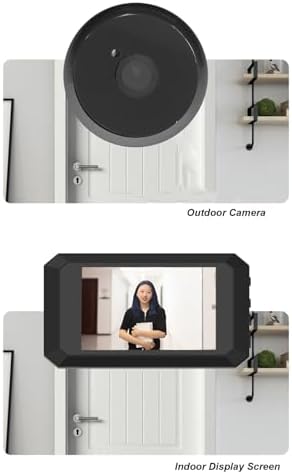
Figure 1: Package Contents
4. Safety Information
- Do not expose the device to extreme temperatures, humidity, or direct sunlight.
- Keep the device away from water and other liquids.
- Use only the specified power adapter and cables.
- Do not attempt to disassemble or repair the device yourself. Contact customer support for assistance.
- Ensure proper installation to prevent the device from falling.
5. Setup Guide
5.1 Pre-installation Checks
- Ensure your door hole is approximately 15-30mm (0.6-1.2 inches) in diameter.
- Ensure your door thickness is approximately 35-80mm (1.4-3.1 inches).
- Insert a Micro Memory Card (8G, 16G, or 32G recommended, not included) into the indoor unit.
5.2 Installation Steps
- Remove your existing peephole viewer from the door.
- Insert the outdoor peephole camera through the door hole from the outside. Ensure the camera is facing outwards.
- From the inside of the door, attach the mounting plate to the outdoor camera's threaded barrel using the appropriate screws. Tighten securely.
- Connect the ribbon cable from the outdoor camera to the indoor display unit.
- Mount the indoor display unit onto the mounting plate.
Video 1: Installation Guide for Door Peephole Camera. This video demonstrates the physical installation process of the peephole camera and indoor monitor.
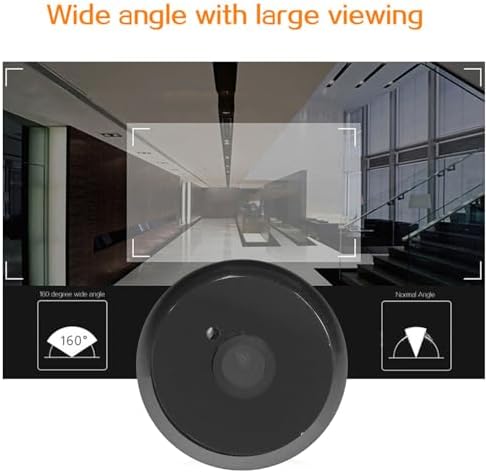
Figure 2: Outdoor Camera and Indoor Display Unit

Figure 3: Product Dimensions and Applicable Door Sizes
6. Operating Instructions
6.1 Powering On/Off
Press and hold the power button on the indoor unit to turn the device on or off.
6.2 Viewing Live Feed
Once powered on, the display will show the live feed from the outdoor camera. You can manually activate the screen to view outside.
6.3 Motion Detection
The device features motion detection. When motion is detected, the camera will automatically record a visitor portrait or video message, which is saved to the Micro Memory Card.
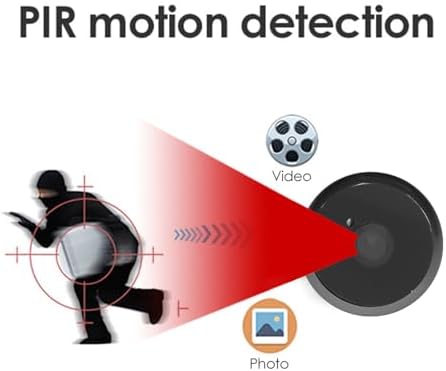
Figure 4: Motion Detection Functionality
6.4 Night Vision
The integrated infrared fill light ensures clear visibility even in low-light conditions or at night.

Figure 5: Night Vision Function
Video 2: Pyhodi Peephole Camera Features Overview. This video highlights key features such as WiFi connectivity, motion detection, night vision, and the 4.3-inch screen.
Video 3: Home Visual Doorbell Usage Demonstration. This video shows a child safely viewing a visitor through the peephole camera's indoor monitor.
7. Maintenance
- Clean the camera lens and display screen regularly with a soft, dry cloth.
- Do not use abrasive cleaners or solvents.
- Ensure the outdoor camera is free from obstructions.
- Check battery levels periodically and recharge or replace as needed.
8. Troubleshooting
8.1 No Image on Screen
- Ensure the device is powered on.
- Check that the ribbon cable connecting the outdoor camera to the indoor unit is securely connected.
- Verify that the battery is charged or properly installed.
8.2 Motion Detection Not Working
- Check the motion detection settings in the device menu.
- Ensure the outdoor camera lens is clean and unobstructed.
- Verify that the Micro Memory Card is inserted correctly and has sufficient storage space.
8.3 Poor Image Quality
- Clean the camera lens and display screen.
- Ensure there is adequate lighting for optimal image capture, especially during the day.
9. Specifications
| Feature | Specification |
|---|---|
| Screen Size | 3.97 Inch |
| Screen Resolution | 480 x 800 |
| Camera Resolution | 1080P |
| Camera Pixel | 2MP |
| Wide Angle | 135° |
| Infrared Light | 2 |
| Storage Method | Micro Memory Card (supports >8G, 16G/32G recommended) |
| Language Support | English, Chinese, Russian, French, Italian, German, Japanese, Korean, Czech, Turkish, Arabic |
| Suitable Door Hole | Approx. 15-30mm / 0.6-1.2in |
| Suitable Door Thickness | Approx. 35-80mm / 1.4-3.1in |
| Battery Type | 3.7-4.2V 1400mAh Lithium Ion Battery (built-in) |
| Charging Interface | Type C |
| Item Weight | 260 g |
| Material | ABS |
10. Warranty and Support
This product comes with a standard manufacturer's warranty. For detailed warranty information, please refer to the warranty card included in your package or contact Fockety customer support. If you encounter any issues or have questions regarding your device, please reach out to our support team for assistance.
Customer Support: Please refer to the contact information provided in your product packaging or on the official Fockety website.