
1. Introduction
Thank you for choosing the AEOCKY X1 Rotary Dehumidifier. This advanced desiccant dehumidifier is designed to efficiently remove excess moisture from your indoor environment, improving air quality and comfort. Utilizing cutting-edge rotary technology, the X1 offers superior performance, quiet operation, and reliable dehumidification across various temperatures, making it ideal for bedrooms, basements, bathrooms, RVs, and other spaces up to 1200 square feet.
Unlike traditional compressor or semiconductor dehumidifiers, the AEOCKY X1 employs a rotary desiccant system that is highly effective even in low-temperature conditions and operates with minimal noise. This manual provides essential information for the safe and effective use of your dehumidifier.

Figure 1.1: The AEOCKY X1 Rotary Dehumidifier, a compact and efficient unit designed for various living spaces.

Figure 1.2: The AEOCKY X1, featuring Zeolitech Technology for effective dehumidification.
2. Important Safety Information
Please read all safety instructions carefully before operating the dehumidifier to prevent injury or damage. Keep this manual for future reference.
General Safety Precautions:
- Always plug the unit into a grounded electrical outlet of the correct voltage.
- Do not operate the dehumidifier with a damaged cord or plug. If the cord or plug is damaged, contact customer support.
- Do not place the unit near heat sources such as radiators, heat registers, stoves, or other appliances that produce heat.
- Ensure proper air circulation around the unit. Do not block air inlets or outlets. Maintain at least 8 inches (20 cm) of clearance from walls and furniture.
- Do not immerse the unit, power cord, or plug in water or other liquids.
- Always unplug the dehumidifier before cleaning, performing maintenance, or when not in use for extended periods.
- Do not allow children or pets to play with or around the dehumidifier.
- Use the unit only on a stable, level surface to prevent tipping.
- Do not use the dehumidifier in areas where flammable liquids or gases are stored.
Quadruple Security Protection:
The AEOCKY X1 is equipped with multiple safety features to ensure reliable operation:
- Overheat Protection: Automatically cuts off power if the internal temperature becomes abnormal.
- Tip-over Protection: Effectively blocks combustion in case the unit is accidentally tipped over.
- V-0 Flame Retardant Material: Constructed with V-0 rated flame-retardant materials for enhanced safety.
- Enhanced Safety Plug: Tested for durability and safety during repeated plugging and unplugging.

Figure 2.1: The AEOCKY X1's Quadruple Security Protection features.
3. Product Overview
Familiarize yourself with the components and controls of your AEOCKY X1 Dehumidifier.
Components:
- Air Inlet Grille: Located on the back/side, where humid air enters.
- Air Outlet: Located on the top/front, where dry air exits.
- Control Panel: Intuitive buttons for operation.
- Water Tank: Removable tank for collected water (85 oz capacity).
- Drain Hose Connection: Port for continuous drainage.
- Washable Pre-filter: Located behind the air inlet grille, for capturing larger particles.
- Integrated Handle: For easy portability.
Control Panel Functions:
- Power Button: Turns the unit on or off.
- Mode Button: Cycles through operating modes (e.g., Turbo Mode, Sleep Mode).
- Timer Button: Sets the auto shut-off timer (8H, 12H, 24H).
- Fan Speed Button: Adjusts fan speed (if applicable).
- Water Full Indicator: Illuminates when the water tank is full and needs emptying.
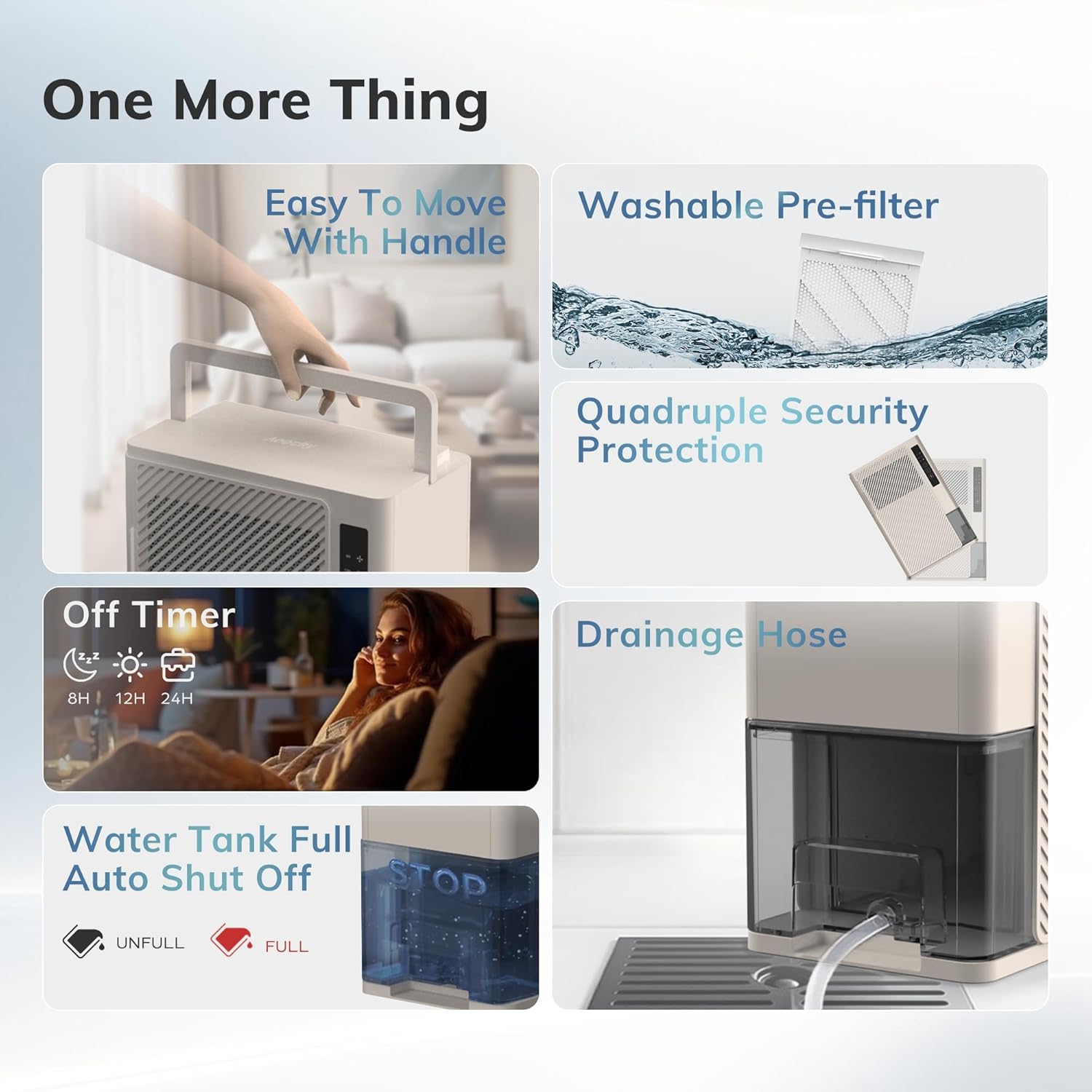
Figure 3.1: Key features and components of the AEOCKY X1 Dehumidifier.

Figure 3.2: Physical dimensions of the AEOCKY X1 Dehumidifier.
4. Setup
Follow these steps to set up your AEOCKY X1 Dehumidifier for the first time.
4.1 Unpacking:
- Carefully remove the dehumidifier and all packaging materials from the box.
- Check for any signs of damage during transit. If damaged, do not operate and contact customer support.
- Ensure all included components are present: Dehumidifier unit, Drain Hose, Quick Start Guide, User Manual.
4.2 Placement:
- Place the dehumidifier on a firm, level surface in the area where you wish to reduce humidity.
- Ensure there is at least 8 inches (20 cm) of clear space around all sides of the unit for proper airflow. Do not place it against a wall or in a corner that restricts air circulation.
- Avoid placing the unit in direct sunlight or near heat-generating appliances.
- For optimal performance, close all doors and windows in the room where the dehumidifier is operating.
4.3 Power Connection:
- Ensure the water tank is correctly inserted into the unit.
- Plug the power cord into a grounded 120V AC electrical outlet.
4.4 Continuous Drainage Setup (Optional):
For continuous operation without needing to empty the water tank, you can connect the included drain hose.
- Locate the drain hose connection port on the back of the unit.
- Remove the rubber stopper (if present).
- Firmly attach one end of the included drain hose to the connection port.
- Direct the other end of the hose to a suitable drain, such as a floor drain, large bucket, or sink. Ensure the hose is sloped downwards to allow gravity drainage and is free of kinks or blockages.
5. Operating Instructions
Learn how to operate your AEOCKY X1 Dehumidifier.
5.1 Power On/Off:
- Press the Power Button (symbol: circle with vertical line) once to turn the unit on. The indicator light will illuminate.
- Press the Power Button again to turn the unit off.
5.2 Selecting Operating Mode:
The AEOCKY X1 offers different operating modes for various needs:
- Turbo Mode: Provides maximum dehumidification power for rapid moisture removal. Ideal for very humid environments or when quick results are needed.
- Sleep Mode: Operates at the lowest fan speed and noise level (as low as 28dB) for quiet operation, suitable for bedrooms or quiet spaces.
- Press the Mode Button (symbol: fan icon) repeatedly to cycle through available modes.

Figure 5.1: The AEOCKY X1's quiet operation in Sleep Mode.
5.3 Setting the Timer:
The timer function allows you to set the unit to automatically shut off after a specified period.
- Press the Timer Button (symbol: clock icon) repeatedly to select the desired shut-off time: 8 hours, 12 hours, or 24 hours.
- The corresponding indicator light will illuminate.
- To cancel the timer, press the Timer Button until no timer indicator light is on.
5.4 Water Tank Full Auto Shut-Off:
When the water tank reaches its maximum capacity (85 oz), the unit will automatically stop dehumidifying, and the Water Full Indicator will light up. The unit will resume operation once the tank is emptied and reinserted correctly.
6. Maintenance
Regular maintenance ensures optimal performance and extends the lifespan of your dehumidifier.
6.1 Emptying the Water Tank:
- When the Water Full Indicator illuminates, carefully pull out the water tank from the unit.
- Pour out the collected water.
- Rinse the tank with clean water if necessary. Do not use harsh detergents or abrasive cleaners.
- Reinsert the empty water tank firmly into the dehumidifier until it clicks into place. The unit will resume operation.
6.2 Cleaning the Washable Pre-filter:
The pre-filter should be cleaned every two weeks or more frequently depending on usage and air quality.
- Turn off and unplug the dehumidifier.
- Locate and remove the pre-filter from the air inlet grille.
- Gently vacuum any dust or debris from the filter. For a deeper clean, rinse the filter under running water.
- Allow the filter to air dry completely before reinserting it into the unit. Do not use a dryer or direct heat.
6.3 Cleaning the Exterior:
- Wipe the exterior of the dehumidifier with a soft, damp cloth.
- Do not use abrasive cleaners, waxes, or solvents, as these may damage the surface.
6.4 Storage:
- If storing the unit for an extended period, ensure the water tank is empty and clean, and the filter is clean and dry.
- Wrap the power cord neatly.
- Store the dehumidifier in a cool, dry place, away from direct sunlight and extreme temperatures.
7. Troubleshooting
Before contacting customer support, please refer to the following table for common issues and their solutions.
| Problem | Possible Cause | Solution |
|---|---|---|
| Dehumidifier does not turn on. | No power supply. Power cord not securely plugged in. Water tank full or not properly inserted. | Check if the unit is plugged into a working outlet. Ensure the power cord is firmly connected. Empty the water tank and ensure it is correctly reinserted. |
| Unit is running but not collecting water. | Room humidity is already low. Air filter is clogged. Room temperature is too low. Unit is in continuous drainage mode and hose is connected. | Dehumidifier will not collect water if humidity is below target. Clean the air filter. The unit operates effectively down to 50°F (10°C). Below this, efficiency may decrease. Check if the drain hose is properly connected and draining. |
| Unusual noise during operation. | Unit is not on a level surface. Air filter is clogged. Obstruction in fan. | Place the unit on a flat, stable surface. Clean the air filter. Turn off and unplug the unit, then check for any foreign objects. |
| Water leaking from the unit. | Water tank not properly inserted. Drain hose connection is loose or kinked (if using continuous drainage). | Ensure the water tank is fully and correctly inserted. Check the drain hose connection and ensure it is not kinked or blocked. |
8. Specifications
Technical details for the AEOCKY X1 Rotary Dehumidifier.
| Feature | Specification |
|---|---|
| Brand | AEOCKY |
| Model Name | X1 |
| Dehumidification Capacity | 10 Pints per Day |
| Floor Area Coverage | Up to 1200 Square Feet |
| Water Tank Volume | 85 Fluid Ounces |
| Product Dimensions (D x W x H) | 11.8"D x 15.4"W x 6.3"H |
| Item Weight | 10.13 pounds |
| Color | Gold |
| Material | Plastic |
| Wattage | 340 watts |
| Operation Modes | Turbo Mode, Sleep Mode |
| Special Features | Portable, Sleep Mode, Never Frost Technology, Continuous Drainage |
| Included Components | Drain Hose, Quick Start Guide, User Manual |
| Upper Temperature Rating | 35 Degrees Celsius (95°F) |
| UPC | 850070532419 |
| ASIN | B0CTK5H746 |
9. Warranty & Support
AEOCKY is committed to providing high-quality products and excellent customer service.
Warranty Information:
The AEOCKY X1 Rotary Dehumidifier comes with a 3-year coverage from the date of purchase. This warranty covers defects in materials and workmanship under normal use. It does not cover damage resulting from misuse, accident, alteration, or unauthorized repair.
Customer Support:
If you encounter any issues or have questions regarding your AEOCKY X1 Dehumidifier, please do not hesitate to contact our customer support team. For the most up-to-date contact information and additional resources, please visit the official AEOCKY store:
Visit the AEOCKY Store on Amazon
Please have your model number (X1) and purchase information ready when contacting support to expedite assistance.