
1. Introduction and Overview
Thank you for choosing the WEGA Stroller Fan SF01. This versatile and portable fan is designed to provide cooling comfort in various settings, from strollers and car seats to personal use at home or while traveling. Its flexible tripod and rechargeable battery offer convenience and adaptability. Please read this manual thoroughly before use to ensure proper operation and maintenance.
2. Product Features
- Flexible Tripod Design: Features a unique flexible tripod with high-quality metal and silicone cover, allowing it to grip, wrap, or stand securely at any angle.
- Baby Finger Protection: The fan cover's gaps are less than 5mm, preventing small fingers from touching the blades.
- Versatile and 360° Rotation: Flexible legs allow attachment to strollers, car seats, cribs, and more. The fan head adjusts horizontally for 360° rotation, directing airflow precisely. Can also be used as a desktop or handheld fan.
- Powerful and Quiet Operation: Upgraded fan blades provide powerful yet quiet airflow with 3 adjustable speed settings.
- Rechargeable Battery: 2-in-1 powered style supports USB or battery power. Includes a safety-designed rechargeable polymer battery, offering 4.5 to 10 hours of working time depending on speed. Can be charged via computer, laptop, power bank, or car charger.
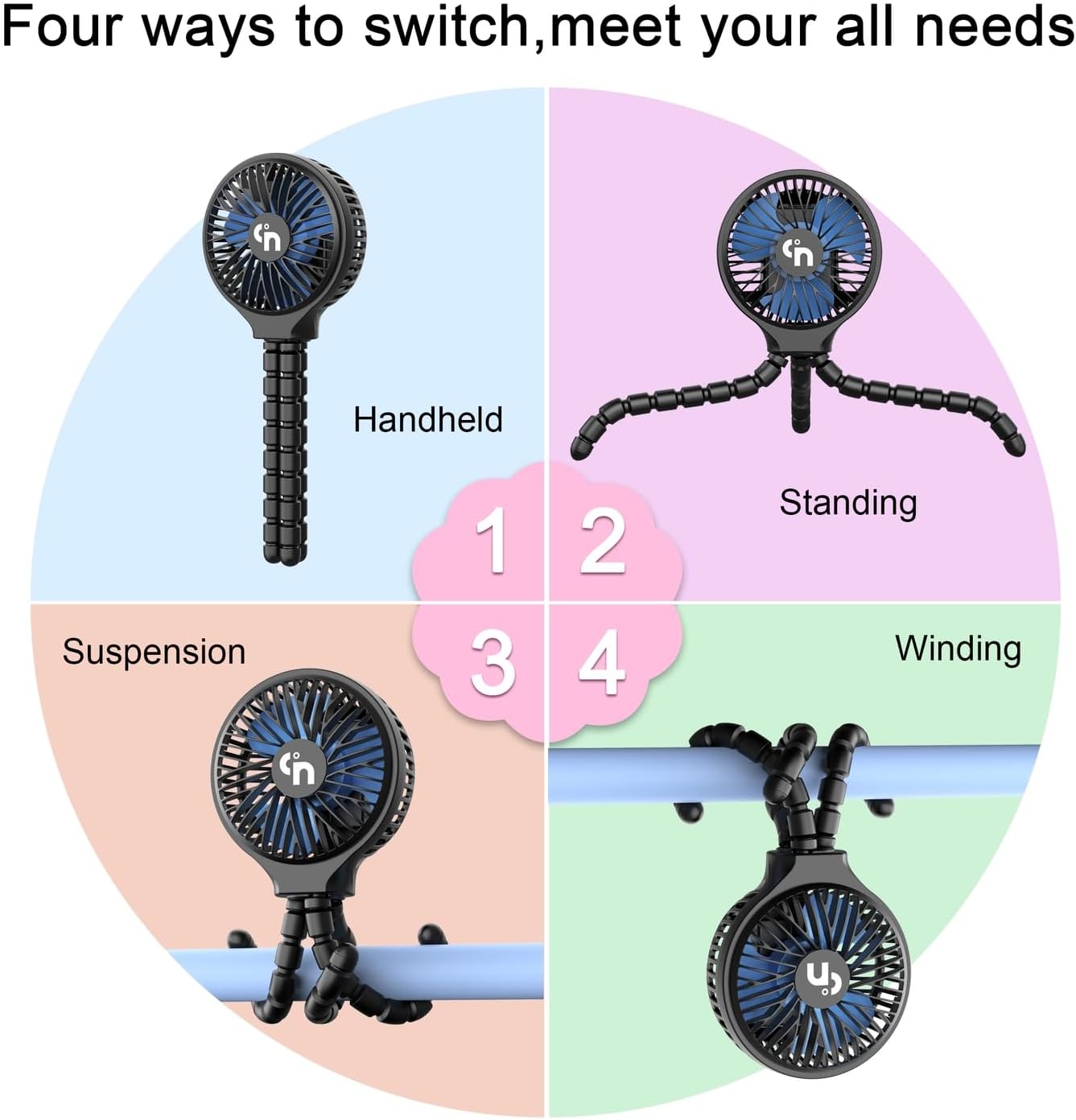
Figure 2.1: The WEGA Stroller Fan can be used in handheld, standing, suspended, or wrapped (winding) configurations.

Figure 2.2: Multiple applications of the WEGA Stroller Fan, including stroller, desk, handheld, treadmill, and car seat use.
3. Package Contents
- WEGA Stroller Fan (Model SF01)
- USB Charging Cord
- User Manual
4. Setup Instructions
The WEGA Stroller Fan comes with a flexible tripod base. To set up:
- Unpack the fan and its components.
- Ensure the flexible tripod is securely attached to the fan head.
- To attach to an object (e.g., stroller handle, car seat bar, crib rail): Carefully bend and wrap the flexible legs around the desired object. Ensure a firm grip to prevent the fan from slipping.
- To use as a standing fan: Adjust the three flexible legs to form a stable tripod base on a flat surface.

Figure 4.1: The fan's flexible legs wrapped around a stroller handle for secure attachment.
5. Operating Instructions
The fan features simple controls for ease of use.
- Power On/Off: Locate the power button on the back of the fan head. Press once to turn the fan on to its lowest speed. Press and hold to turn the fan off.
- Adjust Fan Speed: While the fan is on, press the power button repeatedly to cycle through the 3 available speed settings (Low, Medium, High).
- Adjust Airflow Direction: The fan head can be manually rotated 360 degrees horizontally and vertically. Adjust the head to direct airflow as needed.

Figure 5.1: Fan dimensions, finger protection, and 360° rotation capability.

Figure 5.2: Fan attached to a car seat, highlighting 360° rotation and battery life at different speeds.
6. Charging the Fan
The fan is equipped with a rechargeable battery.
- Charging Port: Locate the USB-C charging port on the back of the fan head.
- Connect Charger: Use the provided USB charging cord to connect the fan to a compatible USB power source (e.g., computer, laptop, power bank, car charger).
- Charging Indicator: The fan may feature an indicator light or display to show charging status and battery percentage.
- Battery Life: A full charge provides approximately 4.5 to 10 hours of operation, depending on the selected speed setting.

Figure 6.1: Charging port and battery indicator details.
7. Safety Information
- Children should use the fan under adult supervision.
- Ensure the fan is securely attached to prevent it from falling.
- Do not insert fingers or other objects into the fan grille while it is operating.
- Keep the fan away from water or excessive moisture.
8. Maintenance and Care
- To clean the fan blades and grille, gently twist the front cover counter-clockwise to remove it. Wipe with a soft cloth dampened with warm water and mild soap. Ensure the fan is completely dry before reassembling and using.
- Store the fan in a cool, dry place when not in use.
9. Troubleshooting
- Fan not turning on: Ensure the battery is charged. Connect the fan to a power source using the USB-C cable.
- Low airflow: Check the selected speed setting and ensure the fan grille is not obstructed.
- Unstable attachment: Re-adjust the flexible tripod legs to ensure they are firmly wrapped or positioned on a stable surface.
10. Specifications
| Brand | WEGA |
| Model Name | SF01 |
| Color | Black |
| Power Source | Battery Powered |
| Product Dimensions | 3.5"D x 4.4"W x 11.2"H |
| Item Weight | 11 ounces |
| Number of Power Levels | 3 |
| Control Method | Touch |
| Batteries | 1 Lithium Polymer battery required (included) |
11. Warranty and Support
WEGA is an American Seller committed to providing high-quality products. If you have any questions or require support regarding your WEGA Stroller Fan, please contact us directly. We aim to respond to all inquiries within 24 hours.
12. Product Videos
Baby Stroller Fan Demonstration
This video, provided by SWEETFULL Technology, demonstrates the features and versatility of a baby stroller fan, including its flexible legs and adjustable head, showcasing various ways it can be attached and used.