
Della 048-OPAC-9H
DELLA 14,000 BTU Portable Air Conditioner User Manual
Model: 048-OPAC-9H | Brand: Della
Introduction
Thank you for choosing the Della 14,000 BTU Portable Air Conditioner. This versatile unit is designed to provide optimal comfort in your home or office, offering cooling, heating, dehumidifying, and fan-only modes. With smart features like Wi-Fi connectivity, Alexa integration, and Geo Fencing, you can easily control your environment from anywhere. Please read this manual thoroughly before operation to ensure proper use, maintenance, and safety.
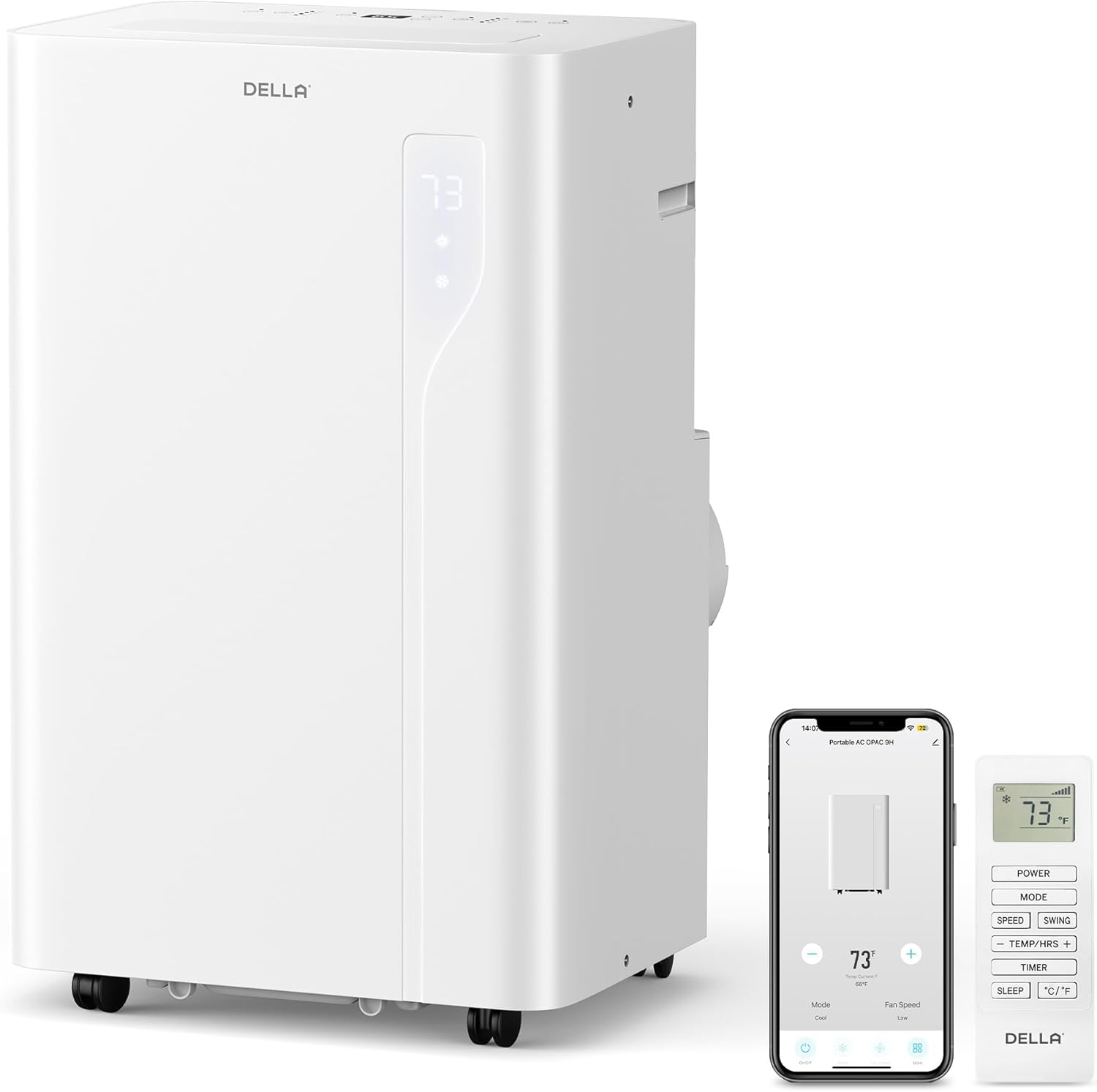
The Della 14,000 BTU Portable Air Conditioner, shown with its remote control and smartphone app interface.
Safety Information
Always follow basic safety precautions when using electrical appliances to reduce the risk of fire, electric shock, or injury. Ensure the unit is plugged into a strong, dedicated electrical outlet to prevent circuit overload. Do not operate the unit if the power cord or plug is damaged. Keep the unit away from water and flammable materials. Always unplug the unit before cleaning or performing any maintenance.
Product Overview
The Della Portable Air Conditioner is a multi-functional unit designed for efficiency and convenience. It features a powerful 14,000 BTU cooling capacity and a 10,000 BTU heating pump, suitable for rooms up to 650 sq.ft. The unit operates with a low noise level of 49 dB in quiet mode, ensuring peaceful comfort.
Key Features:
- 4-in-1 Functionality: Cool, Heat, Fan, Dehumidify.
- Smart Control: Wi-Fi enabled, compatible with Alexa and Google Assistant, Geo Fencing.
- Intuitive Operation: Soft-touch control panel and remote control.
- Automatic Vent Swivel: For optimal air distribution.
- Easy Installation: Quick and tool-less setup with included window kit.
- Low Noise: Operates quietly for minimal disturbance.

The unit features a 49dB Whisper-Quiet Mode, ideal for bedrooms and quiet spaces.

Internal design for Ultimate Efficiency, providing 30% more efficiency and 14,000 BTU cooling.
Setup
The Della Portable Air Conditioner is designed for quick and easy installation without the need for cutting or drilling. Follow these steps to set up your unit:
Window Kit Installation:
- Attach Exhaust Hose to AC Unit: Slide the exhaust hose into the back of the AC unit until it clicks securely into place.
- Attach Exhaust Hose to Sealing Board: Connect the other end of the exhaust hose to the port on the window sealing board.
- Install Sealing Board in Window: Place the adjustable window sealing board into your window opening. Extend or retract the board to fit your window size (25.5"-64.1"). Secure it in place.
- Connect Hose to Window: Attach the exhaust hose with the sealing board to the window opening. Ensure a tight seal to prevent air leakage.

The unit is designed for quick and easy installation in both horizontal and vertical windows.
Damage-Free Installation Steps:
- Step 1: Slide hose into the back of the AC unit.
- Step 2: Attach exhaust hose to sealing board port.
- Step 3: Install sealing board to window frame.


Detailed steps for damage-free installation of the exhaust hose and window kit.
Operating Instructions
Your Della Portable Air Conditioner can be operated using the soft-touch control panel on the unit, the included remote control, or the Della+ app on your smartphone.
Control Panel:
The intuitive soft-touch control panel allows you to easily adjust settings. It includes buttons for Power ON/OFF, Mode Select (Cool, Dry, Fan, Heat), Temperature Control, 3 Fan Speeds, 24H Timer, Sleep Mode, and Automatic Vent Swivel.

The soft-touch control panel provides easy access to all functions.
Remote Control:
The remote control provides convenient access to all unit functions from a distance, including power, mode, fan speed, temperature adjustment, and timer settings.
Della+ App & Smart Features:
Download the free Della+ app to control your unit from anywhere, anytime. The app allows for remote power on/off, mode selection, temperature adjustment, fan speed control, and setting up advanced features like Geo Fencing.
Official video demonstrating the Geo Location Function setup via the Della+ app for automated control.
Operating Modes:
- Cool Mode: Provides cooling for rooms up to 650 sq.ft. Adjustable temperature from 61°F to 90°F.
- Heat Mode: Built-in heat pump function with 10,000 BTU capacity for quick and efficient warming.
- Dry Mode (Dehumidifier): Removes excess moisture from the air, with a dehumidifier capacity 25% higher than traditional models.
- Fan Mode: Circulates air with 3 adjustable fan speeds and auto-swing up-down for optimal airflow.
Maintenance
Regular maintenance ensures optimal performance and longevity of your Della Portable Air Conditioner.
Filter Cleaning:
The unit features permanent/washable filters. Regularly clean the filters to maintain air quality and unit efficiency. Simply slide out the filter, wash it with water, and allow it to dry completely before reinserting.
Official video demonstrating the features of the Della Portable AC, including filter access and cleaning.
Water Disposal:
The unit features a 550ML water tank with a self-evaporate system, reducing the frequency of manual draining. A 'Water Full' indicator will alert you when manual drainage is required. Connect a drain hose to the designated port for continuous drainage or manually drain the tank as needed.


Instructions for easy water disposal, including the self-evaporate system and manual drain options.
Troubleshooting
If you encounter issues with your unit, please refer to the following common troubleshooting tips:
- Unit Not Turning On: Ensure the power cord is securely plugged into a dedicated, functioning electrical outlet. Check your circuit breaker.
- Insufficient Cooling/Heating: Verify that the exhaust hose is properly installed and sealed in the window kit. Ensure filters are clean. Check that the room size is within the unit's capacity (650 sq.ft.). Close all windows and doors in the room.
- Unit is Noisy: Some operational noise is normal. Ensure the unit is on a flat, stable surface. Check for any obstructions in the air intake or exhaust.
- Water Full Indicator On: If the unit stops operating and the 'Water Full' indicator is on, the internal water tank needs to be drained. Refer to the 'Water Disposal' section.
- Wi-Fi Connectivity Issues: Ensure your Wi-Fi network is active and the unit is within range. Follow the app's instructions for re-pairing the device.
Specifications
| Feature | Specification |
|---|---|
| Product Dimensions | 17 x 13.7 x 27.4 inches (or 13.2"D x 17.3"W x 26.2"H) |
| Item Model Number | 048-OPAC-9H |
| Form Factor | Portable |
| Floor Area Coverage | 650 Square Feet |
| Voltage | 120 Volts |
| Noise Level | 49 dB |
| Cooling Power | 14000 British Thermal Units |
| Special Feature | Remote Controlled, Portable |
| BEE Star Rating | Energy Star Certified |
| Refrigerant | R 410A |
| Filter Type | Permanent/Washable |
| Power Source | Corded Electric |
Warranty & Support
Della is committed to providing reliable products and excellent customer service. Your Della Portable Air Conditioner comes with a 1-Year Warranty.
For any product support or technical assistance, our customer support team is available 24/7. You can speak to our technicians Monday-Friday PST. For live chat support, please visit the Della website or contact us through the Della+ app.
For additional resources, you may refer to the official User Manual (PDF).
Related documents048-OPAC-9H


Ask a question about this manual
Ask about setup, troubleshooting, compatibility, parts, safety, or missing instructions. Manuals+ will review the question and use this page’s manual context to help answer it.