
Introduction
Welcome to the SENTRY Ultra-Light Bluetooth Earbuds user manual. These earbuds are designed to provide a seamless and immersive audio experience, perfect for active lifestyles. With an ultra-light design, LED power display, and intelligent touch controls, you can enjoy high-quality sound and convenient operation. Please read this manual carefully to ensure proper use and maintenance of your new earbuds.
Package Contents
- SENTRY Ultra-Light Bluetooth Earbuds (Left and Right)
- Portable Charging Case
- USB Charging Cable
- User Manual
Product Features
- LED Power Display: Transparent design on the charging case allows real-time battery monitoring.
- Compact Design: Ultra-compact and space-saving, making them highly portable.
- Bass Acoustic Design: Advanced dynamic drivers deliver crystal-clear audio with enhanced bass and treble.
- Intelligent Touch Controls: Effortlessly manage volume, music tracks, calls, and voice assistants.
- Stable Connections: Advanced Bluetooth technology ensures lag-free and reliable performance.
Product Overview
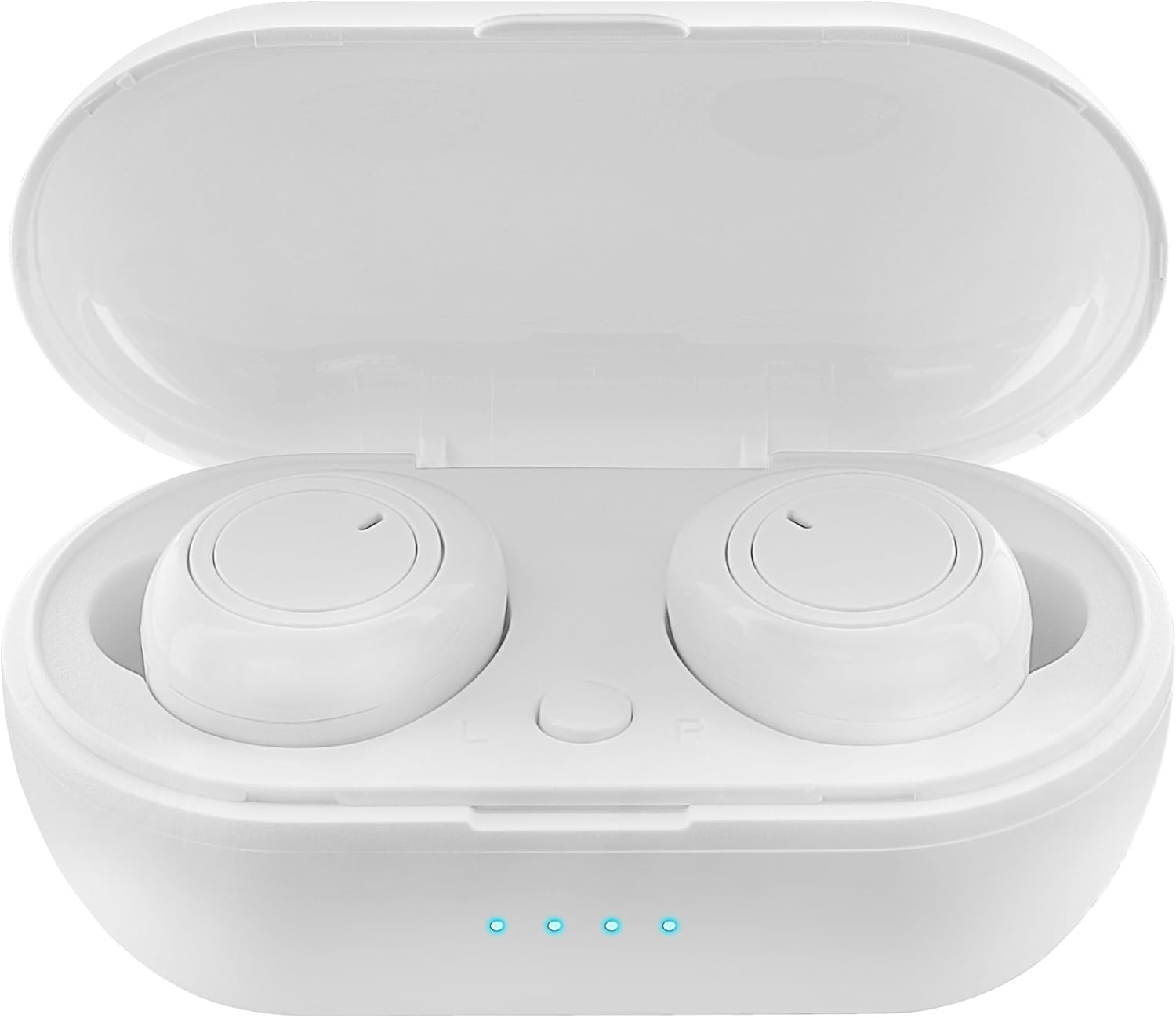
Figure 1: Earbuds in Charging Case with LED Indicators. The charging case features a transparent lid and three blue LED lights indicating battery status.

Figure 2: Individual Earbuds (Front View). Each earbud features a circular touch control area for easy operation.

Figure 3: Individual Earbuds (Side View). The ergonomic design ensures a comfortable and secure fit in the ear.
Setup
1. Charging the Earbuds and Case
- Place the earbuds into the charging case. Ensure they are correctly seated.
- Connect the USB charging cable to the charging port on the case and to a power source (e.g., USB wall adapter, computer USB port).
- The LED display on the charging case will indicate the charging status. A full charge is indicated when all lights are solid.
- Allow approximately 1-2 hours for a full charge of both earbuds and the case.
2. Pairing with Your Device
- Open the charging case. The earbuds will automatically enter pairing mode (indicated by flashing lights on the earbuds).
- On your smartphone or Bluetooth-enabled device, go to the Bluetooth settings.
- Search for new devices and select "SENTRY Earbuds" (or similar name) from the list.
- Once connected, the earbud lights will stop flashing, and you will hear a confirmation tone.
- The earbuds will automatically reconnect to the last paired device when taken out of the case, if Bluetooth is enabled on the device.
Operating Instructions
Your SENTRY Ultra-Light Bluetooth Earbuds feature intelligent touch controls for easy management of your audio and calls.
| Function | Action |
|---|---|
| Play/Pause Music | Single tap on either earbud |
| Next Track | Double tap on the Right earbud |
| Previous Track | Double tap on the Left earbud |
| Answer/End Call | Single tap on either earbud |
| Reject Call | Press and hold either earbud for 2 seconds |
| Activate Voice Assistant | Triple tap on either earbud |
| Volume Up | Press and hold Right earbud |
| Volume Down | Press and hold Left earbud |
Maintenance
- Cleaning: Use a soft, dry, lint-free cloth to clean the earbuds and charging case. Do not use harsh chemicals or abrasive materials.
- Storage: When not in use, store the earbuds in their charging case to protect them and keep them charged. Store in a cool, dry place away from direct sunlight and extreme temperatures.
- Battery Care: To prolong battery life, avoid fully discharging the earbuds and charging case frequently. Charge them regularly, even if not in constant use.
- Water Resistance: These earbuds are not water resistant. Avoid exposure to water, sweat, or high humidity.
Troubleshooting
- Earbuds not pairing: Ensure both earbuds are charged. Place them back in the case, close the lid, then open it again to re-enter pairing mode. Check your device's Bluetooth settings and try reconnecting.
- Only one earbud working: Try placing both earbuds back in the charging case, closing the lid, and then taking them out again. This often re-syncs them.
- No sound: Check the volume level on both your device and the earbuds. Ensure the earbuds are properly connected to your device.
- Charging issues: Ensure the charging cable is securely connected to both the case and the power source. Try a different USB port or charger. Clean the charging contacts on the earbuds and inside the case.
- Poor sound quality: Ensure the earbuds are properly seated in your ears. Try cleaning any debris from the earbud grilles.
Specifications
| Feature | Detail |
|---|---|
| Model Name | 5002-407 |
| Connectivity Technology | Wireless (Bluetooth) |
| Wireless Communication Technology | Bluetooth |
| Age Range (Description) | Adult |
| Charging Time | Approximately 1-2 Hours (for earbuds and case) |
| Compatible Devices | Smartphones, Apple Devices |
| Control Type | Media Control |
| Cable Feature | Without Cable |
| Water Resistance Level | Not Water Resistant |
| Frequency Range | 20Hz - 20kHz |
| Control Method | Touch |
| Battery Life | Up to 12 Hours (with charging case) |
| Audio Driver Type | Dynamic Driver |
| Carrying Case Color | White |
| Earpiece Shape | Rounded |
| Brand | SENTRY |
| Color | White |
| Ear Placement | In Ear |
| Form Factor | In Ear |
| Noise Control | None |
Warranty and Support
SENTRY products are designed for reliability and performance. For information regarding warranty coverage and customer support, please refer to the warranty card included with your product or visit the official SENTRY website. You can also visit the SENTRY Store on Amazon for additional product information and support resources.


