
1. Introduction
Thank you for choosing the Orient Electric Smartchill 125L Desert Air Cooler. This manual provides essential information for the safe and efficient operation, installation, and maintenance of your new air cooler. Please read these instructions carefully before using the appliance and retain them for future reference.
This desert air cooler is designed to provide effective cooling for residential and commercial spaces up to 538 square feet, featuring a large 125-liter water reservoir, Densenest Honeycomb Pads, and multi-directional airflow.
2. Safety Instructions
Always follow basic safety precautions when using electrical appliances to reduce the risk of fire, electric shock, and injury.
- Ensure the power supply voltage matches the cooler's rating (230 Volts).
- Do not operate the cooler with a damaged cord or plug.
- Keep the cooler away from heat sources and direct sunlight.
- Do not immerse the cooler or its electrical parts in water.
- Always unplug the cooler before cleaning, filling, or performing any maintenance.
- Ensure the cooler is placed on a stable, level surface.
- Do not allow children to operate the cooler unsupervised.
- Avoid placing objects on top of the cooler or blocking air inlets/outlets.
- Use only clean water in the reservoir.
3. Package Contents
Verify that all items are present in the package:
- Main unit (Orient Electric Smartchill 125L Desert Air Cooler)
- User Manual
4. Setup
4.1 Unpacking
Carefully remove the air cooler from its packaging. Inspect the unit for any damage incurred during transit. Retain the packaging for future storage or transport.
4.2 Placement
Place the air cooler on a firm, level surface in a well-ventilated area. For optimal cooling, position the cooler near an open window or door to allow fresh air intake and exhaust of humid air. The cooler is suitable for rooms up to 538 square feet.

Image: The Orient Electric Smartchill 125L Desert Air Cooler positioned in a room, illustrating its capacity for superior cooling and high air delivery.
4.3 Wheel Installation (if applicable)
If the wheels are not pre-installed, attach them securely to the base of the cooler. Ensure all wheels are properly fastened before moving the unit. Exercise caution when moving the cooler, especially when the water tank is full, as the wheels may not be designed for heavy loads over rough surfaces.
4.4 Filling the Water Reservoir
Open the water inlet and fill the reservoir with clean water. The cooler has a 125-liter capacity. Monitor the water level indicator to avoid overfilling. For enhanced cooling, you may add ice to the dedicated ice chamber.

Image: The air cooler showcasing its Densenest Honeycomb pads and the ice chamber for quick cooling.
5. Operating Instructions
The Orient Electric Smartchill 125L Desert Air Cooler operates manually with knob controls.

Image: Close-up of the cooler's control panel with speed and function knobs, water level indicator, and swivel wheels.
5.1 Powering On/Off
Plug the power cord into a suitable 230V electrical outlet. Turn the 'Function' knob to the 'Cool' position to start the cooling function. Turn the 'Speed' knob to select your desired fan speed. To turn off, set both knobs to the 'Off' position and unplug the unit.
5.2 Speed Control
The cooler features 3 fan speed settings. Use the 'Speed' knob to adjust the airflow intensity according to your comfort level.
5.3 Airflow Direction (Louvers)
The cooler is equipped with multi-directional airflow and 4-way deflection louvers. Adjust the horizontal and vertical louvers manually to direct the cool air as needed. The louvers are fully collapsible, which helps prevent dust and insects from entering the unit when not in use.

Image: The air cooler in a living room, illustrating its multi-directional airflow capability.

Image: A visual representation of the collapsible louvers preventing dust and insects from entering the cooler.
5.4 Ice Chamber Usage
For quicker and more intense cooling, open the ice chamber lid and place ice cubes inside. Close the lid securely after adding ice.
5.5 Water Level Indicator
The cooler is equipped with a water level indicator on the front. Monitor this indicator to ensure the water reservoir has sufficient water for continuous cooling. Refill when the level is low.
5.6 Inverter Compatibility
This air cooler is designed to work seamlessly with inverters, providing uninterrupted cooling during power outages.
6. Maintenance
Regular maintenance ensures optimal performance and longevity of your air cooler.
6.1 Cleaning the Densenest Honeycomb Pads
The Densenest Honeycomb Pads are crucial for efficient cooling. Periodically clean them to prevent mineral buildup and maintain airflow. Refer to the diagram below for the cooling process.
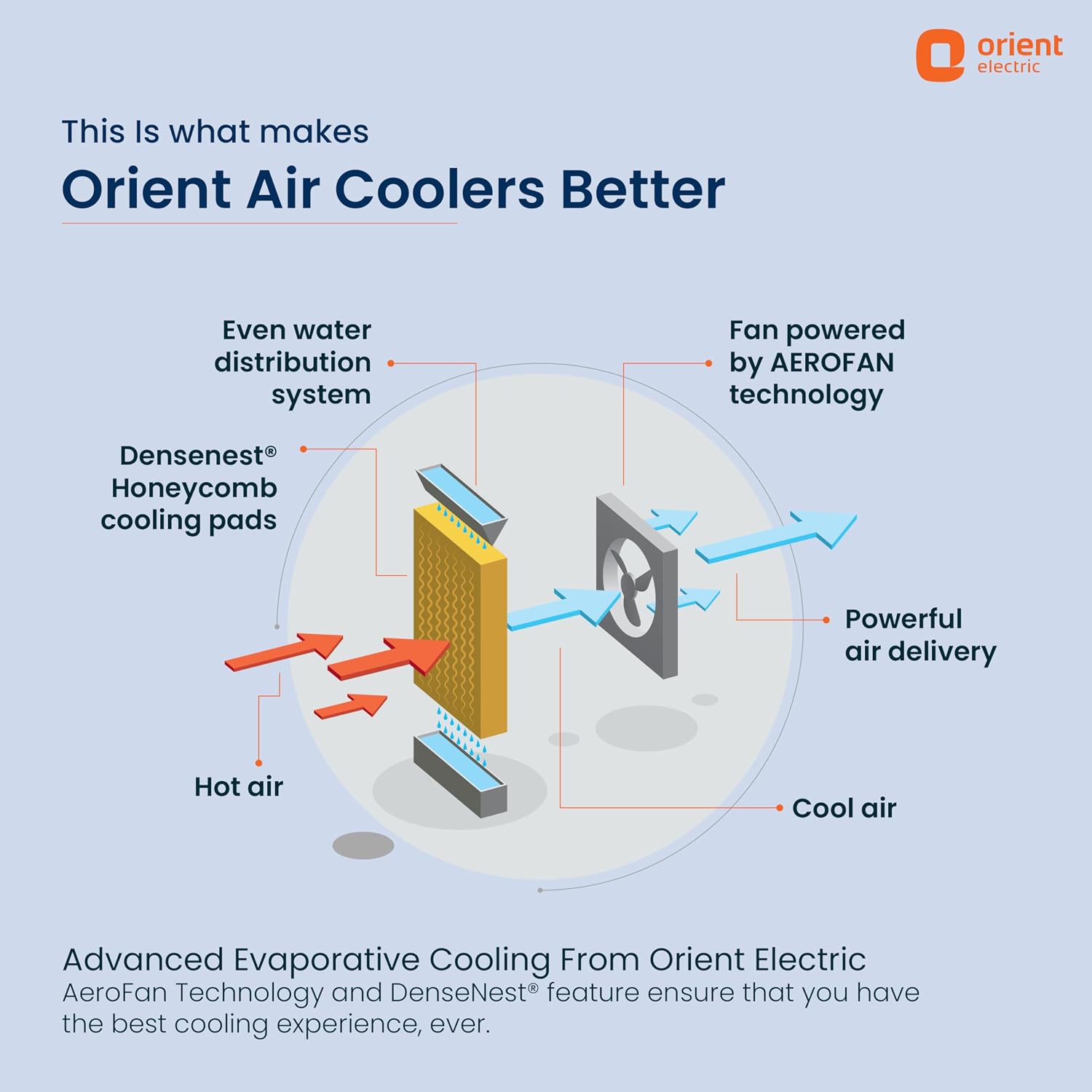
Image: Diagram explaining how the air cooler works, highlighting the Densenest Honeycomb pads and fan technology.
- Unplug the cooler from the power outlet.
- Carefully remove the honeycomb pads from their slots.
- Rinse the pads under running water to remove dust and mineral deposits. For stubborn buildup, soak them in a mild descaling solution.
- Allow the pads to dry completely before reinserting them.
6.2 Cleaning the Water Reservoir
Drain the water from the reservoir using the drain hole located at the bottom. Clean the interior of the reservoir with a soft cloth and mild detergent to prevent algae growth and odors. Rinse thoroughly before refilling.
6.3 Cleaning the Exterior
Wipe the exterior surfaces of the cooler with a soft, damp cloth. Do not use abrasive cleaners or solvents.
6.4 Storage
If storing the cooler for an extended period, ensure the water reservoir is completely drained and dry. Clean the honeycomb pads and exterior. Cover the cooler to protect it from dust and store it in a dry place.
7. Troubleshooting
Refer to the following table for common issues and their solutions:
| Problem | Possible Cause | Solution |
|---|---|---|
| Cooler does not turn on | No power supply | Check if the power cord is securely plugged in and the outlet is functional. |
| No cooling effect | Low water level | Refill the water reservoir. |
| Honeycomb pads are dry or clogged | Ensure the water pump is working. Clean the honeycomb pads. | |
| Poor ventilation in the room | Ensure adequate cross-ventilation by opening windows or doors. | |
| Water pump not working | Water level too low | Fill the water reservoir. |
| Pump clogged or faulty | Clean the pump filter. If the issue persists, contact customer support. | |
| Unusual noise | Fan obstruction or unstable placement | Check for any objects obstructing the fan. Ensure the cooler is on a stable surface. |
If the problem persists after attempting these solutions, please contact Orient Electric customer support.
8. Specifications

Image: The air cooler displaying its physical dimensions.
| Feature | Detail |
|---|---|
| Brand | Orient Electric |
| Model Name | Smartchill 125L desert cooler |
| Model Number | CD1251H |
| Material | Polypropylene (PP) |
| Mounting Type | Freestanding |
| Colour | White |
| Air Flow Capacity | 5000 Cubic Feet Per Minute |
| Controls Type | Knob |
| Reservoir Capacity | 125 Liters |
| Floor Area Coverage | Up to 538 Square Feet |
| Item Weight | 19 Kilograms |
| Wattage | 190 Watts |
| Number Of Speeds | 3 |
| Voltage | 230 Volts |
| Operation Mode | Manual |
| Item Dimensions (D x W x H) | 46.5D x 68.5W x 135.3H Centimeters |
| Special Features | Adjustable Speed, Densenest Honeycomb Pads, Fully Collapsible Louvers, Inverter Compatible, Ice Chamber |
9. Warranty and Support
9.1 Product Warranty
The Orient Electric Smartchill 125L Desert Air Cooler comes with a 1 Year Product Warranty from the date of purchase. This warranty covers manufacturing defects under normal use conditions. Please retain your purchase receipt as proof of purchase for warranty claims.
9.2 Customer Support
For any queries, technical assistance, or warranty claims, please contact Orient Electric customer support. Refer to the contact information provided with your product or visit the official Orient Electric website for support details.