
1. Introduction
Thank you for choosing the Yinleader Power Inverter. This device is designed to convert 12V or 24V DC power from your vehicle's battery into 230V AC household power, allowing you to operate various electronic devices on the go. It features an intelligent LCD display and multiple protection functions to ensure safe and reliable operation. Please read this manual thoroughly before use to ensure proper installation and operation.
2. Safety Instructions
To prevent personal injury and damage to the inverter or connected devices, observe the following safety precautions:
- Ventilation: Ensure adequate ventilation around the inverter. Do not block the cooling fan or vents.
- Environment: Do not expose the inverter to water, rain, snow, or spray. Keep it away from flammable materials, gases, or liquids.
- Connection: Always connect the inverter to a DC power source with the correct voltage (12V or 24V). Incorrect voltage can damage the unit.
- Polarity: Observe correct polarity when connecting to the battery. Reverse polarity connection will trigger protection.
- Load Capacity: Do not exceed the inverter's continuous power rating (1000W) or peak power rating (2000W).
- Inductive Loads: For inductive loads such as refrigerators, microwaves, induction cookers, air pumps, or coffee makers, the actual power consumption during startup can be 3 to 5 times their rated power. It is recommended to choose a higher power pure sine wave inverter for such appliances. For example, an 800W car refrigerator may have a starting power of up to 3000W.
- Cigarette Lighter Adapter: When using the cigarette lighter adapter, ensure the connected load does not exceed 150W to prevent damage to the vehicle's electrical system.
- Maintenance: Do not attempt to open or modify the inverter. Refer all servicing to qualified personnel.
The inverter is equipped with multiple protection features:
- Low Voltage Protection
- High Voltage Protection
- High Temperature Protection
- Short Circuit Protection
- Overload Protection
- Reverse Polarity Protection

Figure 2.1: The inverter incorporates six essential protection mechanisms: over-voltage, under-voltage, over-temperature, overload, short-circuit, and reverse polarity protection to safeguard the device and connected appliances.
3. Product Overview
3.1. Key Features
- Automatic Input Voltage Detection: The inverter automatically detects 12V (9V-15.5V) or 24V (20V-30V) DC input voltage and converts it to 230V AC, preventing damage from incorrect voltage.
- Intelligent LCD Display: A large LCD screen displays real-time input/output voltage, battery capacity, and load capacity.
- Versatile Outputs: Equipped with 1 standard European AC outlet and 2 USB ports for charging various devices.
- Comprehensive Protection: Includes low/high voltage, high temperature, short circuit, overload, and reverse polarity protection.
- Efficient Cooling: Features a high-speed cooling fan for effective heat dissipation.
3.2. Components and Controls

Figure 3.1: Front and Rear Panel Layout. This image highlights the inverter's interface, including the ON/OFF switch, power/fault LED indicators, a standard European AC outlet, dual USB 5V ports, and the DC input terminals with a cooling fan.
- ON/OFF Switch: Powers the inverter on or off.
- LED Indicator: Shows power status (green) and fault conditions (red).
- EU AC Socket: Standard European 230V AC output.
- Dual USB Ports: 5V DC output for charging USB-powered devices.
- Negative Port (-): Connects to the negative terminal of the battery.
- Positive Port (+): Connects to the positive terminal of the battery.
- Cooling Fan: Automatically activates to dissipate heat.
3.3. LCD Display Information
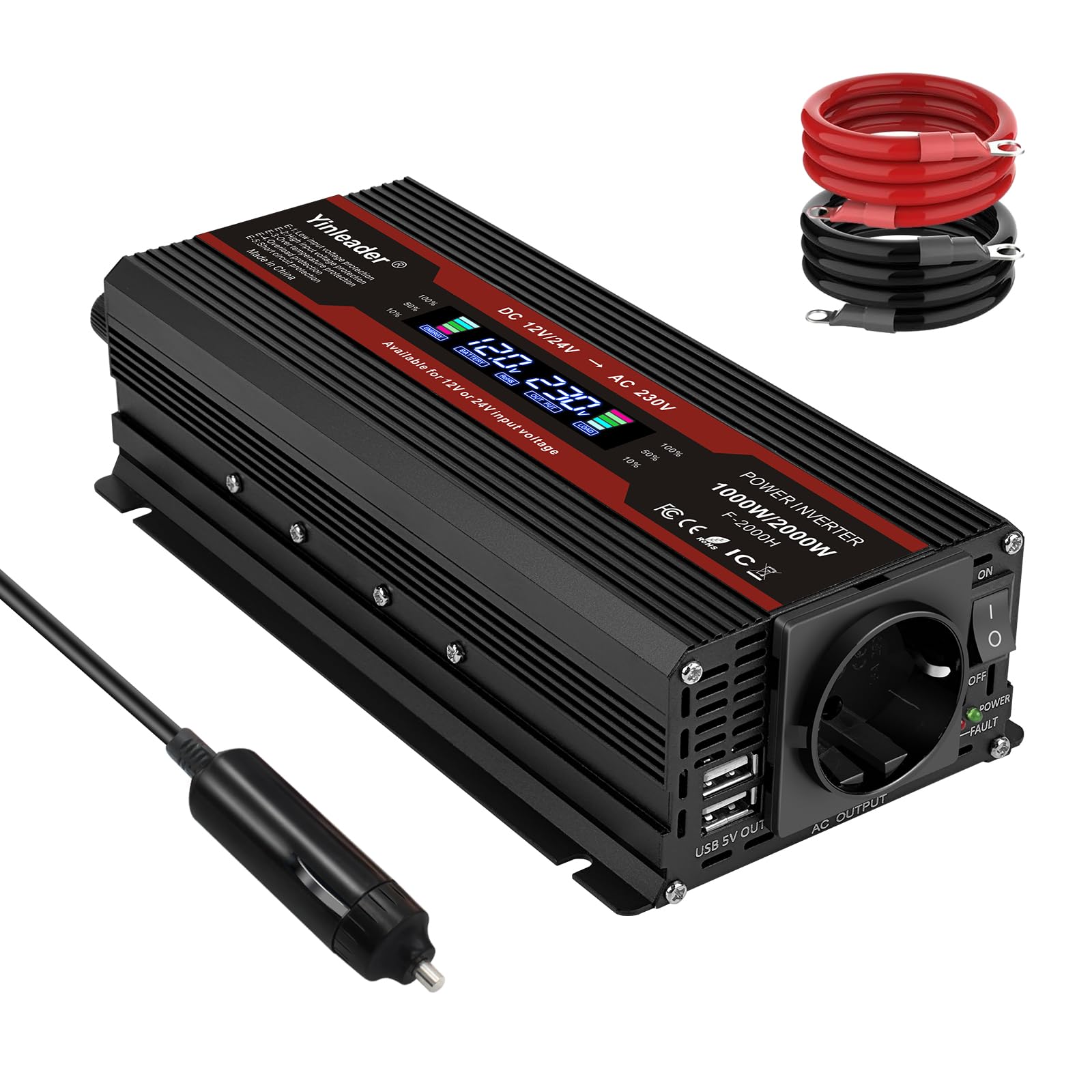
Figure 3.2: Intelligent LCD Display. The intelligent LCD screen provides real-time information on battery capacity, input/output voltage, output frequency, and connected load.
- Battery Capacity: Indicates the remaining battery charge.
- Battery Voltage: Displays the DC input voltage from the battery.
- Output Frequency: Shows the AC output frequency (50Hz).
- Output Voltage: Displays the AC output voltage (230V).
- Load Capacity: Indicates the percentage of the inverter's capacity currently being used.
4. Setup
4.1. Package Contents
Verify that all items are present in the package:
- 1 x Yinleader 1000W Power Inverter
- 1 x Pair of Battery Cables (50 cm)
- 1 x Cigarette Lighter Adapter
- Spare Fuses
- 1 x User Manual

Figure 4.1: Included Accessories. The inverter comes with battery connection cables and a cigarette lighter adapter for versatile power input options.
4.2. Connecting the Inverter
Follow these steps to connect the inverter to your power source:
- Ensure Inverter is OFF: Before making any connections, ensure the inverter's ON/OFF switch is in the "OFF" position.
- Battery Connection:
- Connect the red battery cable to the positive (+) terminal of the inverter and the positive (+) terminal of your 12V or 24V DC battery.
- Connect the black battery cable to the negative (-) terminal of the inverter and the negative (-) terminal of your 12V or 24V DC battery.
- Important: Ensure connections are secure and correct polarity is observed. Loose connections can cause overheating.
- Cigarette Lighter Connection (for loads under 150W):
- Insert the cigarette lighter adapter into the inverter's DC input port.
- Plug the other end of the adapter into your vehicle's cigarette lighter socket.
- Note: This method is suitable for low-power devices only. Do not exceed 150W.
- Automatic Voltage Detection: The inverter will automatically detect whether the input is 12V or 24V DC. If you need to change the input voltage setting (e.g., from 12V to 24V or vice versa), ensure the inverter is turned off before making the connection.

Figure 4.2: Automatic Input Voltage Detection. This image illustrates the inverter's automatic detection of either 12V or 24V DC input voltage, converting it to 230V AC.
5. Operating Instructions
Once the inverter is properly connected to a DC power source:
- Power On: Flip the ON/OFF switch to the "ON" position. The green LED indicator should light up, and the LCD screen will display the operating parameters.
- Connect AC Devices: Plug your 230V AC appliances into the European AC socket. Ensure the total power consumption does not exceed 1000W continuous.
- Connect USB Devices: Plug your USB-powered devices into the dual USB ports for charging.
- Monitor LCD Display: Regularly check the LCD display for input/output voltage, battery capacity, and load capacity to ensure optimal performance and prevent battery drain.
- Power Off: When finished, first disconnect all AC and USB devices, then flip the ON/OFF switch to the "OFF" position.

Figure 5.1: Wide Application. The inverter supports a wide range of applications, powering devices such as mobile phones, laptops, digital cameras, camcorders, lighting, razors, and more, making it ideal for travel, camping, and emergency use.
6. Maintenance
Proper maintenance ensures the longevity and reliable operation of your inverter.
- Cleaning: Periodically clean the exterior of the inverter with a soft, dry cloth. Do not use abrasive cleaners or solvents.
- Ventilation: Ensure the cooling fan and air vents are free from dust and obstructions. A blocked fan can lead to overheating.
- Connections: Regularly check all electrical connections to ensure they are tight and free from corrosion.
- Storage: When not in use for extended periods, store the inverter in a cool, dry place, away from direct sunlight and moisture.

Figure 6.1: High-Speed Cooling Fan. A high-speed cooling fan is integrated into the inverter design to ensure efficient heat dissipation and prevent overheating during operation.
7. Troubleshooting
If you encounter issues with your inverter, refer to the following common problems and solutions:
| Problem | Possible Cause | Solution |
|---|---|---|
| Inverter does not turn on. |
|
|
| No AC output. |
|
|
| Red fault LED is on. |
|
|
If the problem persists after attempting these solutions, please contact customer support.
8. Specifications
| Feature | Detail |
|---|---|
| Brand | Yinleader |
| Model Number | 1000W12 (F-2000H) |
| Continuous Power | 1000 Watts |
| Peak Power | 2000 Watts |
| Input Voltage (DC) | 12V (9V-15.5V) or 24V (20V-30V) Automatic Detection |
| Output Voltage (AC) | 230 Volts |
| Output Frequency | 50 Hz |
| Output Waveform | Modified Sine Wave |
| USB Output | 2 x 5V USB Ports |
| AC Outlets | 1 x European Standard Socket |
| Efficiency | ≥ 90% |
| Display Type | LCD |
| Weight | 1 Kilogram |
| Dimensions (L x W x H) | 220mm x 95mm x 60mm (approximate, based on image) |
| Certifications | CE |
9. Warranty and Support
The Yinleader Power Inverter comes with a limited one-year warranty covering non-human damage. Please retain your proof of purchase for warranty claims.
For technical support, troubleshooting assistance, or warranty inquiries, please contact your retailer or visit the official Yinleader website for contact information.

