
Temank Growatt 5000W Solar Hybrid Inverter
Growatt 5000W Solar Hybrid Inverter User Manual
Model: Growatt 5000W Solar Hybrid Inverter
1. Product Overview
The Growatt 5000W Solar Hybrid Inverter is an all-in-one solution designed for off-grid solar power systems. It integrates a 5000W pure sine wave inverter, an 80A MPPT solar charge controller, and a battery charger, providing a comprehensive power management system. This unit is compatible with 48V lead-acid, lithium, and user-defined battery types, and supports 220V AC output. It is ideal for various applications including recreational vehicles, household appliances, and camping setups.

Figure 1.1: Front view of the Growatt 5000W Solar Hybrid Inverter, showcasing its compact design and integrated LCD display.

Figure 1.2: Overview of key specifications including 80A MPPT solar charge controller, 5000W max PV array power, and 145VDC max PV input VOC. The inverter provides pure sine wave output and supports 50/60Hz auto-sensing, along with lithium battery compatibility.
2. Key Features
- Integrated Design: 5000W Pure Sine Wave 220V AC inverter with built-in 80A MPPT Solar Controller. Max PV Power: 4500W, Max. PV Input VOC: 145VDC. Supports Utility/Generator/Solar Charge.
- User-Friendly Display: LCD display and 3 LED indicators provide dynamic system data and operating status. Configurable AC/Solar input priority and Load Supply Priority via LCD settings.
- Battery Compatibility: Compatible with 48V Lead-Acid, Lithium, and User-defined batteries. Requires a minimum battery capacity of 200Ah.
- Scalability: Supports parallel operation of up to 6 inverters for increased power output.
- Multiple Charging & Output Modes: Four charging modes (Solar first, Utility first, Solar and Utility, Only solar) and three output modes (Solar first, Utility first, SBU Priority) to meet diverse application requirements.
- Remote Monitoring (Optional): Supports WIFI/GPRS remote monitoring for real-time PV system status via mobile phone or website (module sold separately).

Figure 2.1: Visual representation of the inverter's all-in-one capabilities, including integrated MPPT, configurable battery charging and load supply priorities, optional remote monitoring, and parallel support.
3. Specifications
| Parameter | Value |
|---|---|
| Model Number | Growatt 5000W Solar Hybrid Inverter |
| Rated Power | 5000W / 5000VA |
| AC Output Voltage | 220V AC (Single phase/A Hot Leg, NOT Support 110V) |
| AC Output Frequency | 50Hz / 60Hz (Auto sensing) |
| Waveform | Pure Sine Wave |
| Max PV Array Power | 4500W |
| Max. PV Input VOC | 145VDC |
| MPPT Voltage Range | 60 - 115VDC |
| Max. Solar Charge Current | 80A |
| Max. AC Charge Current | 60A |
| Combined Battery Charge | 140A (Solar: 80A + AC: 60A) |
| Battery Voltage | 48VDC |
| Battery Type | Lead-acid / Lithium / User-defined |
| Minimum Battery Capacity | ≥ 200Ah |
| Dimensions (L x W x H) | 23 x 17.7 x 9.5 inches (Package) |
| Item Weight | 29.6 pounds |
| Operating Temperature | 0°C - 55°C |
| Protection Class | IP20 |
| Communication | WIFI/GPRS (Optional) |
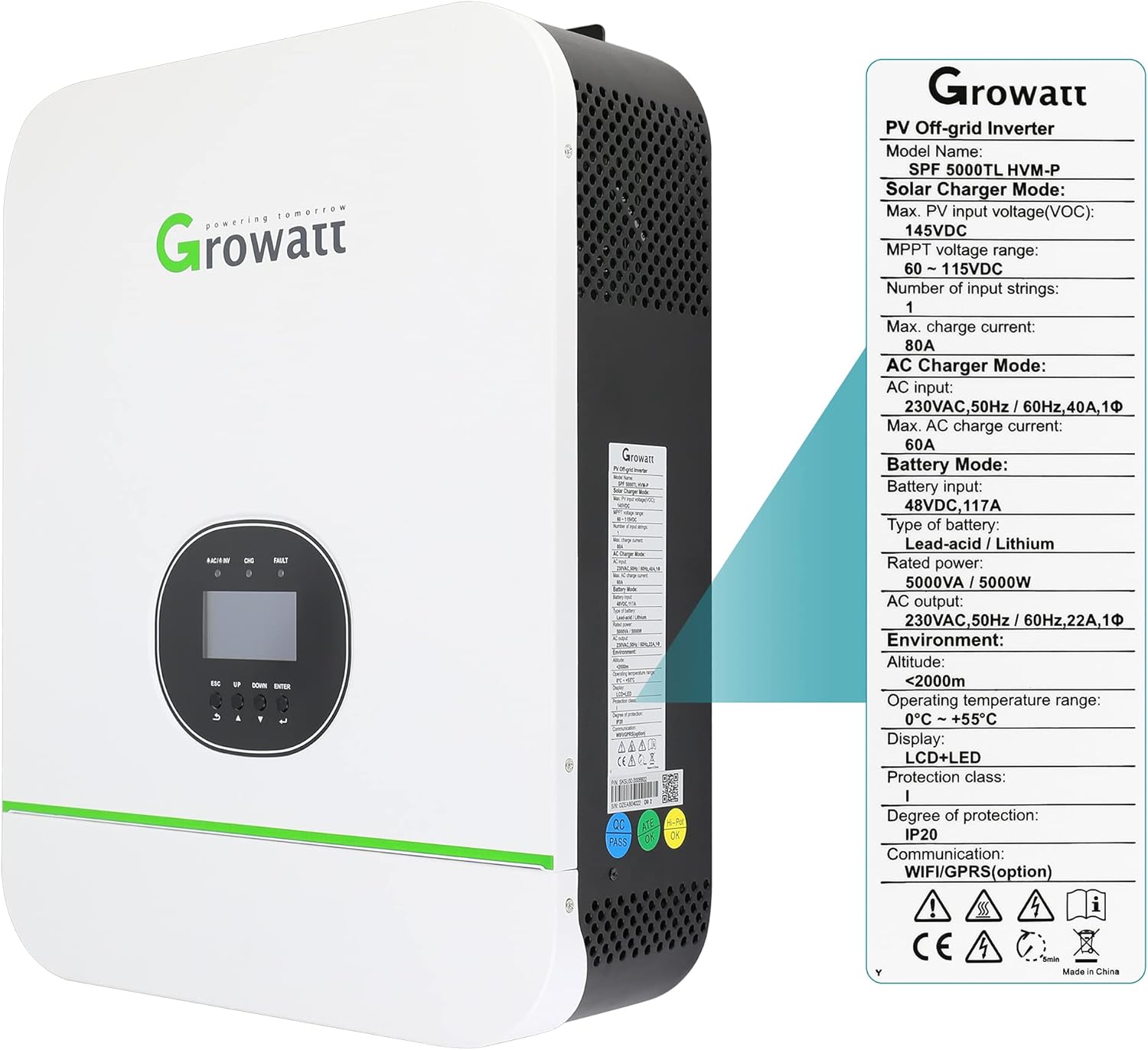
Figure 3.1: A close-up view of the product label detailing electrical specifications and environmental conditions.

Figure 3.2: Physical dimensions of the inverter (130mm width, 350mm depth, 455mm height) along with key power ratings like 5000W pure sine wave energy, 80A MPPT, and 140A combined battery charge.
4. Installation and Connections
4.1 Physical Overview
Familiarize yourself with the various indicators, buttons, and connection ports on the inverter before proceeding with installation.

Figure 4.1: Detailed diagram showing the location of the LCD display, function buttons, status indicators (Status, Charging, Fault), and various communication and power ports including WiFi/GPRS, USB, Dry Contact, PV Input, BMS Communication, RS485, Power On/Off Switch, AC Input, Circuit Breaker, AC Output, Current Sharing Port, Parallel Communication Port, and Battery Input Port.
4.2 Wiring Instructions
Proper wiring is crucial for safe and efficient operation. Ensure all connections are secure and follow local electrical codes. This inverter outputs 220V AC and does not support 110V. Ground and Neutral are not connected together internally.
- Connect the Ground wire to the Ground terminal.
- Connect Hot Line 1 to the L terminal.
- Connect Hot Line 2 to the N terminal.
- NOTE: Do not connect AC input Neutral or Load Neutral to the inverter.
- Battery cable size: 2AWG. Torque value: 2-3 Nm.

Figure 4.2: Diagrams illustrating the correct wiring for AC output, AC input, and battery connections. Note the specific terminals for Ground (G), Hot Line 1 (L1), and Hot Line 2 (L2) for AC connections, and the ring terminal connection for the battery.
4.3 System Connection Diagram
The following diagram illustrates a typical off-grid solar system setup with the Growatt inverter, connecting solar panels, utility grid (optional), generator (optional), battery, and home loads.

Figure 4.3: A complete system diagram showing the interconnection of solar panels, utility grid, generator, the Growatt off-grid solar inverter, 48V battery bank, and various home loads. It also indicates the optional WiFi/GPRS module for remote monitoring.
4.4 Parallel Operation
For higher power requirements, up to 6 Growatt inverters can be connected in parallel. Ensure proper communication connections between units for synchronized operation.

Figure 4.4: Diagram illustrating how multiple Growatt inverters can be connected in parallel to increase total output capacity. It shows the power connections for battery, utility grid, and loads, as well as the communication connections between the inverters.
5. Operating Modes and Settings
The inverter offers flexible configuration options via its LCD display to optimize power flow based on your specific needs.
5.1 Charger Source Priority
This setting determines the preferred source for charging the battery.
- Solar First: Solar energy is the primary charging source. Utility power charges the battery only when solar energy is unavailable.
- Utility First: Utility power is the primary charging source. Solar energy charges the battery only when utility power is unavailable.
- Solar and Utility: Both solar energy and utility power will charge the battery simultaneously.
- Only Solar: Only solar energy will charge the battery, regardless of utility power availability.
5.2 Output Source Priority
This setting determines the preferred source for powering the connected loads.
- Solar First (PV Priority): Solar power is the primary source for loads.
- Utility First (Default): Utility power is the primary source for loads.
- SBU Priority: Solar power loads first, then battery, and finally utility power.

Figure 5.1: Visual explanation of the four charger source priority modes (Solar First, Utility First, Solar and Utility, Only Solar) and three output source priority modes (PV Priority, Utility Priority, SBU Priority).
6. Maintenance
Regular maintenance ensures the longevity and optimal performance of your Growatt Solar Hybrid Inverter. Always disconnect all power sources before performing any maintenance.
- Cleaning: Periodically clean the inverter's exterior with a dry cloth to remove dust and debris. Ensure ventilation openings are clear and unobstructed.
- Connection Check: Annually inspect all electrical connections (PV, battery, AC input/output) for tightness and signs of corrosion. Re-tighten if necessary.
- Battery Inspection: For lead-acid batteries, check electrolyte levels and terminal cleanliness as per battery manufacturer guidelines. For lithium batteries, monitor their health via the inverter's display or a dedicated BMS.
- Environmental Check: Ensure the installation environment remains within specified temperature and humidity ranges. Protect the inverter from direct sunlight, rain, and excessive dust.
- Firmware Updates: If remote monitoring is enabled, check for available firmware updates from the manufacturer to ensure optimal performance and access to new features.
7. Troubleshooting
This section provides guidance on common issues you might encounter. For problems not listed here, or if solutions do not resolve the issue, contact customer support.
| Problem | Possible Cause | Solution |
|---|---|---|
| Inverter not turning on / No display | No battery connection, low battery voltage, or main circuit breaker tripped. | Check battery connections and voltage (must be 48V). Ensure battery capacity is sufficient (≥ 200Ah). Check and reset the circuit breaker. |
| No AC output | Overload, short circuit, battery low, or output breaker tripped. | Reduce load. Check for short circuits in wiring. Charge battery. Reset AC output breaker. Verify output priority settings. |
| Battery not charging from solar | PV input voltage too low/high, solar panels shaded, or MPPT controller fault. | Check PV array voltage (60-115VDC). Ensure panels are not shaded. Verify solar charge priority setting. Inspect PV connections. |
| Battery not charging from utility/generator | AC input not connected, utility/generator power off, or AC charge current setting too low. | Check AC input connection. Ensure utility/generator is providing power. Verify AC charge priority setting. Adjust AC charge current if necessary. |
| Fault indicator lit | Internal error, over-temperature, or specific system fault. | Refer to the LCD display for specific error codes. Ensure adequate ventilation. If persistent, contact support. |
8. Warranty and Support
The Growatt 5000W Solar Hybrid Inverter comes with a manufacturer's warranty covering defects in materials and workmanship. Please refer to your purchase documentation for specific warranty terms and duration.
For technical support, warranty claims, or any inquiries regarding your inverter, please contact the manufacturer or your authorized dealer. When contacting support, please have your product model number and purchase date readily available.
Manufacturer: Temank
For further assistance, visit the Temank Store on Amazon.
Related documentsGrowatt 5000W Solar Hybrid Inverter


Ask a question about this manual
Ask about setup, troubleshooting, compatibility, parts, safety, or missing instructions. Manuals+ will review the question and use this page’s manual context to help answer it.