
WLIVE ACTG005QX
WLIVE Rattan Nightstand with Charging Station User Manual
Model: ACTG005QX
1. Introduction
Thank you for purchasing the WLIVE Rattan Nightstand with Charging Station. This manual provides essential information for the safe and efficient assembly, operation, and maintenance of your new nightstand. Please read this manual thoroughly before assembly and retain it for future reference.
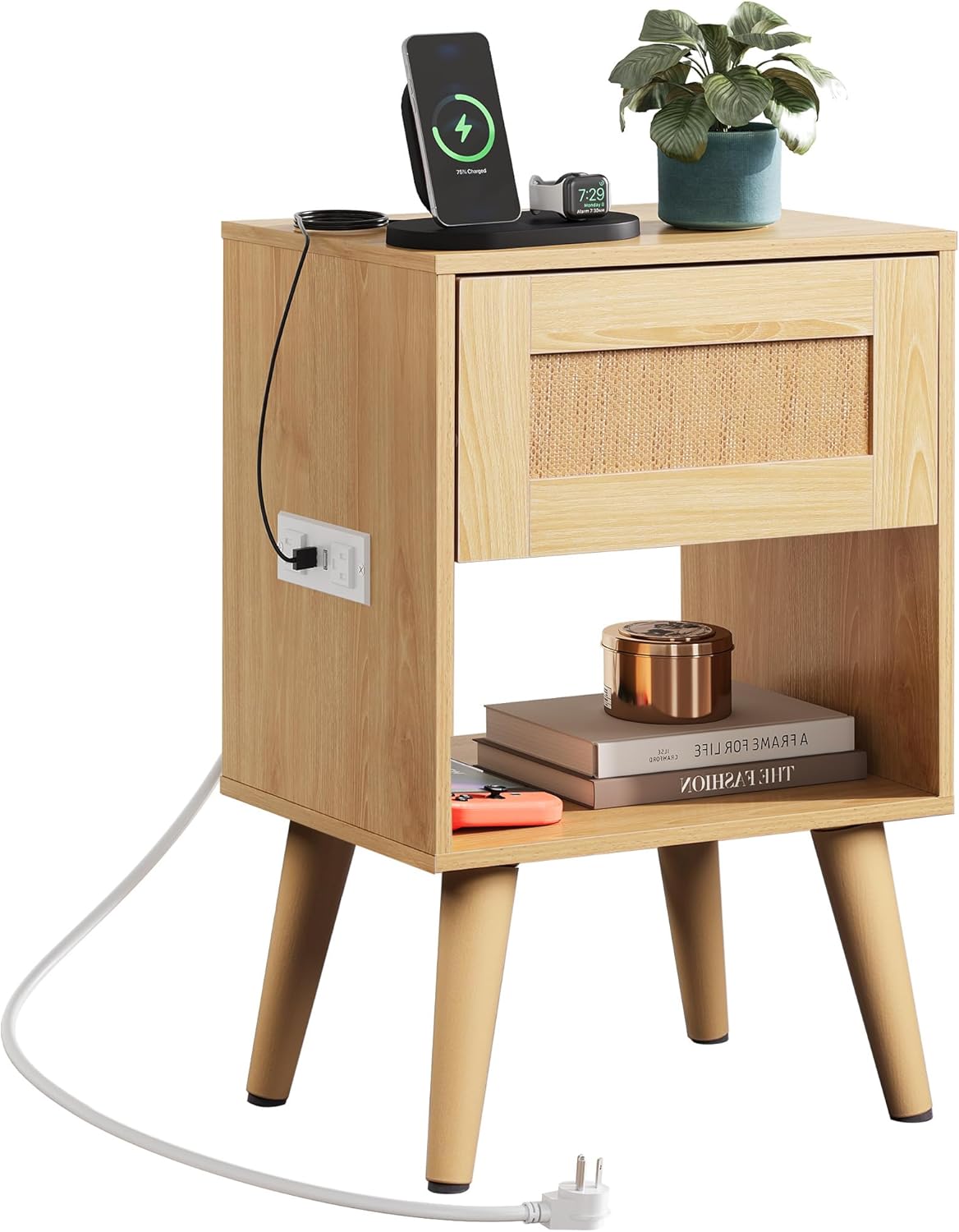
Image 1.1: The WLIVE Rattan Nightstand with Charging Station, showcasing its natural wood finish, rattan-decorated drawer, and integrated charging station.
2. Important Safety Information
Please observe the following safety precautions to prevent injury and damage to the product:
- Do not use power tools for assembly. Hand tools are recommended to prevent overtightening and damage to components.
- Ensure all screws and fasteners are securely tightened before use. Periodically check and re-tighten as necessary.
- Do not exceed the maximum weight recommendation of 50 pounds (22.68 kg) for the tabletop.
- Keep liquids away from the integrated charging station to prevent electrical hazards.
- Place the nightstand on a flat, stable surface to prevent tipping.
- The product is designed for indoor use only.
- Keep small parts away from children during assembly to avoid choking hazards.
3. Package Contents
Before beginning assembly, verify that all parts listed below are present and undamaged. If any parts are missing or damaged, please contact WLIVE customer support.
| Part | Description | Quantity |
|---|---|---|
| A | Top Panel | 1 |
| B | Side Panels (Left/Right) | 2 |
| C | Bottom Shelf | 1 |
| D | Drawer Front with Rattan Decoration | 1 |
| E | Drawer Sides/Back | 3 |
| F | Drawer Bottom | 1 |
| G | Legs | 4 |
| H | Charging Station (2 USB, 2 AC Outlets) | 1 |
| I | Hardware Pack (Screws, Dowels, Drawer Slides, Screwdriver) | 1 |
Note: The package includes 2 instruction manuals, one for left-side charging station installation and one for right-side. Choose the appropriate manual for your desired setup.
4. Setup and Assembly
Assembly typically takes 30-60 minutes. It is recommended to assemble the nightstand in the room where it will be used.
4.1 Tools Required
- Phillips Head Screwdriver (included)
4.2 Assembly Steps
- Step 1: Attach Legs to Bottom Shelf. Secure the four legs (G) to the designated points on the bottom shelf (C) using the provided screws. Ensure the anti-slip pads on the legs face downwards.
- Step 2: Assemble the Frame. Attach the side panels (B) to the bottom shelf (C) and then to the top panel (A) using the appropriate fasteners from the hardware pack (I). Ensure the grooves for the drawer slides are correctly oriented.
- Step 3: Install Charging Station. Determine your preferred side (left or right) for the charging station (H). Carefully insert the charging station into the pre-cut opening on the chosen side panel. Secure it with the provided screws.

Image 4.1: The integrated charging station with 2 USB ports and 2 AC outlets, designed for flexible installation on either side of the nightstand.
- Step 4: Assemble the Drawer. Connect the drawer sides and back (E) to the drawer front (D) with the rattan decoration. Slide the drawer bottom (F) into the grooves. Secure the drawer components.
- Step 5: Install Drawer Slides. Attach the drawer slides to the assembled drawer and the corresponding grooves within the nightstand frame. Ensure smooth operation.

Image 4.2: Detail of the smooth and stable wheel design for the drawer slides, ensuring easy opening and closing.
- Step 6: Final Check. Verify that all connections are secure and the nightstand is stable.

Image 4.3: Detailed product dimensions: 11.73"D x 15.12"W x 23.78"H for the nightstand, and 13.11"D x 7.28"W x 3.39"H for the drawer.
5. Operating Instructions
5.1 Using the Charging Station
- Plug the nightstand's power cord into a standard wall outlet.
- Use the 2 USB ports (5V/2.1A) to charge compatible devices such as smartphones, tablets, or smartwatches.
- Use the 2 AC outlets (125V/2A) to power lamps, laptops, or other small electronics.
- Ensure devices are properly connected and the charging station is powered on.

Image 5.1: The nightstand in use, demonstrating the convenience of the integrated charging station for various electronic devices.
5.2 Storage Features
- The top surface provides ample space for a lamp, alarm clock, or decorative items.
- The smooth-gliding drawer offers concealed storage for personal items.
- The open lower shelf provides easy access storage for books, magazines, or other essentials.

Image 5.2: The drawer of the nightstand, providing convenient storage for various items.
6. Maintenance
- Cleaning: Wipe the nightstand with a dry, soft cloth. Avoid abrasive cleaners or harsh chemicals that may damage the finish.
- Spills: Immediately wipe up any spills to prevent water damage, especially near the charging station.
- Stability Check: Periodically check all screws and connections to ensure they remain tight. Re-tighten if necessary.
- Leg Pads: The plastic leg pads help prevent floor scratches. Ensure they remain intact and in place.
7. Troubleshooting
| Problem | Possible Cause | Solution |
|---|---|---|
| Nightstand is wobbly. | Loose screws; uneven floor. | Tighten all assembly screws. Move to a level surface or use shims under legs if needed. |
| Charging station not working. | Not plugged in; faulty outlet; damaged charging station. | Ensure the nightstand's power cord is securely plugged into a working wall outlet. Test the outlet with another device. If still not working, contact customer support. |
| Drawer does not slide smoothly. | Improperly installed drawer slides; obstruction. | Check that drawer slides are aligned and installed correctly. Remove any obstructions from the drawer path. |
If you encounter issues not listed here or if the suggested solutions do not resolve the problem, please contact WLIVE customer support for assistance.
8. Product Specifications
- Brand: WLIVE
- Model Number: ACTG005QX
- Product Dimensions (D x W x H): 11.73" x 15.12" x 23.78"
- Drawer Size (D x W x H): 13.11" x 11.57" x 7.13" (approximate, based on image 4.3)
- Item Weight: 14.21 Pounds (6.45 kg)
- Maximum Weight Recommendation (Tabletop): 50 Pounds (22.68 kg)
- Material: Particle Board, Plastic (legs)
- Color: Rattan Natural Wood
- Charging Station: 2 USB Ports (5V/2.1A), 2 AC Outlets (125V/2A)
- Power Cord Length: 4.9 Feet (approximate, based on feature bullets)
- Care Instructions: Wipe with Dry Cloth
9. Warranty and Support
For warranty information, missing parts, or technical support, please contact WLIVE customer service through the retailer's platform or visit the official WLIVE website. Please have your model number (ACTG005QX) and purchase date available when contacting support.
WLIVE Store: Visit the WLIVE Store on Amazon
Ask a question about this manual
Ask about setup, troubleshooting, compatibility, parts, safety, or missing instructions. Manuals+ will review the question and use this page’s manual context to help answer it.