
1. Introduction
The ZEBRONICS Riser Party DJ Speaker is designed to deliver a powerful audio experience with versatile connectivity and entertainment features. This manual provides detailed instructions for setting up, operating, and maintaining your speaker to ensure optimal performance.
2. Package Contents
Please check the box for the following items:
- 1 x ZEBRONICS Riser Party DJ Speaker
- 1 x Remote Control
- 2 x Wireless UHF Microphones
- 1 x Power Cable

Image: ZEBRONICS Riser Party DJ Speaker with included accessories.
3. Product Overview
3.1 Top Panel Controls
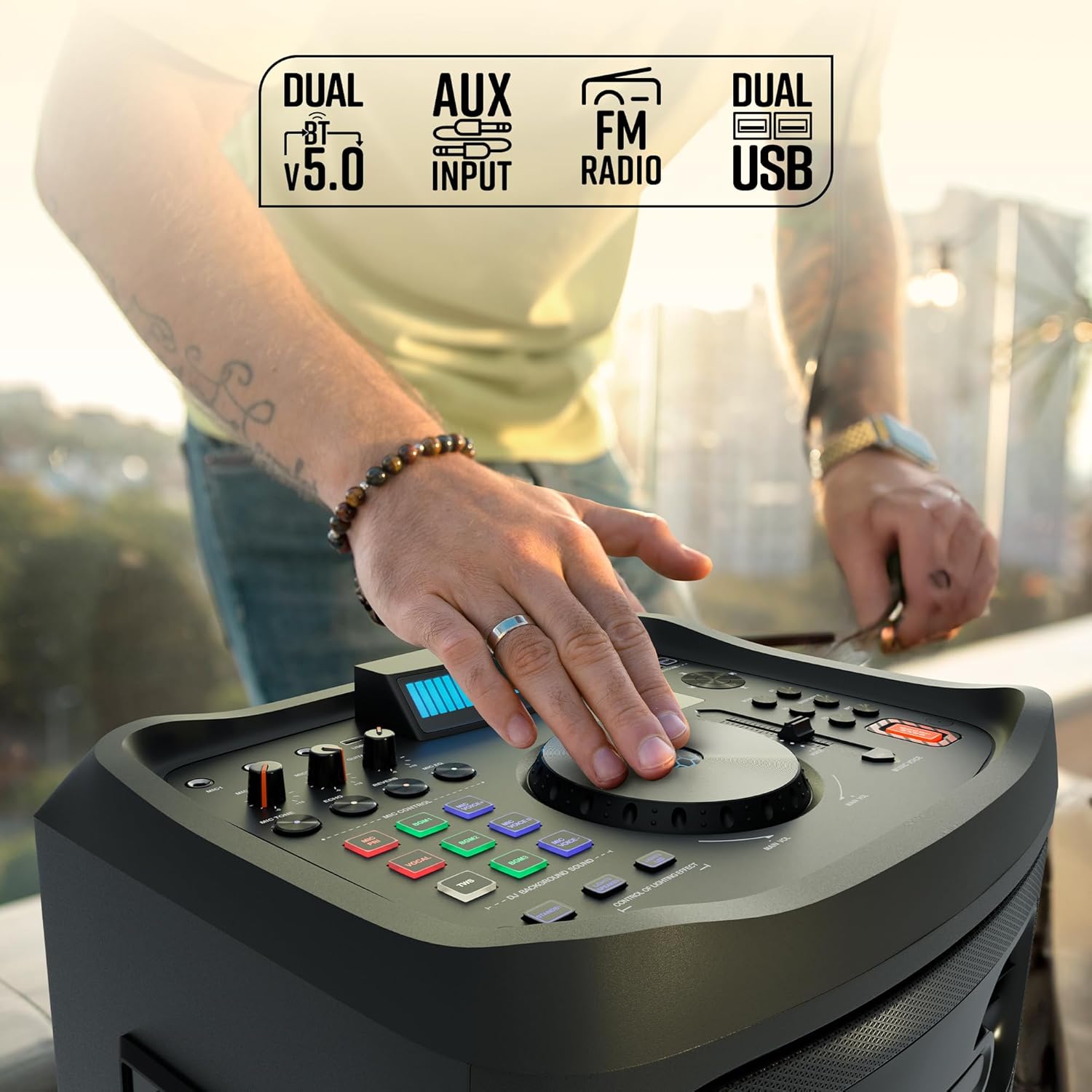
Image: Detailed view of the speaker's top control panel.
The top panel features various controls for audio adjustment, input selection, and special functions:
- Main Volume Knob: Adjusts the overall speaker volume.
- Microphone Volume Knobs (MIC1, MIC2): Controls the volume for each connected microphone.
- Guitar Volume Knob: Adjusts the volume for the connected guitar.
- Echo/Reverb/Mic Tone Knobs: Fine-tune microphone effects.
- Mode Button: Cycles through input sources (Bluetooth, USB, AUX, FM, HDMI ARC).
- Bass/Treble Controls: Adjusts low and high frequencies.
- EQ Button: Selects preset equalizer modes.
- Media Control Buttons: Play/Pause, Skip Track, Repeat.
- DJ BGM Effects: Buttons for activating various DJ background sound effects.
- LED Display: Shows current mode, track information, and other settings.
- Light Controls: Buttons to manage the speaker's LED lighting effects.
- Bass Boost Button: Enhances low-frequency output.
- Music Pitch Control: Adjusts the pitch of the music playback.
- Mic Pitch Control: Adjusts the pitch of the microphone input.
3.2 Rear Panel Connections

Image: Rear panel connections of the speaker.
The rear panel provides essential connection ports:
- Power Input: Connects the power cable to an electrical outlet.
- USB Ports (x2): For USB drive playback and charging.
- AUX Input: 3.5mm jack for connecting external audio devices.
- HDMI (ARC) Port: For connecting to compatible TVs or audio systems.
- Guitar Input: 6.3mm jack for connecting a guitar.
- MIC Inputs (x2): 6.3mm jacks for wired microphones (in addition to wireless mics).
4. Setup
4.1 Power Connection
- Connect the provided power cable to the Power Input port on the rear of the speaker.
- Plug the other end of the power cable into a standard electrical outlet.
- Ensure the power switch on the speaker is in the 'OFF' position before connecting to power.
4.2 Initial Placement
Place the speaker on a stable, flat surface. For optimal sound dispersion, position it in an open area, away from walls or corners that might obstruct audio. The speaker is designed for floor standing use.
5. Operating Instructions
5.1 Power On/Off
To power on the speaker, flip the power switch located on the rear panel to the 'ON' position. The LED display will illuminate. To power off, flip the switch back to 'OFF'.
5.2 Bluetooth Connectivity
- Turn on the speaker. The default mode is usually Bluetooth. If not, press the 'Mode' button until 'BT' appears on the LED display.
- On your mobile device, enable Bluetooth and search for available devices.
- Select 'ZEBRONICS Riser' from the list of devices.
- Once paired, the speaker will indicate a successful connection, and you can play audio from your device.
5.3 USB Playback
- Insert a USB flash drive containing MP3 audio files into one of the USB ports.
- Press the 'Mode' button until 'USB' appears on the LED display.
- The speaker will automatically begin playing audio files from the USB drive. Use the media control buttons to navigate tracks.
5.4 AUX Input
- Connect an external audio device (e.g., smartphone, MP3 player) to the AUX input port using a 3.5mm audio cable.
- Press the 'Mode' button until 'AUX' appears on the LED display.
- Play audio from your connected device.
5.5 FM Radio
- Press the 'Mode' button until 'FM' appears on the LED display.
- Use the media control buttons to scan for and select FM radio stations.
5.6 HDMI ARC Connection
- Connect an HDMI cable from the HDMI ARC port on the speaker to the HDMI ARC port on your television.
- Press the 'Mode' button until 'HDMI ARC' appears on the LED display.
- Ensure your TV's audio output settings are configured for HDMI ARC.
5.7 Guitar Input
- Connect your guitar to the 'Guitar Input' 6.3mm jack on the rear panel.
- Adjust the 'Guitar Vol' knob on the top panel to control the guitar's volume.
5.8 Microphone Input and Karaoke

Image: Overview of microphone and karaoke features.
- Wireless Microphones: Insert batteries into the provided UHF wireless microphones. Turn them on. They will automatically connect to the speaker.
- Wired Microphones: Connect wired microphones to the 'MIC1' or 'MIC2' 6.3mm jacks.
- Adjust the 'MIC1 Vol' and 'MIC2 Vol' knobs to control microphone volume.
- Use the 'Echo', 'Reverb', and 'Mic Tone' knobs to add effects to your vocals.
- The 'Instant Karaoke Maker' function allows you to sing along to music.
- Utilize the 'Mic Pitch Control' for vocal adjustments.
5.9 TWS (True Wireless Stereo) Function

Image: Two speakers demonstrating the TWS function for stereo sound.
To connect two Zeb-Riser speakers for a true wireless stereo experience:
- Ensure both speakers are powered on and in Bluetooth mode, but not yet paired with any device.
- On one of the speakers (this will be the primary speaker), press and hold the 'TWS' button.
- The primary speaker will search for the secondary speaker and connect automatically.
- Once connected, the LED display will indicate TWS mode. You can now pair your mobile device to the primary speaker via Bluetooth, and audio will play in stereo through both units.
5.10 DJ Effects
The speaker includes 3 DJ BGM (Background Music) Effects. Press the corresponding buttons on the top panel to activate these effects during playback.
5.11 LED Light Controls

Image: LED display and light control section.
The speaker features dynamic LED lights. Use the 'Lights Speaker' and 'Lights LED' controls on the top panel to customize or turn off the lighting effects.
5.12 Audio Adjustments
Use the 'Bass/Treble' knobs to adjust the low and high frequencies of the audio output. The 'EQ' button allows you to cycle through various preset equalizer modes to suit different music genres.
6. Maintenance
To ensure the longevity and optimal performance of your speaker:
- Clean the speaker's exterior with a soft, dry cloth. Avoid using abrasive cleaners or solvents.
- Keep the speaker away from direct sunlight, excessive heat, dust, and moisture.
- Do not block the ventilation openings on the speaker.
- Store the speaker in a cool, dry place when not in use for extended periods.
7. Troubleshooting
| Problem | Possible Cause | Solution |
|---|---|---|
| No power | Power cable not connected; Power switch off; Power outlet faulty. | Ensure power cable is securely connected; Turn power switch ON; Test power outlet with another device. |
| No sound | Volume too low; Incorrect input mode; Device not playing audio; Cables loose. | Increase volume; Select correct input mode; Check audio playback on source device; Secure all audio cables. |
| Bluetooth not connecting | Speaker not in pairing mode; Device Bluetooth off; Speaker already connected to another device. | Ensure speaker is in BT mode; Turn device Bluetooth on/off; Disconnect from other devices and try again. |
| Microphone not working | Mic volume low; Batteries dead (wireless mic); Mic not connected (wired mic); Faulty mic. | Increase mic volume; Replace batteries; Ensure wired mic is fully inserted; Test with another mic if possible. |
| Sound distortion | Volume too high; Source audio quality poor; Speaker placed too close to interference. | Reduce volume; Use high-quality audio source; Relocate speaker away from electronic devices. |
8. Specifications
| Feature | Detail |
|---|---|
| Model Name | Zeb-Riser |
| Output Power (RMS) | 210W |
| Driver Size | 25.4cm (Full-range), 7.62cm (Tweeter) |
| Connectivity | Dual BT v5.0, USB x 2, FM, AUX, HDMI (ARC) |
| Inputs | Guitar Input, Dual 6.3mm MIC Input |
| Microphones | Dual Wireless UHF Mic |
| Special Features | Instant Karaoke Maker, TWS Function, 3x DJ BGM Effects, Colorful LED lights, Dynamic Visualizer, 3D EQ, 12x Music Pitch Control, 24x Mic Pitch Control, Bass Boost |
| Mounting Type | Floor Standing |
| Power Source | Corded Electric |
| Item Weight | 12.5 kg |
| Product Dimensions (LxWxH) | 38.3 x 46 x 73 cm |
9. Warranty and Support
This product comes with a standard manufacturer's warranty. For detailed warranty information, service, or technical support, please refer to the warranty card included in your package or visit the official ZEBRONICS website. Keep your purchase receipt for warranty claims.


