
1. Introduction and Overview
The FUNMILY Walking Pad Under Desk Treadmill is designed to provide a convenient and effective way to incorporate physical activity into your daily routine, whether at home or in the office. Its compact and portable design allows for easy storage and use in various settings. This smart treadmill offers a quiet operation and can be controlled via a remote or a dedicated mobile application, making it a versatile fitness solution.

Image: The FUNMILY Walking Pad Under Desk Treadmill, showcasing its compact design and how it can be used for both walking and running, with app and remote control options visible.
2. Safety Instructions
- Read all instructions carefully before using the treadmill.
- Place the treadmill on a flat, stable surface. Ensure there is adequate clear space around the unit (at least 2 feet on sides and rear).
- Keep children and pets away from the treadmill during operation.
- Wear appropriate athletic footwear. Do not operate the treadmill barefoot or in socks.
- Do not step on or off the treadmill while the belt is moving.
- If you feel faint, dizzy, or experience pain, stop exercising immediately.
- Unplug the treadmill from the power outlet when not in use or before cleaning/maintenance.
- Do not use the treadmill if it is damaged or malfunctioning. Contact customer support.
- The maximum user weight capacity for this treadmill is 300 lbs. Do not exceed this limit.
3. Product Features
3.1 Versatile Use
This walking pad is designed for multiple scenarios, including walking, jogging, exercising at a standing desk, and even for pet exercise. Its adaptable speed range (0.5-3.8 MPH for walking, up to 12 MPH for running) makes it suitable for various fitness levels and activities.

Image: Demonstrates the versatility of the walking pad for various home exercise activities, including use with a standing desk and for pets.
3.2 Compact and Portable Design
The FUNMILY Walking Pad features an ergonomic and compact design, making it easy to move and store. Built-in wheels allow for effortless relocation, and its slim profile enables storage under furniture like sofas or beds, saving valuable space in your home or office.

Image: Illustrates the ease of moving and storing the walking pad, highlighting its portability and space-saving design.
3.3 Advanced Running Belt and Shock Absorption
Equipped with a multi-layer running belt, the treadmill provides effective shock absorption to protect your knees and joints during exercise. The non-slip surface ensures safety and stability during walking or jogging.
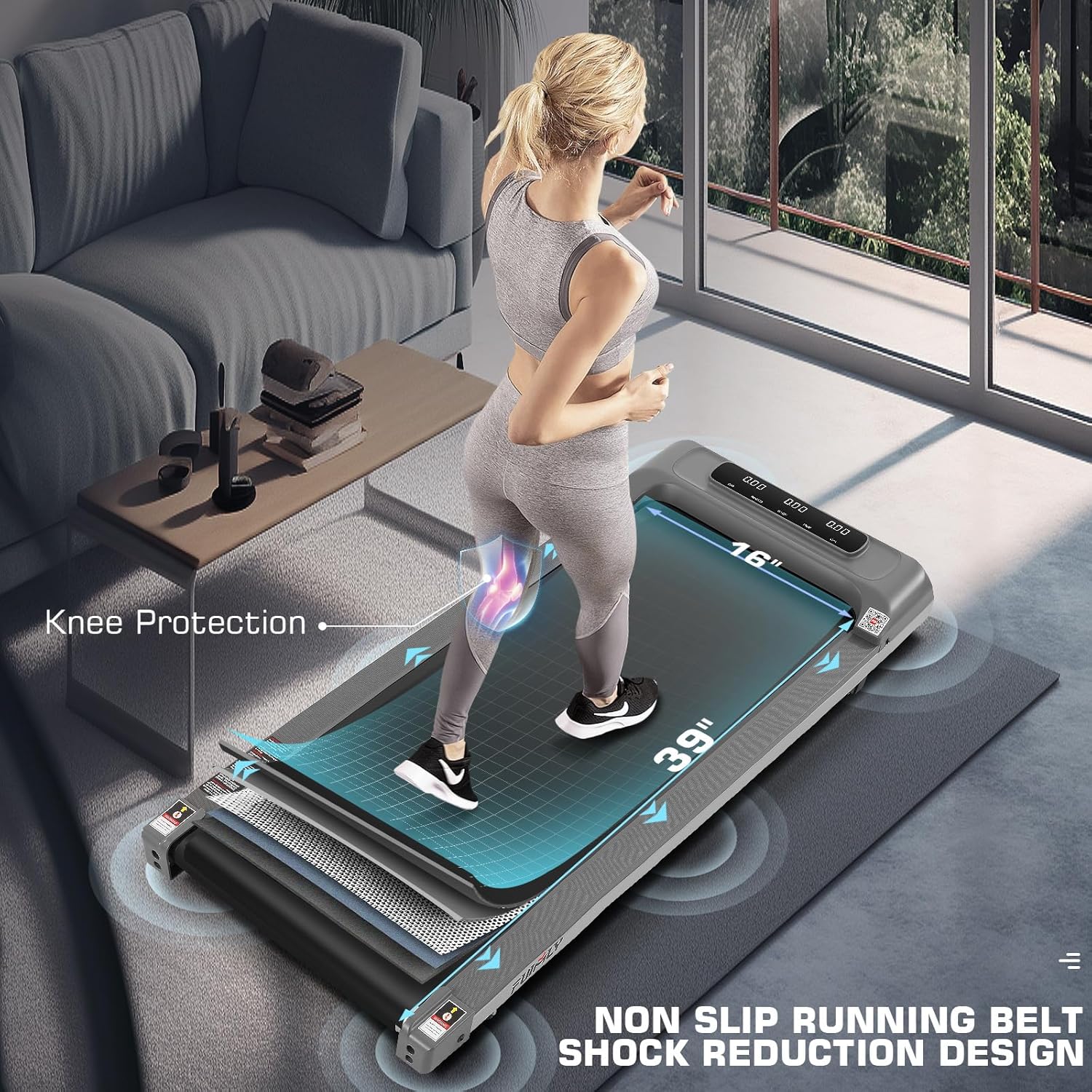
Image: Detailed view of the treadmill's multi-layer running belt, emphasizing its shock absorption and knee protection features.
3.4 Powerful and Quiet Motor
The FUNMILY Walking Pad features a 2.5 horsepower motor, providing stable and safe operation with minimal noise. This quiet performance ensures that your exercise does not disturb others, making it ideal for office or shared living spaces.

Image: Illustrates the powerful yet quiet 2.5HP motor, emphasizing its capacity and low noise output.
3.5 Smart Control and LED Display
Monitor your progress with the integrated HD LED display, which shows real-time data such as time, distance, calories burned, speed, and steps. The treadmill can be conveniently controlled via a compact remote control or through a dedicated mobile application, allowing for personalized workout tracking and adjustments.

Image: Shows the HD LED display and the dual control options via remote and smartphone app, displaying various exercise metrics.
3.6 Official Product Video
Video: An official product video demonstrating the features and usage of the FUNMILY Walking Pad Under Desk Treadmill, including its portability, quiet operation, and smart control capabilities.
4. Setup
The FUNMILY Walking Pad Under Desk Treadmill requires no assembly. Simply remove it from the packaging, place it on a flat surface, and plug it into a standard power outlet. Turn on the main power switch, usually located near the power cord connection point, and the treadmill is ready for use.
Image: The treadmill's compact design facilitates easy setup and storage, requiring no complex assembly.
5. Operating Instructions
5.1 Power On/Off
- To power on, ensure the treadmill is plugged in and flip the main power switch (often red) located at the front or side of the unit.
- To power off, flip the main power switch back to the off position and unplug the unit from the wall outlet.
5.2 Using the Remote Control
- The remote control allows you to start, stop, and adjust the speed of the treadmill.
- Press the Start/Stop button to begin or end your workout.
- Use the + and - buttons to increase or decrease the speed.
- Ensure the remote has fresh batteries for optimal performance.
5.3 Using the Mobile Application
- Download the compatible mobile application (e.g., Fitshow, Kinomap, Zwift) from your device's app store.
- Enable Bluetooth on your smartphone or tablet.
- Open the app and follow the on-screen instructions to pair with your FUNMILY Walking Pad.
- The app allows for detailed tracking of your exercise data, setting goals, and controlling the treadmill's functions.
6. Maintenance
6.1 Cleaning
- Always unplug the treadmill before cleaning.
- Wipe down the surface of the treadmill with a damp cloth after each use to remove sweat and dust.
- Do not use abrasive cleaners or solvents, as they may damage the finish.
6.2 Belt Lubrication
Regular lubrication of the running belt is essential for smooth operation and to prolong the life of your treadmill. Refer to the specific lubrication instructions provided with your treadmill or contact customer support for guidance on the correct type of lubricant and application frequency.
6.3 Belt Adjustment
If the running belt becomes misaligned or feels loose, it may need adjustment. Consult the detailed instructions in the full product manual or contact customer support for assistance. Incorrect adjustment can damage the treadmill.
7. Troubleshooting
| Problem | Possible Cause | Solution |
|---|---|---|
| Treadmill does not power on. | Not plugged in; power switch off; circuit breaker tripped. | Ensure power cord is securely plugged in. Check main power switch. Reset household circuit breaker if tripped. |
| Running belt stops or slips. | Belt needs lubrication; belt is too loose; motor overload. | Lubricate the belt (refer to manual). Adjust belt tension (refer to manual). Reduce user weight or intensity. |
| Unusual noise during operation. | Loose parts; belt friction; motor issue. | Check for loose screws and tighten. Lubricate belt if dry. If noise persists, contact customer support. |
| Remote control not working. | Dead batteries; remote not paired. | Replace remote batteries. Refer to operating instructions for pairing the remote. |
8. Specifications
- Brand: FUNMILY
- Product Grade: Upgraded Smart Treadmill Works with Apps
- Item Weight: 50 Pounds
- Maximum Speed: 12 Miles per Hour
- Minimum Speed: 0.6 Miles per Hour
- Maximum Horsepower: 2.5 Horsepower
- Assembly Required: No
- Display Type: LED
- Metrics Measured: Step Counter, Time, Distance, Calories, Speed
- Maximum Weight Recommendation: 300 Pounds
- Deck Length: 40 Inches
- Item Dimensions (LxWxH): 45 x 20 x 4.7 inches
- Input Power: 300 Watts
9. Warranty and Support
For detailed warranty information, product registration, or technical support, please refer to the official FUNMILY website or contact their customer service department. Keep your purchase receipt as proof of purchase for any warranty claims.
Contact information can typically be found on the product packaging or the manufacturer's official website.