
Product Overview
The ARPHA Keyless Entry Door Lock (Model D180K) is a smart locking solution designed for enhanced home security and convenience. This system integrates multiple unlocking methods, including app control, keypad passcodes, e-keys, and traditional mechanical keys. It supports up to 100 user codes, features anti-peep password protection, and offers automatic locking capabilities. The lock is built for easy installation on most standard US doors and is designed for durability and all-weather performance.
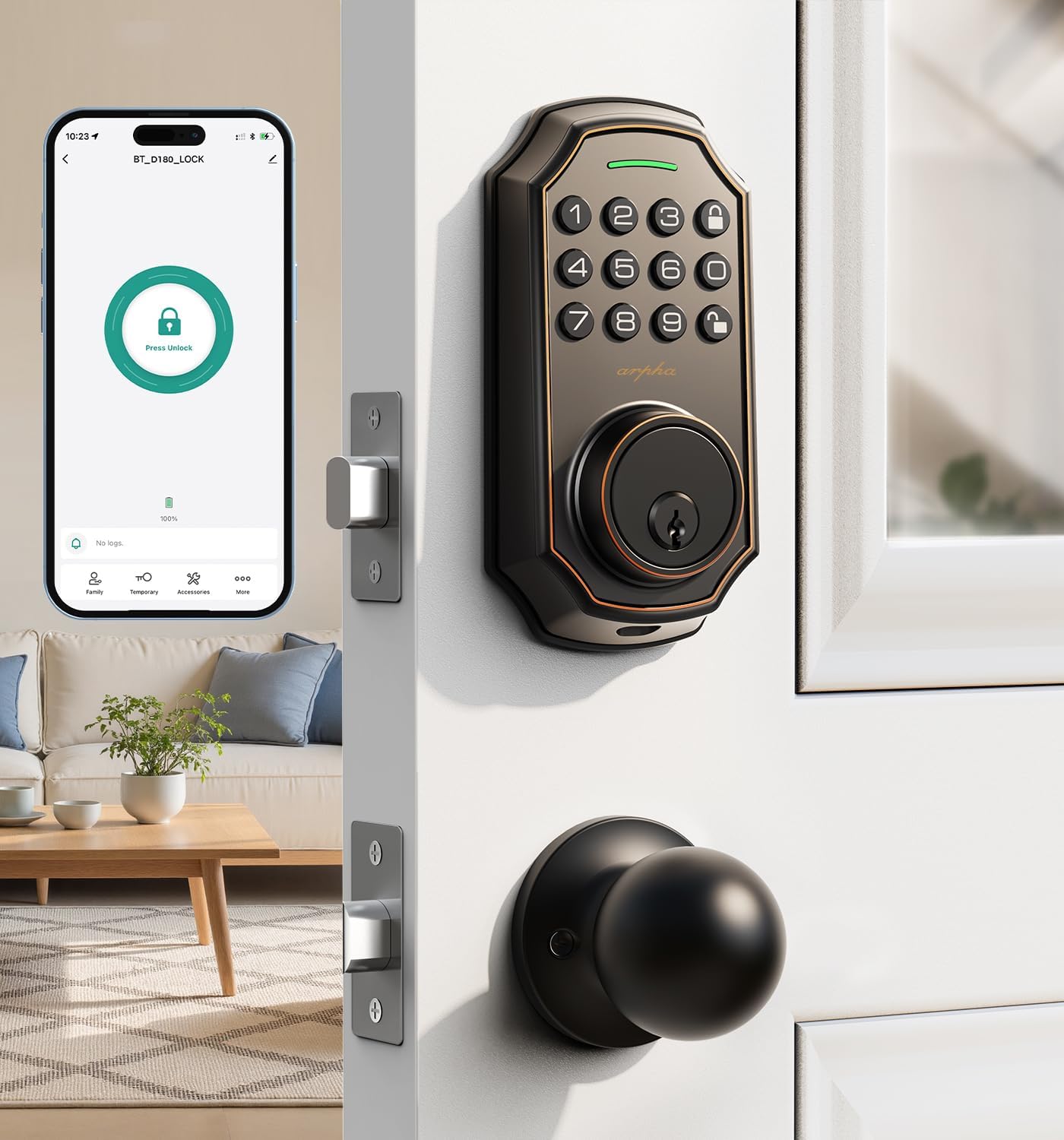
Image: The ARPHA Keyless Entry Door Lock, Model D180K, shown installed on a door. The image highlights the keypad and the accompanying door knob, with a smartphone screen overlay demonstrating the mobile application's unlock function. This smart lock offers modern security and convenient access.

Image: A comprehensive view of the ARPHA Keyless Door Lock Set, including the deadbolt and door knob, presented in a contemporary living room environment. This image emphasizes the product's aesthetic integration into a modern home, highlighting its role as a keyless entry solution.
Setup & Installation
The ARPHA Keyless Entry Door Lock is designed for straightforward installation without the need for drilling, fitting most standard US left and right-hand doors. Follow the instructions carefully for proper setup.
Door Compatibility and Dimensions
Before installation, ensure your door meets the required dimensions and compatibility specifications. The lock is suitable for doors with specific backset and bore hole measurements.
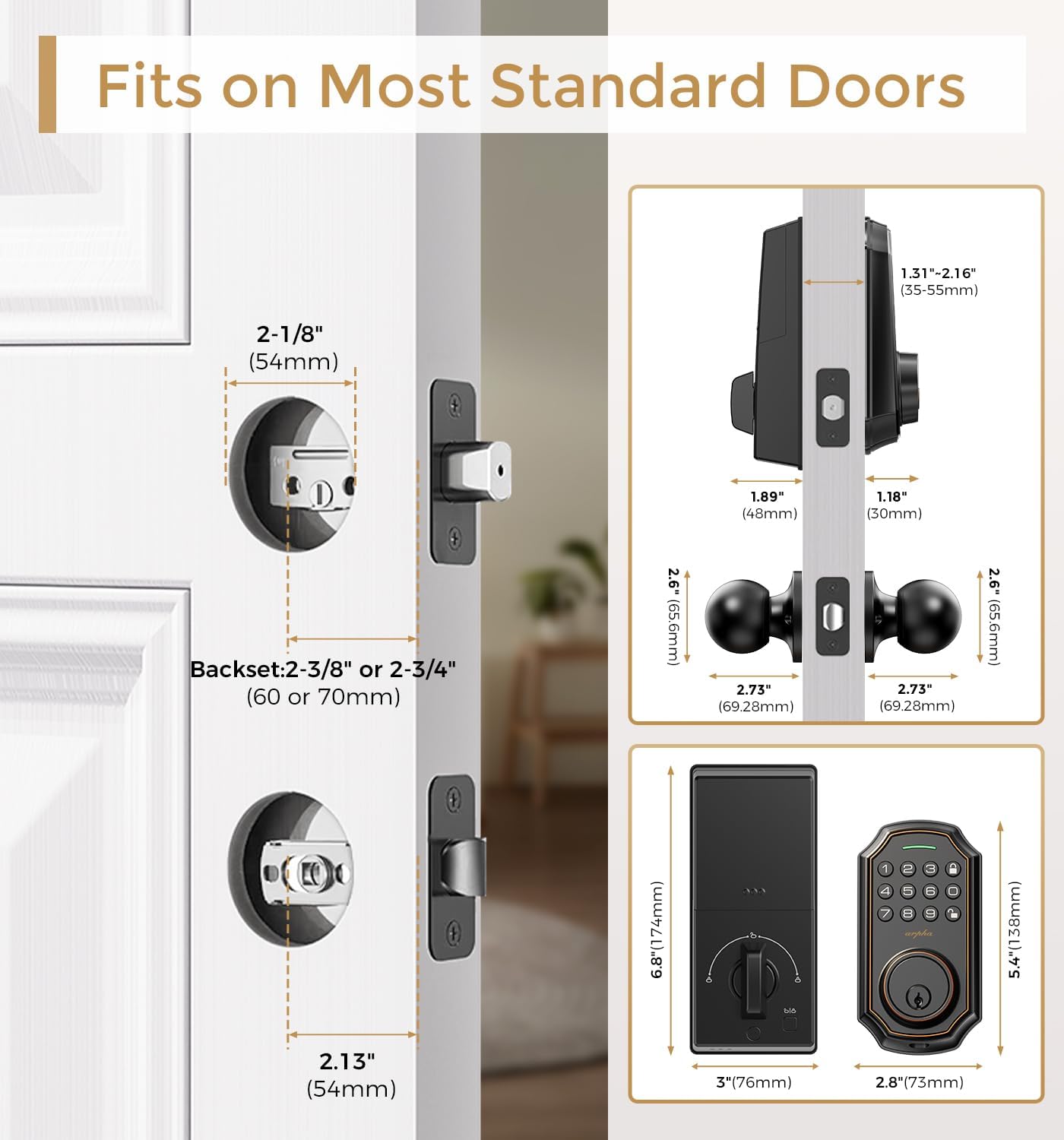
Image: A detailed diagram illustrating the dimensions and compatibility requirements for installing the ARPHA Keyless Entry Door Lock. It shows measurements for the bore hole (2-1/8" or 54mm), backset (2-3/8" or 60mm, or 2-3/4" or 70mm), and the lock's overall size, ensuring proper fit on standard doors.

Image: This graphic provides a comprehensive overview of the ARPHA Keyless Entry Door Lock's dimensions, including the keypad unit, interior assembly, and door knob. It specifies measurements in both inches and millimeters, aiding users in verifying compatibility with their door's existing hardware and ensuring a proper fit.

Image: A visual guide to door compatibility for the ARPHA Keyless Entry Door Lock. It illustrates various latch hole types (chiseled, not chiseled, single cylinder) that are compatible, and highlights incompatible door lock types such as mortise, integrated, and rim cylinder locks. This helps users determine if their door is suitable for installation.

Image: This graphic demonstrates the ARPHA Keyless Entry Door Lock's ability to automatically identify whether it is installed on a left-hand or right-hand opening door. This feature simplifies the installation process by eliminating the need for manual configuration of door handing.
For a detailed installation guide, refer to the video instructions provided by the manufacturer. No drilling is required for installation on compatible doors.
Operation
The ARPHA Keyless Entry Door Lock offers multiple convenient ways to unlock your door, ensuring flexible access for various situations.
Unlocking Methods
- App Control: Unlock your door remotely via the dedicated mobile application.
- Keypad Password: Enter your personalized passcode on the keypad.
- EKey: Utilize digital e-keys for convenient access.
- Mechanical Key: Use the traditional mechanical key as a backup or primary method.

Image: This graphic demonstrates the four primary methods for unlocking the ARPHA Keyless Entry Door Lock: App control via a smartphone, entering a code on the keypad, using a traditional mechanical key, and a one-touch unlock feature. This highlights the versatility and convenience of the lock's access options.
App Control Features
The ARPHA app provides comprehensive control over your smart lock. You can generate and share various types of access codes, manage users, and view access records. Note that remote unlocking via the app requires a separate gateway (ASIN: B09YHFG933).
- Code Generation: Create one-time, permanent, scheduled, and recurring codes for family, house sitters, and guests.
- User Management: Easily add or remove users and their respective access codes.
- Access Records: Monitor who has entered and exited your property with a detailed activity log.

Image: This visual illustrates the app control functionality of the ARPHA Keyless Entry Door Lock. It shows a smartphone displaying the unlock interface, indicating that Bluetooth control is effective within a 10-meter range of the lock. This highlights the convenience of local app-based access.

Image: A graphic demonstrating the ARPHA Keyless Entry Door Lock's capacity to store up to 100 user codes. It features various user profiles, symbolizing the ability to grant unique access to family members, guests, and service personnel, enhancing security and convenience for multiple users.

Image: This graphic visually represents the ARPHA Keyless Entry Door Lock's capability to store up to 100 unique passwords. It specifies the allocation of these codes: 3 for administrators and 97 for general users, providing flexible access management for different individuals.

Image: A user is depicted reviewing real-time unlocking records on the ARPHA mobile application. This image highlights the app's feature that allows users to track and monitor access history for their smart lock, providing enhanced security oversight.

Image: This graphic illustrates the "Timed Passcode" feature of the ARPHA app, showing a calendar interface for selecting specific dates. It demonstrates the ability to remotely generate and share temporary access codes that automatically expire after a set period, ideal for guests or service providers.

Image: A visual representation of the "One Time Code" feature, showing a person receiving a temporary entry code for the ARPHA Keyless Entry Door Lock. This highlights the convenience of granting single-use access to visitors or delivery personnel.
Auto-Lock and One-Touch Locking
The lock features an auto-lock function that can be set to automatically secure the door after a specified time (10 seconds to 30 minutes). Additionally, a one-touch lock feature allows for immediate locking.
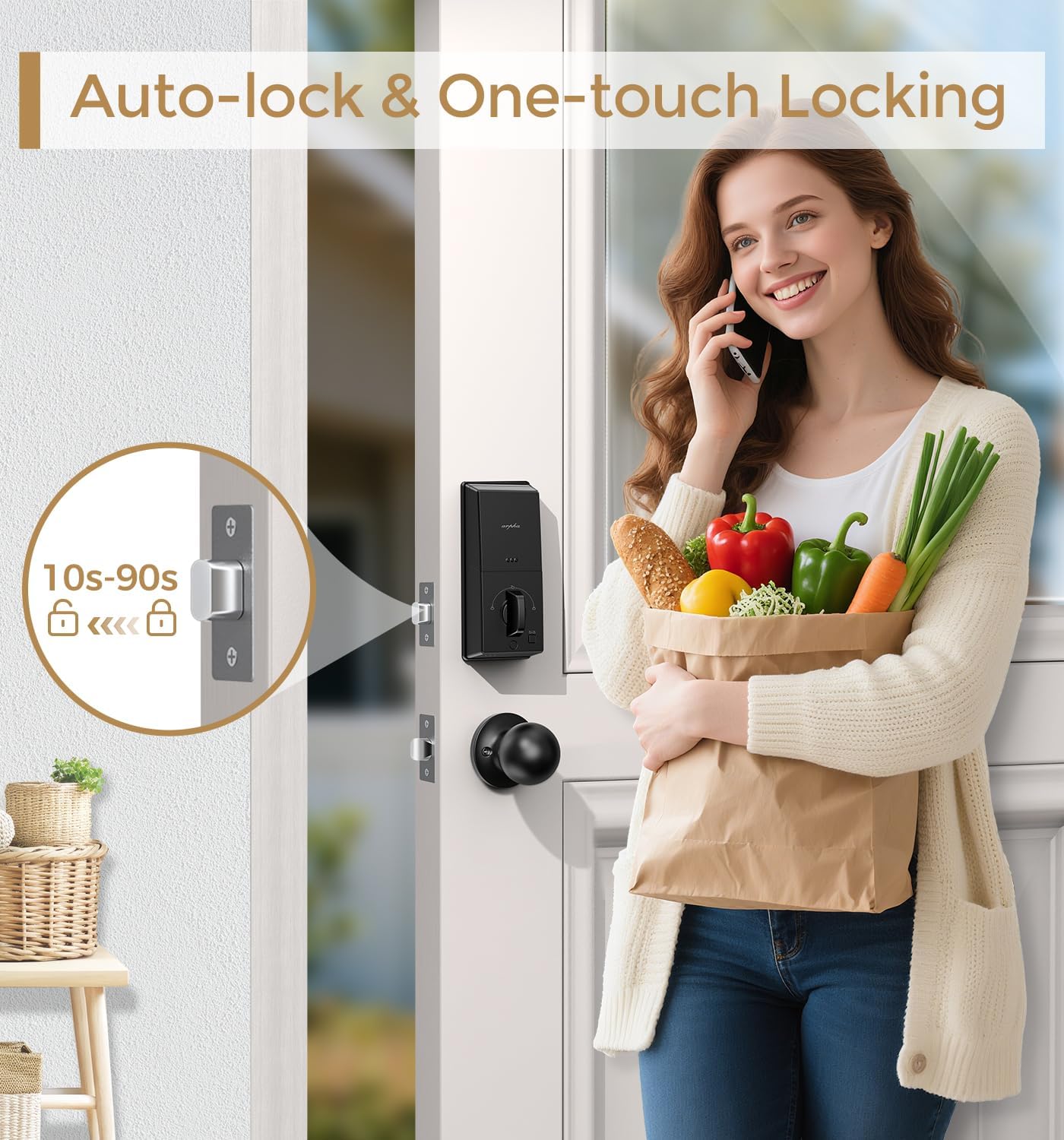
Image: This graphic illustrates the auto-lock and one-touch locking capabilities of the ARPHA Keyless Entry Door Lock. It shows a timer indicating that the auto-lock feature can be set from 10 to 90 seconds, providing peace of mind by automatically securing the door after entry or exit.
Anti-Peeping Password
To enhance security, the anti-peeping password feature allows you to enter random digits before or after your actual 6 to 8-digit passcode. This prevents onlookers from discerning your true code.

Image: This graphic explains the Anti-Peeping Password feature of the ARPHA Keyless Entry Door Lock. It visually demonstrates how users can input random digits before and after their actual passcode, effectively obscuring the real code from prying eyes and enhancing security.

Image: This graphic highlights the "Privacy & Security Combined" feature, specifically the advanced anti-peep passcode system. It visually explains how mixing random numbers with your real code protects your security, even in public or crowded spaces, by making it difficult for others to identify your actual passcode.
Maintenance
Proper maintenance ensures the longevity and optimal performance of your ARPHA Keyless Entry Door Lock.
Battery Replacement
The lock operates on 4 AA batteries (not included). With typical usage, batteries can last approximately 180 days. The lock will provide a low battery alert when replacement is needed.
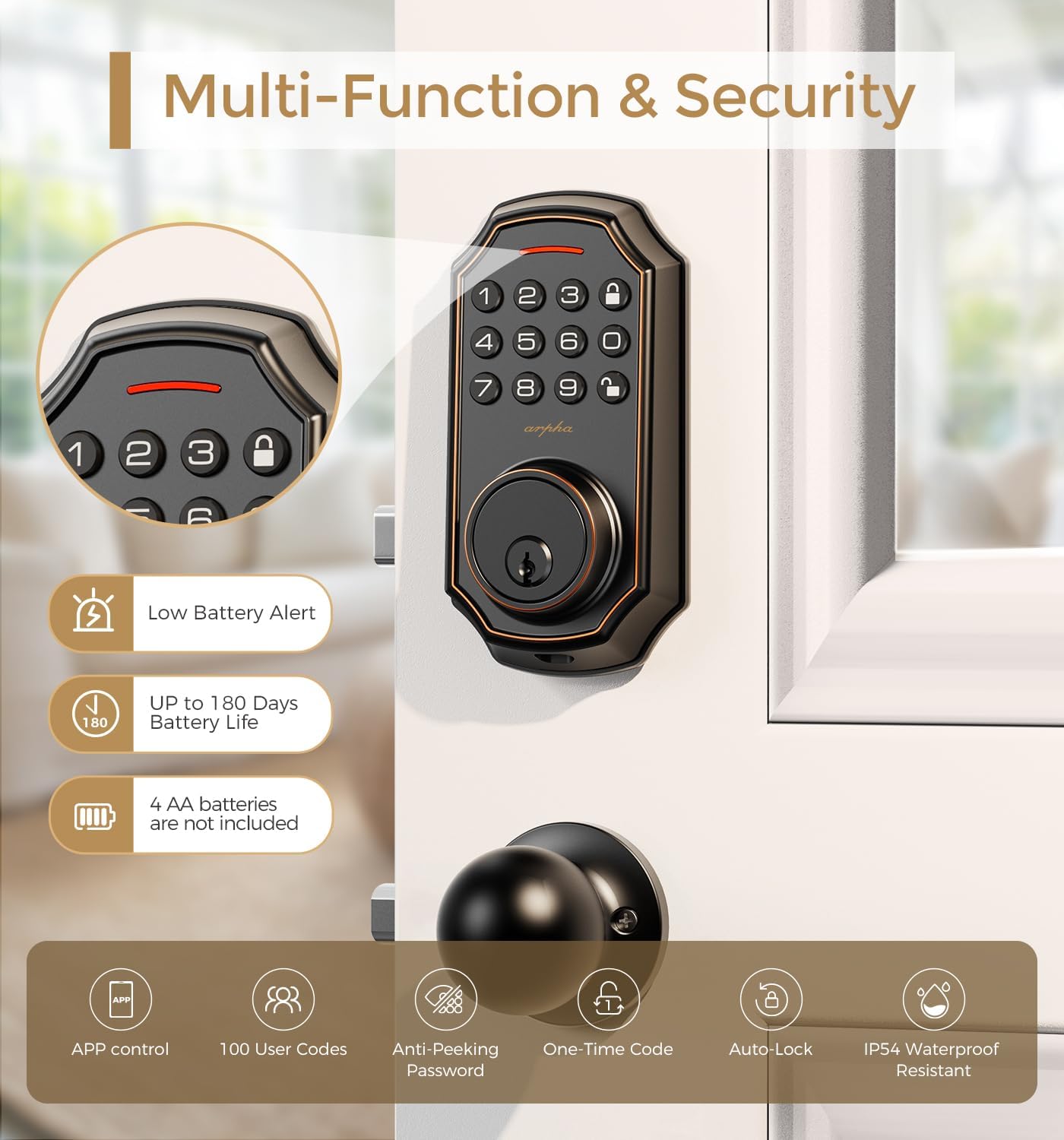
Image: This graphic highlights several multi-functional and security features of the ARPHA Keyless Entry Door Lock. It prominently displays a "Low Battery Alert" indicator and notes an "Up to 180 Days Battery Life," emphasizing the product's power efficiency and user convenience regarding battery status.

Image: This graphic illustrates the "Low Battery Alert" feature, showing a visual warning on both the ARPHA app and the lock itself when battery levels are low. It also indicates an "Alarm After 5 Wrong Password" security feature, providing comprehensive safety notifications.
Troubleshooting
This section addresses common issues you might encounter with your ARPHA Keyless Entry Door Lock.
- Lock Not Responding: Check battery levels. If the battery is low, replace all 4 AA batteries.
- Keypad Not Working: Ensure the keypad is clean and free from debris. Re-enter the code carefully.
- Auto-Lock Malfunction: Verify the auto-lock timer settings in the app. Ensure the door is fully closed and aligned.
- App Connectivity Issues: Ensure Bluetooth is enabled on your device and you are within 10 meters of the lock. If using remote access, confirm your gateway (ASIN: B09YHFG933) is properly connected and functioning.
- Incorrect Password Alarm: The lock will trigger an alarm after 5 consecutive incorrect password attempts. Wait for the alarm to clear before re-attempting.
If issues persist, refer to the detailed video guide for installation and setup, or contact ARPHA customer support for assistance.
Product Specifications
| Feature | Detail |
|---|---|
| Brand | ARPHA |
| Model Name | D180K |
| Lock Type | Deadbolt, Combination Lock |
| Special Features | Anti-Peeping Password, App Control, One-Touch Lock |
| Material | Zinc |
| Color | Bronze |
| Finish Type | Bronze or Powder Coated - Bronze |
| Item Dimensions (L x W x H) | 5.8 x 2.3 x 1.57 inches |
| Item Weight | 3.2 Pounds |
| Included Components | Deadbolt, Door Knob |
| Control Method | App, Hand Control |
| Connectivity Protocol | BLE (Bluetooth Low Energy) |
| Power Source | 4 AA Batteries (not included) |
| Battery Life | Approx. 180 days |
| Recommended Uses | Residential doors, Rental properties, Office spaces, Interior doors requiring secure access, Scenarios where keyless entry and access control are beneficial |
| Durability Standards | ANSI Grade 3 (100,000 Keypad life test, 218H Salt Spray Test, 2,850N Face plate impact test, 176H Humidity Test) |
| Weather Resistance | IP54 Waterproof, suitable for -31°F to 158°F |

Image: This graphic details the ANSI Grade 3 durability standards met by the ARPHA Keyless Entry Door Lock. It highlights rigorous tests such as 100,000 keypad life tests, 218 hours of salt spray testing, 2,850N face plate impact tests, and 176 hours of humidity testing, demonstrating the product's robust construction and reliability.

Image: This graphic emphasizes the ARPHA Keyless Entry Door Lock's suitability for all weather conditions. It highlights its IP54 waterproof rating and operational temperature range from -31°F to 158°F, ensuring reliable performance in diverse environmental settings.
Support & Warranty
ARPHA is committed to providing excellent customer support and assurance for your product.
- Customer Support: A dedicated support team is available 24/7 via email for any assistance you may need.
- Money-Back Guarantee: Enjoy a 30-day money-back guarantee.
- Product Assurance: The product comes with an 18-month assurance period.
- Technical Support: Lifetime technical support is provided for the product.
Please do not hesitate to contact ARPHA if you require any help or have questions regarding your keyless entry door lock.


