1. Introduction
The bonkyo F999 Live Streaming Sound Card is a professional audio mixer designed for live streaming, podcasting, gaming, and music recording. It integrates audio mixing equipment into a comprehensive solution, featuring a built-in digital DSP chip for stable and clear sound effects. This manual provides detailed instructions for setting up, operating, and maintaining your F999 sound card.

Figure 1: bonkyo F999 Live Streaming Sound Card (White model)
2. Product Overview
The F999 sound card offers a range of features to enhance your audio experience:
- Integrated Digital DSP Chip: 120kHz sampling rate for high-detail, stable, and clear sound.
- Audio Adjustments: Detailed control over high, medium, and low frequencies, microphone volume, and reverberation.
- Special Effects: 16 special effects, 8 tone modes, and 5 recording options.
- Voice Changing Modes: Four distinct voice changing modes (female to male, male to female, baby voice, monster voice).
- Connectivity: Multiple input and output interfaces, including 2-way condenser microphone plugs, 2-way microphone inputs, 2-way headphone plugs, and 1-way accompaniment input.
- Bluetooth: Integrated Bluetooth for wireless audio input.
- Noise Reduction: Dedicated DENOISE button for effective noise reduction.
- Compatibility: Compatible with 99% of applications (e.g., YouTube, Zoom, Capcut, Twitch, Spotify) and devices (Android, iOS, Windows).

Figure 2: F999 Sound Card in various usage scenarios: Gaming, Streaming, Podcasting, and Singing.
The device features intuitive controls including knobs for Treble, Mid, Bass, Record, Mic volume, and Reverb, along with sliders for Accompaniment and Monitor volume. A variety of illuminated buttons provide quick access to sound effects, voice modes, and special functions.
3. Setup
3.1 Unboxing and Components
Before starting, ensure all components are present in the package:
- 1x F999 Audio Mixer Sound Card
- 1x Power Cord/Charging Cable (Type-C to USB-A)
- 2x 3.5mm TRRS Audio Cables
- 1x Instruction Manual
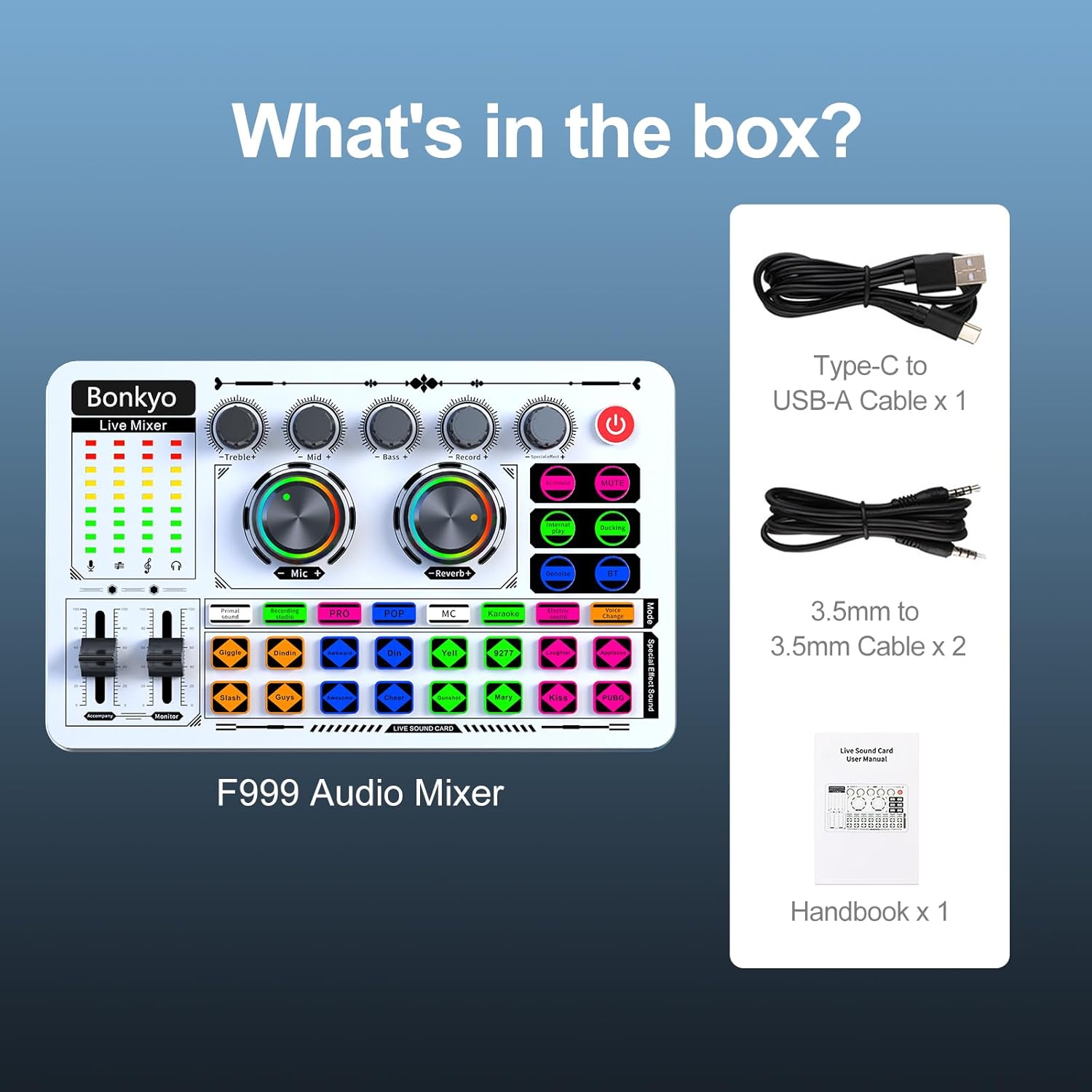
Figure 3: Contents of the F999 Sound Card package.
3.2 Connecting Microphones
The F999 supports both condenser and dynamic microphones. Connect your microphone(s) to the designated 3.5mm or 6.5mm microphone input jacks on the sound card.
3.3 Connecting to Devices (Phone/PC)
Use the provided 3.5mm TRRS audio cables to connect your phone or PC to the sound card. The sound card features multiple live output ports for simultaneous streaming to up to three devices.

Figure 4: Diagram illustrating the various input and output interfaces on the F999 Sound Card.
3.4 Powering the Device
Connect the sound card to a power source using the Type-C to USB-A charging cable. The device has a built-in rechargeable battery.
4. Operating Instructions
4.1 Basic Operation
- Power On/Off: Press and hold the power button (usually red) to turn the device on or off.
- Adjusting Volume: Use the rotary knobs for Microphone Volume and Reverb. Adjust Treble, Mid, and Bass for microphone equalization. Use the sliders for Accompaniment and Monitor headphone volume.
4.2 Bluetooth Connection
To connect via Bluetooth for accompaniment:
- Activate Bluetooth on your mobile device.
- Press the 'BT' button on the F999 sound card to enable Bluetooth pairing mode.
- Search for 'F999' in your device's Bluetooth settings and connect.

Figure 5: The Bluetooth feature on the F999 Sound Card for wireless audio input.
4.3 Using Sound Effects and Voice Modes
The F999 features 16 special effects and 8 tone modes, accessible via dedicated buttons. Press the desired button to activate the effect.
5. Maintenance
To ensure the longevity and optimal performance of your bonkyo F999 Sound Card:
- Keep the device clean and free from dust. Use a soft, dry cloth for cleaning.
- Avoid exposing the device to extreme temperatures, humidity, or direct sunlight.
- Do not attempt to disassemble or repair the device yourself. Refer to qualified service personnel for any repairs.
- Store the device in a safe place when not in use to prevent damage.
6. Troubleshooting
If you encounter issues with your F999 Sound Card, refer to the following common problems and solutions:
| Problem | Possible Cause | Solution |
|---|---|---|
| No sound output | Incorrect cable connection, low volume, muted device | Check all cable connections. Adjust volume knobs and sliders. Ensure device is not muted. |
| Microphone not working | Microphone not connected properly, microphone volume too low | Ensure microphone is securely plugged in. Increase microphone volume. |
| Bluetooth pairing failure | Device too far, Bluetooth not enabled on sound card/phone | Ensure devices are within range. Activate Bluetooth on both devices. Re-attempt pairing. |
| Sound distortion/noise | High gain, interference, DENOISE not active | Lower input gain. Move away from potential interference sources. Activate DENOISE function. |
If the problem persists, please contact customer support.
7. Specifications
- Item Weight: 15.2 ounces (0.43 Kilograms)
- Product Dimensions: 7.52 x 4.65 x 1.97 inches
- Item Model Number: F999
- Batteries: 1 A batteries required (included)
- Color: White
- Compatible Devices: Desktop, Headphone, iPhone, Microphone
- Hardware Interface: USB
- Battery Type: Lithium
- Hardware Platform: Mac, Microphone, PC
- Power Source: Battery Powered
- Number of Channels: 5
- Connectivity Technology: Type-C
8. Warranty and Support
The bonkyo F999 Live Streaming Sound Card comes with a 365-day replacement policy and lifetime technical support. For any questions or assistance, please contact our customer service team. Our staff is available to help you one-on-one to resolve any issues and ensure a smooth live broadcasting experience.
For further support, please refer to the contact information provided with your product or visit the official bonkyo website.

