
1. Introduction
The Ubon BT-50 Multifunction Touch Control Wireless Earbuds (Model BT-315) are designed to provide a seamless and immersive audio experience. Featuring Bluetooth v5.3 connectivity, intuitive touch controls, and a comfortable sporty design, these earbuds are suitable for various activities and active lifestyles. This manual provides instructions for setup, operation, maintenance, and troubleshooting to ensure optimal performance of your device.
Product Overview Video
This video provides a brief overview of the Ubon Wireless Touch Earbuds, highlighting key features, battery life, design, and device compatibility.
2. What's in the Box
Please check the package contents upon unboxing:
- Ubon BT-50 Wireless Earbuds (Left and Right)
- Charging Case
- Charging Cable
- User Manual
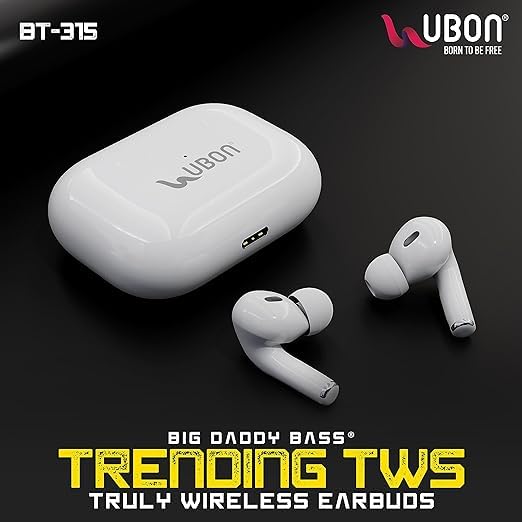
Image: Ubon BT-315 Truly Wireless Earbuds and their charging case, showcasing the product's design.
3. Specifications
| Model Name | BT-315 |
| Bluetooth Version | 5.3 |
| Ear Placement | In Ear |
| Form Factor | In Ear |
| Playtime | Up to 25 Hours (with charging case) |
| Standby Time | Up to 250 Hours |
| Charging Interface | Lightning |
| Control Type | Touch, Volume Control |
| Frequency Range | 20 Hz - 20,000 Hz |
| Audio Driver Type | Dynamic Driver |
| Material | Acrylonitrile Butadiene Styrene (ABS) |
| Weight | 93 Grams |
| Water Resistance | Not Water Resistant |

Image: The Ubon BT-50 Earbuds and charging case, highlighting the 25 hours playtime and 250 hours standby time.
4. Setup
4.1 Initial Charging
Before first use, fully charge the earbuds and the charging case. Connect the provided charging cable to the charging case and a compatible USB power source. The indicator lights on the case will show the charging status. Once fully charged, the indicator lights will change or turn off.
- Insert the earbuds into the charging case correctly.
- Close the charging case lid.
- Connect the Lightning charging cable to the case and a power adapter.
- Allow approximately 1-2 hours for a full charge.
4.2 Powering On/Off
- Power On: Open the charging case, and the earbuds will automatically power on. Alternatively, long-press the touch area on both earbuds for a few seconds.
- Power Off: Place the earbuds back into the charging case and close the lid. They will automatically disconnect and power off. Alternatively, long-press the touch area on both earbuds for a few seconds until you hear a power-off prompt.
4.3 Bluetooth Pairing
Follow these steps to pair your Ubon BT-50 Earbuds with your device:
- Ensure the earbuds are charged and powered on.
- Open the charging case. The earbuds will enter pairing mode, indicated by a flashing LED light (refer to the specific light pattern in your product's quick start guide if available).
- On your smartphone or Bluetooth-enabled device, go to the Bluetooth settings.
- Search for available devices and select "Ubon BT-50" (or similar name) from the list.
- Once connected, you will hear a confirmation tone, and the LED indicator on the earbuds will stop flashing.
- The earbuds will automatically reconnect to the last paired device when taken out of the case, if Bluetooth is enabled on the device.

Image: Ubon BT-50 Wireless Earbuds, highlighting their Bluetooth Version 5.3 for seamless connectivity.
5. Operating Instructions
5.1 Touch Controls
The Ubon BT-50 Earbuds feature intuitive touch controls on each earbud. The functions may vary slightly depending on the specific model and firmware, but generally include:
| Action | Function |
|---|---|
| Single Tap (Left/Right) | Play/Pause Music, Answer/End Call |
| Double Tap (Right Earbud) | Next Track |
| Double Tap (Left Earbud) | Previous Track |
| Triple Tap (Right Earbud) | Volume Up |
| Triple Tap (Left Earbud) | Volume Down |
| Long Press (2-3 seconds) | Activate Voice Assistant (Google Assistant) / Reject Call |
5.2 Calling Functions
- Answer Call: Single tap either earbud.
- End Call: Single tap either earbud during a call.
- Reject Call: Long press either earbud for 2-3 seconds.
5.3 Voice Assistant
To activate your device's voice assistant (e.g., Google Assistant), long-press the touch area on either earbud for approximately 2-3 seconds until you hear a prompt.
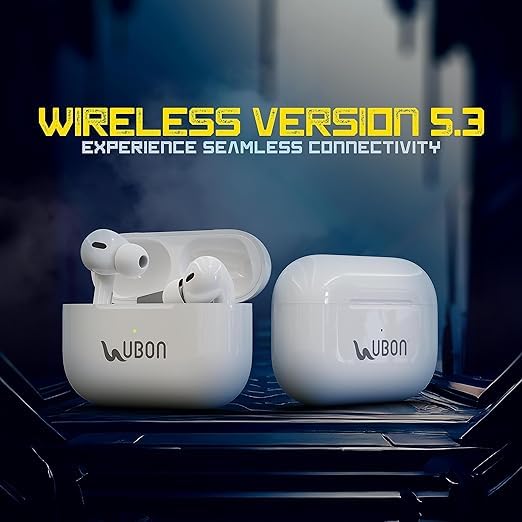
Image: Ubon BT-50 Earbuds, illustrating their immersive sound quality and rocking bass capabilities.

Image: Ubon BT-50 Earbuds connected to a smartphone, demonstrating wide compatibility with Android and iOS devices.
6. Maintenance
Proper maintenance ensures the longevity and optimal performance of your earbuds.
- Cleaning: Regularly clean the earbuds and charging case with a soft, dry, lint-free cloth. Do not use abrasive cleaners, alcohol, or chemical solvents.
- Storage: When not in use, store the earbuds in their charging case to protect them from dust and damage.
- Avoid Water: These earbuds are not water-resistant. Avoid exposure to water, sweat, or high humidity to prevent damage.
- Temperature: Do not expose the earbuds to extreme temperatures (hot or cold).
7. Troubleshooting
If you encounter issues with your Ubon BT-50 Earbuds, try the following solutions:
| Problem | Solution |
|---|---|
| Earbuds not pairing |
|
| Only one earbud working |
|
| No sound or low volume |
|
| Charging case not charging |
|
8. Warranty and Support
For warranty information and customer support, please refer to the product packaging or the official Ubon website. You may also contact the manufacturer directly:
- Manufacturer: UBON PVT.LTD
- Contact Email: support@ubon.in
Please retain your proof of purchase for any warranty claims.