
Mooyran TYD-YHY-001
Mooyran Astronaut Star Sky Projector LED User Manual
Model: TYD-YHY-001
Introduction
Thank you for purchasing the Mooyran Astronaut Star Sky Projector LED. This device is designed to transform any room into a captivating galaxy, featuring stunning nebula effects and twinkling stars. With its unique astronaut design, adjustable projection angle, and convenient timer functions, it creates a magical and relaxing atmosphere for various occasions.
Please read this manual carefully before using the product to ensure proper operation and to maximize your experience.

Image: The Mooyran Astronaut Star Sky Projector, a white astronaut figure with a projector lens in its helmet, accompanied by its remote control.
Package Contents
Before setup, please verify that all items are present in the package:
- 1 x Astronaut Star Sky Projector
- 1 x Remote Control (batteries not included)
- 1 x USB Charging Cable
- 1 x User Manual
Setup
1. Power Connection
- Connect the provided USB charging cable to the projector's power input port.
- Plug the other end of the USB cable into a compatible 5V 1A USB power adapter (not included) or a USB port on a computer/power bank.
- The projector will power on or enter standby mode.
2. Remote Control Setup
The remote control requires batteries (not included) to operate. Please insert two AAA batteries into the remote control, ensuring correct polarity.
3. Positioning and Angle Adjustment
Place the astronaut projector on a stable, flat surface. The astronaut's head is magnetically attached and can be rotated 360 degrees, allowing you to adjust the projection angle of the nebula and stars to your desired position on the ceiling or wall. The astronaut's arms are also movable, allowing for various poses.

Image: Illustration showing the magnetic attachment of the astronaut's head for angle adjustment and the detachable moon-shaped base.
Operating Instructions
The projector can be controlled using the buttons on the back of the astronaut's backpack or via the included remote control.
1. Basic Operation
- Power On/Off: Press the power button on the projector or the remote control to turn the device on or off.
2. Nebula and Star Effects
The projector offers 8 stunning nebula effects and green twinkling stars. These can be used simultaneously or separately.
- Nebula Control: Use the 'Nebula' button on the remote to cycle through different nebula colors and patterns.
- Star Control: Use the 'Star' button on the remote to turn the green stars on or off.

Image: A visual representation of the various nebula color effects available from the projector.
3. Brightness and Speed Adjustment
- Brightness: Use the 'B+' and 'B-' buttons on the remote to adjust the brightness of the projection.
- Rotation Speed: Use the 'S+' and 'S-' buttons on the remote to adjust the rotation speed of the nebula effect.
4. Timer Function
The projector features an automatic shut-off timer, ideal for bedtime use.
- Press the timer button on the remote control or the projector to set the timer to 45 minutes or 90 minutes.
- The projector will automatically turn off after the selected time duration.

Image: A child sleeping peacefully under the starry projection, illustrating the 45-minute and 90-minute auto-off timer functions.
5. Usage Scenarios
The Mooyran Astronaut Projector is versatile and suitable for various settings:
- Bedrooms, nurseries, living rooms
- Home cinemas, game rooms, study rooms
- Indoor parties (Christmas, Halloween, birthdays, dinners)
- Creating a romantic or relaxing ambiance

Image: The astronaut projector illuminating a gaming desk setup with vibrant galaxy projections, demonstrating its suitability for multiple occasions.

Image: A group of people relaxing and watching a movie, with the astronaut projector casting a beautiful starry galaxy across the ceiling, creating an immersive experience.
Maintenance
To ensure the longevity and optimal performance of your projector, follow these simple maintenance guidelines:
- Cleaning: Use a soft, dry cloth to wipe the exterior of the projector. Do not use abrasive cleaners or solvents.
- Lens Care: Gently clean the projector lens with a microfiber cloth to remove dust or smudges. Avoid touching the lens directly with your fingers.
- Storage: When not in use for extended periods, store the projector in a cool, dry place away from direct sunlight and extreme temperatures.
Troubleshooting
If you encounter any issues with your Mooyran Astronaut Projector, please refer to the following common problems and solutions:
- Projector does not turn on:
- Ensure the USB cable is securely connected to both the projector and the power source.
- Verify that the power adapter is functioning correctly and providing 5V 1A output.
- Try a different USB port or power adapter.
- Remote control is not working:
- Check if the batteries are inserted correctly with the correct polarity.
- Replace the batteries with new ones.
- Ensure there are no obstructions between the remote control and the projector's sensor.
- Projection is dim or unclear:
- Adjust the brightness using the 'B+' button on the remote.
- Ensure the room is sufficiently dark for optimal projection.
- Clean the projector lens as described in the Maintenance section.
- Nebula or stars are not appearing:
- Press the 'Nebula' or 'Star' buttons on the remote to activate them.
- Ensure they are not set to minimum brightness.
Specifications
| Feature | Specification |
|---|---|
| Brand | Mooyran |
| Model | TYD-YHY-001 |
| Product Dimensions (L x W x H) | 3 x 4 x 2 cm (approximate) |
| Item Weight | 620 grams |
| Input Voltage | 5V 1A (DC) |
| Power | 5 Watts |
| Color | White |
| Special Features | Color Changing, Adjustable Projection Angle, Timer Function |
| Timer Modes | 45 minutes, 90 minutes |
| Light Source | LED |
| Control Method | Buttons on device, Remote Control |
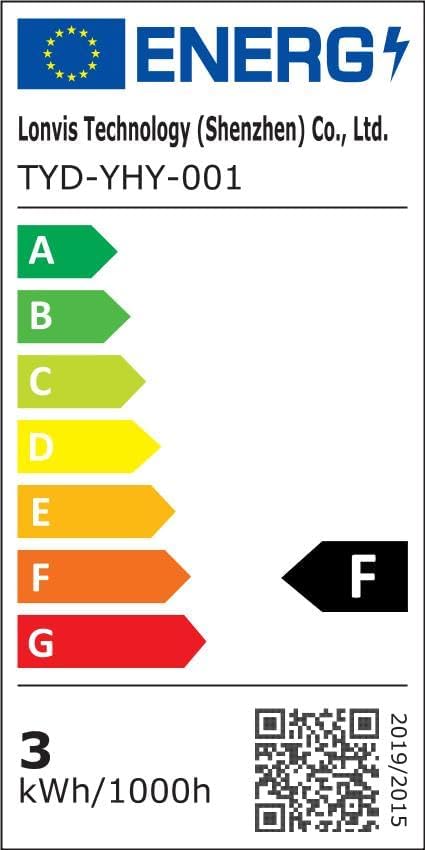
Image: Energy efficiency label for the Mooyran Astronaut Projector, showing an energy rating of F.
For more detailed product information, you can refer to the official EPREL database: https://eprel.ec.europa.eu/qr/1498641
Warranty and Support
Mooyran is committed to providing high-quality products. While specific warranty details are not provided in this manual, please retain your proof of purchase for any warranty claims.
For technical support, troubleshooting assistance, or inquiries regarding your product, please contact your retailer or the Mooyran customer service through the contact information provided on the product packaging or the official Mooyran website.
Related documentsTYD-YHY-001

Ask a question about this manual
Ask about setup, troubleshooting, compatibility, parts, safety, or missing instructions. Manuals+ will review the question and use this page’s manual context to help answer it.