
1. Introduction
Thank you for choosing the onerbl 5V AC/DC Adapter. This adapter is designed to provide reliable power for your Matco Tools MICROJUMP VERSAPRO3 jump starter. Please read this manual carefully before use to ensure proper operation and safety.
2. Safety Information
To prevent injury or damage to your device, always follow these safety guidelines:
- Over Voltage Protection: The adapter is equipped with circuitry to protect against excessive voltage input.
- Over Heat Protection: Internal mechanisms prevent the adapter from overheating during operation.
- Short-Circuit Protection: Designed to prevent damage from short circuits.
- Over-Current Protection: Safeguards against excessive current flow.
- Use only with compatible devices, specifically the Matco Tools MICROJUMP VERSAPRO3 jump starter.
- Do not expose the adapter to water, moisture, or extreme temperatures.
- Do not disassemble or attempt to repair the adapter. Contact qualified personnel for service.
- Ensure the power outlet voltage matches the adapter's input specifications (AC 100-240V).

Image 2.1: Illustration of the adapter's smart chip providing multiple layers of protection, including short-circuit, over-voltage, and over-current safeguards.
3. Product Overview
The onerbl 5V AC/DC Adapter is a high-quality replacement power charger designed for optimal performance and durability. It features a robust construction and advanced safety features.
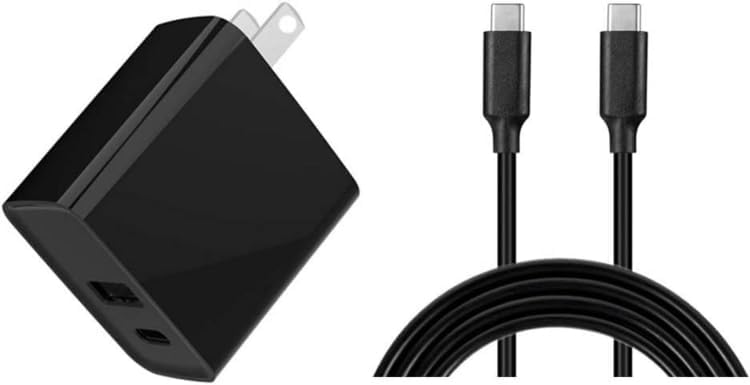
Image 3.1: The onerbl 5V AC/DC Adapter shown alongside its compatible USB cable. The adapter is black with a standard North American two-prong plug.

Image 3.2: A closer view of the black AC/DC adapter and the included USB cable, highlighting the proprietary connector type.
Durable Design
The adapter and cable are constructed with quality materials for longevity.

Image 3.3: This image illustrates the quality control and durable design, showing the internal copper wire and PVC jacket of the cable, along with the robust construction of the adapter's plug.
Extended Cord Design
The adapter comes with an extended cable for convenience and flexibility in placement.

Image 3.4: Examples of extended cord lengths, showing a 10 ft cable and a 6.6 ft cable in typical usage scenarios, highlighting the flexibility for various setups.
4. Setup
- Unpack: Carefully remove the AC/DC adapter and USB cable from the packaging.
- Connect Cable: Insert the USB cable into the appropriate port on the onerbl AC/DC adapter.
- Connect to Device: Plug the other end of the USB cable into your Matco Tools MICROJUMP VERSAPRO3 jump starter.
- Power On: Insert the AC/DC adapter into a standard North American Type A (2-pin) wall outlet.
5. Operating Instructions
Once properly set up, the adapter will begin charging your Matco Tools MICROJUMP VERSAPRO3 jump starter. The charging indicator on your jump starter (if available) will show its charging status.
- Ensure all connections are secure before charging.
- Disconnect the adapter from the power outlet and your device once charging is complete or when not in use.
6. Maintenance
Proper maintenance ensures the longevity and safe operation of your adapter:
- Cleaning: Use a dry, soft cloth to clean the adapter. Do not use liquid cleaners or solvents.
- Storage: Store the adapter in a cool, dry place away from direct sunlight and moisture when not in use.
- Inspection: Periodically inspect the adapter and cable for any signs of damage, such as frayed wires or cracked casing. Discontinue use if damage is found.
7. Troubleshooting
| Problem | Possible Cause | Solution |
|---|---|---|
| Device not charging | Loose connection, faulty outlet, incompatible device | Check all cable connections. Try a different wall outlet. Ensure your device is a Matco Tools MICROJUMP VERSAPRO3. |
| Adapter feels hot | Normal operation (slight warmth), prolonged use, poor ventilation | Disconnect and allow to cool. Ensure adequate ventilation around the adapter. If excessively hot, discontinue use and contact support. |
| No power indicator light on adapter (if applicable) | No power from outlet, adapter malfunction | Test the outlet with another device. If outlet is functional, the adapter may be faulty. |
8. Specifications
- Brand: onerbl
- Model: Compatible with Matco Tools MICROJUMP VERSAPRO3
- Input: AC 100-240V, 50/60Hz (Worldwide AC Input)
- Output: 5V DC
- Connector Type: Proprietary
- Power Plug Type: Type A - 2 pin (North American)
- Manufacturer: Shenzhen Waweis Technology Co., Ltd
- ASIN: B0CTC4GBXT
9. What's in the Box
- 1 x onerbl 5V AC/DC Adapter
- 1 x USB Cable
10. Warranty and Support
For warranty information and customer support, please refer to the seller's policy or contact the retailer where the product was purchased. Keep your purchase receipt for warranty claims.