
1. Product Overview
The OKD PFC70-21 TV Stand with Electric Fireplace is a modern farmhouse-style media entertainment center designed to accommodate TVs up to 80 inches. It features a 36-inch electric fireplace with 3-sided glass display, offering multiple flame colors, brightness levels, and flame speeds. The unit also provides ample storage with drawers and cabinets, including adjustable shelves and integrated LED lights. A cable management hole is included for organized wiring.

Figure 1: Front view of the OKD 70-inch TV Stand with Electric Fireplace.
2. Safety Information
Please read and understand all safety instructions before assembly and operation. Failure to follow these instructions may result in electric shock, fire, property damage, or personal injury.
- Always follow assembly instructions carefully.
- Keep the product away from children and pets during assembly and operation.
- Do not use the product if any part is damaged. Contact customer support for replacement parts.
- Allow the fireplace unit to cool completely before touching or performing any maintenance.
- Use a dry cloth for cleaning. Do not use liquid cleaners or abrasive materials.
- Do not place flammable materials near the fireplace unit. Maintain adequate clearance.
- Always unplug the electric fireplace when not in use or before cleaning.
- The electric fireplace features overheat protection and is ETL/FCC certified for safety.
3. Package Contents
The OKD PFC70-21 TV Stand is shipped in two packages and includes all necessary components and hardware for assembly. Verify all parts are present and undamaged before beginning assembly.
- TV Stand components (engineered wood panels, shelves, drawers, doors)
- 36-inch Electric Fireplace insert
- Assembly hardware (screws, dowels, cam locks, etc.)
- Remote control for electric fireplace
- Instruction manual
4. Product Features
- Accommodates Large TVs: Designed for televisions up to 80 inches.
- Spacious Storage: Features two drawers and two storage cabinets with adjustable shelves and integrated LED lights.
- Cable Management: Includes a dedicated hole at the back for organizing electronic device cables.
- 36-inch Electric Fireplace: Offers a 3-sided glass display for a full view of the flames.
- Customizable Flame Effects: Choose from 3 elegant flame colors and 5 flame speeds.
- Adjustable Heating: Provides 5118 BTUs of heat, suitable for spaces up to 400 sq. ft., with temperature control from 64°F to 82°F. Flame and heat functions can be operated independently.
- Timer Function: Fireplace timer adjustable from 1 to 9 hours.
- Durable Construction: Crafted from MDF with double top panels and a thickened base for stability, supporting up to 300 lbs.
- Quality Hardware: High-quality metal handles and hinges with a cushioned anti-pinch function.

Figure 2: Overview of electric fireplace insert features and controls.
5. Specifications
| Feature | Detail |
|---|---|
| Brand | OKD |
| Model Name | 70 inch TV Stand with Fireplace (PFC70-21) |
| Color | Dark Rustic Oak |
| Material | Engineered Wood, Glass |
| Product Dimensions (D x W x H) | 12.9"D x 70"W x 32"H |
| Fireplace Dimensions (W x D x H) | 37.2"W x 8.2"D x 18"H (36-inch insert) |
| Weight Limit | 300 Pounds |
| Item Weight | 185 Pounds |
| Recommended TV Size | Up to 80 inches |
| Heating Capacity | 5118 BTUs (Heats up to 400 sq. ft.) |
| Temperature Range | 64°F to 82°F |
| Flame Colors | 3 (e.g., Red, Blue, Natural) |
| Flame Speeds | 5 |
| Timer | 1-9 hours |
| Assembly Required | Yes |
| Certifications | ETL/FCC certified |
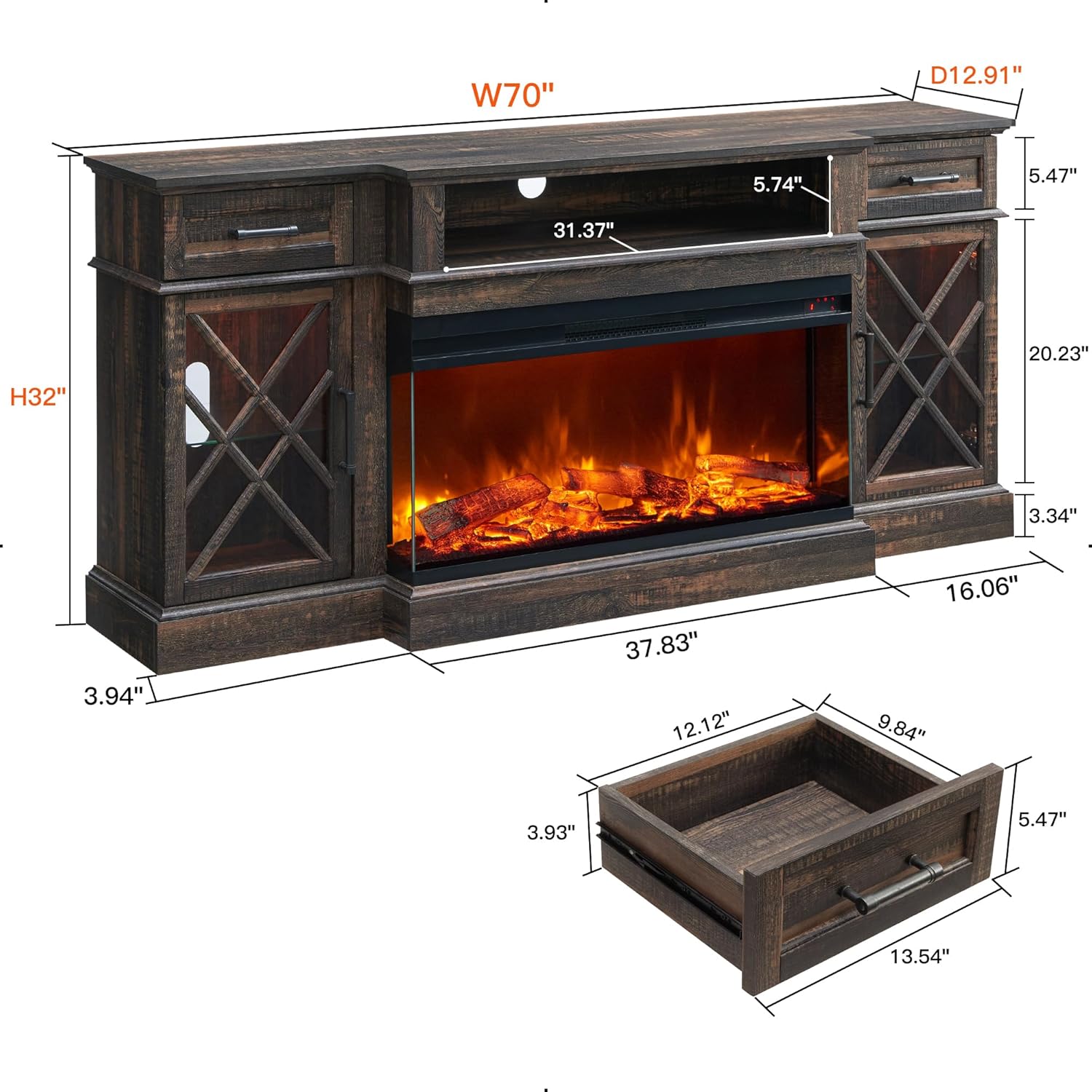
Figure 3: Product dimensions and internal measurements.
6. Setup and Assembly
Assembly of the OKD PFC70-21 TV Stand is required. It is recommended to have two adults for assembly. Please refer to the detailed assembly instructions included in your package for step-by-step guidance. Ensure all parts are accounted for before beginning.
6.1 Pre-Assembly Checklist
- Unpack all components and lay them out on a clean, soft surface to prevent scratches.
- Verify all hardware and parts are present against the parts list in the included manual.
- Gather necessary tools (e.g., screwdriver, hammer).
6.2 Assembly Tips
- Follow the numerical or alphabetical order of steps as indicated in the manual.
- Do not overtighten screws to avoid damaging the wood.
- Ensure all connections are secure before moving or placing items on the stand.
- Install the electric fireplace insert into the designated opening after the main stand structure is complete.
7. Operating Instructions
7.1 Electric Fireplace Operation
The electric fireplace can be operated using the control panel on the unit or the included remote control.
- Power: Press the power button to turn the fireplace ON/OFF.
- Flame Color: Cycle through 3 available flame colors (e.g., red, blue, natural orange/yellow) by pressing the flame color button.
- Flame Speed: Adjust the flame speed through 5 different levels to achieve your desired effect.
- Brightness: Control the flame brightness with multiple levels (L1-L5).
- Heat: Activate the heating function. The temperature can be set between 64°F and 82°F. The heat function operates independently of the flame effects.
- Timer: Set the operational timer for 1 to 9 hours. The fireplace will automatically turn off after the set time.

Figure 4: Natural flame effect of the 36-inch electric fireplace.

Figure 5: Illuminated storage cabinet with adjustable glass shelves.
7.2 Storage and Organization
- Drawers: Utilize the two smooth-gliding drawers for storing remote controls, gaming accessories, or other small items.
- Cabinets: The two side cabinets feature adjustable glass shelves and integrated LED lighting, ideal for displaying decorative items or storing media.
- Open Shelving: The central open shelf above the fireplace is suitable for media devices like DVD players, gaming consoles, or soundbars.
- Cable Management: Route power cords and signal cables through the designated hole at the back of the central open shelf to maintain a tidy appearance.

Figure 6: Drawer with smooth-gliding rails for convenient storage.

Figure 7: Top-down view illustrating the storage compartments.
8. Maintenance
- Cleaning: Wipe surfaces with a soft, dry cloth. Avoid harsh chemicals or abrasive cleaners that may damage the finish.
- Fireplace Care: Ensure the electric fireplace is unplugged and cool before cleaning. Gently wipe the glass and exterior with a soft, damp cloth. Do not spray water directly onto the unit.
- Hardware: Periodically check all screws and fasteners to ensure they remain tight. Retighten as necessary.
- Electrical: Inspect the power cord and plug for any damage. If damaged, discontinue use and contact a qualified electrician or the manufacturer.
9. Troubleshooting
| Problem | Possible Cause | Solution |
|---|---|---|
| Fireplace does not turn on. | No power, loose connection, power switch off. | Ensure the unit is plugged into a working outlet. Check that the power switch on the unit is ON. Verify the circuit breaker has not tripped. |
| No heat output. | Heat function not activated, thermostat setting too low. | Activate the heat function using the control panel or remote. Increase the thermostat setting. Ensure the air intake/output vents are not blocked. |
| Flames are not visible or dim. | Flame effect off, brightness setting too low. | Ensure the flame effect is turned on. Adjust the brightness level using the control panel or remote. |
| Unit makes unusual noises. | Normal operation sounds (fan), obstruction. | A low humming sound from the fan is normal. Check for any obstructions in the fan or heating element area. If the noise is loud or persistent, discontinue use and contact customer support. |
| Remote control not working. | Dead batteries, obstruction, out of range. | Replace batteries in the remote control. Ensure there are no obstructions between the remote and the unit's sensor. Operate within the recommended range. |
10. Warranty and Support
For warranty information, please refer to the documentation included with your purchase or contact OKD customer support directly. If you encounter any issues or require assistance with your OKD PFC70-21 TV Stand, please reach out to the manufacturer's customer service team.
Contact information can typically be found on the product packaging, the official OKD website, or through your retailer.