
1. Product Overview
The EONON P4J Portable Display Audio system offers advanced features for an enhanced driving experience, including a high-resolution IPS touchscreen, integrated dash cam functionality, and seamless smartphone integration.
Key Features:
- 9.33-inch IPS Touchscreen: Features a 1600*600 ultra-high-definition resolution and an IPS panel for natural, ideal images from any viewing angle. Includes a light sensor for automatic brightness adjustment, reducing eye strain.
- V536 Powerful Chip: Provides a faster and more responsive user experience compared to previous models.
- 4K Front Camera: Records in 3840x2160P (8 million pixels), offering 4 times the resolution of standard 1080P. Equipped with WDR (Wide Dynamic Range) for clear images in various lighting conditions.
- 1080P Rear Camera: Features a 120° wide-angle lens to minimize blind spots. Automatically switches to the reverse screen with adjustable guidelines when reversing.
- Front and Rear Dual Camera Simultaneous Recording: Supports simultaneous recording from both front and rear cameras for comprehensive driving safety. Includes loop recording and a G-sensor for automatic emergency recording and overwrite protection. A 64GB SD card is included (supports 32-256GB, Class 10 or higher Micro SD cards).
- Wireless Android Auto/CarPlay: Connects easily to your smartphone for navigation, calls, music, and voice assistant control. Supports wireless connection only. Wireless Android Auto requires a 5 GHz Wi-Fi compatible smartphone with the latest Android Auto app. CarPlay is compatible with iPhone 5 and later.
- Mirroring Function: Wirelessly mirrors photos, music, and videos from your smartphone to the display. Note: Some apps/videos (e.g., Netflix) may not support mirroring due to copyright restrictions.
- Split Screen Display: Simultaneously displays information from CarPlay/Android Auto and real-time camera views.
- 3 Audio Output Methods: Offers Bluetooth output, AUX output, and a built-in speaker.
- DC7-32V Compatibility: Suitable for various vehicles including cars and trucks.
- Easy Installation: Quick 10-second installation without tools. Can be mounted on the center console or windshield.
- Customizable Startup Screen: Set your favorite car logo or images (family, pets, scenery) as the startup screen.
- Screen Saver: Automatically turns off the screen after a set time (10s/30s/1min/Off) to conserve vehicle power.
- Last Memory Function: Retains previous settings after power off and restart, eliminating the need for re-setup (clock memory lasts approximately 3 days).

Image 1: Overview of the EONON P4J Portable Display Audio system, highlighting its key features like wireless CarPlay/Android Auto, 4K+1080P cameras, V536 chip, mirroring, loop recording, WDR, light sensor, and split screen display.
2. Setup and Installation
2.1. Mounting the Device
The EONON P4J offers flexible installation options for your vehicle's dashboard or windshield. The installation process is designed to be quick and tool-free.
- Clean the desired mounting surface thoroughly to ensure proper adhesion.
- Attach the base of the mount to the cleaned surface.
- Peel off the protective film from the adhesive pad on the mount and firmly press it onto the center console or windshield.
- Connect one end of the cigarette lighter power cable to the device's power input port and the other end to your car's cigarette lighter socket.
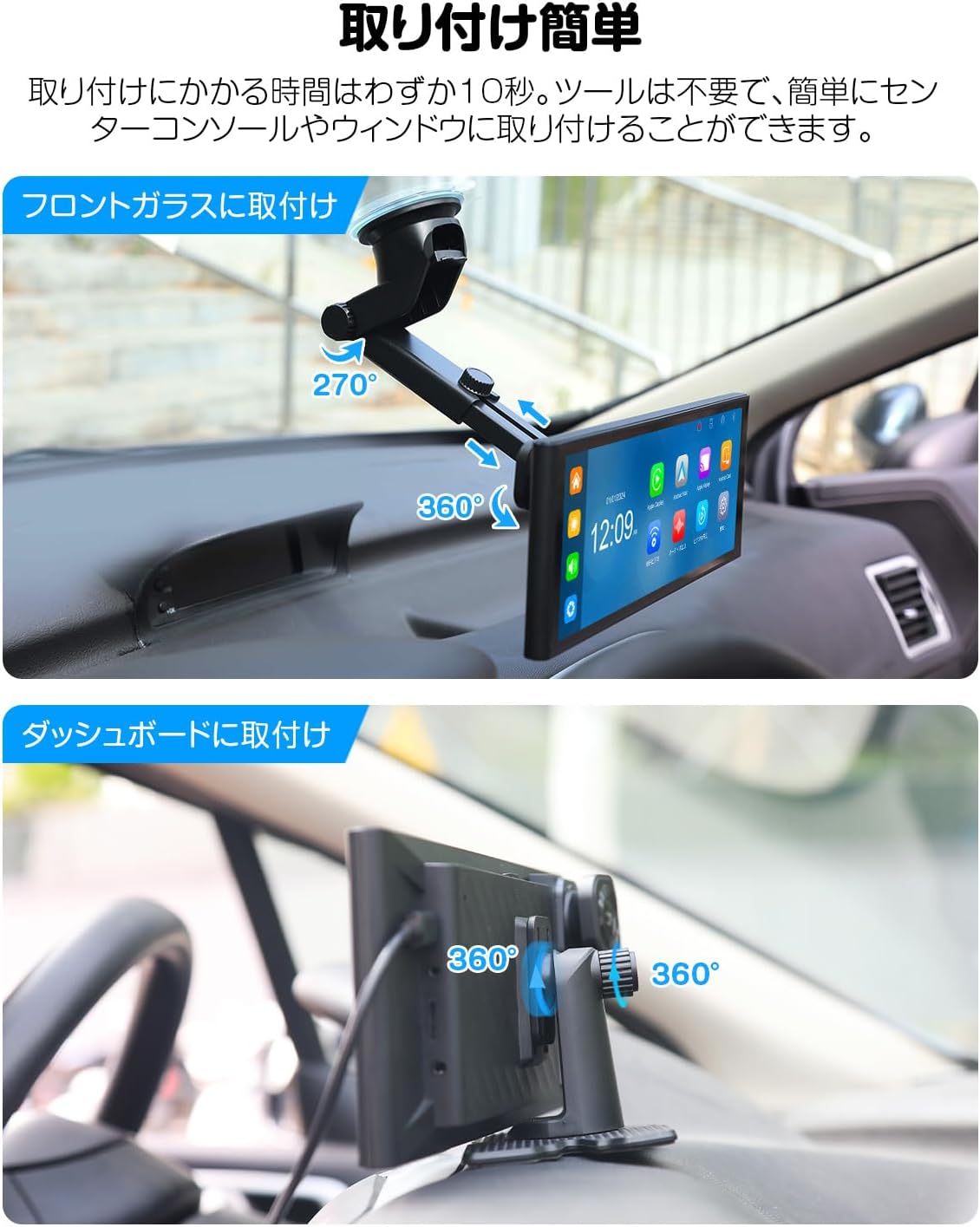
Image 2: Demonstrates two easy installation methods: mounting on the front glass (windshield) using a suction cup bracket, and mounting on the dashboard using an adhesive bracket. Both methods allow for angle adjustments.
2.2. Wiring Diagram and Accessories
Ensure all components are correctly connected as per the wiring diagram. The package includes all necessary accessories for a complete setup.
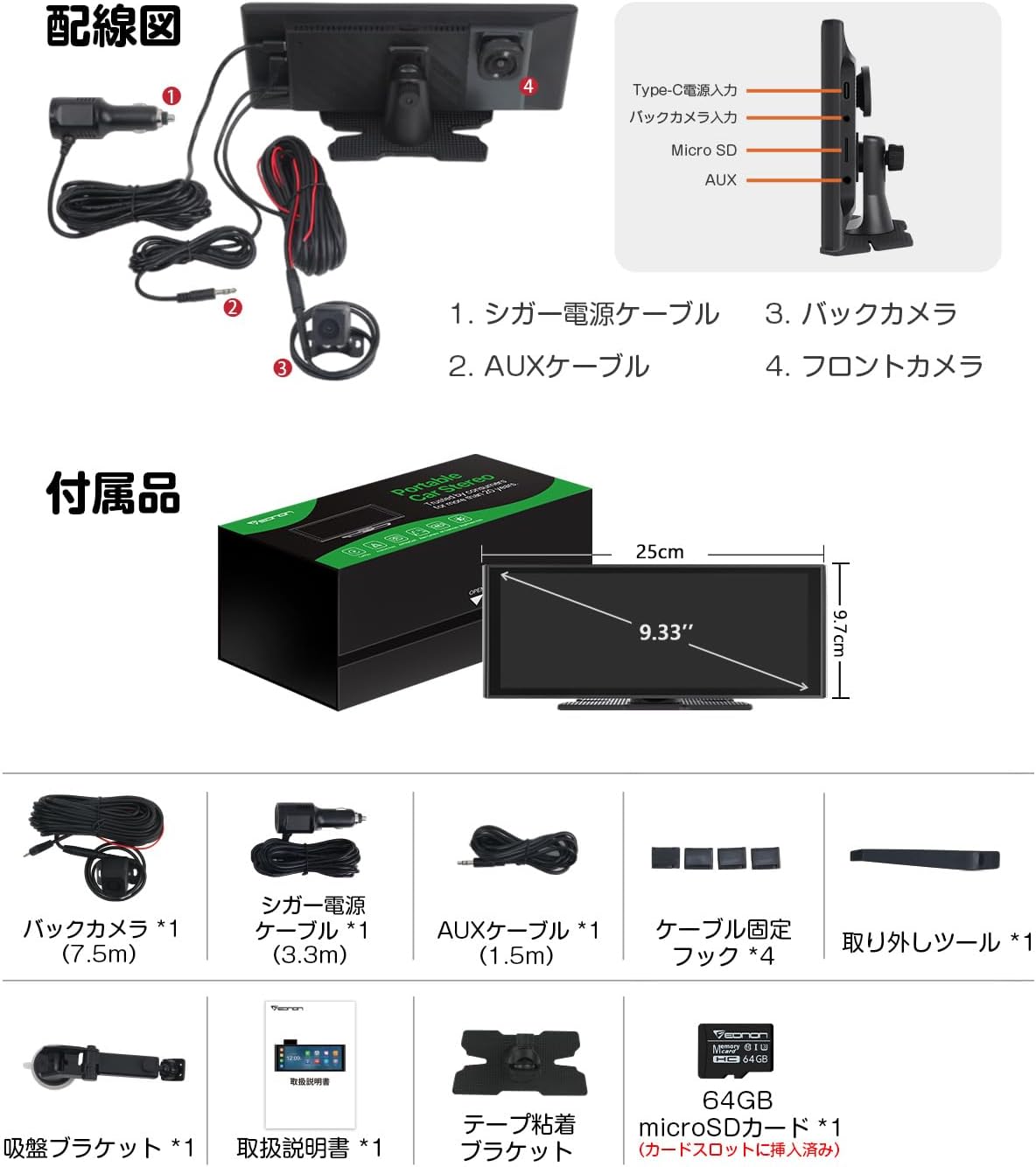
Image 3: Detailed wiring diagram showing connections for the cigarette lighter power cable, AUX cable, rear camera, and front camera. Also lists included accessories: rear camera (7.5m), cigarette power cable (3.3m), AUX cable (1.5m), cable fixing hooks (x4), removal tool, suction bracket, instruction manual, adhesive bracket, and 64GB microSD card.
2.3. Installation Videos
Video 1: This video demonstrates the recommended installation method for the suction cup mount, ensuring minimal obstruction of the driver's view. It shows how to prepare the surface, attach the mount, adjust its length, and position the screen for optimal visibility.
Video 2: This video provides a general guide on how to install the portable display audio unit. It covers unpacking, connecting the main unit to power, testing power on/off with the car engine, and routing cables for a clean installation, including the rear camera cable through the car's interior.
Video 3: This video details the installation process for a similar display audio unit, focusing on the physical mounting and cable management within the vehicle. It shows how to secure the unit on the dashboard and route power and camera cables discreetly.
3. Operating Instructions
3.1. Wireless CarPlay and Android Auto
Connect your smartphone wirelessly to access navigation, make calls, play music, and use voice assistants directly from the display. Ensure your phone's Wi-Fi and Bluetooth are enabled.
3.2. Mirroring Function
Wirelessly display your smartphone's screen content, such as photos, videos, and apps, on the EONON P4J. Note that some copyrighted content may not be mirrored.

Image 4: Illustrates the wireless CarPlay and Android Auto interfaces, showing navigation, music, and communication apps. Also depicts the mirroring function, where a smartphone screen is duplicated on the portable display.
3.3. Split Screen Display and Audio Output
Utilize the split-screen feature to view navigation or other apps alongside real-time camera feeds. Choose from Bluetooth, AUX, or the built-in speaker for audio output.
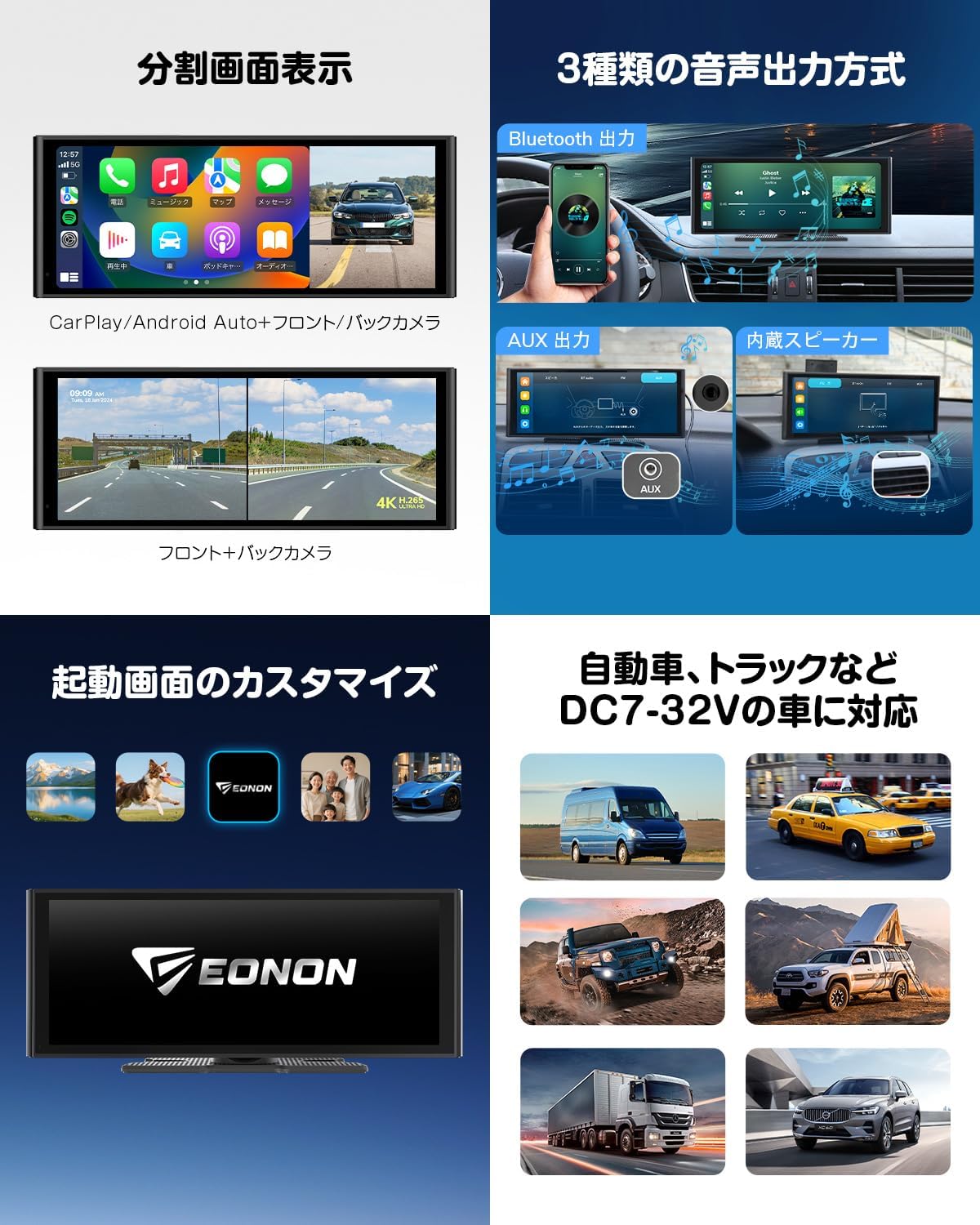
Image 5: Shows the split-screen display with CarPlay/Android Auto on one side and camera view on the other. Also details the three audio output options (Bluetooth, AUX, built-in speaker) and highlights customizable startup screens and compatibility with DC7-32V vehicles.
3.4. Operating Videos
Video 4: This video demonstrates the step-by-step procedure for connecting CarPlay and using the mirroring function. It guides users through the necessary settings on their smartphone and the display unit to establish a successful connection.
Video 5: This video explains how to connect your smartphone to the display audio unit. It covers the wireless connection process for both Android Auto and CarPlay, ensuring users can easily link their devices for integrated functionality.
4. Maintenance
To ensure the longevity and optimal performance of your EONON P4J Portable Display Audio, follow these general maintenance guidelines:
- Cleaning: Use a soft, dry cloth to clean the screen and exterior. Avoid abrasive cleaners or solvents that may damage the surface.
- Temperature: Avoid exposing the device to extreme temperatures, direct sunlight for prolonged periods, or high humidity.
- Cable Management: Periodically check all cables for secure connections and signs of wear. Ensure cables are not pinched or tangled.
- Software Updates: Check the manufacturer's website or device settings for any available software updates to ensure the best performance and compatibility.
5. Troubleshooting
If you encounter issues with your EONON P4J, refer to the following common troubleshooting steps:
- No Power: Ensure the cigarette lighter power cable is securely connected and the vehicle's power outlet is functioning. Check the vehicle's fuse box if necessary.
- Display Not Responding: Try restarting the device by disconnecting and reconnecting the power. If the issue persists, perform a factory reset via the system settings (note: this will erase custom settings).
- CarPlay/Android Auto Connection Issues: Verify that your smartphone's Wi-Fi and Bluetooth are enabled and correctly paired. Ensure your phone is compatible and has the latest app versions. Try forgetting the device on your phone's Bluetooth settings and re-pairing.
- Camera Feed Problems: Check that the camera cables are securely connected to the main unit. Ensure the rear camera's trigger wire is correctly connected to the reverse light power source for automatic switching.
- Audio Distortion/No Sound: Confirm the selected audio output method (Bluetooth, AUX, or built-in speaker) is correct. Adjust the volume on both the device and your vehicle's audio system. If using AUX, ensure the cable is fully inserted.
- SD Card Errors: Ensure the microSD card is Class 10 or higher and within the supported capacity (32-256GB). Try formatting the SD card through the device's system settings.
For further assistance, please contact EONON customer support.
6. Specifications
| Brand | Eonon |
| Manufacturer | EONON |
| Series | Dash Monitor with Drive Recorder |
| Product Dimensions | 29 x 12 x 15 cm; 1.37 kg |
| Product Model Number | P4J |
| Standing Screen Display Size | 9.33 inches |
| Resolution | 1600*600 pixels |
| Display Max Resolution | 1600*600 pixels |
| Item Weight | 1.37 Kilograms |
| ASIN | B0CT8N87QS |
| First Available Date | 2024/1/25 |
7. Warranty and Support
For information regarding product warranty, returns, or technical support, please refer to the documentation included with your purchase or visit the official EONON website. Keep your purchase receipt as proof of purchase.