
Introduction
This manual provides comprehensive instructions for the assembly, operation, and maintenance of your WLIVE Nightstand with Charging Station. Please read this manual thoroughly before use to ensure safe and efficient operation of your new furniture.

Image: The WLIVE Nightstand with Charging Station, showcasing its four fabric drawers, open shelf with LED lighting, and integrated charging station on the top surface.
Safety Information
For your safety and to prevent damage to the product, please adhere to the following guidelines:
- Always follow the assembly instructions carefully.
- Secure the nightstand to the wall using the anti-tip device to prevent tipping, especially in households with children or pets.
- Do not overload the drawers or shelves beyond their specified weight limits.
- Keep the nightstand away from heat sources.
- Avoid placing heavy objects on the top surface that exceed its capacity.
Package Contents
Before beginning assembly, please verify that all components listed below are present and undamaged. If any parts are missing or damaged, please contact customer support.
- Metal Frame Components
- Particle Board Shelves (Top and Open Shelf)
- Fabric Storage Drawers (4 units)
- Integrated Charging Station (2 USB ports, 2 AC outlets)
- RGB LED Light Strip
- Adjustable Feet
- X-shaped Rods (for stability)
- Anti-tip Device
- Assembly Hardware (screws, bolts, etc.)
- Assembly Guide (this manual)
Setup and Assembly
The WLIVE Nightstand is designed for straightforward assembly. Please follow the step-by-step diagrams provided in the included assembly guide. A screwdriver is recommended for assembly.
- Unpack all components and lay them out on a clean, soft surface to prevent scratches.
- Identify each part by matching it with the labels in the assembly guide.
- Assemble the metal frame using the provided hardware. Ensure all connections are secure.
- Attach the particle board shelves to the frame.
- Install the fabric drawers into their designated slots.
- Secure the X-shaped rods to the back of the frame for enhanced stability.
- Adjust the 360° adjustable feet to level the nightstand on uneven surfaces.
- Install the anti-tip device to the wall and the nightstand as per the instructions to prevent accidental tipping.
- Connect the RGB LED light strip and charging station power cord to a suitable power outlet.
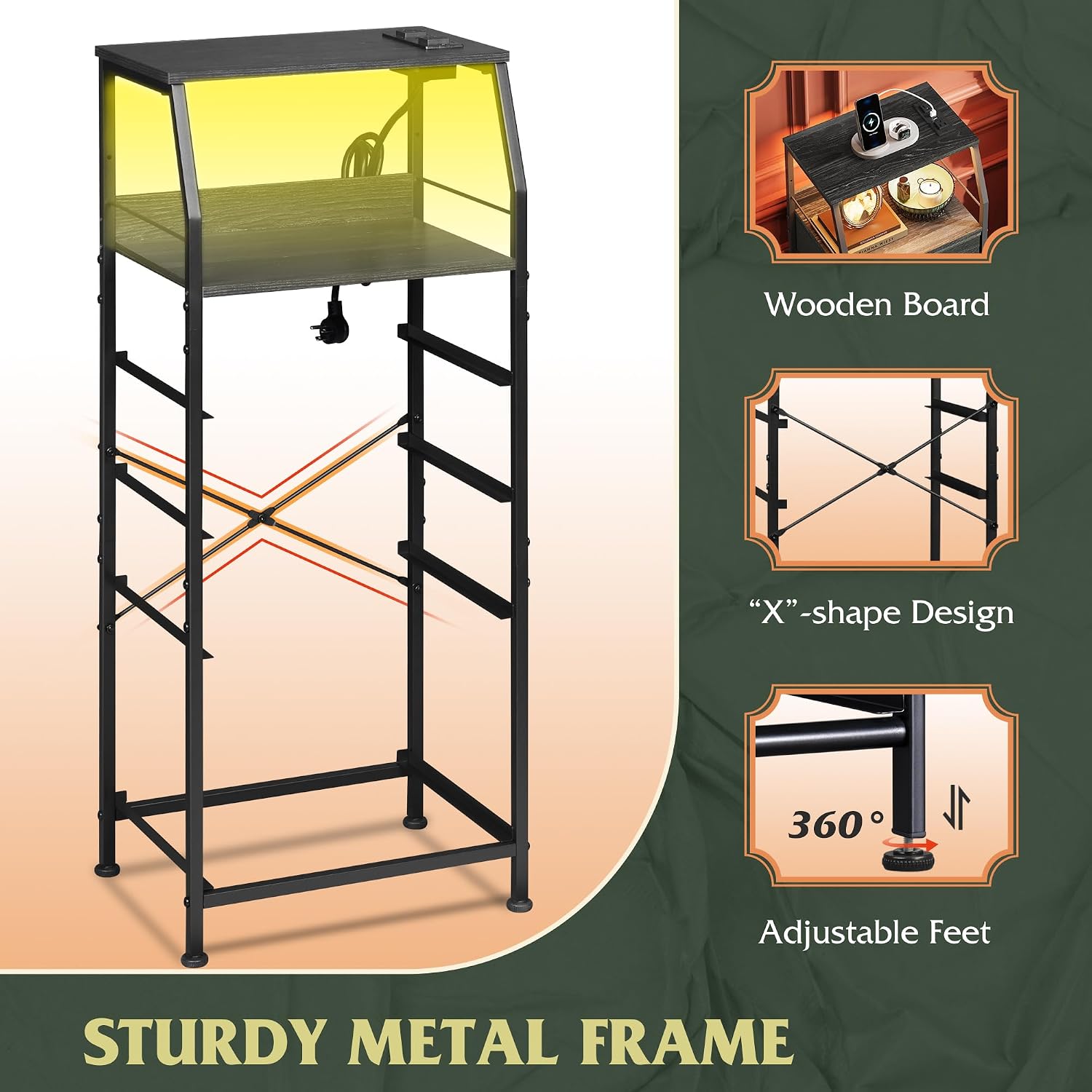
Image: Illustration of the nightstand's sturdy metal frame, X-shaped back rods for stability, and 360-degree adjustable feet for leveling.
Operating Instructions
RGB LED Lights
The integrated RGB LED light strip offers customizable lighting options to enhance your room's ambiance.
- Power On/Off: Use the control button to turn the LED lights on or off.
- Color Selection: Cycle through various colors to match your mood or decor.
- Brightness Adjustment: Adjust the light intensity to your preferred level for visual comfort.
- Dynamic Modes: Select from multiple dynamic lighting effects, such as flashing or fading, to create a vibrant atmosphere.
- Speed Control: Adjust the speed of dynamic lighting modes.

Image: A visual representation of the RGB LED light features, including multi-color options, brightness control, dynamic modes, and flashing frequency adjustment.
Charging Station
The built-in charging station provides convenient power access for your electronic devices. It is ETL certified for safety.
- AC Outlets: Two (2) 125V/12A AC outlets are available for powering larger devices or chargers.
- USB Ports: Two (2) 5V/2.1A USB ports are provided for charging smartphones, tablets, and other USB-powered devices.
- Power Cord: The charging station features a 4.9-foot power cord for flexible placement.

Image: A close-up view of the integrated charging station, highlighting the two AC outlets and two USB ports, along with the power cord.
Maintenance
To maintain the appearance and longevity of your WLIVE Nightstand, follow these simple care instructions:
- Cleaning: Wipe the surfaces with a dry, soft cloth. Avoid using abrasive cleaners or harsh chemicals, which may damage the finish.
- Fabric Drawers: The fabric drawers are breathable and easy to maintain. Spot clean with a damp cloth and mild detergent if necessary, then air dry. Do not machine wash.
- Inspection: Periodically check all screws and connections to ensure they remain tight. Retighten if necessary.
Troubleshooting
If you encounter any issues with your nightstand, please refer to the following common troubleshooting steps:
- LED Lights Not Working:
- Ensure the power cord for the LED lights is securely plugged into a working electrical outlet.
- Check if the light strip connection to the nightstand's power source is firm.
- Verify that the power outlet itself is functional by plugging in another device.
- Charging Station Not Providing Power:
- Confirm the main power cord of the nightstand is fully plugged into a live wall outlet.
- Test the outlet with another appliance to ensure it has power.
- Ensure the devices you are trying to charge are properly connected to the USB ports or AC outlets.
- Avoid overloading the charging station; check the power requirements of your devices.
- Nightstand Wobbles:
- Adjust the 360° adjustable feet at the bottom of the nightstand to level it on uneven floors.
- Ensure all assembly screws and bolts are tightened securely.
- Verify that the X-shaped rods are correctly installed and tightened.
- Drawers Do Not Slide Smoothly:
- Ensure the fabric drawers are fully expanded and correctly inserted into their respective slots.
- Check for any obstructions within the drawer slots.
- Verify that the nightstand frame is assembled squarely and not warped.
If these steps do not resolve the issue, please contact WLIVE customer support for further assistance.
Specifications
| Feature | Detail |
|---|---|
| Brand | WLIVE |
| Model Name | ACTG003DK2 |
| Product Dimensions (D x W x H) | 11.41"D x 15.67"W x 37.48"H |
| Item Weight | 14.56 pounds |
| Maximum Weight Recommendation (Top/Shelf) | 22 lbs (Top and Open Shelf) |
| Maximum Weight Recommendation (Drawer) | 5.5 lbs (Each Drawer) |
| Color | Charcoal Black Wood Grain Print |
| Material | MDF board, Non-woven fabric, Steel frame |
| Number of Drawers | 4 |
| Charging Station | 2 AC outlets (125V/12A), 2 USB ports (5V/2.1A) |
| Power Cord Length | 4.9-Foot |
| Special Feature | RGB LED Lights, Charging Station, Adjustable Feet, Anti-tip Device |
| Indoor/Outdoor Usage | Indoor |
| Tools Recommended For Assembly | Screw Driver |

Image: Detailed diagram showing the dimensions of the nightstand and the weight capacities for the wooden board and fabric drawers.
Warranty and Support
WLIVE is committed to providing high-quality products and customer satisfaction. For any questions regarding your WLIVE Nightstand with Charging Station, including assembly, operation, or parts replacement, please contact WLIVE customer support.
Please refer to your purchase documentation or the WLIVE official website for specific warranty details and contact information.
Note: Keep your purchase receipt as proof of purchase for warranty claims.


