
1. Introduction and Overview
This manual provides detailed instructions for the installation, operation, and maintenance of the Baomain DM25S 1-Module DIN Rail Energy Meter. This single-phase kWh meter is designed for accurate measurement of active energy consumption in various applications, including residential, commercial, and light industrial settings. Its compact design allows for easy integration into distribution panels and control cabinets.
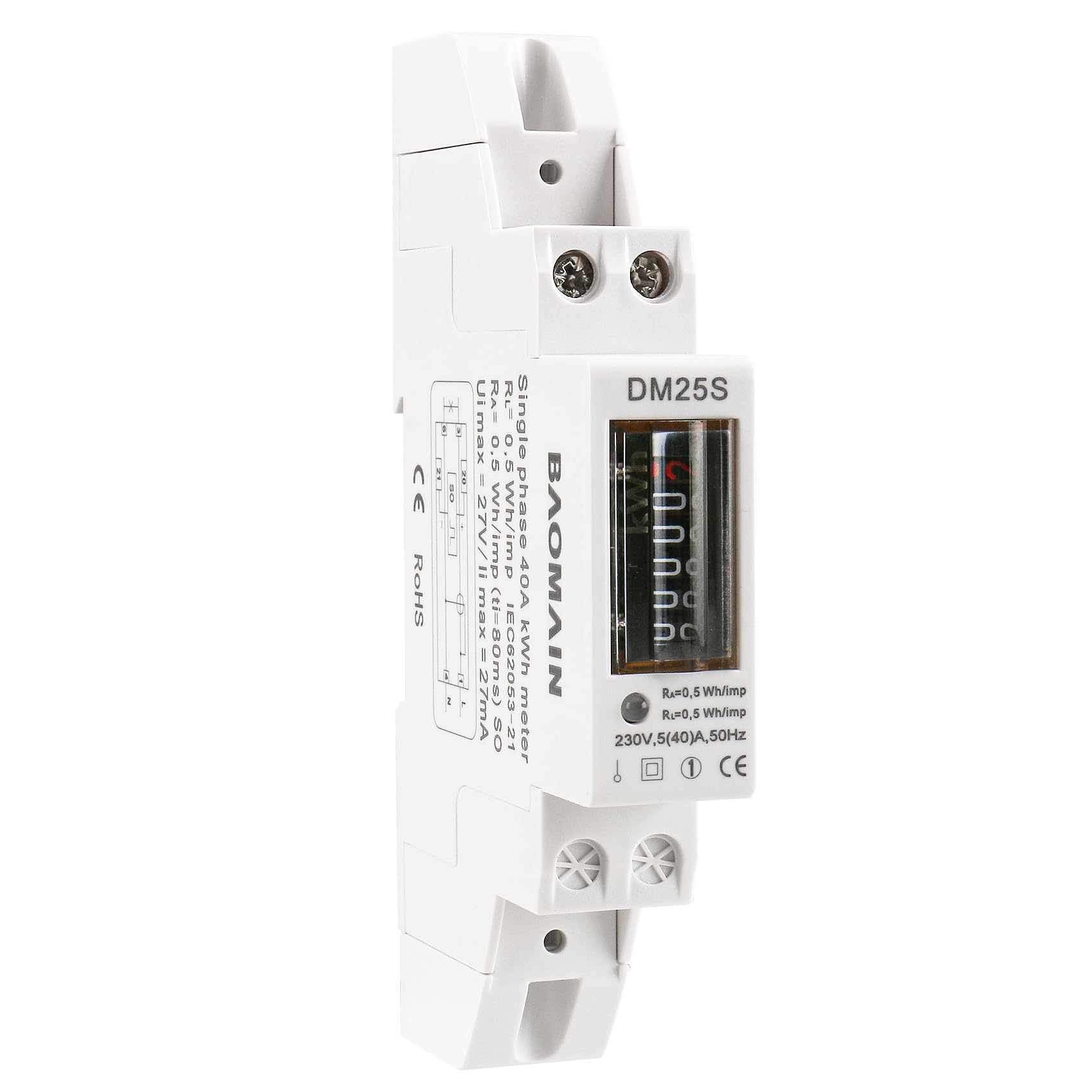
Figure 1: Baomain DM25S Energy Meter, general view.
2. Safety Information
Please read and understand all safety instructions before installing or operating this device. Failure to follow these instructions may result in electric shock, fire, or serious injury.
- Qualified Personnel: Installation and maintenance should only be performed by qualified electricians.
- Power Disconnection: Always disconnect power to the circuit before installing, wiring, or servicing the meter.
- Voltage Check: Verify that the voltage and current ratings of the meter match the electrical system.
- Proper Wiring: Ensure all wiring connections are secure and comply with local electrical codes.
- Environmental Conditions: Do not expose the meter to excessive moisture, dust, or extreme temperatures outside its specified operating range.
- Insulation: The meter is an insulating encased meter of protective class II.
3. Product Features
- Industrial DIN Rail Design: 1-module (18mm) compact kWh meter designed for standard 35mm DIN rail installation.
- Wide Measurement Range: Supports operational current from 0.25A up to 40A.
- High Accuracy: Meets IEC Class 1 standard for reliable and precise energy measurement.
- Clear Counter Display: Mechanical-style 5+1 digit counter with backlight for easy reading.
- Single Phase 2-Wire: Compatible with standard 220–230VAC, 50Hz mains.
- Pulse Output: Features a pulse output for remote monitoring (2000 Impulses per kWh).
- LED Indicators: Green LED for power supply, Red LED for consumption indication.
- Data Retention: Data can be stored for more than 20 years during power cuts.

Figure 2: Front view of the Baomain DM25S Energy Meter, showing the 5+1 digit counter display and indicators.
4. Package Contents
- Baomain DM25S Single Phase Energy Meter
- User Manual (this document)
5. Specifications
| Parameter | Value |
|---|---|
| Model | DM25S |
| Phase | Single Phase (2-wire) |
| Nominal Voltage (Un) | 220VAC |
| Operational Voltage | 100-300V AC |
| Basic Current (Ib) | 5A |
| Maximum Rated Current (Imax) | 5(40)A |
| Operational Current Range | 0.25A ~ 40A |
| Accuracy Class | 1.0 |
| Operational Frequency | 50Hz-60Hz ±10% |
| Internal Power Consumption | ≤ 2W/10VA |
| Test Output Flash Rate (RED LED) | 2000 Impulses per kWh (0.5Wh/imp) |
| Pulse Output Rate (pins 20&21) | 2000 pulses per kWh (0.5Wh/imp) |
| Display Type | Counter Display 5+1 with backlight |
| Operating Temperature | -25°C ~ +55°C |
| Storage Temperature | -30°C ~ +70°C |
| Operating Humidity | ≤ 75% |
| Storage Humidity | ≤ 95% |
| International Standard | IEC 62053-21 |
| IP Protection | IP51 (panel) / IP20 (case) |
| Protective Class | II (Insulating encased meter) |
| Housing Material | PC Inflammable retarding, Environmental, Flame Retardant |
| Dimensions (L x W x H) | 4.5 x 0.7 x 2.3 inches (116 x 18 x 63 mm) |

Figure 3: Dimensions of the Baomain DM25S Energy Meter.
6. Setup and Installation
The Baomain DM25S is designed for easy installation on a standard 35mm DIN rail. Ensure power is disconnected before proceeding.
6.1. Mounting
- Locate a suitable 35mm DIN rail within your distribution panel or control cabinet.
- Align the meter's DIN rail clip with the rail.
- Press the meter firmly onto the DIN rail until it clicks into place, ensuring it is securely fastened.
6.2. Wiring Connections
Refer to the wiring diagram below for correct connections. This meter is a single-phase, 2-wire device.

Figure 4: Wiring Diagram for Baomain DM25S Energy Meter.
- Terminal 1 (L): Connect the incoming Phase (Live) line.
- Terminal 3 (L): Connect the outgoing Phase (Live) line to the load.
- Terminal 4 (N): Connect the incoming Neutral line.
- Terminal 6 (N): Connect the outgoing Neutral line to the load.
- Terminals 20 & 21 (SO): These are for the pulse output contact. Connect external monitoring equipment here if pulse output is required.
After all connections are made, double-check for proper polarity and secure terminals before restoring power.
7. Operating Instructions
7.1. Power On
Once the meter is correctly installed and wired, restore power to the circuit. The meter will automatically begin measuring energy consumption.
7.2. Display Reading
The meter features a 5+1 digit mechanical counter display, showing total energy consumption in kilowatt-hours (kWh). The last digit (after the decimal point) represents tenths of a kWh.
7.3. LED Indicators
- Green LED (Power Supply Indicator): Illuminates when the meter is connected to power and operating correctly.
- Red LED (Consumption Indicator): Flashes to indicate active energy consumption. The flash rate is 2000 impulses per kWh (0.5Wh/imp). A faster flash rate indicates higher power consumption.
8. Maintenance
The Baomain DM25S energy meter is designed for long-term, maintenance-free operation. However, periodic checks are recommended:
- Cleaning: Keep the meter clean and free from dust. Use a soft, dry cloth for cleaning. Do not use abrasive cleaners or solvents.
- Connection Check: Periodically inspect wiring connections to ensure they remain tight and secure.
- Environmental Conditions: Ensure the operating environment remains within the specified temperature and humidity ranges.
- No User Serviceable Parts: Do not attempt to open or repair the meter. Refer all servicing to qualified personnel.
9. Troubleshooting
If you encounter issues with your Baomain DM25S energy meter, refer to the following common troubleshooting steps:
- Meter Not Powering On (Green LED Off):
- Check if power is supplied to the circuit.
- Verify all wiring connections (Terminals 1, 4) are correct and secure.
- Ensure the input voltage is within the operational range (100-300V AC).
- Red LED Not Flashing (No Consumption Indication):
- Ensure there is an active load connected to the meter (Terminals 3, 6).
- Verify the load is drawing current (operational current range 0.25A ~ 40A).
- Check wiring to the load for continuity.
- Inaccurate Readings:
- Confirm correct wiring according to the diagram (Figure 4). Incorrect wiring can lead to inaccurate measurements.
- Ensure the meter is not exposed to strong magnetic fields or extreme environmental conditions.
If the problem persists after performing these checks, contact customer support for further assistance.
10. Warranty and Support
Baomain products are manufactured to high-quality standards. For warranty information, technical support, or service inquiries, please refer to the contact information provided with your purchase or visit the official Baomain website.
Please retain your proof of purchase for warranty claims.