
1. Introduction
This manual provides comprehensive instructions for the assembly, operation, and maintenance of your Aheaplus King Size Headboard. This headboard is designed to enhance your bedroom with convenient features including integrated power outlets, USB charging ports, RGB LED lighting, and practical storage shelves. Please read this manual thoroughly before beginning assembly or use to ensure proper installation and safe operation.
2. Safety Information
- Always follow the safety instructions provided for proper wall mounting, if applicable, to prevent tipping.
- Ensure all connections for the power strip and LED lights are secure before use.
- Do not overload the electrical outlets. Refer to the specifications for maximum load.
- Keep liquids away from electrical components to prevent electric shock.
- Assembly should be performed by at least two adults to ensure safety and ease of installation.
3. Package Contents
Verify that all components are present before beginning assembly. If any parts are missing or damaged, please contact customer support.
- Headboard panels and frame components
- Integrated power strip with 3 AC outlets and 2 USB ports
- RGB LED light strip with remote control
- Assembly hardware (screws, bolts, etc.)
- Tools for assembly
- 2 bed frame adapters
- Instruction manual
4. Specifications
| Brand | Aheaplus |
| Size | King |
| Color | Rustic Brown |
| Style | Wood |
| Special Features | Adjustable Height, Easy To Assemble, Storage, Integrated Power Outlets, USB Ports, LED Lighting |
| Mounting Type | Bed Frame Mount |
| Item Weight | 36.4 pounds |
| Package Dimensions | 45.2 x 11.3 x 6.8 inches |
| Power Strip Cable Length | 6.56 feet |
5. Setup & Assembly
Your Aheaplus headboard is designed for straightforward assembly. All necessary tools and hardware are provided, along with clear, labeled instructions. We recommend assembling the headboard with another person.
5.1 General Assembly
- Unpack all components and verify against the package contents list.
- Follow the step-by-step diagrams and instructions provided in the included assembly guide.
- Ensure all screws and fasteners are tightened securely, but do not overtighten.
5.2 Height Adjustment
The headboard features an adjustable height mechanism to accommodate various bed frame and mattress heights. Adjust the frame to your desired height during assembly or by loosening and re-tightening the appropriate fasteners.
5.3 Attaching to Bed Frame
The headboard includes 2 bed frame adapters for easy connection to most standard bed frames. These connectors are adjustable to suit different sizes and styles of bed frames. No additional accessories are typically required for this connection.

Figure 5.1: Fully assembled Aheaplus King Size Headboard with LED lights and charging station.

Figure 5.2: Detailed dimensions of the headboard, illustrating adjustable height and shelf measurements.

Figure 5.3: Close-up view of the headboard's round corners for safety and the included bed frame connectors.
6. Operating Instructions
6.1 Power and USB Charging Station
The headboard features a built-in power strip with 3 standard AC outlets and 2 USB charging ports. The power cable is 6.56 feet long, providing flexibility for connecting to a wall outlet.
- Connect the headboard's power cord to a functional wall outlet.
- Plug in electronic devices (e.g., phones, tablets, lamps) into the AC outlets or USB ports for convenient charging.
- The power strip can be installed on either the left or right side of the headboard during assembly to suit your preference.

Figure 6.1: Headboard with devices charging via the integrated power and USB ports.

Figure 6.2: Detailed view of the power strip, showing 3 AC outlets and 2 USB ports.
6.2 RGB LED Lighting
The headboard includes an RGB LED light strip that offers over 60,000 colors and multiple flashing modes. It can be controlled via a remote control and features music sync and timer functions.
- Connect the LED light strip to a USB port on the power strip or another compatible USB power source.
- Use the provided remote control to power the lights on/off, change colors, select flashing modes, and activate music sync or timer functions.
- The music sync function allows the lights to change color with the rhythm of sound and music in the room.
- The timer function allows you to set a specific duration for the lights to remain on.
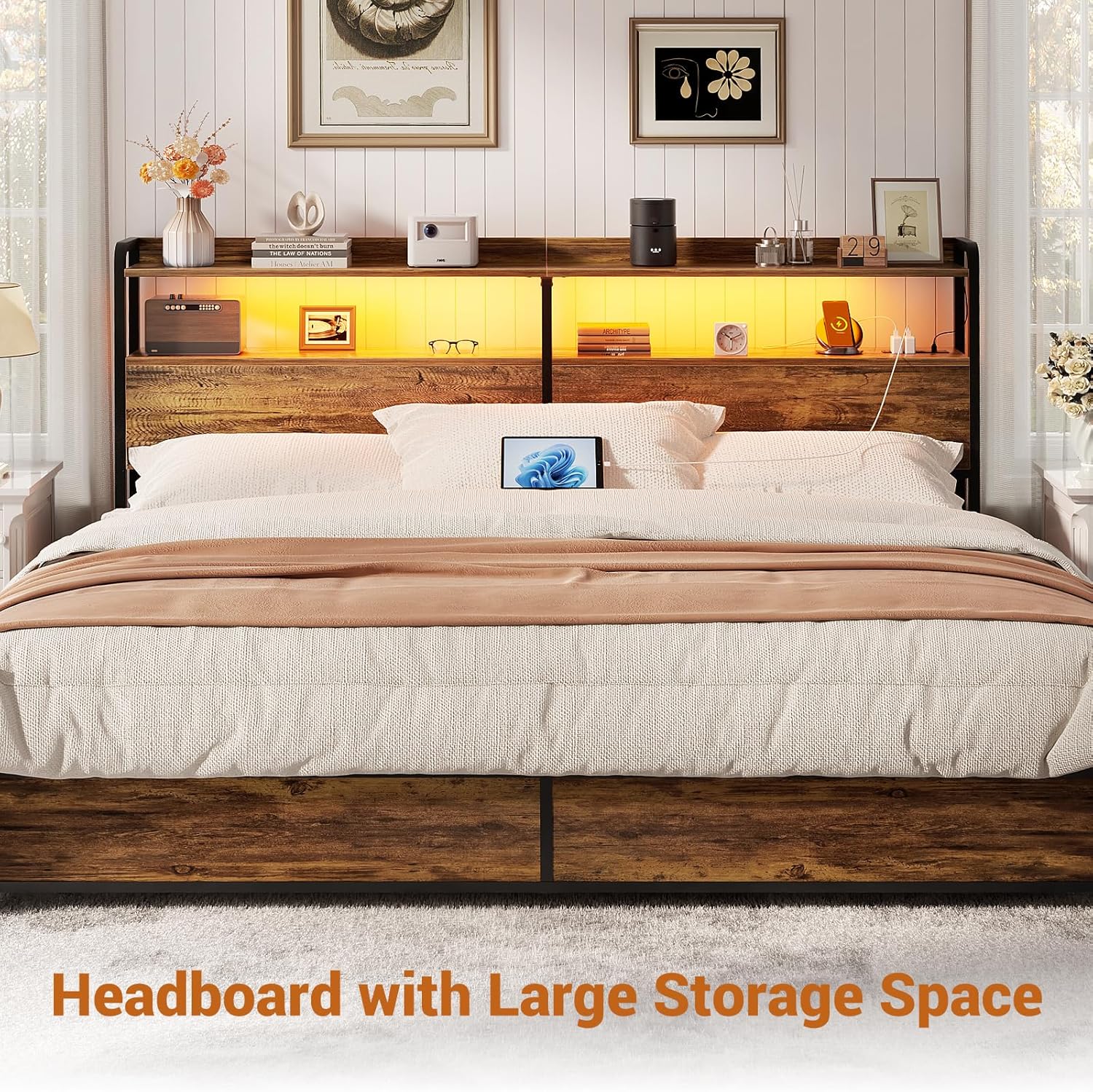
Figure 6.3: Headboard illuminated with vibrant RGB LED lights, showcasing various color options.
7. Maintenance
To maintain the appearance and longevity of your headboard, follow these simple care instructions:
- Cleaning: Wipe the surfaces with a dry, soft cloth. Avoid using harsh chemicals or abrasive cleaners, which can damage the finish.
- Dusting: Regularly dust the shelves and surfaces to prevent buildup.
- Electrical Components: Ensure the power strip and LED lights remain dry and free from dust. Do not attempt to disassemble or repair electrical components yourself.
8. Troubleshooting
If you encounter any issues with your Aheaplus headboard, please refer to the following common troubleshooting tips:
- Missing Parts: If any parts are missing upon delivery, contact customer support immediately for assistance.
- Wobbling: Ensure all screws and fasteners are securely tightened. Check that the headboard is properly attached to the bed frame using the provided adapters.
- Power Outlets/USB Ports Not Working: Verify that the headboard's main power cord is securely plugged into a functional wall outlet. Check for tripped circuit breakers.
- LED Lights Not Functioning: Ensure the LED light strip is correctly connected to a powered USB port. Check the remote control battery and ensure there are no obstructions between the remote and the light strip receiver.
For issues not covered here, please contact Aheaplus customer support.
9. Warranty and Support
This Aheaplus headboard is sold without an explicit manufacturer's warranty. However, Aheaplus offers lifetime customer support. If you have any questions, concerns, or require assistance before or after your purchase, please do not hesitate to reach out to our experienced support team. Contact information can typically be found on the Aheaplus official website or through your purchase platform.