1. Introduction
The SIMSONN NEW PRO Pedals are a high-quality pressure sensor load cell hydraulic pedal set designed for PC racing simulators. This manual provides essential information for setup, operation, maintenance, and troubleshooting to ensure optimal performance and longevity of your pedal set.
Key features include:
- Compatibility with PC (Windows 11 and below) via USB, no driver installation required.
- Constructed from high-quality, anti-rust steel with CNC precision laser cutting for durability.
- Brake damping with Red polyurethane damping (55 hardness) for progressive feel.
- Adjustable pedal strength and inclination angle.
- Calibration data stored directly in the controller.
- Upgraded ball bearings for smooth, wobble-free operation.
2. Package Contents
Please verify that all components are present in your package:
- SIMSONN NEW PRO Pedal Set (Throttle, Brake, Clutch pedals)
- Base Plate (if included with your specific model)
- Control Box
- USB Cable
- Assorted Springs and Elastomers for customization
- Mounting Hardware (screws, washers, Allen keys)
- Instruction Manual

Figure 2.1: SIMSONN NEW PRO Pedals with included Base Plate.
3. Setup Guide
3.1. Assembly
The SIMSONN NEW PRO Pedals are designed for straightforward assembly. Follow the steps below for mounting the pedals to the base plate and connecting the components.
Video 3.1: SIMSONN Pedals Installation Guide. This video demonstrates the physical assembly of the pedals onto the base plate and connecting the cables.
Detailed dimensions for mounting:
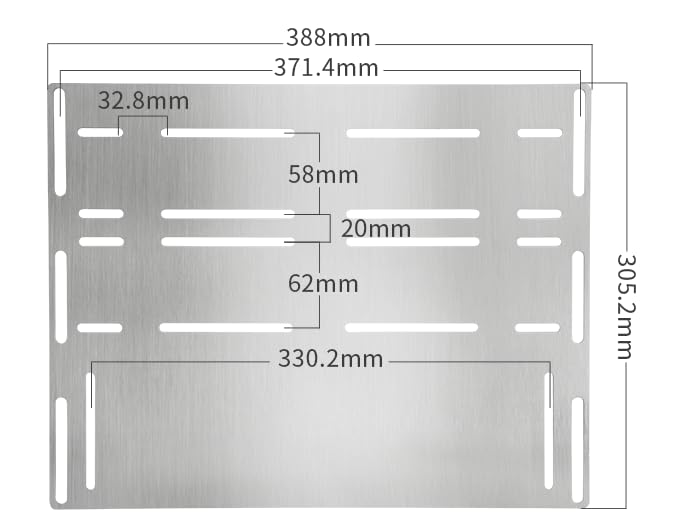
Figure 3.1: Base plate dimensions for mounting to a rig or cockpit.
3.2. Connectivity
The SIMSONN NEW PRO Pedals are designed for PC compatibility. Connect the pedal set directly to your computer via the provided USB cable. No additional drivers are required for Windows 11 and below operating systems.
- Ensure your PC is running Windows 11 or an earlier compatible version.
- Plug the USB cable from the pedal control box into an available USB port on your computer.
- The system should automatically recognize the device.
Note: These pedals are exclusively for PC use and are not compatible with PS4/5, XBOX, or MAC systems.
3.3. Calibration
Calibration is crucial for accurate pedal response. The calibration data is stored directly in the pedal controller, meaning you only need to calibrate once. SIMSONN provides dedicated software for this purpose, and the pedals are also compatible with third-party calibration tools like FreeJoy.
Video 3.2: SIMSONN PRO Pedals V4.0 Software Calibration Steps. This video demonstrates the calibration process using the official SIMSONN software.
Video 3.3: FreeJoy Calibration Steps of SIMSONN PRO Pedals. This video demonstrates an alternative calibration method using FreeJoy software.
For the latest software information and calibration guidance, please refer to the message center after receiving your product or contact SIMSONN support.

Figure 3.2: The control box allows for custom output curves to be configured and stored, avoiding repeated calibrations.
4. Operating Instructions
4.1. Pedal Adjustments
The SIMSONN NEW PRO Pedals offer extensive adjustability to suit individual preferences and racing styles. You can modify the pedal strength, inclination angle, and damping characteristics.
- Pedal Strength: Adjust the height of the mounting holes to modify the force required to actuate the pedals.
- Inclination Angle: The angle of the pedal faces can be adjusted for ergonomic comfort and optimal foot placement.
- Brake Damping: The brake pedal features Red polyurethane damping with a hardness of 55, providing a realistic, progressive feel. Experiment with different elastomers (if provided) to fine-tune the damping.
- Heel-Toe Operation: The throttle panel includes added heel and toe positions, and the brake panel is widened to facilitate easy heel-toe maneuvers.
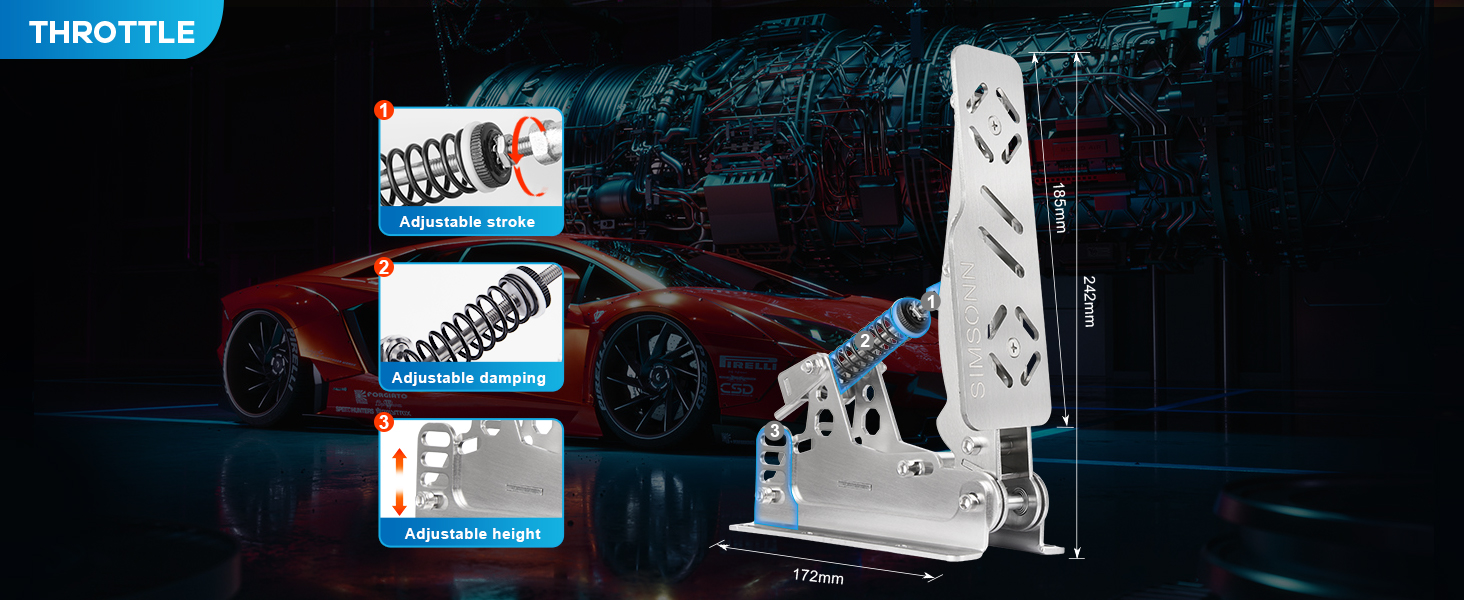
Figure 4.1: Adjustable features of the Throttle pedal, including stroke, damping, and height.

Figure 4.2: Adjustable features of the Clutch pedal, including stroke, damping, and height.

Figure 4.3: Adjustable features of the Brake pedal, including stroke, damping, and height.
5. Maintenance
Regular maintenance will help preserve the performance and lifespan of your SIMSONN NEW PRO Pedals.
- Cleaning: Wipe down the metal surfaces with a soft, dry cloth. Avoid abrasive cleaners or solvents that could damage the finish.
- Inspection: Periodically check all screws and connections to ensure they are secure. Tighten any loose fasteners.
- Lubrication: The pedals feature upgraded ball bearings at key pivot points for smooth operation. These are designed for durability and typically do not require frequent lubrication. If you notice any stiffness or noise, a small amount of silicone-based lubricant can be applied to moving parts, avoiding contact with sensors.
- Storage: When not in use for extended periods, store the pedals in a clean, dry environment to prevent dust accumulation and potential corrosion.

Figure 5.1: Upgraded ball bearings ensure smooth, rust-proof, and wobble-free functionality.

Figure 5.2: The 6mm thick stainless steel construction ensures durability and stability, even under high-intensity braking.
6. Troubleshooting
If you encounter issues with your SIMSONN NEW PRO Pedals, please refer to the following common solutions:
| Problem | Possible Cause | Solution |
|---|---|---|
| Pedals not recognized by PC | Incorrect USB connection, incompatible OS, or USB port issue. | Ensure the USB cable is securely connected to both the control box and the PC. Try a different USB port. Verify your operating system is Windows 11 or below. |
| Inaccurate pedal response / Spiking inputs | Calibration required or Electromagnetic Interference (EMI). | Perform a full calibration using the SIMSONN software or FreeJoy (refer to Section 3.3). If using a direct drive wheel base, consider installing a USB isolator inline with the pedal set's USB cable to mitigate EMI. |
| Pedals feel too stiff/soft | Incorrect physical adjustment. | Adjust the pedal strength by modifying the height of the mounting holes (refer to Section 4.1). For the brake pedal, experiment with different elastomers if available. |
| Hydraulic rods not included | Hydraulic rods are not shipped separately. | As per manufacturer's note, hydraulic rods are not shipped separately. If your model was expected to include them and they are missing, contact customer support immediately. |
If the issue persists after attempting these solutions, please contact SIMSONN customer support for further assistance.
7. Specifications
| Feature | Detail |
|---|---|
| Model | NEW PRO Pedals (Base Plate) |
| Compatibility | PC (Windows 11 and below) |
| Connectivity | USB (Driverless installation) |
| Material | High-quality Steel, CNC precision laser cut (3mm thickness) |
| Brake Damping | Red polyurethane (55 hardness) |
| Load Cell | Up to 200kg (as per brand story) |
| Dimensions (Package) | 18.9 x 12.99 x 5.12 inches |
| Item Weight | 12.32 pounds |
| Manufacturer | SIMSONN |
| Country of Origin | China |
| First Available Date | January 25, 2024 |
8. Warranty and Support
8.1. Warranty Information
SIMSONN provides a 12-month warranty for defective products. This warranty does not cover any damage or misuse caused by the buyer. Accessories included with the pedal set are covered by a 3-month warranty.
8.2. Customer Support
For any questions, technical assistance, or warranty claims, please contact SIMSONN customer support. Comprehensive user manuals and online resources are available, and remote support is offered to assist customers with their inquiries.
Please refer to the contact information provided in your product packaging or through your purchase platform's message center for the most direct support channels.


