Introduction
This manual provides detailed instructions for the installation, operation, and maintenance of your ATOTO F7XE Double Din Car Stereo. Please read this manual thoroughly before using the product to ensure proper functionality and safety.
What's in the Box
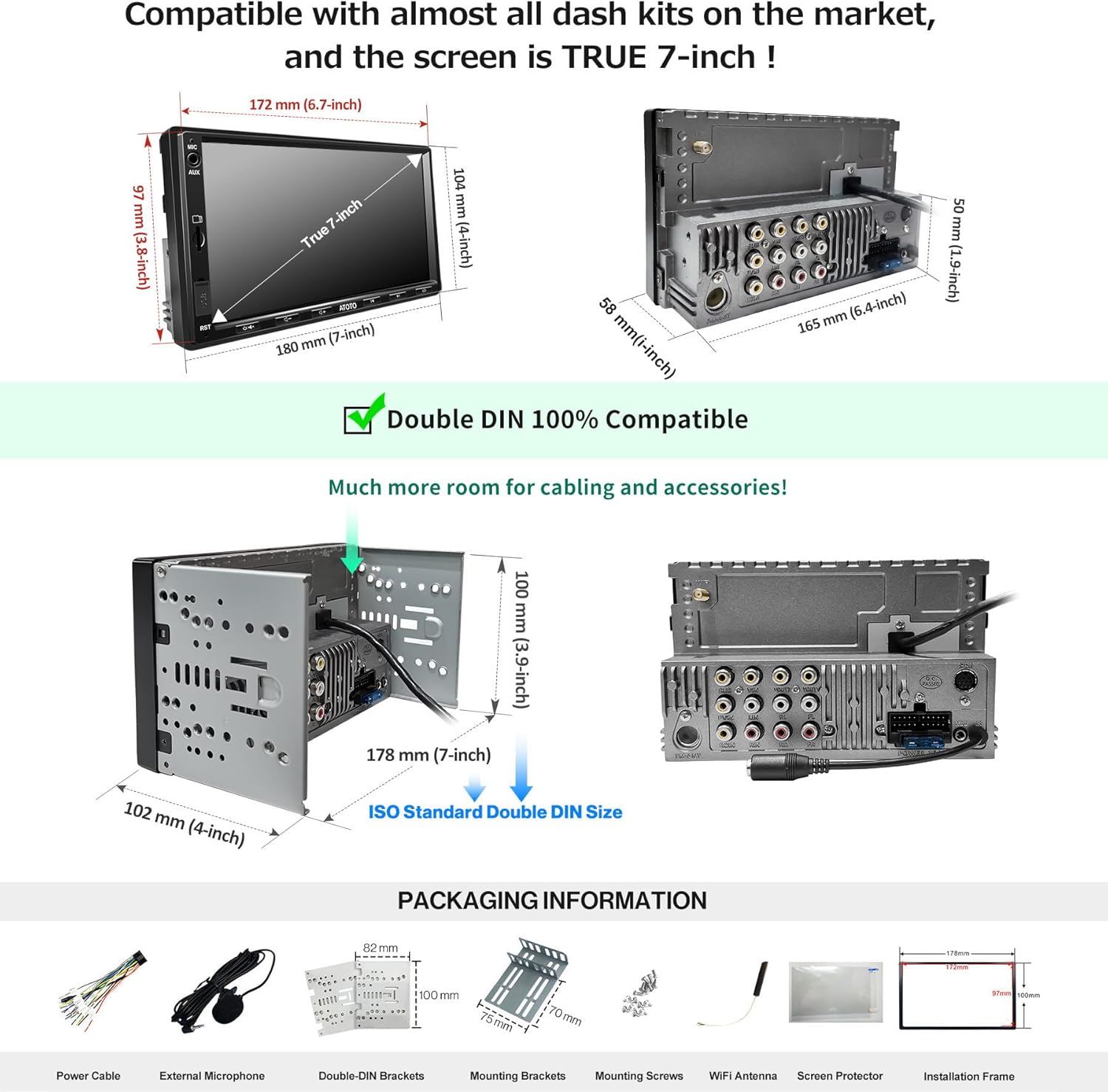
Verify that all components are present before beginning installation.
- Car Stereo
- External Microphone
- Brackets
- Power Cable
Setup and Installation
Professional installation is recommended. Ensure the vehicle's power is disconnected before starting installation.
1. Wiring Connections
Refer to the wiring diagram for correct connections. All wire connections must be fully insulated with electrical tape to prevent short circuits.
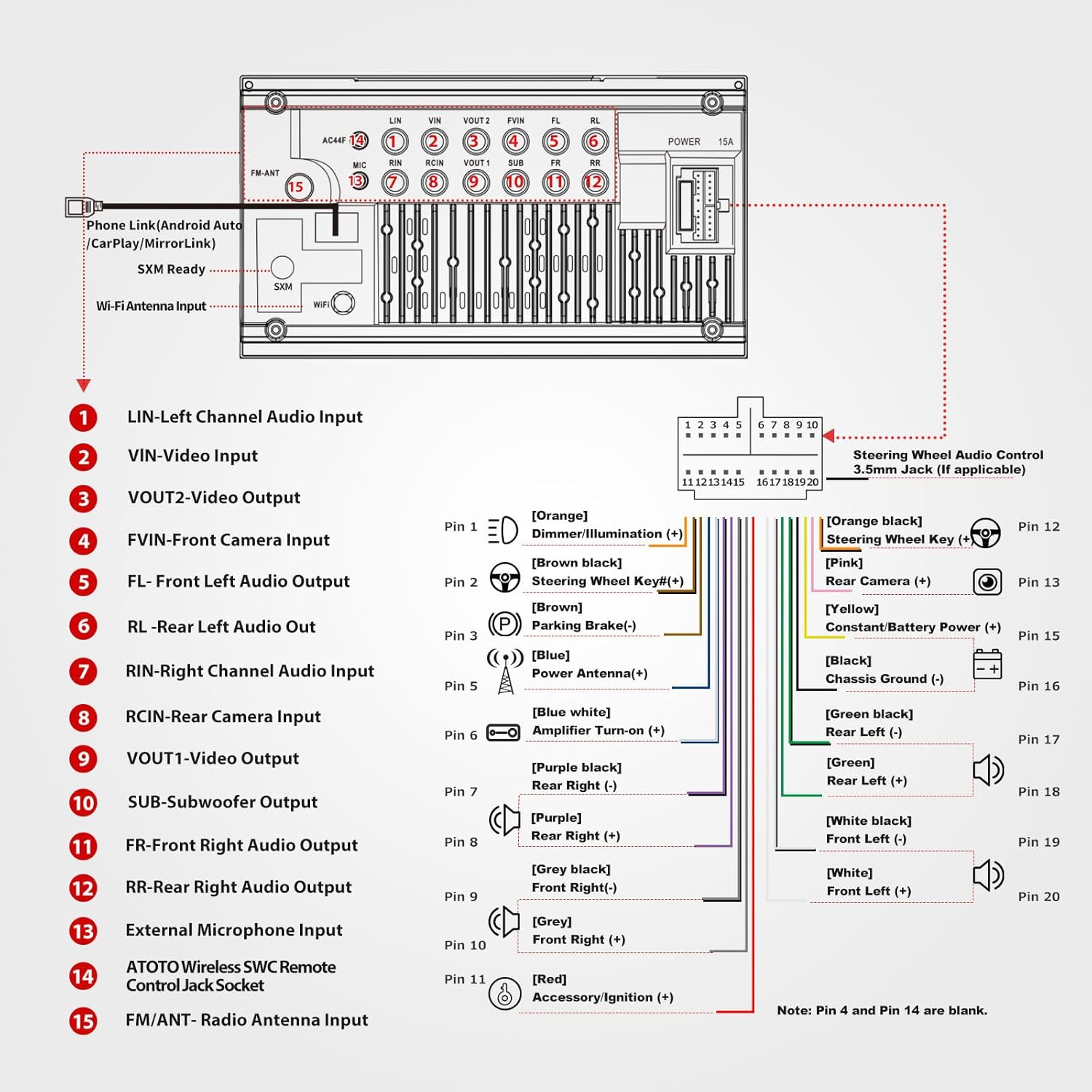
- Power Cable: Connect the main power cable to the vehicle's power harness.
- Speaker Wires: Connect the speaker wires (Front Left, Front Right, Rear Left, Rear Right) to your vehicle's corresponding speaker outputs.
- Steering Wheel Control (SWC): If your vehicle supports OEM steering wheel controls, connect the SWC wires. An optional ATOTO AC-44F5 wireless remote is available for vehicles without existing controls.
- Camera Inputs: Connect HD 720P front and rear cameras (compatible with ATOTO AC-HD02LR camera, not included) to the designated inputs.
- USB Ports: Utilize the two USB ports for Phone Link (CarPlay, Android Auto, MirrorLink) and external storage/multimedia playback.
- SD Slot: Insert SD cards up to 512 GB for additional storage.
2. Physical Installation
The F7G2A7XE features a UDH07D (Universal Double DIN) mounting style. It is compatible with most double DIN dash kits.

- Secure the unit into the double DIN dash opening using the provided brackets and screws.
- Ensure all cables are properly routed and secured to prevent interference or damage.
- Reconnect the vehicle's power supply.
Operating Instructions
1. Wireless CarPlay & Android Auto
The F7XE supports both wired and wireless CarPlay and Android Auto. Connect your smartphone via Bluetooth for wireless functionality or use a USB cable for wired connection and charging.
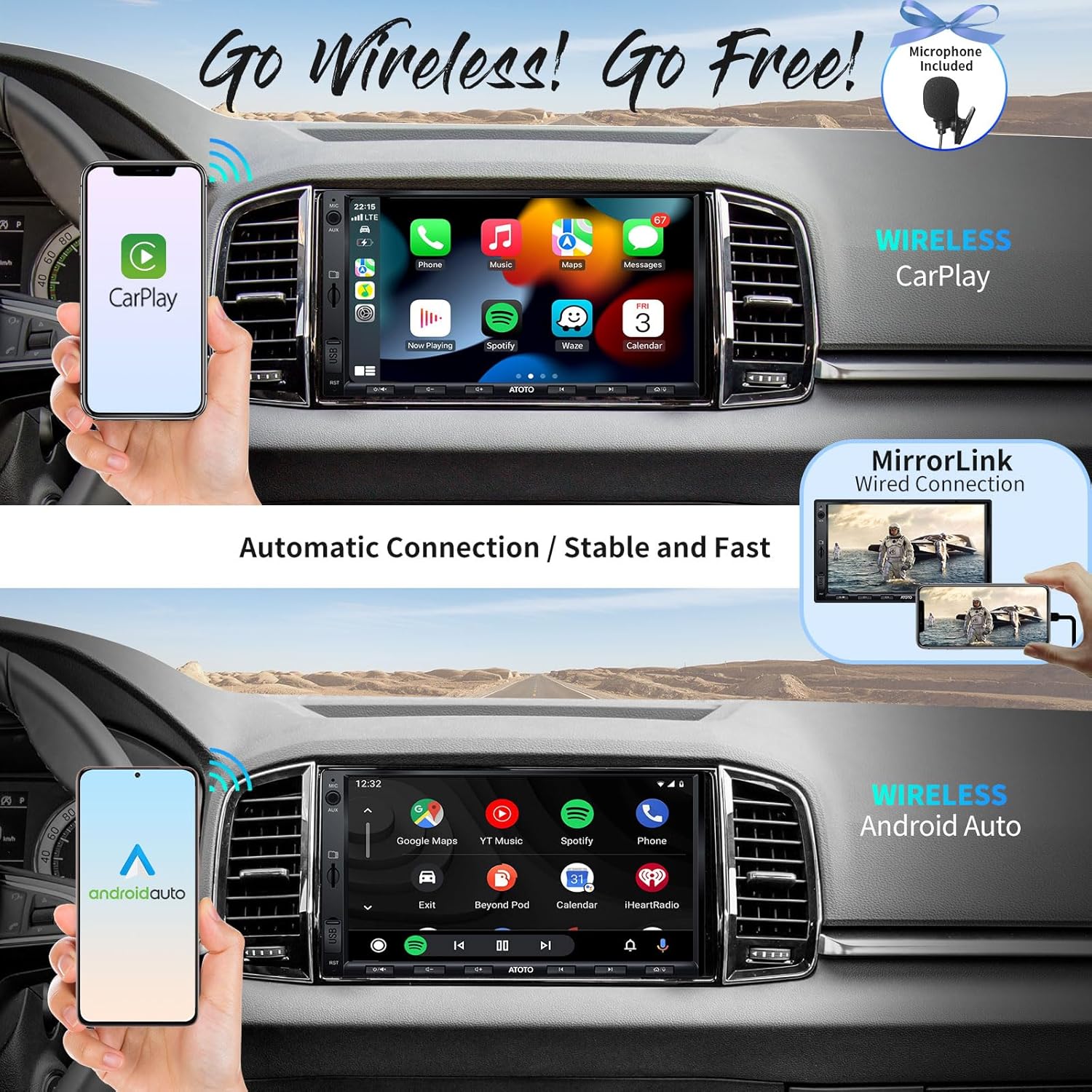
- Wireless Connection: Pair your smartphone via Bluetooth to enable wireless CarPlay or Android Auto.
- Wired Connection: Connect your phone to the designated USB port for wired CarPlay/Android Auto, which also provides significant charging.
- MirrorLink (AutoLink): Supports wired MirrorLink for both Android and iOS devices.
2. Audio Features
Enjoy high-quality audio with the built-in preamplifier and equalizer.
- FM/AM Radio: Receives FM/AM radio with RBDS (Radio Broadcast Data System).
- Preamplifier: Maximum 4*49W, RMS 4*29W output.
- Equalizer: 10-band Equalizer with 7 presets for audio customization.
- Bluetooth Audio: Stream music wirelessly from your smartphone via Bluetooth.
3. Camera and Display Features
The 7-inch QLED touchscreen provides a clear and responsive interface.

- HD 720P Camera Inputs: Supports front and rear cameras for enhanced visibility.
- Live Rear View (LRV): Provides continuous rear visibility even when driving forward (requires compatible ATOTO AC-HD02LR camera).
- Video Outputs: Connect to headrest monitors for passenger entertainment.
- QLED Touchscreen: 7-inch 1024x600P QLED display with high sensitivity and a 178° wide viewing angle.
Maintenance
- Cleaning: Use a soft, dry cloth to clean the touchscreen and unit exterior. Avoid abrasive cleaners or solvents.
- Software Updates: Periodically check the ATOTO official website for firmware updates to ensure optimal performance and access to new features.
- Cable Inspection: Regularly inspect all connected cables for wear or damage. Ensure connections remain secure.
Troubleshooting
| Problem | Possible Cause | Solution |
|---|---|---|
| Unit does not power on. | Incorrect wiring, blown fuse, vehicle power issue. | Check power cable connections, inspect vehicle fuses, ensure vehicle battery is charged. |
| No sound from speakers. | Incorrect speaker wiring, amplifier issue, volume too low. | Verify speaker connections, check external amplifier (if used), increase volume. |
| CarPlay/Android Auto not connecting wirelessly. | Bluetooth not paired, Wi-Fi interference, phone settings. | Ensure Bluetooth is enabled and paired, check phone's CarPlay/Android Auto settings, try wired connection. |
| Rearview camera not displaying. | Incorrect camera wiring, camera malfunction. | Verify camera input connection and reverse trigger wire. Test camera functionality. |
| Touchscreen unresponsive or inaccurate. | Software glitch, physical damage. | Restart the unit. If issue persists, contact customer support. |
Specifications
| Feature | Detail |
|---|---|
| Model Number | F7G2A7XE |
| Display | 7-inch QLED Touchscreen, 1024x600P, 178° Wide Viewing Angle |
| Connectivity | Bluetooth, USB, Wi-Fi |
| Smartphone Integration | Wireless CarPlay, Wireless Android Auto, Wired MirrorLink (AutoLink) |
| Audio Output Power | Max 4*49W, RMS 4*29W |
| Equalizer | 10-Band EQ with 7 Presets |
| Camera Inputs | HD 720P Front and Rear Camera Inputs, Live Rear View (LRV) support |
| USB Ports | 2 (one for Phone Link, one for external storage up to 2TB SSD) |
| SD Slot | Supports up to 512 GB SD cards |
| Dimensions (Front Panel) | 172mm x 97mm (6.7-inch x 3.8-inch) |
| Item Weight | 2.72 pounds |
Warranty and Support
Your ATOTO F7XE car stereo includes a 12-month warranty from the date of purchase. An additional 6 months of warranty can be obtained by contacting customer support.
Our customer care team is available around the clock on workdays. Refer to the package details for contact information and access to the online manual in different languages.


