
1. Product Overview
The PARTPHONER PAFP088AB1 is a large glass display shelf designed as an LED floor lamp. It features five tiers of tempered glass shelves, supported by a sturdy wood frame. The integrated LED lighting is dimmable and offers adjustable color temperature, ranging from 2700K (warm white) to 6000K (cool white). Control options include both a remote control and a dedicated mobile application.

Figure 1: PARTPHONER Large Glass Display Shelf with remote and app control interfaces.
2. What's in the Box
- Glass Shelves (5 tiers)
- Poles (Frame components)
- Power Cable
- Remote Control
- Instruction Manual (Text and Video Installation Steps)
- Assembly Tools
3. Setup and Assembly
Assembly of the PARTPHONER PAFP088AB1 display shelf is designed to be straightforward and typically takes approximately 10 minutes. All necessary tools are included in the package.
Assembly Steps:
- Unpack all components and verify against the 'What's in the Box' list.
- Follow the detailed text and video installation steps provided in the included instruction manual.
- Carefully assemble the glass shelves and poles, ensuring all connections are secure.
- Connect the power cable to the unit.

Figure 2: Assembled dimensions of the PARTPHONER display shelf (15.35"D x 15.35"W x 66.4"H).
4. Operating Instructions
The LED lighting system of your display shelf can be controlled via the included remote control or a dedicated mobile application.
4.1 Remote Control Operation
The remote control (batteries not included) allows for easy adjustment of brightness, color temperature, and preset lighting modes.
- Power Button: Turns the lights ON/OFF.
- Brightness Adjustment: Use '+' and '-' buttons to increase or decrease brightness (0-100%).
- Color Temperature Adjustment: Use the sun icon buttons to adjust between warm (2700K) and cool (6000K) tones.
- Preset Modes: Dedicated buttons for modes such as Nursery, Night, Work, and Study.
- Timer: '1H' button sets a 1-hour timer for automatic shut-off.

Figure 3: Remote control for the display shelf lighting.
4.2 Mobile Application (APP) Control
For advanced control and customization, download the dedicated mobile application. Scan the QR code located on the power cable to access the download link.
- Brightness and Color Temperature: Adjust seamlessly using the app's interface (2700K-6000K, 0-100% brightness).
- Custom Modes: Access dynamic lighting presets like Jump, Strobe, Breathe, and Warning.
- Schedule ON/OFF: Set specific times for the lights to turn on or off.
- Memory Function: The unit remembers the last lighting setting used.
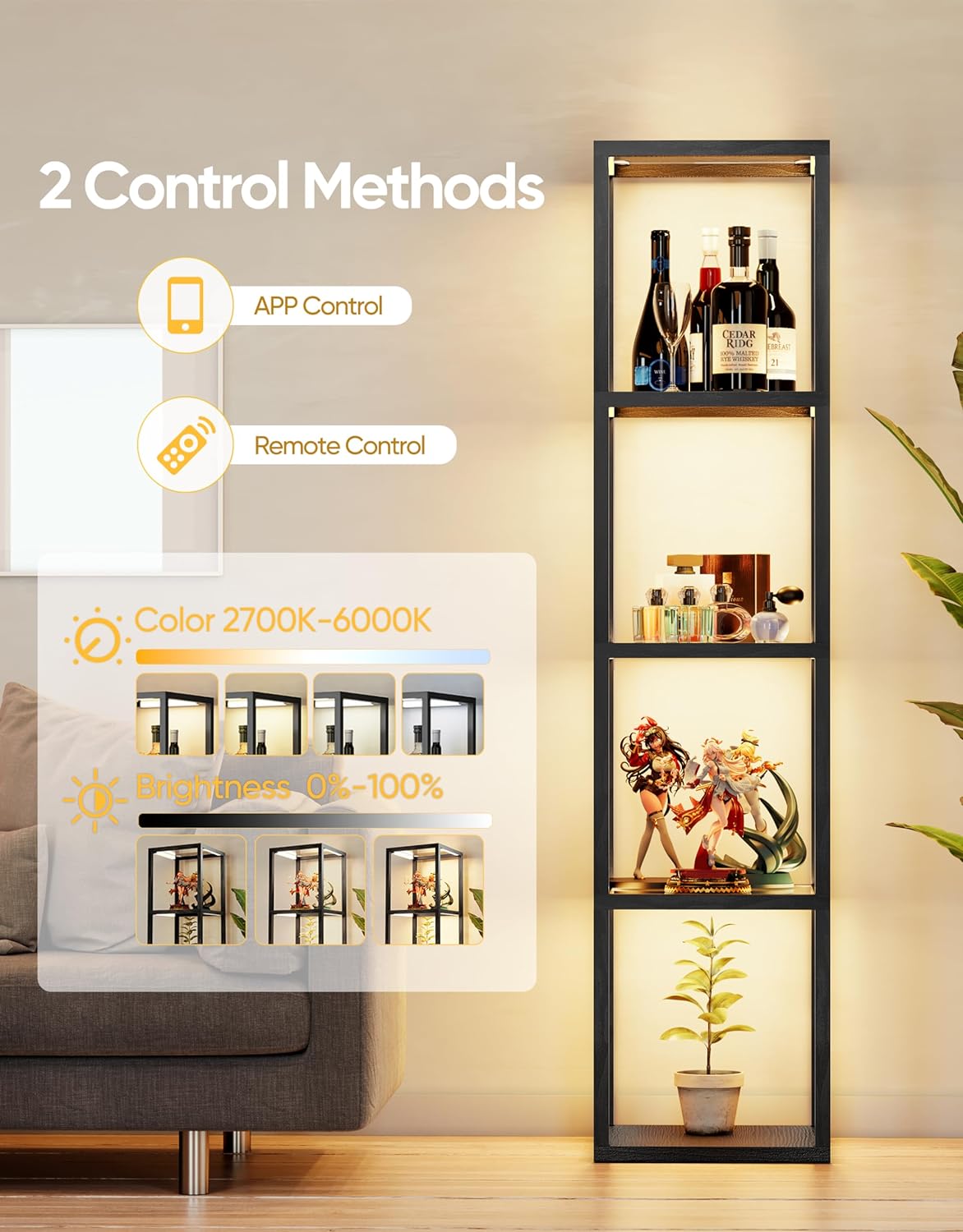
Figure 4: Two control methods: Mobile App and Remote Control.
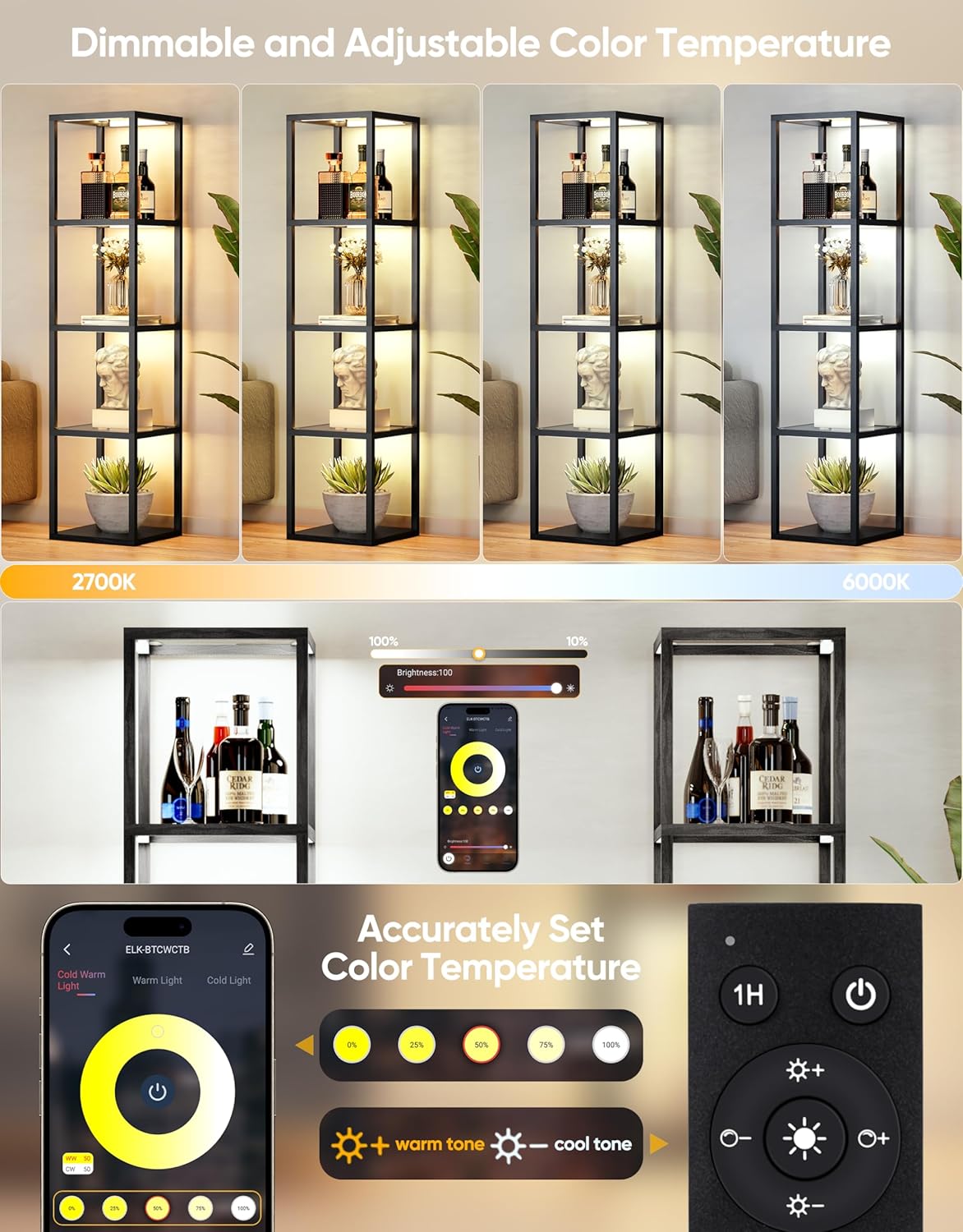
Figure 5: Dimmable and adjustable color temperature features.
Video 1: Demonstration of dimmable and adjustable color features of the display shelf lamp.
Video 2: Overview of smart control features for the glass display shelf.
5. Maintenance
To ensure the longevity and optimal performance of your PARTPHONER display shelf, follow these maintenance guidelines:
- Cleaning: Use a soft, dry cloth to wipe down the wood frame. For glass shelves, use a glass cleaner and a microfiber cloth to avoid streaks.
- Dusting: Regularly dust the shelves and LED strips to maintain light output and appearance.
- Avoid Harsh Chemicals: Do not use abrasive cleaners or solvents on any part of the shelf, as this may damage the finish or electronic components.
- Power Disconnection: Always unplug the unit from the power source before cleaning or performing any maintenance.
6. Troubleshooting
If you encounter any issues with your display shelf, refer to the following common troubleshooting steps:
- Lights Not Turning On:
- Ensure the power cable is securely connected to both the unit and a working power outlet.
- Check if the remote control batteries are correctly inserted and not depleted.
- Verify that the unit is not set to an OFF schedule via the mobile app.
- Remote Control Not Responding:
- Replace the batteries in the remote control.
- Ensure there are no obstructions between the remote and the unit's receiver.
- App Control Issues:
- Ensure your mobile device's Bluetooth is enabled and connected to the shelf.
- Restart the mobile application.
- Check for app updates.
- Inconsistent Lighting:
- Verify that all LED strip connections are secure.
- Dust or debris on LED strips can affect light output; clean as per maintenance instructions.
If the issue persists after attempting these steps, please contact customer support.
7. Specifications
| Feature | Specification |
|---|---|
| Model Name | PAFP088AB1 |
| Product Dimensions | 15.35"D x 15.35"W x 66.4"H |
| Item Weight | 23.84 Pounds |
| Material | Glass, Wood |
| Finish Type | Coated |
| Light Source Type | LED |
| Color Temperature | 2700K-6000K (Adjustable) |
| Dimmable | Yes (0-100%) |
| Control Method | App, Remote |
| Max Loading Capacity (per shelf) | 60 lbs |
| Power Source | Corded Electric (110 Volts) |
| Indoor/Outdoor Usage | Indoor |
| Assembly Required | Yes |

Figure 6: Tempered frosted glass shelves and durable wood construction.
8. Warranty and Support
For warranty information, product support, or to purchase protection plans, please refer to the documentation included with your product or visit the official PARTPHONER website.
Protection plans are available for extended coverage:
- 3-Year Protection Plan
- 4-Year Protection Plan
- Complete Protect (monthly plan covering eligible purchases)
For direct assistance, please contact PARTPHONER customer service.