
1. Introduction and Overview
The Arvitek 4K HDMI Matrix Switcher 4x4 is designed to route four HDMI input sources to four HDMI output displays. This device supports resolutions up to 4K (3840x2160) at 30Hz, ensuring high-quality video transmission. It also features 3.5mm audio extraction on Output 4, allowing for separate audio output. Control options include front panel buttons, an IR remote, RS232, LAN, Web GUI, and a dedicated mobile application, providing flexible management for various setups. The switcher is suitable for professional and home audio-visual environments, offering robust performance and 8KV ESD protection.
2. Package Contents
Please verify that all items listed below are included in your package:
- 1 x Arvitek 4K HDMI Matrix Switcher 4x4 (Model AT-HD44L)
- 1 x RS232 Cable
- 1 x IR Remote Control
- 1 x Power Adapter
- 1 x Rack Ears & Screws (2 sets)
- 1 x Non-slip Pad
- QR Code for User Manual and Control Software (located on the device or packaging)

Image: Contents of the Arvitek 4x4 HDMI Matrix Switcher package, including the main unit, cables, remote, and power adapter.
3. Product Features
The Arvitek 4K HDMI Matrix Switcher 4x4 offers a range of features for versatile audio-visual management:
- 4K@30Hz Resolution: Supports video resolutions up to 3840x2160 at 30Hz.
- 4x4 Matrix Switching: Connects 4 HDMI input sources to 4 HDMI output displays, allowing any input to be routed to any output independently.
- 3.5mm Audio Extraction: Provides a dedicated 3.5mm audio output for audio extraction from Output 4.
- Multiple Control Methods: Control the switcher via front panel buttons, IR remote, RS232 serial port, LAN, Web GUI, or a mobile application.
- EDID Management: Ensures compatibility between sources and displays.
- HDCP Decoding: Supports HDCP for secure content transmission.
- 8KV ESD Protection: Built-in electrostatic discharge protection for enhanced durability.
- Rack-Mountable Design: Standard 1U 19-inch cabinet/rack compatibility for professional installations.
- Audio Format Support: Compatible with PCM, Dolby AC3, DTS5.1, DTS7.1, and DSD audio formats.

Image: Overview of the Arvitek 4x4 HDMI Matrix Switcher highlighting its key features like 4K 30Hz resolution, 3.5mm audio separation, and multiple control modes.
4. Setup Instructions
Follow these steps to set up your Arvitek 4K HDMI Matrix Switcher:
- Power Off Devices: Ensure all HDMI source devices (e.g., TV box, PC, Blu-ray player) and display devices (e.g., TV, monitor, projector) are powered off before making connections.
- Connect HDMI Inputs: Connect your HDMI source devices to the HDMI INPUT ports (IN 1 to IN 4) on the rear panel of the matrix switcher using high-quality HDMI cables.
- Connect HDMI Outputs: Connect your HDMI display devices to the HDMI OUTPUT ports (OUT 1 to OUT 4) on the rear panel of the matrix switcher using high-quality HDMI cables.
- Audio Output (Optional): If using external audio, connect an audio cable from the 3.5mm AUDIO OUT port (associated with OUT 4) to your audio receiver or speakers.
- Control Connections (Optional):
- LAN Control: Connect an Ethernet cable from the LAN port on the switcher to your network router or switch.
- RS232 Control: Connect the provided RS232 cable from the RS232 IN port on the switcher to your control system or PC.
- Power On: Connect the power adapter to the DC 12V input on the switcher and then plug it into a power outlet. Turn on the switcher using the ON/OFF switch.
- Power On Devices: Power on your HDMI source devices and display devices.
- Software/App Installation: For LAN, Web GUI, or APP control, refer to the QR code provided in the package or on the device for links to download necessary software or applications and detailed setup instructions.

Image: Diagram illustrating typical connections for the Arvitek 4x4 HDMI Matrix Switcher, showing inputs from various sources and outputs to displays.
Video: An unboxing and overview of the Arvitek 4K HDMI Matrix Switcher, demonstrating its physical appearance and included accessories.
5. Operating Instructions
5.1 Control Modes
The Arvitek 4K HDMI Matrix Switcher can be controlled using several methods:
- Front Panel Buttons: Use the 'IN' buttons (1-4) to select an input source and the 'OUT' buttons (1-4) to select an output display. Press 'ENTER' to confirm your selection.
- IR Remote Control: Use the included IR remote to switch inputs and outputs. Buttons F1-F4 correspond to inputs, and buttons 1-4 correspond to outputs.
- RS232 Control: Connect to a PC or control system via the RS232 port for command-line control. Refer to the software documentation for specific commands.
- LAN/Web GUI Control: Access the switcher's web interface via a web browser by entering its IP address (default is typically 192.168.1.200). This provides a graphical user interface for switching and configuration.
- Mobile App Control: Download the dedicated mobile application (available via QR code) to control the switcher from your smartphone or tablet.

Image: Visual representation of the five control modes for the Arvitek 4x4 HDMI Matrix Switcher: button, IR remote, RS232, LAN, and Web/App.
5.2 Switching Modes
The switcher supports various display configurations:
- Matrix Mode: Each output can display a different input source. For example, Input 1 to Output 1, Input 2 to Output 2, Input 3 to Output 3, and Input 4 to Output 4.
- Splitter Mode: A single input source can be displayed on multiple or all outputs simultaneously. For example, Input 1 to Output 1, Output 2, Output 3, and Output 4.
- Mixed Mode: A combination of matrix and splitter modes, allowing flexible routing where some outputs show the same input while others show different inputs.


Image: Diagrams illustrating Matrix Mode (different inputs to different outputs), Splitter Mode (one input to multiple outputs), and a combined Matrix & Splitter Mode.
6. Connections and Panel Layout
6.1 Front Panel
The front panel features a system monitor display, power indicator, IR receiver, and buttons for input/output selection and control.
- SYSTEM MONITOR: LCD display showing current input/output status.
- POWER: LED indicator for power status.
- IR: Infrared receiver for remote control signals.
- INPUT Buttons (1-4): Select the desired HDMI input source.
- OUTPUT Buttons (1-4): Select the desired HDMI output display.
- CONTROL Buttons (ALL, UP, DOWN, ENTER, MENU, EXIT): For advanced settings and navigation.
6.2 Back Panel
The back panel provides all necessary ports for connecting your devices.
- HDMI INPUT (IN 1-4): Connect HDMI source devices (e.g., TV box, PC, laptop, Blu-ray DVD, decoder).
- HDMI OUTPUT (OUT 1-4): Connect HDMI display devices (e.g., TV, monitor, projector, LED screen).
- LAN: Ethernet port for network control (Web GUI, APP, MatrixController software).
- AUDIO: 3.5mm stereo audio output (for audio extraction from OUT 4).
- RS232 IN/OUT: Serial ports for RS232 control systems.
- DC 12V: Power input for the included power adapter.
- ON/OFF: Power switch for the device.

Image: Detailed view of the front panel of the Arvitek 4x4 HDMI Matrix Switcher, showing the display, power indicator, IR receiver, and control buttons.
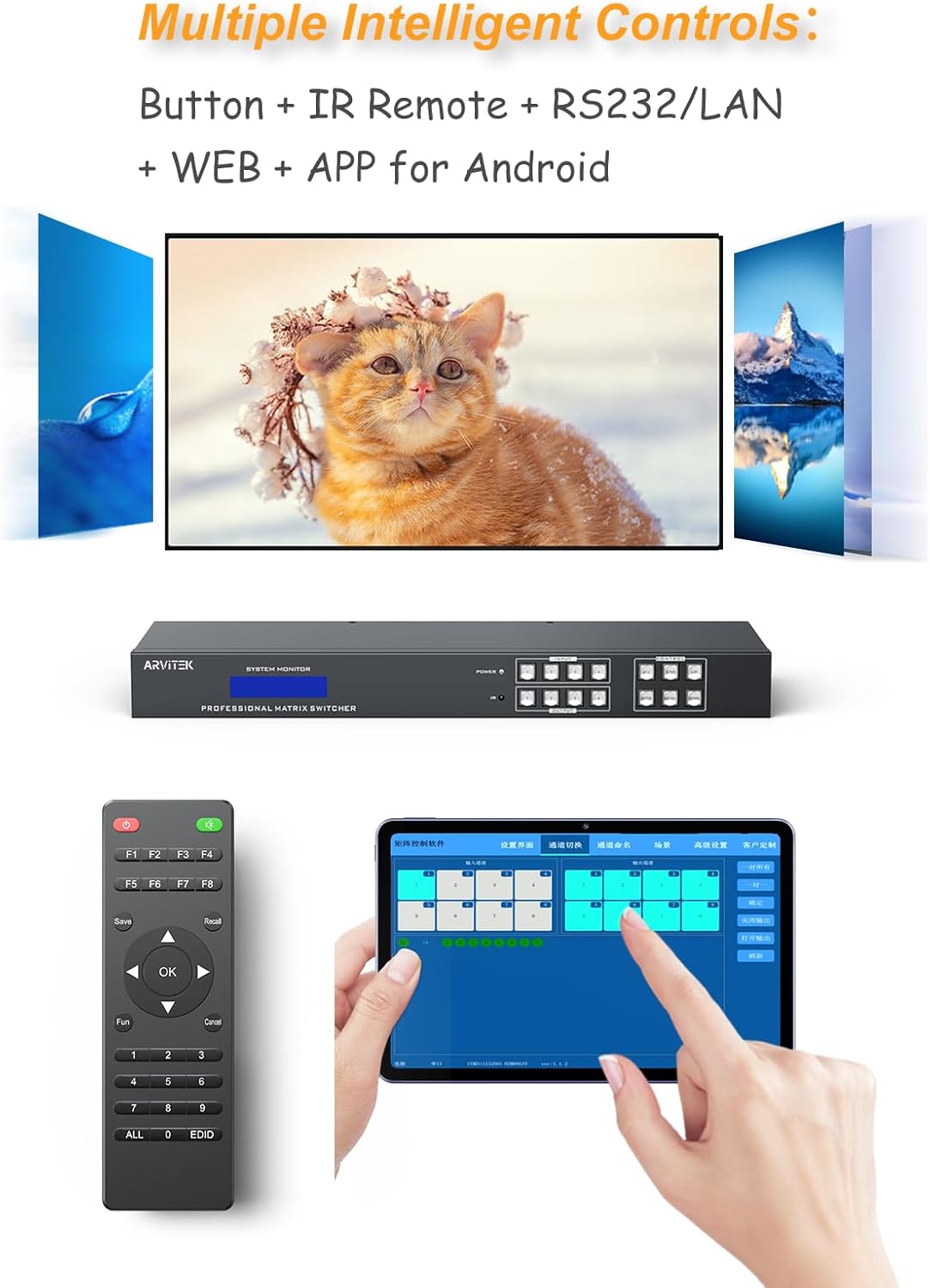
Image: Detailed view of the back panel of the Arvitek 4x4 HDMI Matrix Switcher, showing all input and output ports, LAN, audio, RS232, and power connections.
7. Specifications
| Model Number | AT-HD44L |
| HDMI Version | HDMI 1.4 |
| Resolution Support | Up to 4K (3840x2160) @ 30Hz |
| HDCP Support | Yes |
| Audio Output | 3.5mm Stereo Audio (from Output 4) |
| Audio Formats | PCM, Dolby AC3, DTS5.1, DTS7.1, DSD |
| ESD Protection | 8KV |
| Control Methods | Front Panel Buttons, IR Remote, RS232, LAN, Web GUI, Mobile App |
| Dimensions (L x W x H) | 19.5 x 8 x 4 inches |
| Item Weight | 5.29 pounds |
| Power Supply | DC 12V (Power Adapter Included) |
| Rack Mount | Standard 1U 19-inch compatible |
8. Troubleshooting
If you encounter issues with your Arvitek 4K HDMI Matrix Switcher, please refer to the following common troubleshooting steps:
- No Video Output:
- Ensure all HDMI cables are securely connected to both the input sources and output displays.
- Verify that the correct input source is selected for the desired output display on the switcher.
- Check if the display device is set to the correct HDMI input.
- Test with different HDMI cables or a different display device to rule out cable or display issues.
- Ensure the power adapter is correctly connected and the switcher is powered on.
- No Audio Output:
- If using the 3.5mm audio output, ensure it is connected to an active audio system and that the correct input is selected on your audio system.
- Verify that the source device is outputting audio in a supported format (PCM, Dolby AC3, DTS5.1, DTS7.1, DSD).
- Check audio settings on your source device and display.
- Control Issues (IR Remote, LAN, RS232, App):
- IR Remote: Ensure there are no obstructions between the remote and the switcher's IR receiver. Replace remote batteries if necessary.
- LAN/Web GUI/App: Verify network connectivity. Ensure the switcher and your control device are on the same network. Check the IP address and ensure the control software/app is correctly installed and configured. Some users have reported issues with QR code links for software; if this occurs, please visit the official Arvitek support website for the latest downloads.
- RS232: Confirm the RS232 cable is correctly connected and that the control software is using the correct serial port settings (baud rate, data bits, parity, stop bits).
- Intermittent Signal/Flickering:
- Ensure HDMI cables are of good quality and appropriate length for 4K signals.
- Check for potential electromagnetic interference from other electronic devices.
- Power cycle all connected devices, including the switcher, sources, and displays.
For more detailed troubleshooting or specific software instructions, please refer to the comprehensive user manual and software available via the QR code provided with your product or on the Arvitek support website.
9. Maintenance
To ensure the longevity and optimal performance of your Arvitek 4K HDMI Matrix Switcher, follow these maintenance guidelines:
- Cleaning: Use a soft, dry cloth to clean the exterior of the device. Avoid using liquid cleaners or abrasive materials, as they may damage the finish or internal components.
- Ventilation: Ensure the device is placed in a well-ventilated area to prevent overheating. Do not block any ventilation openings.
- Environment: Keep the switcher away from direct sunlight, excessive heat, humidity, and dust.
- Cable Management: Organize cables neatly to prevent strain on ports and accidental disconnections.
- Power Disconnection: If the device will not be used for an extended period, disconnect it from the power outlet.
10. Warranty and Support
Arvitek products are designed for reliability and performance. This product comes with a standard manufacturer's warranty against defects in materials and workmanship. The specific terms and duration of the warranty may vary by region and retailer. Please retain your proof of purchase for warranty claims.
For technical support, warranty inquiries, or to access the latest drivers and software, please visit the official Arvitek website or contact their customer service department. Contact information can typically be found on the product packaging or the Arvitek brand store page.
Online Resources:
- Arvitek Brand Store: https://www.amazon.com/stores/ARVITEK/page/93A41ABA-CF2F-4AEF-ADDF-6C342B9C0E01