
ANENG GN601
ANENG GN601 Wood Moisture Meter User Manual
Model: GN601
Introduction
The ANENG GN601 Wood Moisture Meter is a portable, pin-type detector designed for accurate and rapid measurement of moisture levels in various materials, including wood, concrete, bricks, and other building materials. Its compact design and versatile features make it suitable for woodworking, water damage restoration, construction, and home improvement projects.
What's Included
- 1X ANENG GN601 Lumber Moisture Meter
- 2X 1.5V AAA Batteries
- 1X User Manual

Figure 1: Contents of the ANENG GN601 package, showing the moisture meter, batteries, and protective cap.
Setup
Battery Installation
- Locate the battery compartment on the back of the device.
- Use a screwdriver to open the battery compartment cover.
- Insert two 1.5V AAA batteries, ensuring correct polarity.
- Replace the battery compartment cover and secure it with the screw.
Video 1: Demonstrates the battery installation process for the ANENG GN601 moisture meter. The video shows disassembling the back cover, inserting two AAA batteries, and re-securing the cover.
Operating Instructions
Key Functions
- Power Button: Turns the device on/off.
- Material Selection Key (Mode): Cycles through different material types for accurate readings.
- Backlight Button: Activates/deactivates the LCD backlight for visibility in low-light conditions.
- Data Retention (Hold): Freezes the current reading on the display.

Figure 2: Detailed view of the ANENG GN601, highlighting the high-precision pins and the clear LCD display.
Manual Calibration
Before each use, it is recommended to perform a self-calibration to ensure accuracy:
- Turn on the device.
- Remove the protective cap from the pins.
- Insert the pins into the test point located on the protective cap.
- The display should show approximately 20.5% RH, indicating the meter is normal and calibrated.
Material Selection and Measurement
The ANENG GN601 features 7 calibration scales for different materials. Press the 'Mode' button to cycle through these options:
- Mode 1: Beech, Spruce, Larch, Walnut (8.8% - 54.8%)
- Mode 2: Oak, Maple, Lauan (6.8% - 47.9%)
- Mode 3: Concrete, Cement sand bed (0.9% - 22.1%)
- Mode 4: Gypsum mortar layer (0.0% - 11.0%)
- Mode 5: Cement mortar (0.7% - 8.6%)
- Mode 6: Lime mortar, Gypsum (0.0% - 16.5%)
- Mode 7: Brick (0.0% - 16.5%)
To measure, firmly press the pins into the material. The moisture percentage will be displayed on the LCD screen.
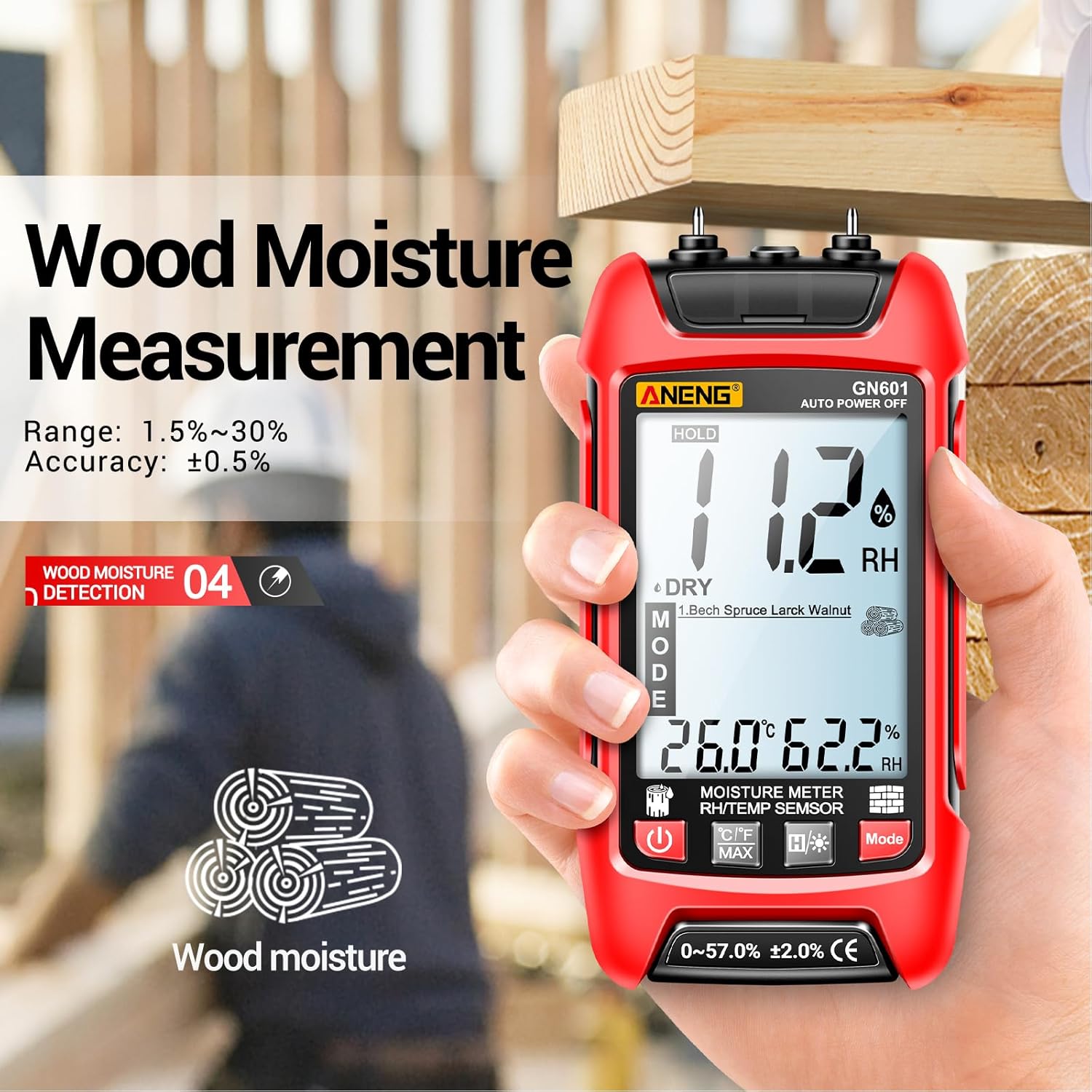
Figure 3: Measuring moisture content in wood using the ANENG GN601.

Figure 4: Measuring moisture content in a wall using the ANENG GN601.
Temperature and Humidity Detection
The device can also measure ambient temperature and humidity. These readings are displayed alongside the moisture content.
Specifications
| Feature | Detail |
|---|---|
| Manufacturer | ANENG |
| Part Number | GN601 |
| Item Weight | 5.6 ounces |
| Package Dimensions | 5.79 x 2.8 x 1.34 inches |
| Item Model Number | Multimeter-type Moisture Meter |
| Power Source | Battery Powered |
| Batteries Included? | Yes |
| Batteries Required? | Yes |
| Battery Cell Type | Alkaline |
| Moisture Range | 0.0% to 58% (material dependent) |
| Auto Shut-off | After 10 minutes of inactivity |
| Display | Backlit LCD screen |
Maintenance
- Keep the device clean and dry. Wipe with a soft, damp cloth; do not use abrasive cleaners or solvents.
- Store the meter in a cool, dry place away from direct sunlight and extreme temperatures.
- Always replace the protective cap over the pins when not in use to prevent damage and ensure safety.
- If the device will not be used for an extended period, remove the batteries to prevent leakage and damage.
Troubleshooting
| Problem | Possible Cause | Solution |
|---|---|---|
| Device does not turn on. | Low or dead batteries; incorrect battery installation. | Replace batteries; ensure correct polarity. |
| Inaccurate readings. | Pins not fully inserted; incorrect material mode selected; calibration needed. | Ensure pins are fully inserted; select correct material mode; perform manual calibration. |
| Display is dim or flickering. | Low battery. | Replace batteries. |
| "LO" or "HI" reading. | Moisture content is outside the measurable range for the selected material. | This indicates the material is either extremely dry (LO) or extremely wet (HI) beyond the meter's range for that specific material type. |
Warranty and Support
ANENG provides a lifetime of service and technical support for the GN601 Wood Moisture Meter. For any inquiries, technical assistance, or warranty claims, please contact ANENG customer support through the official channels provided with your product or visit the ANENG store online.
Visit the ANENG Store for more information.
Related documentsGN601


Ask a question about this manual
Ask about setup, troubleshooting, compatibility, parts, safety, or missing instructions. Manuals+ will review the question and use this page’s manual context to help answer it.