
Introduction
This manual provides instructions for the Generic Replacement Remote Control, model Easytry22629. This infrared remote is designed to be compatible with various Etec LCD HDTV television models. Please ensure your original remote matches the appearance of this replacement remote for optimal compatibility. This remote functions as a direct replacement for many common Etec TV models, offering essential control over your television.
Setup
1. Battery Installation
The remote control requires two (2) AA batteries (not included) for operation. Follow these steps to install the batteries:
- Locate the battery compartment cover on the back of the remote control.
- Press down on the tab and slide the cover downwards to remove it.
- Insert two AA batteries, ensuring the positive (+) and negative (-) terminals align correctly with the markings inside the compartment.
- Slide the battery compartment cover back into place until it clicks securely.
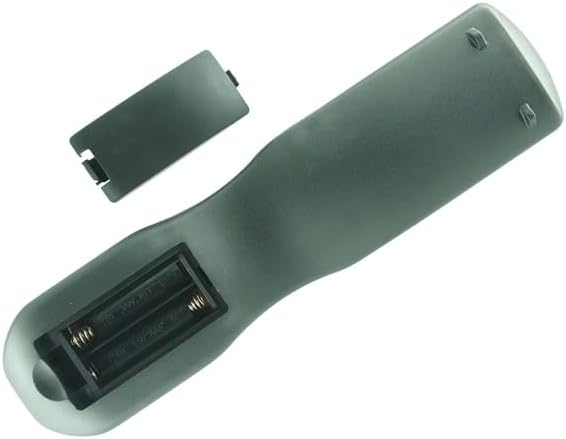
Image: Rear view of the remote control with the battery cover detached, illustrating the correct orientation for inserting two AA batteries into their respective slots.
Once batteries are installed, the remote is ready for use. No programming is typically required for this replacement remote.
Operating Instructions
To operate your television with this remote control, point the remote directly at the TV's infrared sensor and press the desired button. Ensure there are no obstructions between the remote and the TV.

Image: Front view of the replacement remote control, displaying the layout of all buttons including power, number pad, volume, channel, and menu navigation.
Key Functions:
- Power (Red Button): Turns the TV on or off.
- Number Pad (0-9): Direct channel selection.
- VOL +/-: Adjusts the volume level.
- CH +/-: Changes the television channel.
- MUTE: Silences the TV audio.
- MENU: Accesses the TV's main menu.
- ENTER: Confirms selections within menus.
- Navigation Arrows (Up/Down/Left/Right): Navigates through menus and options.
- EXIT: Exits the current menu or function.
- RETURN: Returns to the previous screen or channel.
- INPUT: Selects the input source (HDMI, AV, etc.).
- DISPLAY: Shows current channel information.
- GUIDE: Accesses the electronic program guide (if supported by TV).
- FAV: Accesses favorite channels.
- FREEZE: Pauses the current image on screen.
- TEMP: (Functionality may vary by TV model)
- PICTURE: Adjusts picture settings.
- SLEEP: Sets a sleep timer for the TV.
- LAST: Returns to the previously viewed channel.
- ASPECT: Changes the screen aspect ratio.
- AUDIO/MTS: Selects audio track or MTS (Multi-channel Television Sound).
- CCD: (Functionality may vary by TV model, often related to Closed Captioning)
Note: Some advanced functions or specific buttons may not be fully compatible with all Etec TV models, as this is a universal replacement remote.
Maintenance
Cleaning:
To clean the remote control, use a soft, dry cloth. For stubborn dirt, lightly dampen the cloth with water or a mild, non-abrasive cleaner. Do not use harsh chemicals or immerse the remote in water.
Battery Care:
- Replace batteries when the remote's performance degrades or stops working.
- Do not mix old and new batteries, or different types of batteries.
- Remove batteries if the remote will not be used for an extended period to prevent leakage.
- Dispose of used batteries according to local regulations.
Troubleshooting
Remote Not Responding:
- Check Batteries: Ensure batteries are installed correctly with the correct polarity (+/-) and are not depleted. Replace with fresh AA batteries if necessary.
- Line of Sight: Make sure there are no objects blocking the path between the remote's infrared emitter and the TV's IR receiver.
- Distance: Ensure you are within the maximum operating range of 8 meters (approximately 26 feet).
- TV Compatibility: Verify that your Etec TV model is listed as compatible. While this remote supports many models, some specific models may have unique IR codes.
Limited Functionality:
- This is a replacement remote. It may not offer all the exact same functions or button layouts as your original TV remote. Some specialized functions might not be supported.
- Refer to your television's original manual to confirm the correct remote control type and expected functions.
Specifications
| Feature | Detail |
|---|---|
| Brand | Generic |
| Model Number | Easytry22629 |
| Color | Black |
| Connectivity Technology | Infrared |
| Compatible Devices | Television (Etec LCD HDTV models) |
| Max Number of Supported Devices | 1 |
| Maximum Range | 8 meters |
| Number of Batteries Required | 2 AA batteries |
| Manufacturer | Easytry |
Warranty Information
This product comes with a 90-day warranty. Hassle-free returns are available within this period. For warranty claims or return inquiries, please contact the seller directly.
Customer Support
For any questions, concerns, or technical assistance regarding your Generic Replacement Remote Control, please contact the seller, Easytry123, through the platform where the purchase was made. Please provide your order details when contacting support for faster service.