
1. Product Overview
The TDLOL F6 Rechargeable Portable Camping Fan is a versatile 3-in-1 device designed for various outdoor and indoor uses. It integrates a powerful fan, an LED lantern, and a power bank into a compact and portable unit. Featuring a high-capacity 20000mAh battery, it offers extended operation times, automatic oscillation, multiple fan speeds, and adjustable light brightness. The included remote control provides convenient operation from a distance, making it an ideal companion for camping, outdoor events, power outages, or as a personal fan.

Image 1: Overview of the TDLOL F6 fan highlighting its 20000mAh battery, fan and light runtimes, oscillation, and timer functions.
2. What's in the Box
- TDLOL F6 Rechargeable Portable Camping Fan
- Light Kit (integrated)
- Remote Control
- USB Cable (Type-C)
- User Manual
3. Key Features
- High-Capacity Battery: Equipped with a 20000mAh rechargeable battery, providing 8-58 hours of continuous fan use or 39-138 hours of lighting.
- 3-in-1 Functionality: Operates as a fan, an LED lantern, and a power bank.
- Adjustable Airflow & Lighting: Features 4 fan speeds and 3 brightness levels for the LED light.
- Automatic Oscillation & Pivot: Offers 270° manual pivot and automatic oscillation (45°/90°) for wide coverage.
- Remote Control: Conveniently adjust fan speeds, light settings, and timer from up to 26 feet away.
- Timer Function: Set the fan to operate for 1H, 2H, 4H, or 8H.
- Power Bank Function: Built-in USB output port allows charging of other devices.
- Versatile Mounting: Includes a 360° rotatable hanging hook and a sturdy base for tabletop use.
- Low Noise Operation: Operates at a low noise level (≤28dB) for undisturbed use, especially in sleep mode.

Image 2: The fan's multi-angle adjustment capabilities, including 270° pivot and 45°/90° auto-oscillation.

Image 3: Detailed view of the fan's compact size, control panel, charging ports, and integrated hanging hook.

Image 4: Illustration of the fan's LED light with three brightness settings and their approximate runtimes.
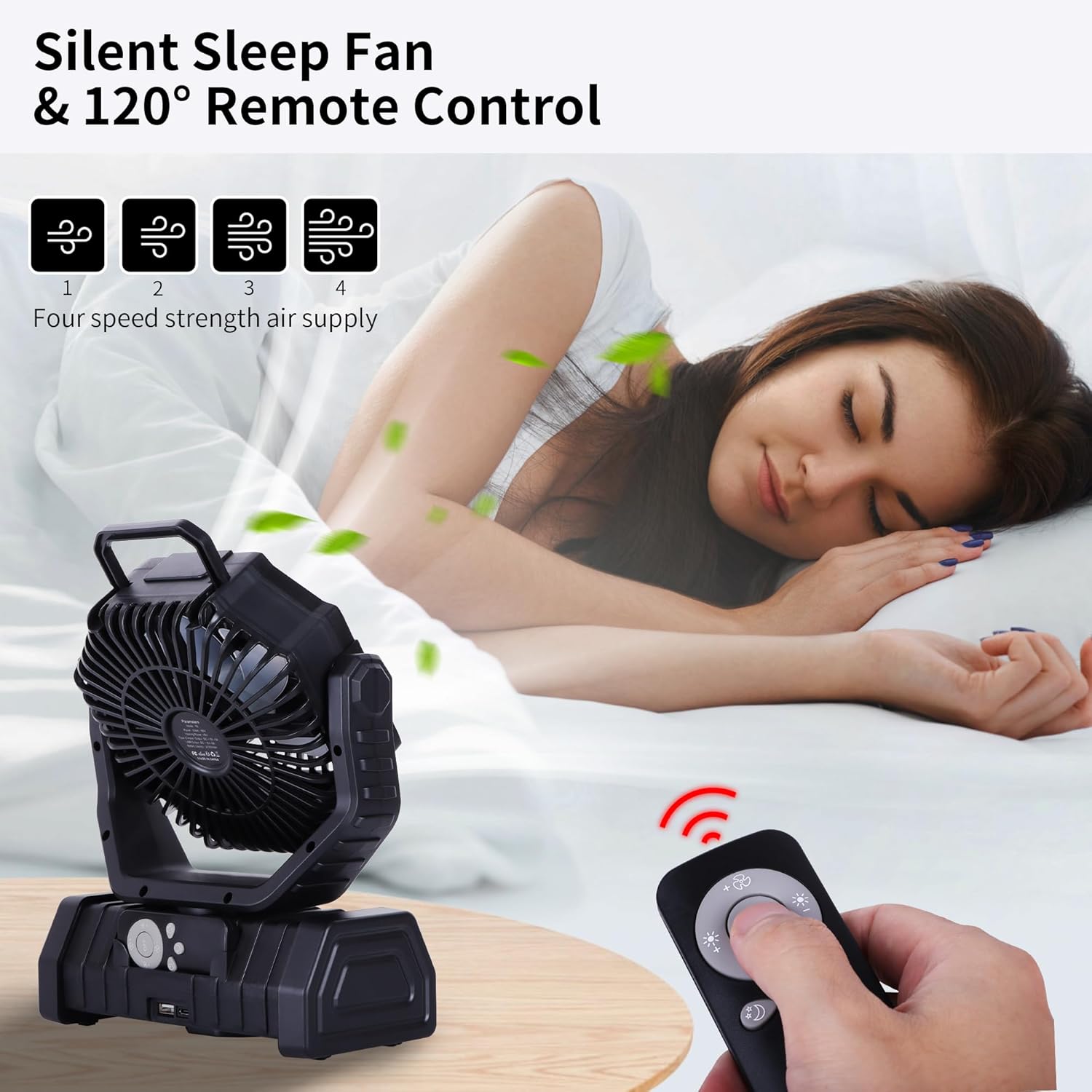
Image 5: The fan operating quietly in sleep mode, controlled by the remote, with indicators for four fan speeds.
4. Setup
4.1. Charging the Fan
- Connect the provided USB Type-C cable to the fan's charging port.
- Plug the other end of the USB cable into a 5V/3A compatible power adapter (not included).
- The power indicator lights will illuminate, showing the charging progress. The fan is fully charged when all indicators show 100%.
4.2. Remote Control Setup
- Before first use, remove the insulation strip from the battery compartment of the remote control.
- Ensure the remote is pointed towards the fan for optimal response.
5. Operating Instructions
5.1. Fan Operation
- Power On/Off: Press the fan power button on the unit or the 'OFF' button on the remote to turn the fan on or off.
- Adjust Fan Speed: Press the fan speed button on the unit or the '+' and '-' buttons on the remote to cycle through 4 fan speeds.
5.2. LED Light Operation
- Turn Light On/Off: Press the light power button on the unit or the light icon button on the remote.
- Adjust Brightness: Press the light brightness button on the unit or the sun icon buttons on the remote to cycle through 3 brightness levels.
5.3. Timer Function
- Press the timer button on the unit or the clock icon button on the remote to set the fan to turn off automatically after 1H, 2H, 4H, or 8H.
5.4. Oscillation Control
- Press the oscillation button on the unit or the oscillation icon button on the remote to activate automatic 45° or 90° horizontal oscillation.
- Manually adjust the fan head up to 270° vertically.
5.5. Power Bank Function
- Connect your device's charging cable to the USB output port on the fan to use it as a power bank.
6. Mounting and Placement
- Tabletop Use: Place the fan on its sturdy base on any flat surface.
- Hanging Use: Utilize the built-in 360° rotatable hook to hang the fan from tent poles, tree branches, or other suitable structures.

Image 6: The fan demonstrating its hanging capability, remote control, and the ability to charge external devices via its USB port.
7. Maintenance
- Cleaning: Ensure the fan is turned off and unplugged before cleaning. Use a soft, dry cloth to wipe the exterior. Do not immerse the fan in water.
- Storage: Store the fan in a cool, dry place when not in use.
8. Troubleshooting
- Fan/Light Not Turning On: Check if the battery is charged. Recharge the fan if the power indicators are low.
- Remote Not Responding: Ensure the insulation strip is removed from the remote. Replace the remote battery if necessary. Point the remote directly at the fan.
- Weak Airflow: Ensure the fan is on a higher speed setting. Check for any obstructions to the fan blades.
9. Specifications
| Feature | Specification |
|---|---|
| Brand | TDLOL |
| Model Name | F6 |
| Power Source | Battery Powered (20000mAh Lithium Metal batteries included) |
| Electric Fan Design | Table Fan |
| Product Dimensions | 1"D x 1"W x 1"H |
| Special Features | LED Light, Oscillating, Portable, Remote Controlled, Timer |
| Noise Level | 28 Decibels |
| Wattage | 5.56 watts |
| Number of Blades | 3 |
| Voltage | 5 Volts |
| Control Method | Remote, Touch |
| Reusability | Rechargeable |
| Main Power Connector Type | USB Type-C |
| Indoor/Outdoor Usage | Outdoor |
10. Warranty and Support
For warranty information or technical support, please refer to the contact details provided with your purchase or visit the official TDLOL website. Keep your purchase receipt for any warranty claims.